Manual · Oakton
Operating Instructions: OAKTON 35710-series OaktonLog Temperature and Temperature/Humidity Data Loggers
Manual5 pagesPDF 209 KB
Operating instructions for the OAKTON 35710-series OaktonLog temperature and temperature/humidity data loggers and MicroLab software.
What this file really is
The old site listed this file as “User Guide” for the Oakton LoggerPlus and OaktonLog DataLogger. Named as a LoggerPlus user guide, the document is the operating instructions for the OaktonLog 35710-series data loggers and MicroLab software, and does not mention LoggerPlus.
Names · 1 model
The models it names
Filed with · 1 model
Also filed with these models on the old site
Summary
What is in it
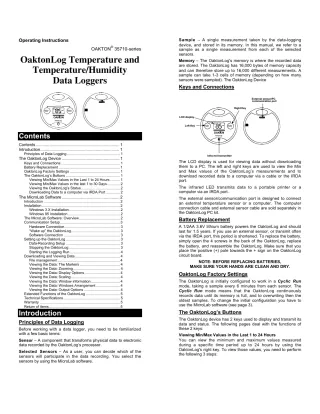
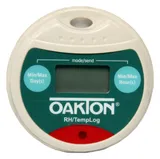
Operating instructions for the OAKTON 35710-series OaktonLog, a small temperature or temperature/humidity data logger with an LCD, two keys, an infrared port and a socket for a PC cable or external sensor. It explains data logging terms, battery replacement, factory settings, viewing min/max values and status, downloading over IRDA, then installing and using the MicroLab software to connect, set up and start a logging run, download and view data, and set comments and alarm levels. It ends with specifications and warranty.
Its parts
- Introduction
- The OaktonLog Device
- The MicroLab Software
- Communication Setup
- Setting up the OaktonLog
- Downloading and Viewing Data
- Extended Functions of the OaktonLog
- Technical Specifications
- Warranty
- Return of items
From the manual · read page by page
Key facts from this manual
Each line names its page in the PDF.
Operating instructions for the OAKTON 35710-series OaktonLog temperature and temperature/humidity data loggers, models 35710-00 and 35710-10; the LoggerPlus name does not appear in it. It explains the two keys and the display, battery replacement, downloading over the infrared port or a serial cable, and setting up and viewing recordings in the MicroLab software. It ends with the technical specifications.
- Device
- Temperature or temperature/humidity data logger with an LCD, two keys and an external sensor port p. 1
- Models
- 35710-00: temperature + external input; 35710-10: temperature + humidity + external input p. 5
- Temperature sensor
- -30°C to 50°C, resolution 0.5°C, accuracy ±0.6°C p. 5
- Humidity sensor
- 35710-10: 0-90%, resolution 0.5%, accuracy ±3% at 77°F p. 5
- External sensor
- One external temperature sensor, -50°C to 100°C, accuracy ±1.5°C p. 5
- Interfaces
- IRDA infrared to a portable HP printer or PC; RS-232 cable to the PC p. 5
- Display
- Two-digit 7-segment LCD p. 5
- Battery
- 1/2AA 3.6 V lithium, TL5101 p. 1, 5
- Sampling rate
- User set, every 10 seconds to every 2 hours; factory setting every 6 minutes in Cyclic Run p. 1, 5
- Size and weight
- 72 mm diameter, 22.9 mm thick; 55 g p. 5
- Software
- MicroLab, for Windows 3.x and Windows 95/98; exports to CSV and Excel p. 2, 5
- IR printer
- HP portable printer model No. 82240B p. 2
- PC kit
- Computer cable and external sensor cable sold separately in the OaktonLog PC kit p. 1
What this manual walks you through
- Replacing the battery p. 1
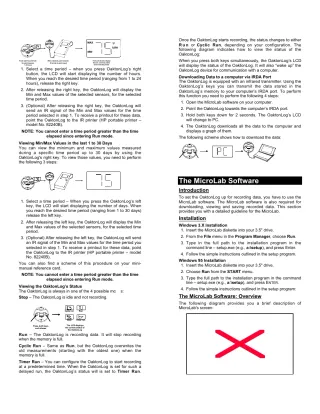
- Viewing min and max values for the last 1 to 24 hours or 1 to 30 days p. 1, 2
- Checking the logger's status (Stop, Run, Cyclic Run, Timer Run) p. 2
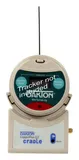
- Downloading data to a computer through the IRDA port p. 2
- Installing the MicroLab software p. 2
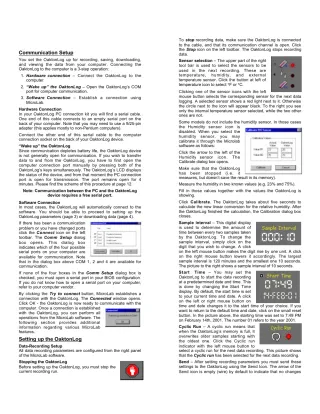
- Connecting the logger to a PC serial port and waking it up p. 3
- Setting sensors, sample interval, start time and cyclic run, then sending the settings p. 3, 4
- Calibrating the humidity sensor at two known values p. 3
- Viewing, zooming and exporting downloaded data p. 4, 5
- Setting alarm levels and a comment of up to 32 characters p. 5
Good to know
- Using an external sensor or sending often over the IRDA port shortens battery life. p. 1
- After both keys are pressed, the PC connection port stays open for 4 minutes. p. 3
- The current recording must be stopped before the logger is set up. p. 3
- A min/max period cannot be longer than the time since Run mode began. p. 2
- Saved file names are limited to 8 characters; data files use the .SMP extension. p. 4
Questions this manual answers
What battery does the OaktonLog data logger use?
A 1/2AA 3.6 V lithium battery; the specifications list it as TL5101. It is replaced by opening 4 screws on the back. p. 1, 5
Which OaktonLog model measures humidity?
Model 35710-10 has temperature, humidity and an external input; 35710-00 has temperature and an external input only. p. 5
What software does the OaktonLog need?
MicroLab, which sets up recording and downloads, views and saves data. It runs on Windows 3.x and Windows 95/98. p. 2, 5
How often can the OaktonLog take samples?
The interval is user set from every 10 seconds to every 2 hours. p. 5
How do I connect the OaktonLog to a computer?
Use the serial cable from the PC connection kit or the IRDA infrared port, then press both keys to open the port. p. 3
The whole text · 1 part
Read the manual here as text
Its text as extracted from the PDF, unedited, in parts; each page opens the PDF at that page.
The file