Manual · Nordic ID
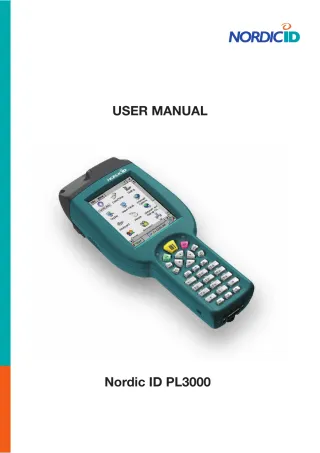
Nordic ID PL3000 User Manual
Manual91 pagesPDF 4.8 MB
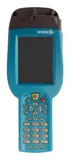
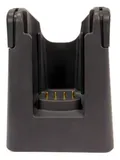
User manual for the Nordic ID PL3000 Windows CE handheld computer and its charger, from setup to Control Panel settings.
Names · 1 model
The models it names
Filed with · 1 model
Also filed with these models on the old site
Summary
What is in it
Nordic ID's user manual for the PL3000, a configurable Windows CE handheld computer with optional imager and wireless options. It covers unpacking, installing the SD/MMC card, battery, handstrap and charger, the keyboard and indicators, hardware features, handling, resets, backups and code reading, the bundled applications and every Control Panel applet (WLAN, Bluetooth, scanner, keymap, power). Safety, warranty and appendices on specifications, code reading distances, ActiveSync, WLAN and GPRS connections and application development follow.
Its parts
- Introduction
- Getting started
- User interface
- PL3000 Features
- Handling the device
- Applications & tools
- Safety warnings
- Warranty
From the manual
Key facts from this manual
Each line names its page in the PDF.
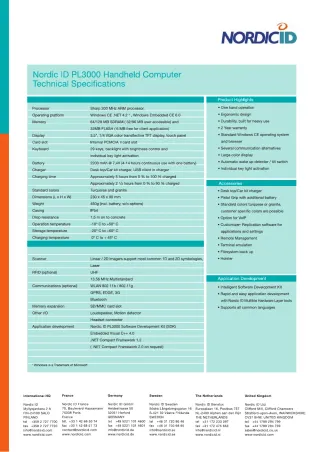
User manual (v. 2.4, March 2006) for the Nordic ID PL3000, a configurable handheld computer running Windows CE. It walks through installing the memory card, battery and handstrap, setting up the charger, the keyboard and indicator lights, the optional imager, resets and battery handling. Appendices give technical specifications and code reading distances.
- Device
- Configurable handheld computer with Windows CE and a one hand operated keyboard p. 9
- Processor
- 200 MHz ARM 9225 p. 21
- Operating system
- Microsoft Windows CE with Internet Explorer 6.0 p. 22
- Memory
- 64 MB (or 128 MB) SDRAM, 32 MB (or 96 MB) for user applications; 32 MB flash with 8 MB non-volatile storage p. 22
- Display
- 3.5 in, 320 x 240 pixel 1/4 VGA color transflective TFT; resistive touch screen p. 22
- Keypad
- 29 keys, 10 function keys, 2 programmable free keys, individually guided backlight p. 22
- Battery
- Removable lithium-ion pack, 2200 mAh, 4 to 28 hours continuous use; dual battery with pistol grip p. 24, 73
- Charging time
- About 2½ hours to 90% and 5 hours to full; first charge about 8 hours p. 16
- Imager (optional)
- LED or laser sighter; high density (HD) or standard (SR) optics, SR reading 5 cm to 50 cm; 1D, limited or full decoder p. 23
- Wireless
- WLAN 802.11b/g, Bluetooth and GPRS, depending on configuration p. 76
- Connections
- USB client through the desktop charger; 2.5 mm headset jack; SD/MMC card slot p. 12, 24, 25
- Size and weight
- L 230 mm, H 45 mm, W 90 mm; 450g with batteries, without pistol grip and extra antenna p. 76
- Operating temperature
- -10 C to +50 C (storage -20 C to +60 C) p. 76
- Accessories
- Desktop/wall mount/vehicle charger, USB cable, extra battery, multiple desktop charger, multiple battery charger, pistol grip p. 11
What this manual walks you through
- Installing an SD/MMC memory card p. 12
- Installing the battery p. 13
- Fitting the handstrap p. 14, 15
- Setting up the charger and reading the charge indicator p. 16, 17
- Switching on the unit p. 18
- Keyboard, indicator lights and connectors p. 19, 20
- Suspend, warm reset, cold reset and Windows CE reload p. 28, 29
- Handling the lithium-ion battery pack safely p. 73
- Printing codes the imager can read p. 79
- Near and far reading distances for each code type and optics p. 81, 82
Good to know
- The battery usually arrives discharged and must be charged for 8 hours before first use. p. 12
- If the battery cover is not properly closed, the device loses its IP 54 rating. p. 13
- The USB port is a client only; the PL3000 cannot control other USB devices. p. 25
- Below 540 lux the imager's reading distance may be reduced, and it may not work with specular reflection. p. 23
- Use only original battery packs from Nordic ID or authorized dealers. p. 73
Questions this manual answers
How long does the Nordic ID PL3000 battery last?
The 2200 mAh pack gives 4 to 28 hours of continuous use, and the pistol grip allows dual battery operation. p. 24
How do I reset a PL3000?
A short press of the power key opens a window with Suspend, Warm reset, Cold reset and Windows CE reload. A reset switch inside the battery compartment reloads Windows CE. p. 28, 29
How far can the PL3000 imager read a barcode?
With standard density optics it reads codes from 5 cm to 50 cm, depending on the size and density of the code. p. 23
How do I connect the PL3000 to a PC?
Connect the desktop charger's USB port to the PC with the USB cable; the PL3000 acts as a USB client. p. 25, 26
How long does the PL3000 take to charge?
About 2½ hours to 90% and about 5 hours to full; the first charge takes about 8 hours. p. 16
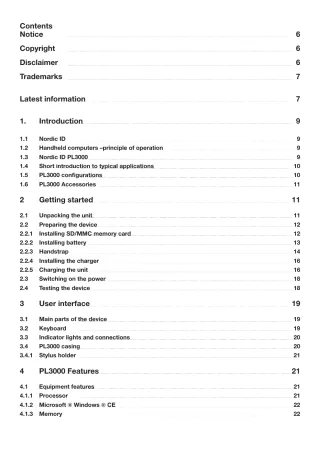
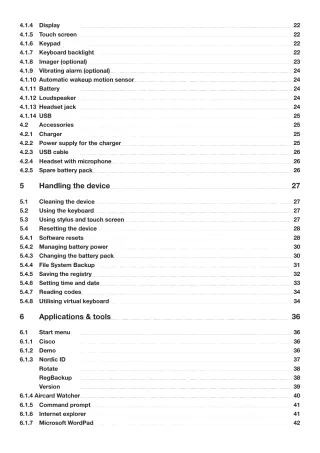
Contents
Chapters and sections
Each line opens the PDF at its page.
- Notice6
- Copyright6
- Disclaimer6
- Trademarks7
- Latest information7
- 1. Introduction9
- 2 Getting started11
- 3 User interface19
- 4 PL3000 Features21
- 5 Handling the device27
- 6 Applications & tools36
- 7 Safety warnings70
17 more lines, from page 70 on
- 7.2 Regulatory and safety agency approvals70
- 8 Warranty73
- Appendix A -Technical specifications76
- Appendix B - Code reading distances and requirements77
- Appendix C – Keyboard key mappings83
- Appendix D Activesync84
- Appendix E Creating Cisco WLAN connection86
- Appendix F Creating Option GPRS connection87
- Appendix G Application development88
- Appendix H Configuring the Linksys WCF54G –card90
The whole text · 14 parts
Read the manual here as text
Its text as extracted from the PDF, unedited, in parts; each page opens the PDF at that page.
- Contents1-5
- Pages 6 to 86-8
- Pages 9 to 189-18
- Pages 19 to 2619-26
- 5 Handling the device27-35
- 6 Applications & tools, pages 36 to 4436-44
- 6 Applications & tools, pages 45 to 5345-53
- 6 Applications & tools, pages 54 to 6254-62
- 6 Applications & tools, pages 63 to 6963-69
- 7 Safety warnings70-72
- 8 Warranty73-75
- Pages 76 to 8276-82
- Pages 83 to 8583-85
- Pages 86 to 9186-91
The file