Manual · Monarch
Monarch Printers 9403, 9820, 9830, 9835
Manual219 pagesPDF 1.1 MB
Programming reference for Monarch Printer Control Language II (MPCLII) on the Monarch 9403, 9820, 9830 and 9835 label printers.
What this file really is
The old site listed this file as a manual for the Monarch 9446. Linked as a Monarch 9446 manual, it is the MPCLII programming reference for the 9403, 9820, 9830 and 9835 printers; the 9446 appears only in an appendix comparing it with the 9820.
Filed with · 1 model
Also filed with these models on the old site
Summary
What is in it
A programming reference for writing Monarch Printer Control Language II (MPCLII) formats on the Monarch 9403, 9820, 9830 and 9835 printers. It covers designing a label format, configuring the printer with online configuration packets, defining text, bar code, line and box fields and their options, creating compliance labels and bitmapped graphics, printing with batch packets, status polling, diagnostics and error codes. An appendix compares the 9820 with the Monarch 9446 printer.
Its parts
- Getting Started
- Designing a Format
- Configuring the Printer
- Defining Fields
- Defining Field Options
- Creating Graphics
- Printing
- Status Polling
- Diagnostics
- Errors
From the manual
Key facts from this manual
Each line names its page in the PDF.
This manual explains how to design, write and print Monarch Printer Control Language II (MPCLII) formats for the Monarch 9403, 9820, 9830 and 9835 printers. It covers communication setup, test labels and the printer error codes. An appendix lists the differences between the 9820 and the Monarch 9446.
- Printers covered
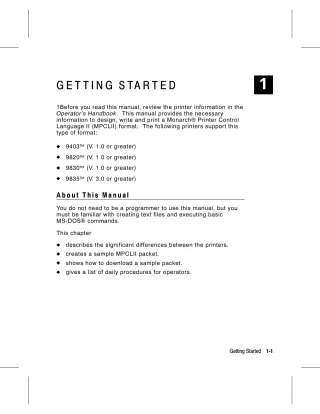
- 9403 (V. 1.0 or greater), 9820 (V. 1.0 or greater), 9830 (V. 1.0 or greater), 9835 (V. 3.0 or greater) p. 2
- 9446 print head
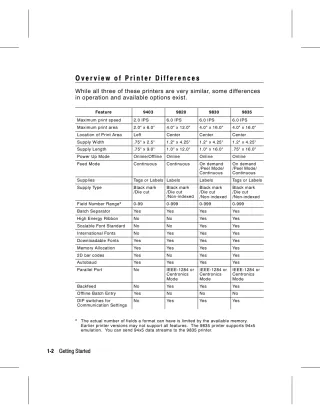
- 9446: 192 DPI print head (square dot); the 9820 has 203 DPI p. 218
- 9446 bar codes
- 9446: supports PDF417, MaxiCode, Code 16K and POSTNET p. 218
- 9446 memory
- 9446: 256K printer RAM plus optional 256K RAM p. 219
- 9446 controls
- 9446: two-line display with six keypad controls; no DIP switches, settings made at the keypad or through packet F p. 218, 219
- 9446 fonts
- 9446: fonts from Expanded Font rom set # 2 (P/N 115801-99AIAG); scalable font (selector #50) sold separately p. 219
- 9446 connections
- 9446: external TWINAX/COAX protocol converter; no parallel port; no Ethernet print server p. 219
- 9446 supplies
- 9446: tags or labels; field numbers 0-99; .06 inch non-print zone on the left side p. 218
- Speed and print area
- 9403: 2.0 IPS, 2.0" x 6.0"; 9820: 6.0 IPS, 4.0" x 12.0"; 9830 and 9835: 6.0 IPS, 4.0" x 16.0" p. 3
- Serial settings
- Baud 1200 to 38400; 7 or 8 bit words; 1 or 2 stop bits; parity none, odd or even; flow control none, DTR, CTS/RTS or XON/XOFF p. 158
- Parallel port
- Where fitted, IEEE-1284 or Centronics mode, chosen by a DIP switch p. 18
- Autobaud
- Send 32 alternating @A characters after power-up to match the host's settings p. 18
- Error code ranges
- 001 to 499 data errors; 571-619 formatting errors; 700 to 793 machine faults; 900-999 hard printer failures p. 150, 152, 162, 163
What this manual walks you through
- Creating and downloading a sample MPCLII format and batch packet p. 4, 5, 6
- Daily startup checklist and print log for operators p. 6
- Setting serial communication parameters and using autobaud p. 17, 18, 19
- Printing and reading a test label p. 145, 146
- Fixing communication between the PC and printer p. 147
- Reading an error label p. 151
- Data error codes 001 to 499 p. 152, 153, 154, 155, 156, 157, 158, 159
- Communication and data formatting failures p. 160, 161, 162, 163
- Machine faults and hard printer failures p. 163, 164, 165, 166, 167
- Differences between the 9820 and the 9446 p. 218, 219
Good to know
- Send no data to the printer before using autobaud, and wait one second after the sequence. p. 18
- Switching between Windows and MS-DOS while using the COPY command causes a framing error; exit Windows first. p. 161
- After changing an online configuration packet, resend the format packet so the change takes effect. p. 147
- An error label is not available on the 9403 printer. p. 150
- On a 9820, a 9446 format using font selector 510 is mapped to selector 15; other 9446 rom fonts give error 611. p. 219
Questions this manual answers
What does Monarch error 704 mean?
The printer has not sensed a supply mark within the set distance or is out of supplies. Check supply tracking, the marks, the black mark sensor position and the roll for binding. p. 163
What is error 411 on a Monarch printer?
A framing error: the printer cannot communicate with the host. Check the cables, port settings, baud rate, word length and stop bits. p. 161
How do I print a test label on a Monarch 9800 series printer?
Press FEED and PAUSE together, hold for one second and release. p. 146
How does the Monarch 9446 differ from the 9820?
The 9446 has a 192 DPI print head, takes tags or labels, supports PDF417, MaxiCode, Code 16K and POSTNET, and has no DIP switches or parallel port. p. 218, 219
What does Monarch error 409 mean?
The printer memory is full. Delete unneeded formats or graphics, or use run length encoding for a very large graphic. p. 160
Contents
Chapters and sections
Each line opens the PDF at its page.
- GETTING STARTED 1-12
- DESIGNING A FORMAT 2-18
- CONFIGURING THE PRINTER 3-116
- DEFINING FIELDS 4-148
- DEFINING FIELD OPTIONS 5-172
- CREATING GRAPHICS 6-194
- PRINTING 7-1120
- Creating DOS Batch Files for Downloading 7-9128
- STATUS POLLING 8-1130
- DIAGNOSTICS 9-1144
- ERRORS 10-1150
- PRINTER OPTIMIZATION 11-1168
- SAMPLES A-1174
- FONTS B-1184
- SYMBOL SETS/CODE PAGES C-1198
- FORMAT DESIGN TOOLS D-1214
- PRINTER DIFFERENCES E-1218
The whole text · 22 parts
Read the manual here as text
Its text as extracted from the PDF, unedited, in parts; each page opens the PDF at that page.
- Pages 1 to 101-10
- Pages 11 to 2011-20
- Pages 21 to 3021-30
- Pages 31 to 4031-40
- Pages 41 to 5041-50
- Pages 51 to 6051-60
- Pages 61 to 7061-70
- Pages 71 to 8071-80
- Pages 81 to 9081-90
- Pages 91 to 10091-100
- Pages 101 to 110101-110
- Pages 111 to 120111-120
- Pages 121 to 130121-130
- Pages 131 to 140131-140
- Pages 141 to 150141-150
- Pages 151 to 160151-160
- Pages 161 to 170161-170
- Pages 171 to 180171-180
- Pages 181 to 190181-190
- Pages 191 to 200191-200
- Pages 201 to 210201-210
- Pages 211 to 219211-219
The file