Manual · Microscan
Microscan MS-2 Accessories
Manual2 pagesPDF 537 KB
Both pages are below, each with its text.
Covers · 1 model
The models it covers
From the manual · read page by page
Key facts from this manual
Each line names its page in the PDF.
A two-page Microscan accessory guide (2010) for the MS-2 and MS-3 bar code readers. It lists part numbers for mounting arms, brackets and the right angle mirror, and for the interface boxes, cables, power supplies and sensors used to connect the reader to a PC, a USB port or a daisy chain network.
- Mounting arm
- Mounting Arm Kit 98-000048-01 (4 in./101 mm), adjustable ball and socket arm p. 1, 2
- Extension joints
- 98-000053-01 (4 in./101 mm) and 98-000053-02 (3 in./76 mm) p. 2
- Base plate
- Base Plate Kit 98-000054-01, desktop plate 6 in. by 6 in. (152.4 mm by 152.4 mm) p. 2
- Brackets
- Side Mount 98-000060-01 (90°), Angle Mount 98-000059-01 (15°), Through-Hole Mount 98-000057-01 p. 2
- Right angle mirror
- Extended Right Angle Mirror 98-000058-02, turns the view direction 90° p. 2
- USB kit
- USB Conversion Kit 98-000051-01: USB 1.X, reader draws 5 VDC from the USB connector, virtual COM port driver p. 2
- IB-3 PC interface
- Works in keyboard wedge or serial interconnect mode p. 2
- IB-3 power supply
- 97-000002-01 (US/Euro plug, 5 VDC), for the IB-3 PC p. 2
- IC-332
- Connects the reader to an IB-131, changing the pinout and converting voltage level to 10-28 p. 2
- IC-332 power supply
- 97-100004-15 (US/Euro plug, 24 VDC) p. 2
- IB-131
- 99-000018-01, links readers in a daisy chain; one kit per reader p. 2
- Cables
- 61-000010-02 DB-9 socket to DB-9 socket, 6 ft; 61-300026-01 DB-25 plug to DB-9 socket, 6 ft; 61-100030-03 IB-131 multidrop trunk, 10 ft; 61-100029-03 daisy chain, 1 ft; 61-000113-01 crossed multidrop to MS-Connect 5100, 10 ft p. 2
- DeviceNet box
- DeviceNet Protocol Box 20-500013-01, serial gateway from RS-232 to DeviceNet p. 2
- Object detectors
- 99-000017-01 and 99-000017-02, visible NPN photo sensors in dark on and light on versions; ESP software Tools CD 37-000001-01 p. 2
What this manual walks you through
- Choosing a mounting arm, extension joint, base plate or bracket p. 1, 2
- Connecting the reader to a PC through the IB-3 PC interface p. 1, 2
- Connecting the reader by USB without a separate power supply p. 2
- Building a multidrop daisy chain of readers with IB-131 boxes p. 2
Good to know
- The integral case, with side mounting, a right angle beam exit and a nearer focal point, is for the MS-3 only. p. 2
- The scanner and the mounting arm are sold separately from the base plate kit. p. 1
Questions this manual answers
What is the part number of the Microscan MS-2 USB conversion kit?
98-000051-01. It lets the reader run on USB 1.X and take its 5 VDC from the USB connector. p. 1, 2
Which bracket mounts the MS-2 at an angle?
The Angle Mount Bracket 98-000059-01 mounts the reader at 15°; the Side Mount Bracket 98-000060-01 mounts it at 90°. p. 2
What power supply goes with the IC-332 for the MS-2?
Power supply 97-100004-15, a 24 VDC unit with a US/Euro plug. p. 2
How do I network several MS-2 readers?
Each reader needs an IB-131 (99-000018-01) for a daisy chain, joined by IB-131 trunk or daisy chain cables. p. 2
The file
Size and text
Every page · 2
Read it here
Each page as it is printed, and its words beside it, so a phone can search and copy them.
Page1of 2
Open in the PDF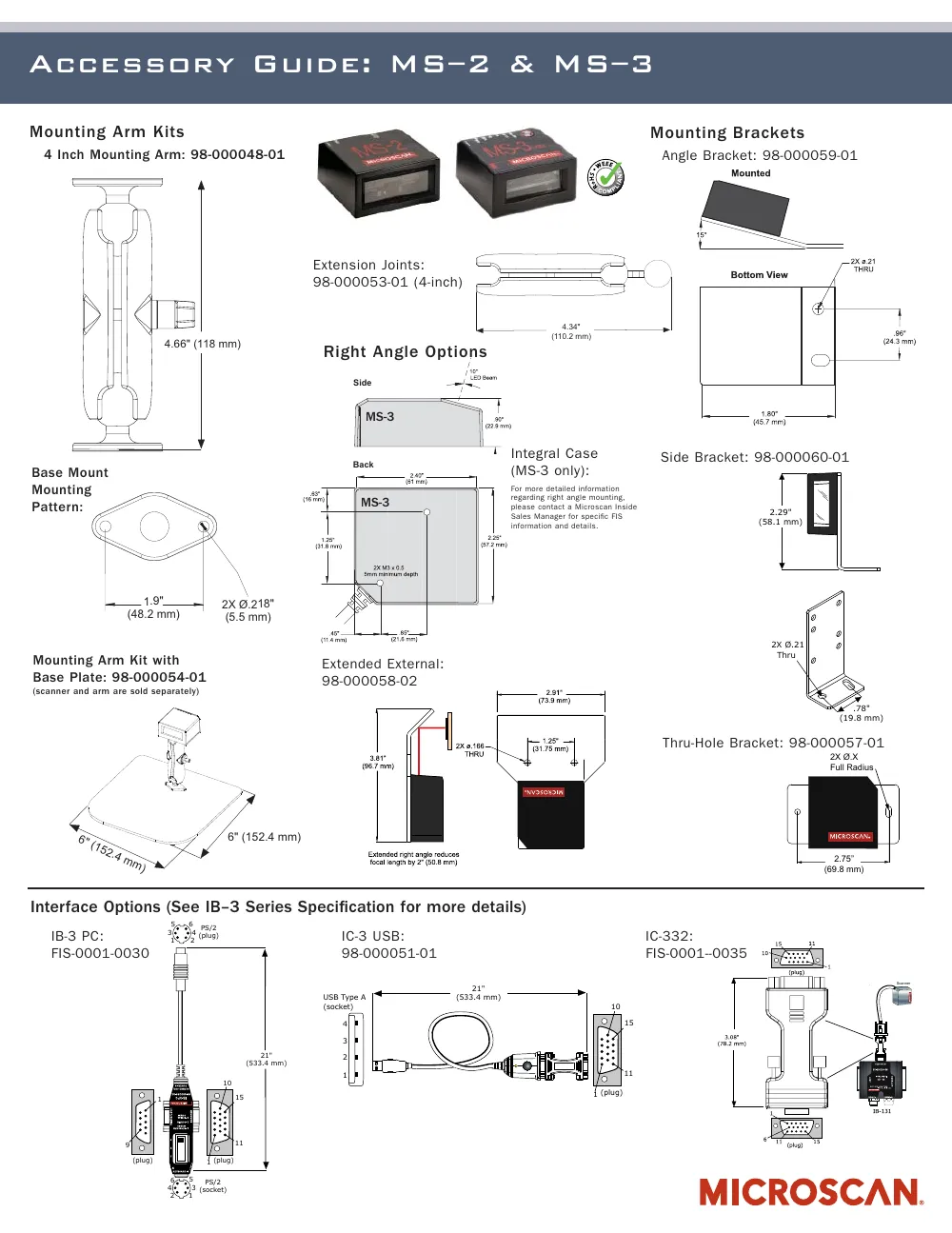
The text of page 1, from the PDF itself
Accessory Guide: MS–2 & MS–3 Mounting Brackets
Mounting Arm Kits 4 Inch Mounting Arm: 98-000048-01
Angle Bracket: 98-000059-01
Extension Joints: 98-000053-01 (4-inch) 4.34" (110.2 mm)
4.66" (118 mm)
Right Angle Options Side
MS-3
- Integral Case (MS-3 only)
- Back
- Base Mount Mounting Pattern
- For more detailed information regarding right angle mounting, please contact a Microscan Inside Sales Manager for specifi c FIS information and details.
MS-3
1.9" (48.2 mm)
Side Bracket: 98-000060-01
2.29" (58.1 mm)
2X Ø.218" (5.5 mm)
Mounting Arm Kit with Base Plate: 98-000054-01
2X Ø.21 Thru
Extended External: 98-000058-02
(scanner and arm are sold separately)
.78" (19.8 mm)
Thru-Hole Bracket: 98-000057-01 2X Ø.X Full Radius
6"(15 26" (152.4 mm) .4 m2.75” (69.8 mm)m)
Interface Options (See IB–3 Series Specification for more details) 5 3 1
IB-3 PC: FIS-0001-0030
6 PS/2 4 (plug) 2
IC-3 USB: 98-000051-01 USB Type A (socket)
IC-332: FIS-0001--0035 Scanner
21" (533.4 mm) 10 154 3 21" (533.4 mm)15119 (plug)1 (plug) 6 4 25 PS/2 3 (socket) 111110 121 (plug)
Page2of 2
Open in the PDF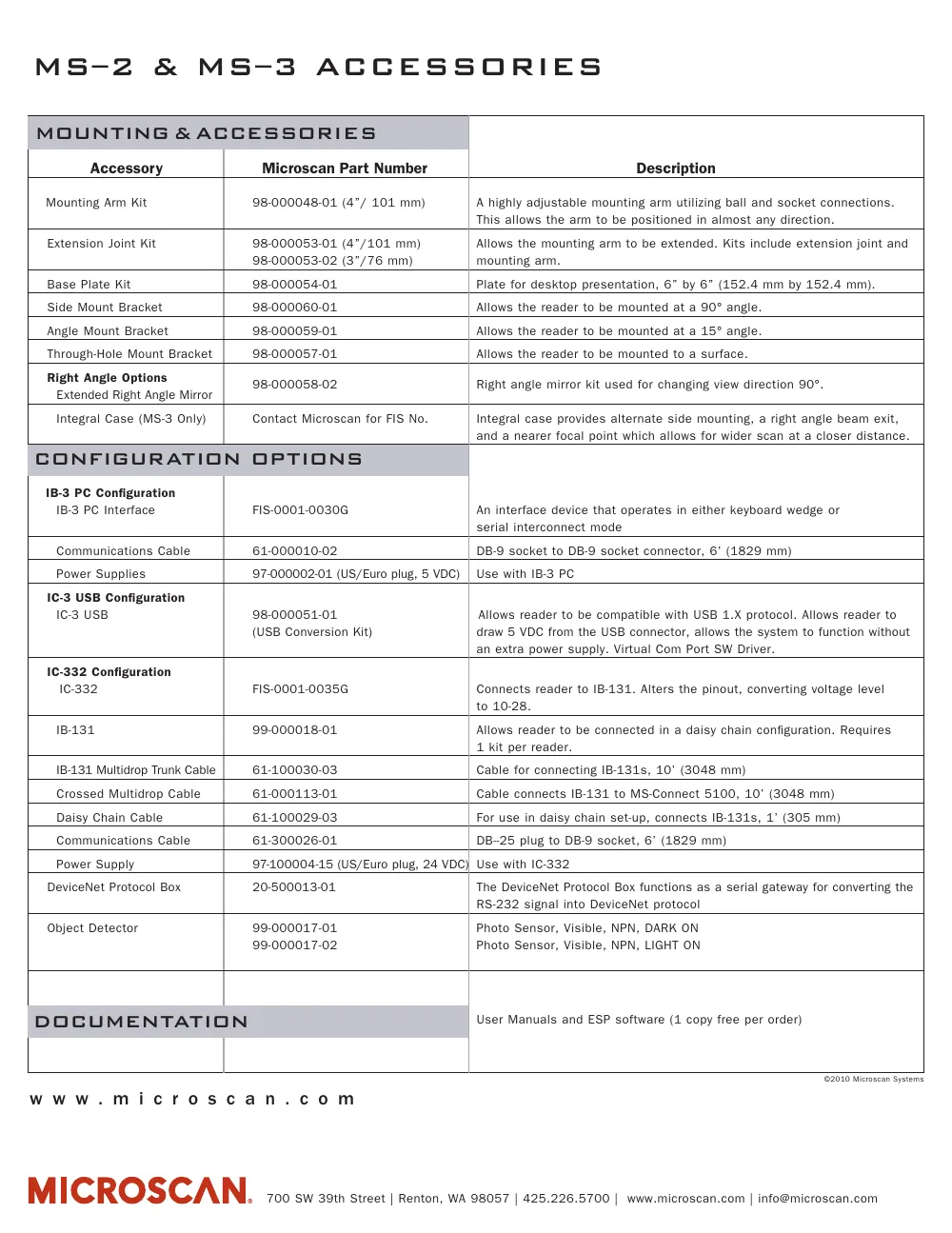
The text of page 2, from the PDF itself
MS–2 & MS–3 ACCESSORIES MOUNTING & ACCESSORIES Accessory
Microscan Part NumberDescriptionMounting Arm Kit
98-000048-01 (4”/ 101 mm)
A highly adjustable mounting arm utilizing ball and socket connections. This allows the arm to be positioned in almost any direction.
Extension Joint Kit
98-000053-01 (4”/101 mm) 98-000053-02 (3”/76 mm)
Allows the mounting arm to be extended. Kits include extension joint and mounting arm.
Base Plate Kit
98-000054-01
Plate for desktop presentation, 6” by 6” (152.4 mm by 152.4 mm).
Side Mount Bracket
98-000060-01
Allows the reader to be mounted at a 90° angle.
Angle Mount Bracket
98-000059-01
Allows the reader to be mounted at a 15° angle.
Through-Hole Mount Bracket
98-000057-01
Allows the reader to be mounted to a surface.
Right Angle Options Extended Right Angle Mirror
98-000058-02
Right angle mirror kit used for changing view direction 90°.
Contact Microscan for FIS No.
Integral case provides alternate side mounting, a right angle beam exit, and a nearer focal point which allows for wider scan at a closer distance.
Integral Case (MS-3 Only)
CONFIGURATION OPTIONS IB-3 PC Confi guration IB-3 PC Interface
FIS-0001-0030G
An interface device that operates in either keyboard wedge or serial interconnect mode
Communications Cable
61-000010-02
DB-9 socket to DB-9 socket connector, 6’ (1829 mm)
Power Supplies
97-000002-01 (US/Euro plug, 5 VDC)
Use with IB-3 PC
98-000051-01 (USB Conversion Kit)
Allows reader to be compatible with USB 1.X protocol. Allows reader to draw 5 VDC from the USB connector, allows the system to function without an extra power supply. Virtual Com Port SW Driver.
FIS-0001-0035G
Connects reader to IB-131. Alters the pinout, converting voltage level to 10-28.
IB-131
99-000018-01
Allows reader to be connected in a daisy chain confi guration. Requires 1 kit per reader.
IB-131 Multidrop Trunk Cable
61-100030-03
Cable for connecting IB-131s, 10’ (3048 mm)
Crossed Multidrop Cable
61-000113-01
Cable connects IB-131 to MS-Connect 5100, 10’ (3048 mm)
Daisy Chain Cable
61-100029-03
For use in daisy chain set-up, connects IB-131s, 1’ (305 mm)
Communications Cable
61-300026-01
DB--25 plug to DB-9 socket, 6’ (1829 mm)
Power Supply
97-100004-15 (US/Euro plug, 24 VDC) Use with IC-332
IC-3 USB Confi guration IC-3 USB
IC-332 Confi guration IC-332
DeviceNet Protocol Box
20-500013-01
The DeviceNet Protocol Box functions as a serial gateway for converting the RS-232 signal into DeviceNet protocol
Object Detector
99-000017-01 99-000017-02
Photo Sensor, Visible, NPN, DARK ON Photo Sensor, Visible, NPN, LIGHT ON
ESP®Software, Tools CD 37-000001-01 DOCUMENTATION
User Manuals and ESP software (1 copy free per order)
©2010 Microscan Systems
w w w . m i c r o s c a n . c o m
700 SW 39th Street | Renton, WA 98057 | 425.226.5700 | www.microscan.com | info@microscan.com