Manual · Metrologic
MH941 Hand-Held Laser Scanner Installation and User's Guide
Manual33 pagesPDF 585 KB
Installation and user's guide for the Metrologic MH941 hand-held laser scanner: connections, indicators, scan field and specifications.
Covers · 1 model
The models it covers
Summary
What is in it
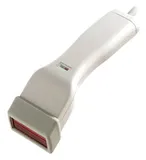
The installation and user's guide for the Metrologic MH941 hand-held laser scanner, a scan head used with a Metrologic fixed scanner or another maker's decoder/controller. It explains how the scanner operates with its infrared object sensor, what comes in the carton, connecting it to a fixed scanner and host or to a decoder, its parts, audible and visual indicators (with translated pages), labels, IR sensor activation, scan field and depth of field, maintenance, specifications, scan head pin assignments, warranty, notices and patents.
Its parts
- Introduction and Identification
- Unpacking List
- Connecting the MH941 Hand-Held Scanner to the Fixed Scanner and Host Device
- Connecting the MH941 Hand-Held Scanner to the Decoder/Controller
- Parts of the MH941 Scanner
- Audible Indicators
- Visual Indicators
- Labels
- IR Sensor Activation
- Scan Field
- Depth of Field and Symbol Specification
- Maintenance
From the manual
Key facts from this manual
Each line names its page in the PDF.
Metrologic's Installation and User's Guide (MLPN 2183, October 1998) for the MH941 hand-held laser scanner, a scan head that works with a fixed scanner or a decoder/controller. It covers connecting the scanner, its beep and LED signals, the infrared object sensor, the scan field, cleaning, specifications and the 9-pin head cable pin assignments.
- Device
- Hand-held laser scanner that connects to a fixed scanner or to a decoder/controller p. 6, 7
- Decoding
- Done by the MC941 decoder/controller or the host system p. 24
- Head cable
- 9-pin squeeze connector; coil cord 3.5' collapsed, 6' extended p. 8, 23
- Power
- +5 VDC at pin 9, up to 125 mA when the laser and motor are enabled by pin 6 p. 26
- Scan field
- From the face of the output window to 5 inches p. 19
- Scan rate
- Single scan line, 38 scan lines per second p. 24
- Light source
- Visible laser diode, 675 ± 5nm p. 23
- Dimensions
- 205mmL x 63mmW x 24mmD (8"L x 2.5"W x .94"D) p. 23
- Weight
- .18 kg (6.4 oz.) without cable p. 23
- Pin assignments
- 1 Flip Sense, 2 Data, 3 Decode LED, 4 Reserved, 5 Proximity Detect, 6 Laser/Motor Control, 7 Ground, 8 Shield, 9 Scanner VCC p. 25, 26
- Data output
- Open collector, low level for a bar, high level for a space; sinks 25 mA, pull-up not over +20 VDC p. 25
- Object sensor
- ScanQuest infrared sensor reaching about 8 inches; laser turns off after a dormant time p. 18
- Indicators
- Red LED: ready to scan; green LED and one beep: good read; razzberry tone at power up: failed diagnostics p. 8, 9
- Environment
- 5% to 95% relative humidity, non-condensing; up to 3200 foot candles, works in direct sunlight p. 24
What this manual walks you through
- Connecting the scanner to a fixed scanner and host device p. 6
- Connecting the scanner to a decoder/controller p. 7
- Understanding the beep signals p. 9
- Understanding the LED signals p. 13
- Waking the scanner from standby with the IR sensor p. 18
- Cleaning the output window p. 22
- Wiring the 9-pin scan head connector p. 25, 26
Good to know
- All circuits connected to the scanner must meet the SELV requirements of EN60950. p. 6
- Beep and LED signals depend on the decoder and may differ with one not made by Metrologic. p. 9
- The scan head was not designed to keep the laser on continuously, as in a permanent mounting fixture. p. 26
- Repeated red flashes while the scanner lies still mean an object is triggering the IR sensor; point the window elsewhere. p. 13
- The manual states the MH941 is a CDRH Class II and IEC Class I laser system. p. 17
Questions this manual answers
What connector does the Metrologic MH941 scanner use?
Its head cable ends in a 9-pin squeeze connector. p. 8
Does the MH941 decode bar codes itself?
No. Decoding is controlled by the MC941 decoder/controller or the host system. p. 24
What does a razzberry tone at power up mean on the MH941?
The scanner has failed its diagnostics; the guide says to report it to the company it was bought from. p. 9
How far from a bar code can the MH941 read?
From the face of the output window out to five inches. p. 19
What does the letter after MH941 in the model number mean?
It is the revision level: an MH941J is an MH941 at revision J. p. 17
The whole text · 4 parts
Read the manual here as text
Its text as extracted from the PDF, unedited, in parts; each page opens the PDF at that page.
The file