Manual · Intermec
Intermec PF4i Quick Start Guide
Manual2 pagesPDF 1.8 MB
Both pages are below, each with its text.
Covers · 1 model
The models it covers
From the manual · read page by page
Key facts from this manual
Each line names its page in the PDF.
Intermec's multilingual quick start guide (P/N 930-172-008, 2012) for the PF4i Mid-Range Printer. It is mostly pictures: it shows the front panel and the Setup menu steps to a test print, names the printer command languages and the manuals for ZSim and DSim, and gives the electrical rating.
- Device
- Mid-range printer p. 1
- Electrical rating
- 100-240 V, 2-1 A, 50/60 Hz p. 1
- Printer languages
- Fingerprint, IPL, ZSim and DSim; the display shows F1=FP, F2=IPL, F3=ZSIM, F4=DSIM p. 1
- Programming manuals
- ZSim Programmer's Guide P/N 937-009-xxx; DSim Programmer's Guide P/N 937-008-xxx p. 1
What this manual walks you through
- Printing a test label from the Setup menu (TEST/SERVICE, TESTPRINT) p. 1
- Where to find the setup steps for ZSim or DSim p. 1
Good to know
- Media and ribbon are sold separately. p. 1
- A Compliance Insert lists use restrictions for the printer. p. 1
Questions this manual answers
What power does the Intermec PF4i need?
The guide gives the electrical rating as 100-240 V, 2-1 A, 50/60 Hz. p. 1
Which printer languages does the PF4i run?
Fingerprint, IPL, ZSim and DSim, shown on the display as F1=FP, F2=IPL, F3=ZSIM, F4=DSIM. p. 1
How do I set up ZSim or DSim on the PF4i?
The guide points to the ZSim Programmer's Guide (P/N 937-009-xxx) and the DSim Programmer's Guide (P/N 937-008-xxx). p. 1
Does the PF4i come with media and ribbon?
No. Media and ribbon are sold separately. p. 1
The file
Size and text
Every page · 2
Read it here
Each page as it is printed, and its words beside it, so a phone can search and copy them.
Page1of 2
Open in the PDF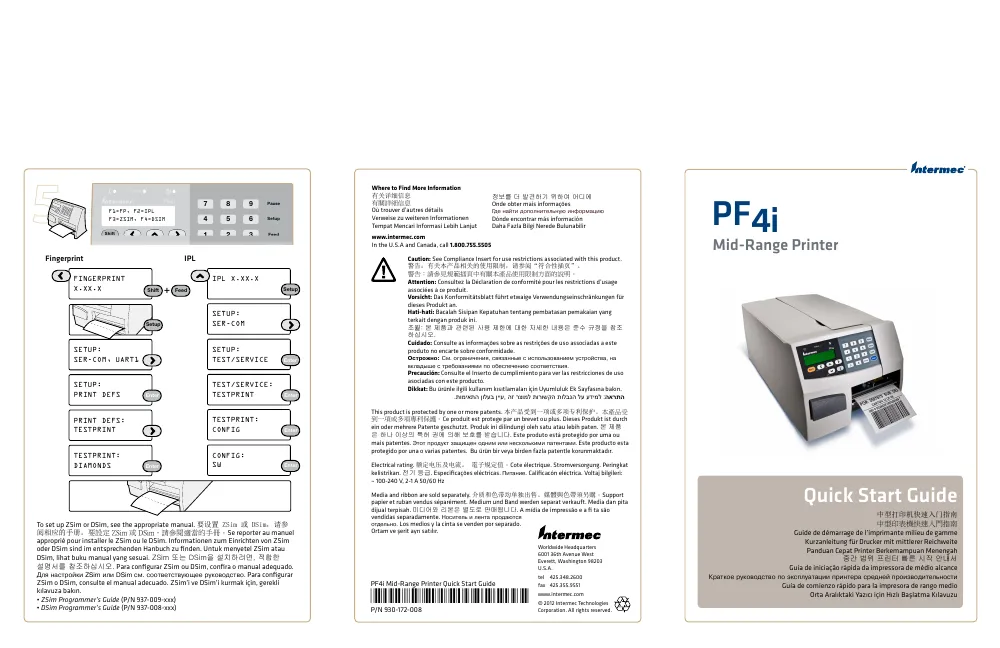
The text of page 1, from the PDF itself
Where to Find More Information 有关详细信息 有關詳細信息 Où trouver d’autres détails Verweise zu weiteren Informationen Tempat Mencari Informasi Lebih Lanjut
Status
PF4i F1=FP, F2=IPL F3=ZSIM, F4=DSIM Shift F1
F2
F3
Fingerprint FINGERPRINT X.XX.X
789Pause456Setup123FeedIPL X.XX.XSetup+ FeedSetupSETUP: SER-COMSETUP: SER-COM, UART1SETUP: TEST/SERVICESETUP: PRINT DEFS
TEST/SERVICE: TESTPRINT
EnterPRINT DEFS: TESTPRINTTESTPRINT: DIAMONDSEnter
Где найти дополнительную информацию
Dónde encontrar más información Daha Fazla Bilgi Nerede Bulunabilir
www.intermec.com In the U.S.A and Canada, call 1.800.755.5505
IPL
Shift
정보를 더 발견하기 위하여 어디에 Onde obter mais informações
EnterEnterTESTPRINT: CONFIGEnterCONFIG: SWEnter
To set up ZSim or DSim, see the appropriate manual. 要设置 ZSim 或 DSim,请参 阅相应的手册。要設定 ZSim 或 DSim,請參閱適當的手冊。Se reporter au manuel approprié pour installer le ZSim ou le DSim. Informationen zum Einrichten von ZSim oder DSim sind im entsprechenden Hanbuch zu finden. Untuk menyetel ZSim atau DSim, lihat buku manual yang sesuai. ZSim 또는 DSim을 설치하려면, 적합한 설명서를 참조하십시오. Para configurar ZSim ou DSim, confira o manual adequado. Для настройки ZSim или DSim см. соответствующее руководство. Para configurar ZSim o DSim, consulte el manual adecuado. ZSim’i ve DSim’i kurmak için, gerekli kılavuza bakın.
- ZSim Programmer’s Guide (P/N 937-009-xxx)
- DSim Programmer’s Guide (P/N 937-008-xxx)
Caution: See Compliance Insert for use restrictions associated with this product. 警告:有关本产品相关的使用限制,请参阅“符合性插页”。 警告:請參見規範插頁中有關本產品使用限制方面的說明。 Attention: Consultez la Déclaration de conformité pour les restrictions d’usage associées à ce produit. Vorsicht: Das Konformitätsblatt führt etwaige Verwendungseinschränkungen für dieses Produkt an. Hati-hati: Bacalah Sisipan Kepatuhan tentang pembatasan pemakaian yang terkait dengan produk ini. 본 제품과 관련된 사용 제한에 대한 자세한 내용은 준수 규정을 참조 하십시오. Cuidado: Consulte as informações sobre as restrições de uso associadas a este produto no encarte sobre conformidade.
PF4i
Mid-Range Printer
Острожно: См. ограничения, связанные с использованием устройства, на вкладыше с требованиями по обеспечению соответствия.
Precaución: Consulte el Inserto de cumplimiento para ver las restricciones de uso asociadas con este producto. Dikkat: Bu ürünle ilgili kullanım kısıtlamaları için Uyumluluk Ek Sayfasına bakın. .עיין בעלון התאימות, למידע על הגבלות הקשורות למוצר זה:התראה This product is protected by one or more patents. 本产品受到一项或多项专利保护。本產品受 到一項或多項專利保護。Ce produit est protege par un brevet ou plus. Dieses Produkt ist durch ein oder mehrere Patente geschutzt. Produk ini dilindungi oleh satu atau lebih paten. 본 제품 은 하나 이상의 특허 권에 의해 보호를 받습니다. Este produto está protegido por uma ou mais patentes. Этот продукт защищен одним или несколькими патентами. Este producto esta protegido por una o varias patentes. Bu ürün bir veya birden fazla patentle korunmaktadır. Electrical rating. 额定电压及电流。 電子規定值。Cote électrique. Stromversorgung. Peringkat kelistrikan. 전기 등급. Especificações eléctricas. Питание. Calificacón eléctrica. Voltaj bilgileri: ~ 100-240 V, 2-1 A 50/60 Hz Media and ribbon are sold separately. 介质和色带均单独出售。媒體與色帶須另購。Support papier et ruban vendus séparément. Medium und Band werden separat verkauft. Media dan pita dijual terpisah. 미디어와 리본은 별도로 판매됩니다. A mídia de impressão e a fi ta são vendidas separadamente. Íîñèòåëü è ëåíòà ïðîäàþòñÿ îòäåëüíî. Los medios y la cinta se venden por separado. Ortam ve şerit ayrı satılır.
PF4i Mid-Range Printer Quick Start Guide
*930-172-008* P/N 930-172-008
Worldwide Headquarters 6001 36th Avenue West Everett, Washington 98203 U.S.A. tel 425.348.2600 fax 425.355.9551 www.intermec.com © 2012 Intermec Technologies Corporation. All rights reserved.
Quick Start Guide 中型打印机快速入门指南 中型印表機快速入門指南 Guide de démarrage de l’imprimante milieu de gamme Kurzanleitung für Drucker mit mittlerer Reichweite Panduan Cepat Printer Berkemampuan Menengah 중간 범위 프린터 빠른 시작 안내서 Guia de iniciação rápida da impressora de médio alcance Краткое руководство по эксплуатации принтера средней производительности
Guía de comienzo rápido para la impresora de rango medio Orta Aralıktaki Yazıcı için Hızlı Başlatma Kılavuzu
Page2of 2
Open in the PDF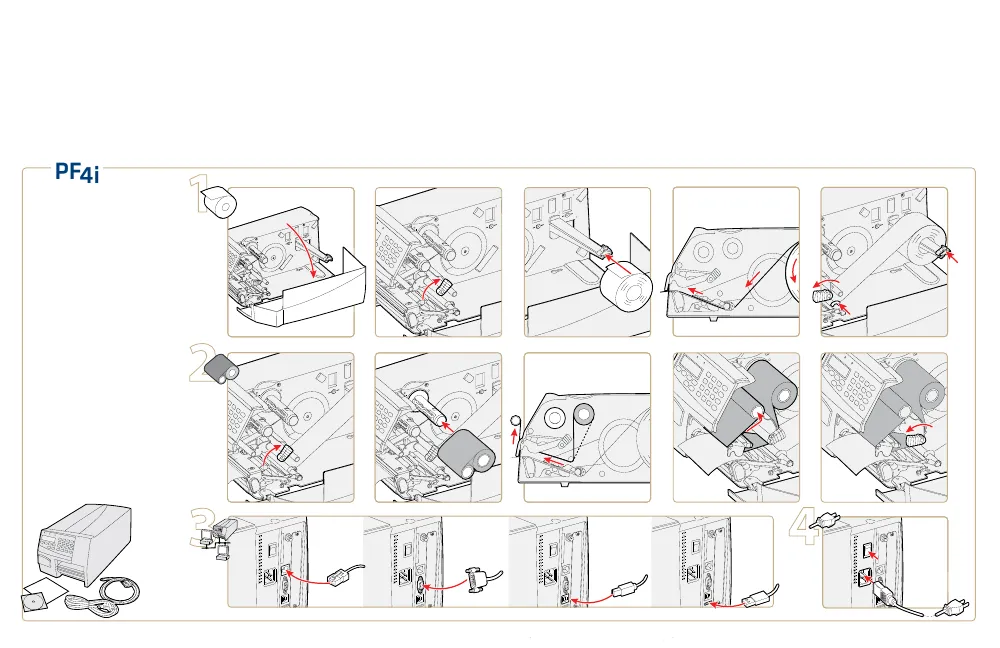
The text of page 2, from the PDF itself
PF4i