Manual · Intermec
Intermec CK31 Operator Manual
Manual2 pagesPDF 1.1 MB
Both pages are below, each with its text.
Covers · 1 model
The models it covers
From the manual · read page by page
Key facts from this manual
Each line names its page in the PDF.
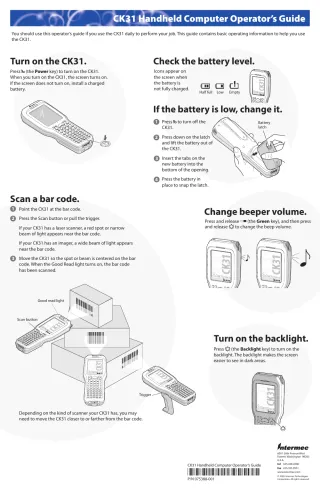
The Intermec CK31 Handheld Computer Operator's Guide (P/N 075388-001, 2005), a two-page sheet for people who use the CK31 every day. It shows how to turn the unit on, change the battery, scan a bar code, set the beeper volume and backlight, find the main keys and read the screen icons.
- Device
- Handheld computer with a laser scanner or an imager, a keypad and a backlit screen p. 1
- Scanning
- Scan button or trigger; laser shows a red spot or narrow beam, imager a wide beam; Good Read light on success p. 1
- Battery
- Removable pack held by a latch; battery icons show when it is not fully charged p. 1
- Keys
- Power, Backlight, Orange, Green, Backspace and Esc keys, with F1 to F4 p. 2
- Screen icons
- Battery level, radio connection quality, and Orange or Green key pressed or locked p. 2
- Related manuals
- CK31 Quick Start Guide P/N 075205; CK31 User's Manual P/N 075207 p. 2
What this manual walks you through
- Turning on the CK31 and checking the battery p. 1
- Changing the battery p. 1
- Scanning a bar code p. 1
- Changing the beep volume and turning on the backlight p. 1
- Reading the battery and radio icons p. 2
Good to know
- Turn the CK31 off before removing the battery. p. 1
- If the screen does not come on at power-up, install a charged battery. p. 1
Questions this manual answers
How do I change the battery on an Intermec CK31?
Turn it off, press down on the latch and lift the battery out, then insert the new battery's tabs at the bottom and press it in until the latch snaps. p. 1
How do I change the beep volume on a CK31?
Press and release the Green key, then the Backlight key. p. 1
What does the bad radio icon mean on the CK31?
The radio link to the network is poor; move until the connection improves. p. 2
The file
Size and text
Every page · 2
Read it here
Each page as it is printed, and its words beside it, so a phone can search and copy them.
Page1of 2
Open in the PDF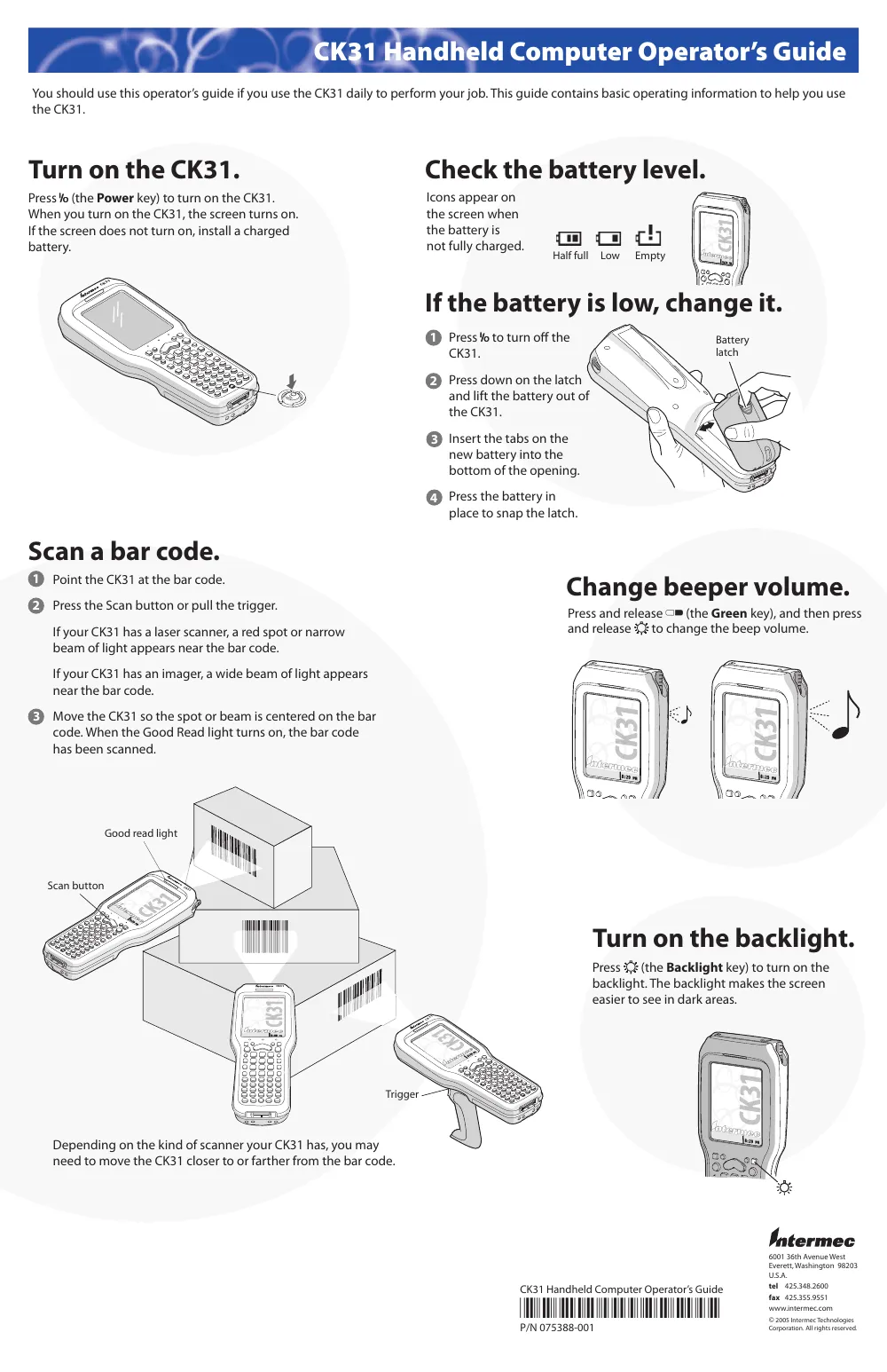
The text of page 1, from the PDF itself
CK31 Handheld Computer Operator’s Guide You should use this operator’s guide if you use the CK31 daily to perform your job. This guide contains basic operating information to help you use the CK31.
Turn on the CK31.
Check the battery level.
Press I (the Power key) to turn on the CK31. When you turn on the CK31, the screen turns on. If the screen does not turn on, install a charged battery.
Icons appear on the screen when the battery is not fully charged.
������������� ����������������
If the battery is low, change it. 1 Press I to turn off the CK31.
Battery latch
���
2 Press down on the latch and lift the battery out of the CK31. 3 Insert the tabs on the new battery into the bottom of the opening. 4 Press the battery in place to snap the latch.
Scan a bar code. 1 Point the CK31 at the bar code.
Change beeper volume.
2 Press the Scan button or pull the trigger.
Press and release C (the Green key), and then press and release E to change the beep volume.
If your CK31 has a laser scanner, a red spot or narrow beam of light appears near the bar code. If your CK31 has an imager, a wide beam of light appears near the bar code. 3 Move the CK31 so the spot or beam is centered on the bar code. When the Good Read light turns on, the bar code has been scanned.
������������������������������������������������������� �
Turn on the backlight. Press E (the Backlight key) to turn on the backlight. The backlight makes the screen easier to see in dark areas.
�������������� �� ���������
Depending on the kind of scanner your CK31 has, you may need to move the CK31 closer to or farther from the bar code.
�������� ����
CK31 Handheld Computer Operator’s Guide
*075388-001* P/N 075388-001
6001 36th Avenue West Everett, Washington 98203 U.S.A. tel 425.348.2600 fax 425.355.9551 www.intermec.com © 2005 Intermec Technologies Corporation. All rights reserved.
Page2of 2
Open in the PDF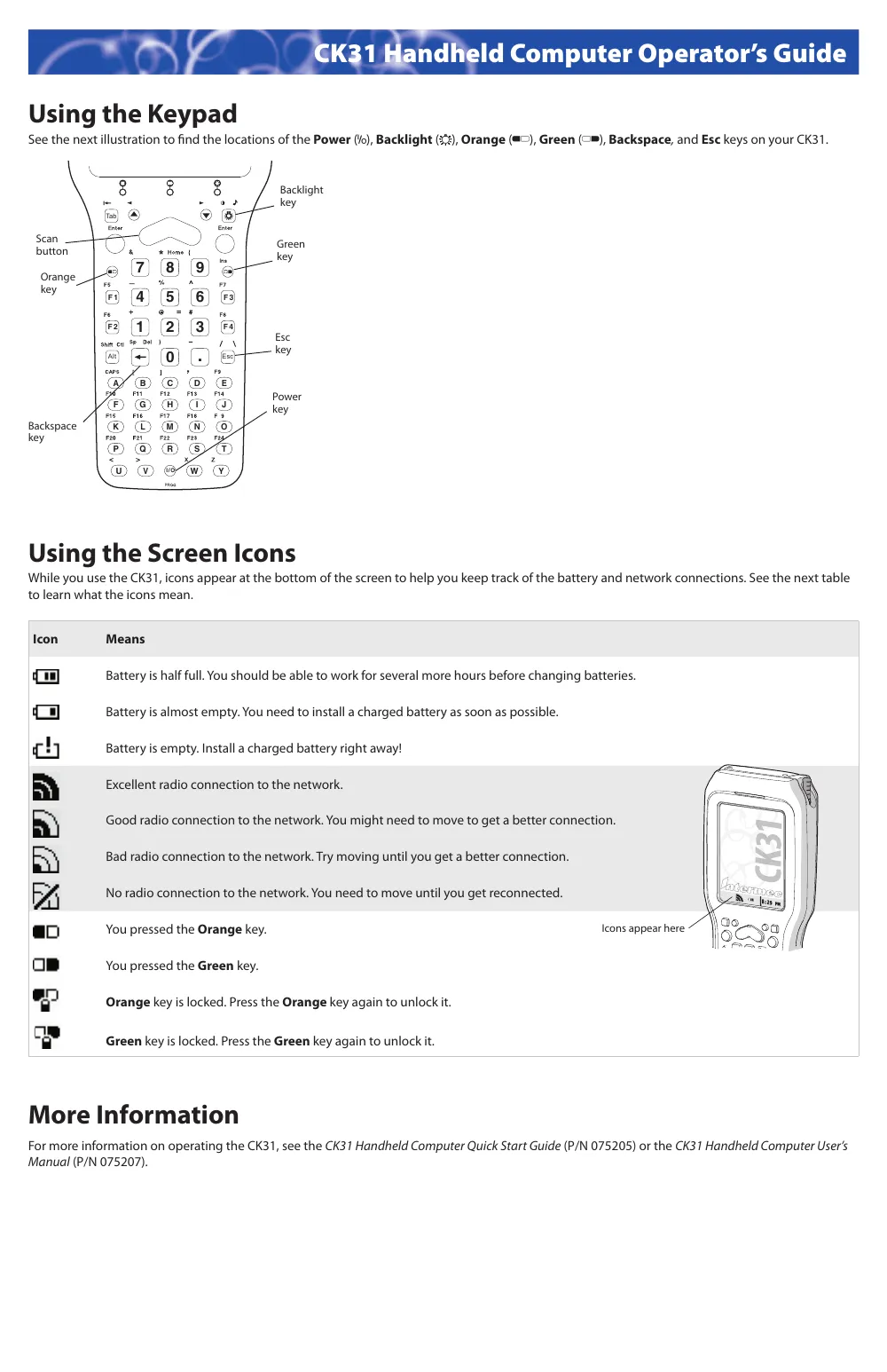
The text of page 2, from the PDF itself
CK31 Handheld Computer Operator’s Guide Using the Keypad See the next illustration to find the locations of the Power (I), Backlight (E), Orange (B), Green (C), Backspace, and Esc keys on your CK31.
��������� ��� ������� ������ ������ ���789F1456F3F2123F40.������Backspace key����� ���ABCDEFGHIJKLMNOPQRSTUVI/OWY��� �������� ���
Using the Screen Icons While you use the CK31, icons appear at the bottom of the screen to help you keep track of the battery and network connections. See the next table to learn what the icons mean. Icon
Means Battery is half full. You should be able to work for several more hours before changing batteries. Battery is almost empty. You need to install a charged battery as soon as possible. Battery is empty. Install a charged battery right away! Excellent radio connection to the network. Good radio connection to the network. You might need to move to get a better connection. Bad radio connection to the network. Try moving until you get a better connection. No radio connection to the network. You need to move until you get reconnected. You pressed the Orange key.
�������� ����
�����������������
You pressed the Green key. Orange key is locked. Press the Orange key again to unlock it. Green key is locked. Press the Green key again to unlock it.
More Information For more information on operating the CK31, see the CK31 Handheld Computer Quick Start Guide (P/N 075205) or the CK31 Handheld Computer User’s Manual (P/N 075207).