Manual · ID Innovations
Programmable Magnetic Stripe Reader for IBM AT, PS/2, USB and Compatible Keyboard Interfaces
Manual35 pagesPDF 283 KB
User manual for ID Innovations programmable magnetic stripe card readers with PS/2 keyboard wedge, serial, wand emulation and USB output.
Filed with · 1 model
Also filed with these models on the old site
Summary
What is in it
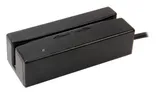
The user manual for ID Innovations' programmable magnetic stripe card readers, in dual and triple track versions of the Classic Line and Value Line. It explains the features, installation as a USB device (keyboard wedge, virtual COM port or HID mode), as a PS/2 style keyboard wedge, serially or in wand emulation, mounting and operation, and configuring the reader in setup mode: interface, track and output options, field editing, preambles, postambles, beeps and LEDs, diagnostics, cloning and parsing. Appendixes give character sets, track formats, pinouts and error beeps.
Its parts
- Features
- Installation
- Mounting The Card Reader
- Operating The Card Reader
- Using the USB Programmer to Configure the Card Reader
- Using The Setup Mode To Configure The Card Reader
- Programming Quick Keys (PS2 Style)
From the manual
Key facts from this manual
Each line names its page in the PDF.
User manual (Revision 7.71) for ID Innovations programmable magnetic stripe card readers, dual and triple track, in the Classic Line and Value Line, for PS/2 keyboard wedge, USB, serial and wand emulation use. It explains installation for each interface, mounting, reading cards, configuration by keyboard setup mode, quick keys or the Universal Programmer software, and troubleshooting. The manual does not use the designation MSR-PS2; it describes the PS2 style keyboard wedge readers generally.
- Device
- Programmable magnetic stripe card reader, dual or triple track, in Classic Line and Value Line versions p. 1, 6
- Output modes
- Classic Line: Keyboard Wedge, RS232-C, Wand Emulation, USB, USB-HID, USB-Serial; Value Line: Keyboard Wedge, USB, USB-HID, USB-Serial p. 6
- Power
- Classic Line: 5 VDC ±5%, 25 mA max standby, 60 mA max operating, 70 mA max setup mode; Value Line: 5 VDC ±5%, 32 mA max standby, 45 mA max operating p. 30
- Wedge cable
- 6 ft Y-cable with 6 in. adapter for 5 pin DIN and 6 pin Mini-DIN connections; KB end 6 pin Mini-DIN female, PC end 5 pin DIN male p. 30
- Size
- 1.62 in. W x 1.08 in. H x 4 in. L p. 30
- Environment
- 0 to 60° C operating; 10 to 90% relative humidity, non condensing p. 30
- USB modes
- Keyboard wedge (default, no extra drivers; Windows, Linux, MAC), Virtual COM port (free driver), and two vendor-defined HID interfaces p. 6, 7
- Serial use
- Through an ID Innovations Serial Converter (TTL to RS-232), 9-pin straight or 25-pin Y cable; or a powered serial port giving +5v @75ma with Inverted Serial Output p. 7
- Wand emulation
- Plugs into the wand port of a bar code decoder and sends card data as Code 128 bar codes p. 8
- Indicators
- Buzzer and tri-color LED: green for good read, red for no read p. 6, 8
- Configuration
- Free Universal Programmer software for USB and PS2 style readers; Classic Line PS2 readers also by keyboard setup mode; Value Line wedge by software or hot keys p. 8, 9
- Keyboard layouts
- USA and international keyboard country layouts; Classic Line supports over 20 keyboard countries p. 6
- Mounting
- Two included Velcro strips, or screws in four threaded inserts on the bottom p. 8
- Setup categories
- Interface, magnetic stripe, editing, preambles, postambles, termination string, buzzer/LED, diagnostics, cloning, reset defaults, parsing p. 10
What this manual walks you through
- Installing the USB reader as a keyboard wedge, virtual COM port or HID device p. 6, 7
- Installing the PS2 style reader between the keyboard and computer p. 7
- Connecting the reader serially through a Serial Converter p. 7
- Connecting to a bar code decoder in wand emulation mode p. 8
- Mounting the reader p. 8
- Swiping a card and reading the good read and no read signals p. 8
- Configuring the Classic Line reader from the keyboard in setup mode p. 8, 9, 10
- Exiting setup mode and saving changes p. 23
- Quick keys for factory reset, transmit speed and output format p. 23, 24
- Troubleshooting reading, data and setup mode problems p. 31, 32
Good to know
- In serial or wand emulation mode, no keyboard may be connected at power-up, or the reader falls back to keyboard wedge mode. p. 7, 8
- Do not use a long screw in the threaded insert by the cable; it damages the socket above it. p. 8
- Mount the reader so the cable is not bent often; frequent bending can break its wires. p. 8
- The Value Line keyboard wedge reader is configured with the Universal Programmer software, plus a few hot keys. p. 9
- The manual states Classic Line FCC Class A, and Value Line FCC Class B, CE and RoHS compliance. p. 30
Questions this manual answers
How do I reset an ID Innovations card reader to factory defaults?
On PS2 style readers, press and hold Left-Control, D, Right-Shift and Backspace; the reader beeps as it enters and leaves programming mode. p. 23
How much power does the ID Innovations magnetic stripe reader draw?
It runs on 5 VDC ±5%; the Classic Line draws up to 60 mA operating and the Value Line up to 45 mA operating. p. 30
Why will my card not read in the ID Innovations reader?
Causes the manual lists include a dirty magnetic head, disabled tracks, a card with the stripe facing the wrong way, or a damaged stripe. p. 31
Can the PS2 keyboard wedge reader connect to a serial port?
Yes, through an ID Innovations Serial Converter that changes TTL levels to RS-232, in a 9-pin straight or 25-pin Y cable. p. 7
Why does my keyboard Caps Lock light flicker when I swipe a card?
This is normal: the keyboard country needs shift changes to send the data. Sending numerics as keypad numerics or using UNIVERSAL mode reduces it. p. 32
The whole text · 5 parts
Read the manual here as text
Its text as extracted from the PDF, unedited, in parts; each page opens the PDF at that page.
The file