Manual · Honeywell
Dolphin 7600 Mobile Computer with Windows Mobile 6.0 Quick Start Guide
Manual12 pagesPDF 295 KB
Quick start guide for the Honeywell Dolphin 7600 mobile computer with Windows Mobile 6.0: box contents, panels, battery and resets.
Filed with · 1 model
Also filed with these models on the old site
Summary
What is in it
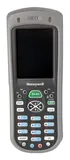
Quick start guide for the Honeywell Dolphin 7600 mobile computer running Windows Mobile 6.0. It lists what comes in the carton, labels the front, back, side and bottom panels, and walks through installing and charging the main battery, booting the terminal, and soft and hard resets. It also lists Dolphin peripherals and accessories, technical support and service contacts, and the limited warranty terms for the 7600 series.
From the manual · read page by page
Key facts from this manual
Each line names its page in the PDF.
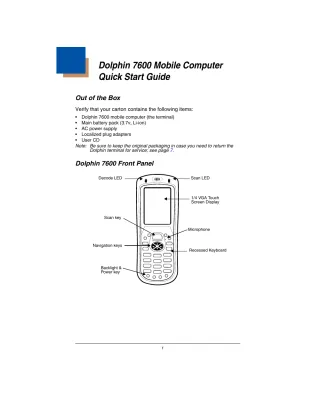
Quick start guide from 2008 for the Honeywell Dolphin 7600 mobile computer with Windows Mobile 6.0; it names the Dolphin 7600 only. It shows what comes in the box and the panel layout, and walks through installing and charging the battery, booting and resetting the terminal.
- Device
- Dolphin 7600 mobile computer running Windows Mobile 6.0 p. 1
- Battery
- Main battery pack, 3.7v Li-ion p. 3
- Display
- 1/4 VGA touch screen p. 3
- Ports
- DC power jack, headset jack, IrDA port, and an I/O connector on the bottom panel p. 4
- Card slots
- Memory card door and SIM card door on the back p. 4
- Scanning
- Image engine behind a window on the back panel, with Scan key and Scan and Decode LEDs p. 3, 4
- Keys
- Recessed keyboard, navigation keys, scan key, backlight and power key, side button p. 3, 4
- In the box
- Terminal, main battery pack, AC power supply, localized plug adapters, User CD p. 3
- Accessories
- Dolphin HomeBase, Dolphin QuadCharger, Dolphin Mobile Mount Kit, charge/communication cable kits p. 6
- First charge
- At least four hours with the charging cable before first use p. 5
What this manual walks you through
- Checking the carton contents p. 3
- Installing the main battery p. 5
- Charging the batteries before first use p. 5
- Booting the terminal p. 6
- Soft and hard resets p. 6
Good to know
- The terminal ships with the main and internal backup batteries significantly discharged. p. 5
- Do not press keys or interrupt the boot; tap the screen only when prompted. p. 6
- Remove the plastic film over the image engine window before using the image engine. p. 4
- Non-Hand Held Products batteries, cables or power adapters may cause damage. p. 5
Questions this manual answers
What battery does the Dolphin 7600 use?
A 3.7v Li-ion main battery pack. p. 3
How long should a new Dolphin 7600 charge before first use?
At least four hours with the charging cable. p. 5
How do I reset a Dolphin 7600?
Soft reset: hold Red + ESC for about 5 seconds. Hard reset: hold Red + TAB for about 5 seconds. p. 6
Where is the Dolphin 7600 user's guide?
The guide points to the Dolphin 7600 Mobile Computer User's Guide, available for download at www.honeywell.com/aidc. p. 6
Contents
Chapters and sections
Each line opens the PDF at its page.
The whole text · 2 parts
Read the manual here as text
Its text as extracted from the PDF, unedited, in parts; each page opens the PDF at that page.
The file