Manual · HHP
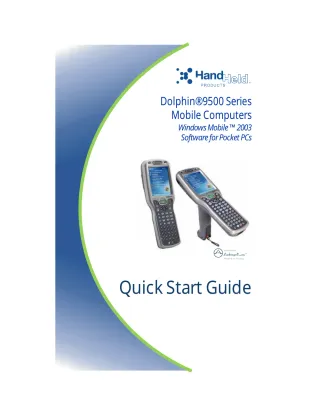
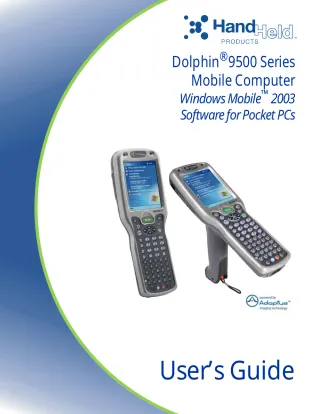
Dolphin 9500 Series Mobile Computer User's Guide (Windows Mobile 2003 Software for Pocket PCs)
Manual276 pagesPDF 4.8 MB
User's guide for the Hand Held Products Dolphin 9500 series mobile computers (9500, 9501, 9550, 9551) running Windows Mobile 2003.
Covers · 2 models
The models it covers
Summary
What is in it
The user's guide for the Hand Held Products Dolphin 9500 series of Windows Mobile 2003 mobile computers, including the 9500 batch terminal and the 9501, 9550 and 9551. It covers safety and regulatory approvals, first-time setup and charging, resets, the hardware and batteries, technical specifications, the image engine and keyboards, system settings, ActiveSync and infrared communications, 802.11b wireless LAN, Bluetooth and GSM/GPRS radios, and the bundled applications.
Its parts
- Introduction
- Getting Started
- Dolphin 9500 Series Hardware Overview
- Using Dolphin 9500 Series Mobile Computers
- Settings
- Communications
- Wireless LAN Communications with 802.11b
- Wireless PAN Communications with Bluetooth
- Wireless WAN Communications with GSM/GPRS
- Applications
From the manual
Key facts from this manual
Each line names its page in the PDF.
The Hand Held Products user's guide for the Dolphin 9500 Series mobile computers running Windows Mobile 2003 for Pocket PCs. It covers the Dolphin 9500, 9550, 9501 and 9551: setup, hardware, settings, 802.11b, Bluetooth and GSM/GPRS communications, applications, and the HomeBase, Mobile Base, ChargeBase and QuadCharger.
- Device
- Windows Mobile 2003 Pocket PC (Professional Edition) mobile computer with a digital image engine; the 9550 has an integrated pistol grip p. 11, 43
- Processor and memory
- Intel X-Scale PXA255 400MHz; 64MB RAM, 32MB non-volatile Flash; Secure Digital (SD) slot p. 43
- Display
- 1/4 VGA (240 x 320) color or monochrome backlit touch screen p. 11
- Battery
- 7.4V, 14.8 watt-hour hot-swappable Li-ion main battery; internal backup battery holds RAM and clock up to 30 minutes p. 26, 44
- Radios
- IEEE 802.11b DSSS (LEAP, MD5, TLS, TTLS, PEAP, WEP) and Bluetooth; GSM/GPRS tri-band (900, 1800, 1900 MHz) with SIM slot on the 9500 only p. 43
- Ports
- Industrial-grade connector with USB at 12Mbps, RS-232 up to 115Kbps and charging; IrDA port, speaker, microphone p. 43
- Image engines
- IT4100SR or IT4300SR (13 mil UPC 2.4 to 12.4 in.), IT4100SF or IT4300SF (13 mil UPC 2.2 to 8.8 in.), or IT4100HD high density p. 23
- Keyboards
- 35-key numeric-shifted alpha, 43-key alpha-shifted numeric or 56-key full alpha/numeric p. 43
- Dimensions
- 9.6"L x 3.45"W x 1.66"D at display; 2.7"W x 1.5"D at grip p. 43
- Weight
- 9500: 19.7 oz. (Batch) to 20.3 oz. (WLAN/WPAN); 9550: 23.4 oz. (Batch) or 23.9 oz. (WLAN) p. 44
- Environment
- 14 to 122°F (-10°C to 55°C) operating, -22 to 176°F storage, 95% humidity non-condensing; withstands multiple 5 ft. drops onto concrete p. 44
- Cradles
- HomeBase (RS-232 up to 115k baud, USB 12 Mbps, spare battery well), Mobile Base (RS-232 with power out, vehicle use), ChargeBase (four slots), Net Base (four slots, Ethernet) p. 21, 225
- QuadCharger
- Four-slot Li-ion charger, under four hours per battery; the fourth slot also analyzes a battery and shows its capacity p. 21, 255
- Accessories
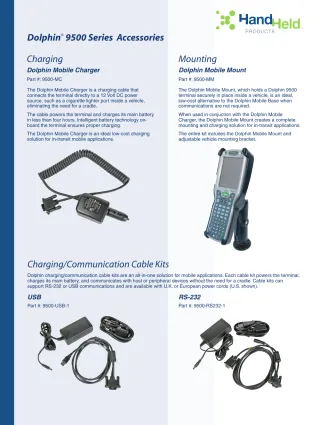
- Mobile Charger (12 Volt DC vehicle port), Mobile Mount, RS-232 or USB charging/communication cable kits, holsters, protective enclosure, stylus kits p. 22
What this manual walks you through
- Choosing cradles, chargers and accessories p. 21, 22
- Image engine working ranges by bar code type p. 23
- Charging the main and backup batteries p. 26
- Starting the terminal and aligning the screen p. 26, 27
- Charging and communicating through the HomeBase p. 225, 226
- Charging and analyzing batteries in the QuadCharger p. 255, 256
- Troubleshooting the QuadCharger p. 262
Good to know
- Terminals ship with both batteries discharged; the first charge takes four hours for the main pack and eight for the backup battery. p. 26
- Use only Hand Held Products peripherals, cables, adapters and Li-ion packs; others may damage the terminal or battery. p. 26, 225
- Terminals with the IT4300SF/SR imager carry a Class 2 laser label: do not stare into the beam. p. 12
- HomeBases cannot be daisy-chained, but can be networked through a serial or USB hub. p. 225
Questions this manual answers
What processor and memory does the Dolphin 9500 have?
An Intel X-Scale PXA255 at 400MHz with 64MB RAM and 32MB Flash, plus an SD memory slot. p. 43
What battery does the Dolphin 9550 use?
A 7.4V, 14.8 watt-hour Li-ion main battery that can be swapped in the field. p. 44
Does the Dolphin 9550 have a GSM/GPRS radio?
No; the guide lists the GSM/GPRS radio for the Dolphin 9500 only. Both can have 802.11b and Bluetooth. p. 43
Contents
Chapters and sections
Each line opens the PDF at its page.
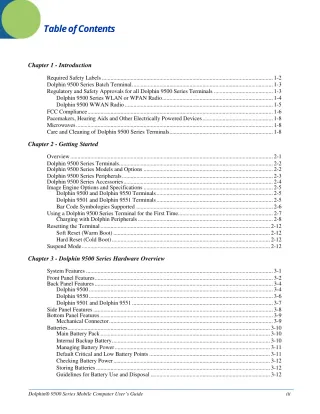
- Dolphin® 9500 Series Mobile Computer1
- Introduction11
- Getting Started19
- Dolphin 9500 Series Hardware Overview31
- Using Dolphin 9500 Series Mobile Computers45
- Settings69
- Communications95
- Wireless LAN Communications with 802.11b103
- Wireless PAN Communications with Bluetooth143
- Wireless WAN Communications with GSM/GPRS171
- Applications197
- Dolphin 9501 and Dolphin 9551217
- Dolphin 9500 Series HomeBase225
- Dolphin 9500 Series Mobile Base237
- Dolphin 9500 Series ChargeBase247
- Dolphin 9500 Series QuadCharger255
- Customer Support263
- Keyboard Combinations267
The whole text · 28 parts
Read the manual here as text
Its text as extracted from the PDF, unedited, in parts; each page opens the PDF at that page.
- Pages 1 to 71-7
- Pages 8 to 178-17
- Pages 18 to 2718-27
- Pages 28 to 3728-37
- Pages 38 to 4738-47
- Pages 48 to 5748-57
- Pages 58 to 6758-67
- Pages 68 to 7768-77
- Pages 78 to 8778-87
- Pages 88 to 9788-97
- Pages 98 to 10798-107
- Pages 108 to 117108-117
- Pages 118 to 127118-127
- Pages 128 to 137128-137
- Pages 138 to 147138-147
- Pages 148 to 157148-157
- Pages 158 to 167158-167
- Pages 168 to 177168-177
- Pages 178 to 187178-187
- Pages 188 to 197188-197
- Pages 198 to 207198-207
- Pages 208 to 217208-217
- Pages 218 to 227218-227
- Pages 228 to 237228-237
- Pages 238 to 247238-247
- Pages 248 to 257248-257
- Pages 258 to 267258-267
- Pages 268 to 276268-276
The file