Manual · Datalogic
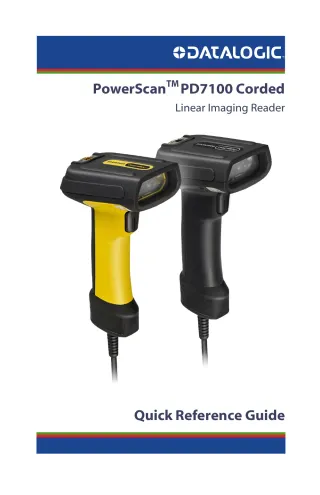
PowerScan PD7100 Corded Linear Imaging Reader Quick Reference Guide
Manual20 pagesPDF 1.0 MB
Quick reference guide for the Datalogic PowerScan PD7100 corded linear imaging bar code reader: specifications, connection and defaults.
Covers · 1 model
The models it covers
Summary
What is in it
Datalogic's quick reference guide for the PowerScan PD7100 corded linear imaging reader. It gives agency compliance and power supply notes, the end user license agreement, laser cautions for the optional laser pointer, full technical specifications, how to connect by RS-232, USB, wand emulation, IBM or keyboard wedge, programming and default settings, enabled and disabled symbologies, how to scan, and troubleshooting.
Its parts
- Statement of Agency Compliance
- Software Product Policy
- Laser Cautions
- Technical Specification
- Getting Started
- Defaults
- Symbologies
- How to Scan
From the manual
Key facts from this manual
Some pages are scans or cannot be read; this says only what the readable text supports. Each line names its page in the PDF.
This is the Datalogic quick reference guide (820032314 Rev. B, March 2011) for the PowerScan PD7100 corded linear imaging reader. It gives the technical specifications, how to connect the reader by RS-232, USB, IBM, keyboard wedge or wand emulation, interface selection bar codes, default settings and symbologies, how to scan, and troubleshooting. For full programming it refers to the separate Product Reference Guide.
- Device
- Corded handheld linear imaging bar code reader with dual LED light source p. 1, 7
- Interfaces
- RS-232 Std., RS-232 Wincor-Nixdorf, RS-232 OPOS, IBM 46xx (ports 5B and 9B), USB Com, USB Keyboard, USB Alternate Keyboard, USB OEM, Keyboard Wedge, Wand Emulation p. 8
- Power
- 4-14VDC input; approved power supply 90-264 VAC in, 5 VDC out, 0.5 A max. p. 3, 18
- Depth of field
- Typical: 5 mil 0.6" to 5.5"; 13 mil (UPC) 0" to 31.5"; 100 mil 5.1" to 208.7" (13 cm to 530 cm) p. 8
- Resolution
- 3 mil minimum element width; 15% minimum print contrast p. 8
- Bar codes
- UPC/EAN/JAN with P2/P5 add-ons, Code 39, Code 32, Code 128, Code 128 ISBT, I 2 of 5, Standard 2 of 5, Code 11, Codabar, EAN 128, GS1 DataBar, Code 4, Code 5, Follett 2 of 5 p. 8
- Size and weight
- Height 7.5"/190 mm, length 4.5"/115 mm, width 3.0"/75 mm; about 280 g without cable p. 7
- Operating temperature
- -22° to 122° F (-30° to 50° C); storage -40° to 158° F (-40° to 70° C) p. 8
- Sealing
- IP65 p. 3
- Drop resistance
- 50 drops from 2 meters (6.5 feet) to concrete, -30°C to 50°C p. 8
- Scan angles
- Roll ±30°, pitch ±65°, skew ±60° p. 7
- Field of view
- 2" wide at 1" from the reader; 7" wide at 7" p. 7
- Default RS-232 settings
- 9600 baud, no parity, 1 stop bit, handshaking disabled p. 13
- Ambient light
- Up to 100,000 lux in sunlight p. 8
What this manual walks you through
- Connecting by RS-232 with an AC adapter p. 9
- Connecting by USB, wand emulation, IBM port or keyboard wedge p. 10
- Selecting the interface by scanning a bar code p. 11, 13
- Default settings for each interface type p. 13, 14
- Restoring the factory default settings p. 14
- Symbologies enabled and disabled at the factory p. 14, 15
- Scanning linear bar codes p. 15
- Troubleshooting power, reading and data problems p. 16, 17
- Label placement and part names p. 18
Good to know
- On highly reflective surfaces, tilt the item or reader 15° to 18° to avoid unwanted reflection. p. 15
- Use only authorized power supplies; others can damage the reader. p. 3
- For USB Power Off Terminal use, attach only to a USB 1.0, 1.1 or 2.0 host. p. 3
- Do not open or service any part of the optics cavity. p. 7
- USB cables CAB-465, CAB-467 and CAB-486 are certified to residential immunity and not recommended for industrial EN61000 6-2:2005. p. 8
Questions this manual answers
How do I reset a Datalogic PD7100 to factory defaults?
Scan the Factory Default Settings bar code in the guide; settings can vary by interface type. p. 14
What are the default RS-232 settings of the PowerScan PD7100?
9600 baud, no parity, 1 stop bit, with handshaking disabled. p. 13
Why does the PD7100 scan show on screen but not enter?
Program a suffix, such as a carriage return, so the reader sends the key your application needs after the data; the PRG explains how. p. 17
What interfaces does the PD7100 support?
RS-232 (standard, Wincor-Nixdorf, OPOS), IBM 46xx ports 5B and 9B, several USB modes, keyboard wedge and wand emulation. p. 8
How far away can the PD7100 read?
Typically up to 208.7 inches (530 cm) for 100 mil codes and up to 31.5 inches for 13 mil UPC. p. 8
Contents
Chapters and sections
Each line opens the PDF at its page.
The whole text · 2 parts
Read the manual here as text
Its text as extracted from the PDF, unedited, in parts; each page opens the PDF at that page.
The file