Manual · Datalogic
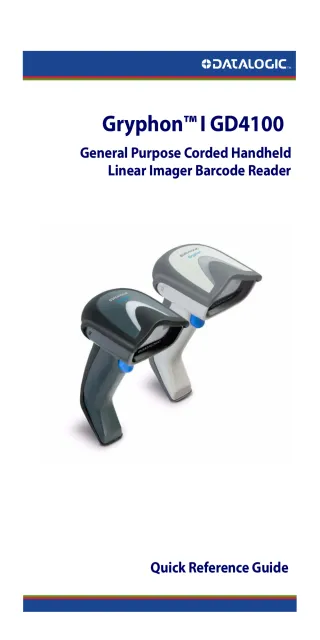
Gryphon I GD4100 General Purpose Corded Handheld Linear Imager Barcode Reader Quick Reference Guide
Manual28 pagesPDF 2.3 MB
Quick reference guide for the Datalogic Gryphon I GD4100 series corded linear imager (GD4110 and GD4130 models): specs, setup and programming.
Names · 2 models
The models it names
 Datalogic GD4110Hand-held imaging barcode scanner from$205.001 in stock Datalogic GD4130Hand-held imaging barcode scanner from$195.0010 in stock
Filed with · 1 model
Also filed with these models on the old site
Summary
What is in it
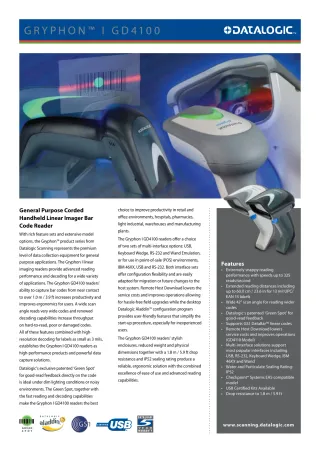
The quick reference guide for the Datalogic Gryphon I GD4100 general purpose corded handheld linear imager barcode reader, with electrical data for the GD4110 and GD4130 models. It lists technical features, then shows how to connect the cable and the keyboard wedge, RS-232 or USB host interface, aim and scan, use the scanning modes, read LED and beeper indications, troubleshoot, and scan programming barcodes, plus ergonomic and regulatory information.
Its parts
- Software Product Policy
- Technical Features
- Connect/Disconnect Cable
- Connect Host Interface
- Aim and Scan
- Parts of the Imager
- Scanning Modes
- Troubleshooting
- LED and Beeper Indications
- Programming Barcodes
- Ergonomic Recommendations
- Regulatory Information
- Imager Labeling
From the manual
Key facts from this manual
Each line names its page in the PDF.
Quick Reference Guide (2009) for the Datalogic Gryphon I GD4100 general purpose corded handheld linear imager barcode reader, naming the GD4110 and GD4130 models. It gives technical features, cable and host connection, scanning modes, troubleshooting, LED and beeper meanings, and programming barcodes for host interfaces and factory defaults.
- Device
- General purpose corded handheld linear imager barcode reader p. 1
- Interfaces
- RS-232 (Standard, Wincor-Nixdorf, OPOS), IBM 46xx ports 5B and 9B, USB (Com, Keyboard, Alternate Keyboard, OEM), Keyboard Wedge, Wand Emulation p. 9
- USB default
- GD4130: USB keyboard; GD4110: USB-OEM; powered by the USB host or a powered hub p. 19
- Power
- GD4110: 340 mA max at 5V, 1.8W max over 4.5 to 14V; GD4130: 360 mA max, 1.9W max at 5V±5%; 2.5 mA in sleep or suspend p. 8
- Power supply
- Host power, or a UL Listed/CSA Certified Class 2 or LPS supply: GD4110 4.5-14 minimum 600mA, GD4130 5.2V minimum 600mA p. 22
- Depth of field
- 3 mil: 2.9 to 4.7 in (7.5 to 12cm); 13 mil: 1.2 to 23.6 in (3 to 60cm); 20 mil: 1.2 to 31.5 in (3 to 80cm) p. 8
- Field of view
- 10.0 in (25.4cm) wide at 12.5 in (31.8cm); dual LED light source p. 8
- Tolerances
- Tilt (roll) ± 35°, pitch ± 65°, skew ± 65°; 3 mil minimum element; 15% minimum print contrast p. 8
- Symbologies
- UPC/EAN/JAN with P2/P5 add-ons, Code 39, Code 32, Code 128, Interleaved and Standard 2 of 5, Code 11, Codabar, EAN 128, GS1 DataBar, Follett 2 of 5 p. 8
- Scanning modes
- Trigger Single, Trigger Hold Multiple, Trigger Pulse Multiple, Flashing, Always On, Object Sense, Trigger Object Sense p. 12, 13
- Size and weight
- Height 7.1 in (181mm), length 3.9 in (100mm), width 2.8 in (71mm); about 6.0 ounces (169 g) without cable p. 8
- Environment
- Operating 32° to 131° F (0° to 55° C); storage -4° to 158° F; 5% to 90% humidity; 18 drops from 1.8 m; IP52; 16 KV ESD p. 9
What this manual walks you through
- Connecting the cable and the keyboard wedge, RS-232 or USB host p. 10, 11
- Choosing a scanning mode p. 12, 13, 14
- Troubleshooting no power, no decode and no transmission to the host p. 15
- Reading the LED and beeper indications p. 16
- Restoring the factory default settings p. 17
- Selecting the RS-232, IBM, USB or keyboard wedge host type with programming barcodes p. 17, 18, 19, 20, 21
- Ergonomic recommendations p. 22
Good to know
- Some interfaces start the scanner disabled at power-up; hold the trigger for five seconds to allow programming with barcodes. p. 17
- Factory defaults are restored only for the currently active interface. p. 17
- The USB-COM-STD interface needs the USB Com driver from Datalogic. p. 19
- The 13 mil depth of field is based on EAN and the others on Code 39, with grade A labels. p. 9
Questions this manual answers
My Gryphon GD4110 reads bar codes but nothing reaches the computer. Why?
The imager may not be programmed for the correct host type; scan the matching host type barcode. p. 15
How do I reset the Gryphon GD4100 to factory defaults?
Scan the Factory Default Settings barcode in the guide; it restores the defaults for the active interface. p. 17
Does the GD4110 need a power supply when used on USB?
No, on USB it is powered by the host or a powered USB hub. p. 19
What power supply does the GD4110 use?
Host power, or a UL Listed/CSA Certified Class 2 or LPS supply rated 4.5-14 with at least 600mA (5.2V, 600mA for the GD4130). p. 22
What does one loud error beep from the GD4100 mean?
One error beep at highest volume for 200 mS, with the LED at 200ms on and 200ms off, indicates a ROM failure. p. 16
Contents
Chapters and sections
Each line opens the PDF at its page.
The whole text · 3 parts
Read the manual here as text
Its text as extracted from the PDF, unedited, in parts; each page opens the PDF at that page.
The file