Manual · Datalogic
DX8200A Quick Guide
Manual18 pagesPDF 1.4 MB
Quick guide for the Datalogic DX8200A omnidirectional fixed-mount laser scanner: specifications, connectors, networks and mounting.
Filed with · 1 model
Also filed with these models on the old site
Summary
What is in it
Quick guide for the DX8200A omnidirectional industrial laser bar code scanner. It shows the scanner's parts and indicators, lists the electrical, optical, reading, software, environmental and physical specifications, decodes the model number, lists accessories, gives the pinouts of the 26-pin, Lonworks, Ethernet, Profibus and DeviceNet connectors, explains Lonworks network termination and common system layouts, and covers mechanical installation and reading conditions.
From the manual · read page by page
Key facts from this manual
Each line names its page in the PDF.
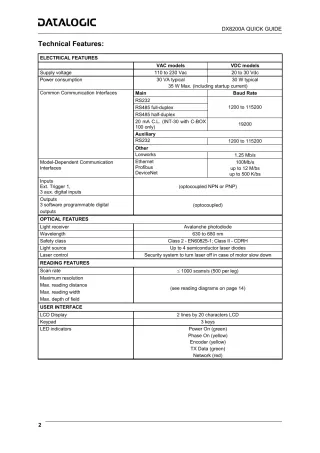
This is the quick guide for the Datalogic DX8200A laser scanner, the model it names throughout, rather than the plain DX8200. It gives the technical features, model numbering, connector pinouts, Lonworks network termination and layouts, mounting dimensions, reading tables and diagrams, and power supply rules.
- Device
- DX8200A laser scanner with up to 4 semiconductor laser diodes p. 2, 18
- Versions
- VDC or VAC power; Standard, Ethernet, Profibus or DeviceNet version; medium, high or very high resolution p. 4
- Supply voltage
- 110 to 230 Vac or 20 to 30 Vdc depending on model p. 2
- Power consumption
- 30 VA typical or 30 W typical; 35 W max. (including startup current) p. 2
- Connectors
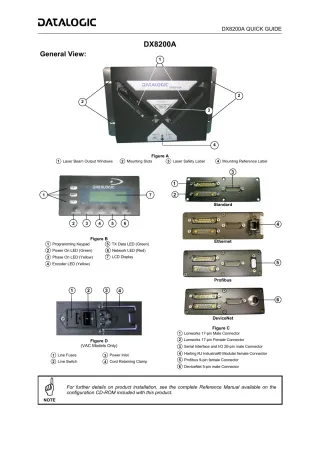
- Lonworks 17-pin male and 17-pin female; serial interface and I/O 26-pin male; Harting RJ Industrial® modular female (Ethernet); Profibus 9-pin female; DeviceNet 5-pin male p. 1
- Interfaces
- Main: RS232, RS485 full-duplex or half-duplex, 20 mA C.L. (INT-30 with C-BOX 100 only); auxiliary RS232; Lonworks, Ethernet, Profibus, DeviceNet p. 2
- Inputs and outputs
- External trigger and 3 auxiliary digital inputs (optocoupled NPN or PNP); 3 software programmable digital outputs (optocoupled) p. 2
- Scan rate
- Up to 1000 scans/s (500 per leg) p. 2
- Display and keys
- 2 lines by 20 characters LCD, 3 keys; LEDs Power On (green), Phase On (yellow), Encoder (yellow), TX Data (green), Network (red) p. 2
- Readable codes
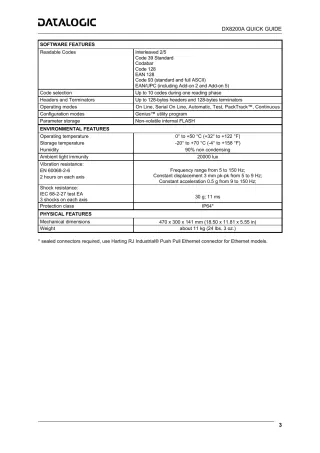
- Interleaved 2/5, Code 39, Codabar, Code 128, EAN 128, Code 93, EAN/UPC with Add-on 2 and Add-on 5 p. 3
- Operating modes
- On Line, Serial On Line, Automatic, Test, PackTrack™, Continuous; configured with the Genius™ utility p. 3
- Temperature
- Operating 0 to +50 °C (+32 to +122 °F); storage -20 to +70 °C (-4 to +158 °F) p. 3
- Size and weight
- 470 x 300 x 141 mm (18.50 x 11.81 x 5.55 in); about 11 kg (24 lbs. 3 oz.) p. 3
- Network termination
- BTK-8102 Lonworks terminator in the master; BTK-8100 bus return in the last slave; CAB-8605 and CAB-8305 power cables for VDC models p. 7
What this manual walks you through
- Wiring the 26-pin serial interface and I/O connector p. 5
- Ethernet, Profibus and DeviceNet connector pinouts p. 6
- Terminating and powering a Lonworks network p. 7
- Point-to-point and synchronized network layouts p. 8, 9, 10
- Wiring through the C-BOX 100 terminal block p. 11
- Mounting the scanner p. 12
- Minimum code height for each conveyor speed and code p. 12, 13
- Reading diagrams for each optical resolution p. 14, 15
- Building a simple interface test cable p. 16
Good to know
- VDC models need a UL Listed Class 2 or LPS supply rated 20 - 30 V dc, minimum 1.75 A, or a UL Listed computer with LPS outputs. p. 17
- On VAC models, replace a line fuse only with the same type and rating (250V, 3.15 A). p. 17
- The CAB-8605 and CAB-8305 cables are for VDC models only. p. 7
- Position several scanners so no laser beam enters another reader's window perpendicularly, or its laser may start blinking. p. 12
- Disconnect the power supply before opening the device for maintenance or installation. p. 16
Questions this manual answers
What power supply does the DX8200A need?
110 to 230 Vac or 20 to 30 Vdc depending on model; VDC models need a supply rated 20 - 30 V dc, minimum 1.75 A. p. 2, 17
How do I terminate a DX8200A Lonworks network?
Put the BTK-8102 terminator in the 17-pin male connector of the master and the BTK-8100 bus return in the 17-pin female connector of the last slave. p. 7
How big and heavy is the DX8200A?
It measures 470 x 300 x 141 mm (18.50 x 11.81 x 5.55 in) and weighs about 11 kg (24 lbs. 3 oz.). p. 3
How fast does the DX8200A scan?
Up to 1000 scans/s, 500 per leg. p. 2
What barcodes can the DX8200A read?
Interleaved 2/5, Code 39, Codabar, Code 128, EAN 128, Code 93 and EAN/UPC with add-ons, up to 10 codes in one reading phase. p. 3
The whole text · 2 parts
Read the manual here as text
Its text as extracted from the PDF, unedited, in parts; each page opens the PDF at that page.
The file