
Manual · Datalogic
DS2200 Installation Manual
Manual33 pagesPDF 2.6 MB
Installation manual for the Datalogic DS2200, a compact fixed-mount laser barcode scanner with built-in decoder for automated equipment.
Covers · 1 model
The models it covers
Summary
What is in it
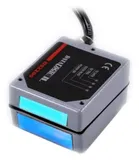
The installation manual for the Datalogic DS2200 ultra compact laser barcode scanner with decoder, made for integration into automated equipment. It covers laser safety and power supply, general features, indicators and models, then installation: package contents, mechanical mounting, electrical connections for the RS485 half-duplex main interface, RS232 auxiliary interface, inputs and outputs, positioning and typical layouts. It also explains reading features (step ladder and picket fence modes, raster, reading diagrams), maintenance and technical features.
Its parts
- General Features
- Installation
- Reading Features
- Maintenance
- Technical Features
From the manual · read page by page
Key facts from this manual
Some pages are scans or cannot be read; this says only what the readable text supports. Each line names its page in the PDF.
The Datalogic DS2200 Installation Manual (Ed. 02/2002, 821000125 Rev. E) for the DS2200, an ultra compact industrial laser barcode scanner with a built-in decoder. It explains mounting, wiring the 25-pin connector for power, the RS485 and RS232 interfaces, the trigger input and outputs, scanner positioning and system layouts, reading performance and the technical specifications.
- Device
- Ultra compact laser barcode scanner with built-in decoder, for integration into automated equipment p. 11
- Interfaces
- Main RS485 half-duplex and auxiliary RS232; baud rates 150 to 115200 p. 11, 31
- Connector
- 25-pin female D-sub on the scanner cable, for power and all signals p. 16
- Power
- 5 Vdc ± 5%, 2 W maximum consumption p. 31
- DC converter
- DC5-2200 converts 4-30 Vdc to 5 Vdc (accessory on request) p. 13
- Scan rate
- 500 scans/sec p. 11
- Reading distance
- From 40 mm (1.6 in) up to 220 mm (8.7 in), depending on version and code p. 13
- Model code
- DS2200-XXXX: resolution 1 = standard, 2 = high; Linear/Raster 0 = linear, 1 = raster p. 13
- Light source
- Semiconductor laser diode, 630 to 680 nm p. 31
- Symbologies
- EAN/UPC with Add-on 2 and Add-on 5, 2/5 Interleaved, Code 39, Codabar, Code 93, Code 128, EAN 128, Pharmacode p. 32
- Inputs and outputs
- External trigger input (max 9 Vdc on EXT TRIG-); two open collector outputs OUT1 and OUT2, 50 Vdc and 50 mA max p. 19, 20
- Configuration
- WinHost utility on diskette or ESC sequences over the serial interface; parameters kept in internal EEPROM p. 11, 32
- Operating temperature
- 0° to 40 °C (32° to 104 °F); storage -20° to 70 °C (-4° to 158 °F) p. 32
- Size and weight
- 50 x 40 x 28 mm (1.97 x 1.57 x 1.10 in.); 150 g. (5.29 oz.) without cable p. 32
What this manual walks you through
- Mounting the scanner with its three screw holes and bracket p. 15
- Wiring power and reading the 25-pin connector pinout p. 16, 17
- Connecting the RS485 main interface in a multidrop layout p. 17, 18
- Connecting the RS232 auxiliary interface to a host or for configuration p. 18, 19
- Wiring the external trigger input and the two outputs p. 19, 20
- Positioning the scanner for pitch, skew and tilt p. 20, 21
- Point-to-point, master/slave and multiplexer layouts p. 22, 23, 24
- Working out the number of effective scans on a moving code p. 25, 26
- Reading the four LED indicators p. 12
- Cleaning the scanner windows p. 30
Good to know
- The power must be 5 Vdc only. p. 17
- Do not connect GND and SGND to different external ground references; the internal filter can be damaged. p. 16
- The signal on the external trigger input must not exceed 9 Vdc. p. 19
- In the RS485 master/slave layout, the bus termination resistors must not be installed. p. 23
- Above 35 °C, the manual advises using the Beam Shutter set in the WinHost program. p. 32
Questions this manual answers
What power supply does the Datalogic DS2200 need?
5 Vdc ± 5% at up to 2 W. The DC5-2200 accessory converts 4-30 Vdc to 5 Vdc. p. 13, 31
What connector is on the DS2200 cable?
A 25-pin female D-sub connector that carries power, the RS485 and RS232 interfaces, the trigger input and the outputs. p. 16
How far can the DS2200 read a barcode?
From 40 mm (1.6 in) up to 220 mm (8.7 in), depending on the scanner version and the code. p. 13
How many DS2200 scanners can work in a master/slave system?
One master and up to 5 slaves on the RS485 interface, each slave with a multidrop address from 0 to 4. p. 22
The whole text · 4 parts
Read the manual here as text
Its text as extracted from the PDF, unedited, in parts; each page opens the PDF at that page.
The file