Manual · Datalogic
Datalogic D130 Quick Reference
Manual2 pagesPDF 296 KB
Both pages are below, each with its text.
Covers · 1 model
The models it covers
From the manual · read page by page
Key facts from this manual
Each line names its page in the PDF.
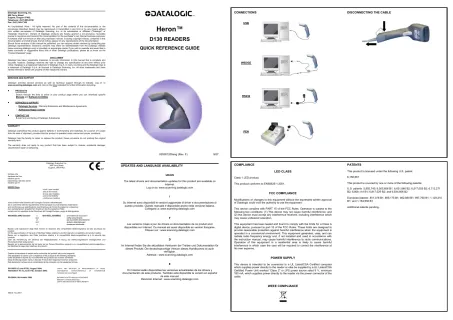
A two-page Datalogic quick reference guide for the Heron D130 reader. It shows the cable connections, the bar codes for interface selection, keyboard nationality and restoring defaults, the default settings, stand installation and the technical features.
- Device
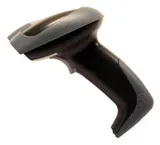
- Heron bar code reader with a CCD sensor, used in the hand or reading automatically from its stand p. 2
- Interfaces
- USB, keyboard wedge, RS232 and pen emulation p. 1, 2
- Power
- 5 Vdc ± 5%, from the host computer or a Class 2 or LPS power unit of at least 180 mA p. 1, 2
- Sensor
- CCD solid state (2048 pixels); LED array illuminator, 630 ~ 670 nm p. 2
- Reading field
- 2 ~ 27 cm (20 mils) p. 2
- Resolution
- 0.10 mm (4 mils) maximum p. 2
- RS232 defaults
- 9600 baud, no parity, 8 data bits, 1 stop bit, no handshaking; terminator CR-LF p. 2
- Keyboard defaults
- USB-KBD and wedge: USA keyboard p. 2
- Codes on by default
- EAN 8/EAN 13/UPC A/UPC E without add-on, Interleaved 2/5, Standard Code 39, Code 128 p. 2
- Codes off by default
- EAN 128, ISBT128, Code 93, Codabar, MSI, Plessey, Telepen, Code 11, RSS Codes and others p. 2
- Indicators
- Audible tone and good-read green spot; green aiming light in the stand p. 2
- Configuration manual
- HHD II Software Configuration Manual, part number 90ACC1877 p. 2
- Stand mounting
- Self-tapping screws, double sided adhesive strips or rubber feet; optional metal plate p. 2
- Protection class
- IP30 p. 2
What this manual walks you through
- Connecting and disconnecting the USB, wedge, RS232 and pen cables p. 1
- Selecting the interface by scanning a bar code p. 2
- Choosing the keyboard nationality p. 2
- Restoring the default settings p. 2
- Setting a data terminator p. 2
- Reading in the hand and in the stand p. 2
- Mounting the stand and inserting the reader p. 2
- Running the operating test p. 2
Good to know
- USB-COM needs files and drivers installed from the USB Device Installation software. p. 2
- To read the same code twice in a row, take it out of the reading area first. p. 2
- Tilt the reader against the bar code to avoid direct reflections. p. 2
- The light bar must cover the entire code. p. 2
Questions this manual answers
What are the Datalogic D130 RS232 default settings?
9600 baud, no parity, 8 data bits, 1 stop bit, no handshaking, with a CR-LF terminator. p. 2
What power supply does the Heron D130 need?
5 V from the host computer, or from a Class 2 or LPS power unit of at least 180 mA through the cable's power connector. p. 1
How do I change the D130 interface?
Scan the interface selection bar code for the application from the quick reference guide. p. 2
Which bar codes does the D130 read out of the box?
EAN 8, EAN 13, UPC A and UPC E without add-on, Interleaved 2/5, Standard Code 39 and Code 128. p. 2
Where are the full D130 configuration settings?
In the HHD II Software Configuration Manual, part number 90ACC1877, or the Configuration program. p. 2
The file
Size and text
Every page · 2
Read it here
Each page as it is printed, and its words beside it, so a phone can search and copy them.
Page1of 2
Open in the PDF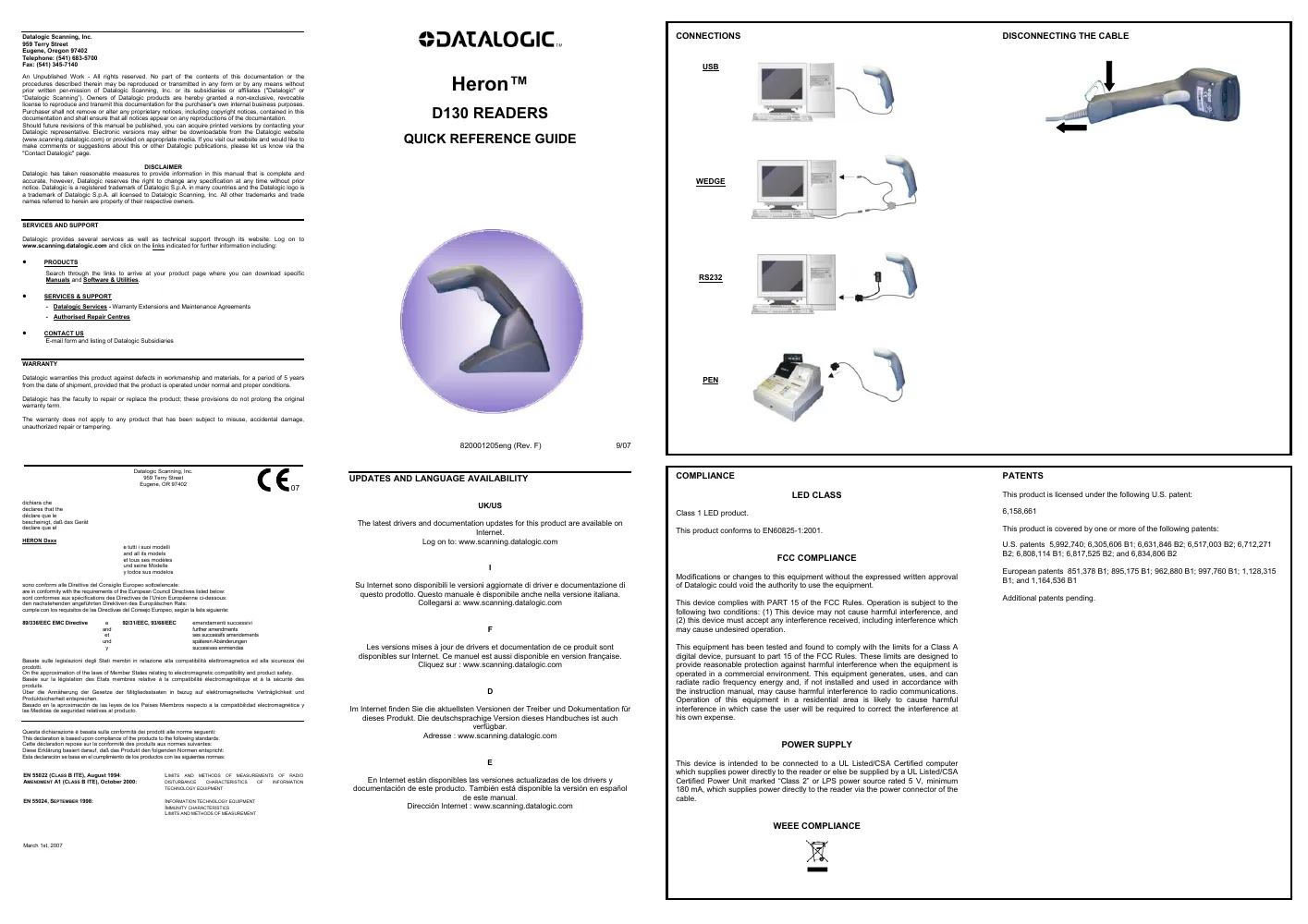
The text of page 1, from the PDF itself
CONNECTIONS
Datalogic Scanning, Inc. 959 Terry Street Eugene, Oregon 97402 Telephone: (541) 683-5700 Fax: (541) 345-7140
DISCONNECTING THE CABLE
USB
An Unpublished Work - All rights reserved. No part of the contents of this documentation or the procedures described therein may be reproduced or transmitted in any form or by any means without prior written per-mission of Datalogic Scanning, Inc. or its subsidiaries or affiliates ("Datalogic" or “Datalogic Scanning”). Owners of Datalogic products are hereby granted a non-exclusive, revocable license to reproduce and transmit this documentation for the purchaser's own internal business purposes. Purchaser shall not remove or alter any proprietary notices, including copyright notices, contained in this documentation and shall ensure that all notices appear on any reproductions of the documentation. Should future revisions of this manual be published, you can acquire printed versions by contacting your Datalogic representative. Electronic versions may either be downloadable from the Datalogic website (www.scanning.datalogic.com) or provided on appropriate media. If you visit our website and would like to make comments or suggestions about this or other Datalogic publications, please let us know via the "Contact Datalogic" page.
Heron™ D130 READERS QUICK REFERENCE GUIDE
DISCLAIMER Datalogic has taken reasonable measures to provide information in this manual that is complete and accurate, however, Datalogic reserves the right to change any specification at any time without prior notice. Datalogic is a registered trademark of Datalogic S.p.A. in many countries and the Datalogic logo is a trademark of Datalogic S.p.A. all licensed to Datalogic Scanning, Inc. All other trademarks and trade names referred to herein are property of their respective owners.
WEDGE
SERVICES AND SUPPORT Datalogic provides several services as well as technical support through its website. Log on to www.scanning.datalogic.com and click on the links indicated for further information including:
PRODUCTS Search through the links to arrive at your product page where you can download specific Manuals and Software & Utilities.
RS232
SERVICES & SUPPORT
- Datalogic Services - Warranty Extensions and Maintenance Agreements
- Authorised Repair Centres
CONTACT US E-mail form and listing of Datalogic Subsidiaries
WARRANTY Datalogic warranties this product against defects in workmanship and materials, for a period of 5 years from the date of shipment, provided that the product is operated under normal and proper conditions.
PEN
Datalogic has the faculty to repair or replace the product; these provisions do not prolong the original warranty term. The warranty does not apply to any product that has been subject to misuse, accidental damage, unauthorized repair or tampering.
820001205eng (Rev. F) Datalogic Scanning, Inc. 959 Terry Street Eugene, OR 97402
UPDATES AND LANGUAGE AVAILABILITY
The latest drivers and documentation updates for this product are available on Internet. Log on to: www.scanning.datalogic.com
HERON Dxxx e tutti i suoi modelli and all its models et tous ses modèles und seine Modelle y todos sus modelos
emendamenti successivi further amendments ses successifs amendements späteren Abänderungen succesivas enmiendas
F
Basate sulle legislazioni degli Stati membri in relazione alla compatibilità elettromagnetica ed alla sicurezza dei prodotti. On the approximation of the laws of Member States relating to electromagnetic compatibility and product safety. Basée sur la législation des Etats membres relative à la compatibilité électromagnétique et à la sécurité des produits. Über die Annäherung der Gesetze der Mitgliedsstaaten in bezug auf elektromagnetische Verträglichkeit und Produktsicherheit entsprechen. Basado en la aproximación de las leyes de los Países Miembros respecto a la compatibilidad electromagnética y las Medidas de seguridad relativas al producto.
Questa dichiarazione è basata sulla conformità dei prodotti alle norme seguenti: This declaration is based upon compliance of the products to the following standards: Cette déclaration repose sur la conformité des produits aux normes suivantes: Diese Erklärung basiert darauf, daß das Produkt den folgenden Normen entspricht: Esta declaración se basa en el cumplimiento de los productos con las siguientes normas: EN 55022 (CLASS B ITE), August 1994: AMENDMENT A1 (CLASS B ITE), October 2000: EN 55024, SEPTEMBER 1998:
6,158,661
This product conforms to EN60825-1:2001.
This product is covered by one or more of the following patents:
I Su Internet sono disponibili le versioni aggiornate di driver e documentazione di questo prodotto. Questo manuale è disponibile anche nella versione italiana. Collegarsi a: www.scanning.datalogic.com
INFORMATION TECHNOLOGY EQUIPMENT IMMUNITY CHARACTERISTICS LIMITS AND METHODS OF MEASUREMENT
D Im Internet finden Sie die aktuellsten Versionen der Treiber und Dokumentation für dieses Produkt. Die deutschsprachige Version dieses Handbuches ist auch verfügbar. Adresse : www.scanning.datalogic.com E
LIMITS AND METHODS OF MEASUREMENTS OF RADIO DISTURBANCE CHARACTERISTICS TECHNOLOGY EQUIPMENT
Les versions mises à jour de drivers et documentation de ce produit sont disponibles sur Internet. Ce manuel est aussi disponible en version française. Cliquez sur : www.scanning.datalogic.com
OF
INFORMATION
En Internet están disponibles las versiones actualizadas de los drivers y documentación de este producto. También está disponible la versión en español de este manual. Dirección Internet : www.scanning.datalogic.com
Modifications or changes to this equipment without the expressed written approval of Datalogic could void the authority to use the equipment. This device complies with PART 15 of the FCC Rules. Operation is subject to the following two conditions: (1) This device may not cause harmful interference, and (2) this device must accept any interference received, including interference which may cause undesired operation. This equipment has been tested and found to comply with the limits for a Class A digital device, pursuant to part 15 of the FCC Rules. These limits are designed to provide reasonable protection against harmful interference when the equipment is operated in a commercial environment. This equipment generates, uses, and can radiate radio frequency energy and, if not installed and used in accordance with the instruction manual, may cause harmful interference to radio communications. Operation of this equipment in a residential area is likely to cause harmful interference in which case the user will be required to correct the interference at his own expense.
POWER SUPPLY This device is intended to be connected to a UL Listed/CSA Certified computer which supplies power directly to the reader or else be supplied by a UL Listed/CSA Certified Power Unit marked “Class 2” or LPS power source rated 5 V, minimum 180 mA, which supplies power directly to the reader via the power connector of the cable.
WEEE COMPLIANCE March 1st, 2007
This product is licensed under the following U.S. patent:
Class 1 LED product.
FCC COMPLIANCE
sono conformi alle Direttive del Consiglio Europeo sottoelencate: are in conformity with the requirements of the European Council Directives listed below: sont conformes aux spécifications des Directives de l'Union Européenne ci-dessous: den nachstehenden angeführten Direktiven des Europäischen Rats: cumple con los requisitos de las Directivas del Consejo Europeo, según la lista siguiente: 92/31/EEC, 93/68/EEC
PATENTS LED CLASSUK/USe and et und yCOMPLIANCE07
dichiara che declares that the déclare que le bescheinigt, daß das Gerät declare que el
89/336/EEC EMC Directive
9/07
U.S. patents 5,992,740; 6,305,606 B1; 6,631,846 B2; 6,517,003 B2; 6,712,271 B2; 6,808,114 B1; 6,817,525 B2; and 6,834,806 B2 European patents 851,378 B1; 895,175 B1; 962,880 B1; 997,760 B1; 1,128,315 B1; and 1,164,536 B1 Additional patents pending.
Page2of 2
Open in the PDF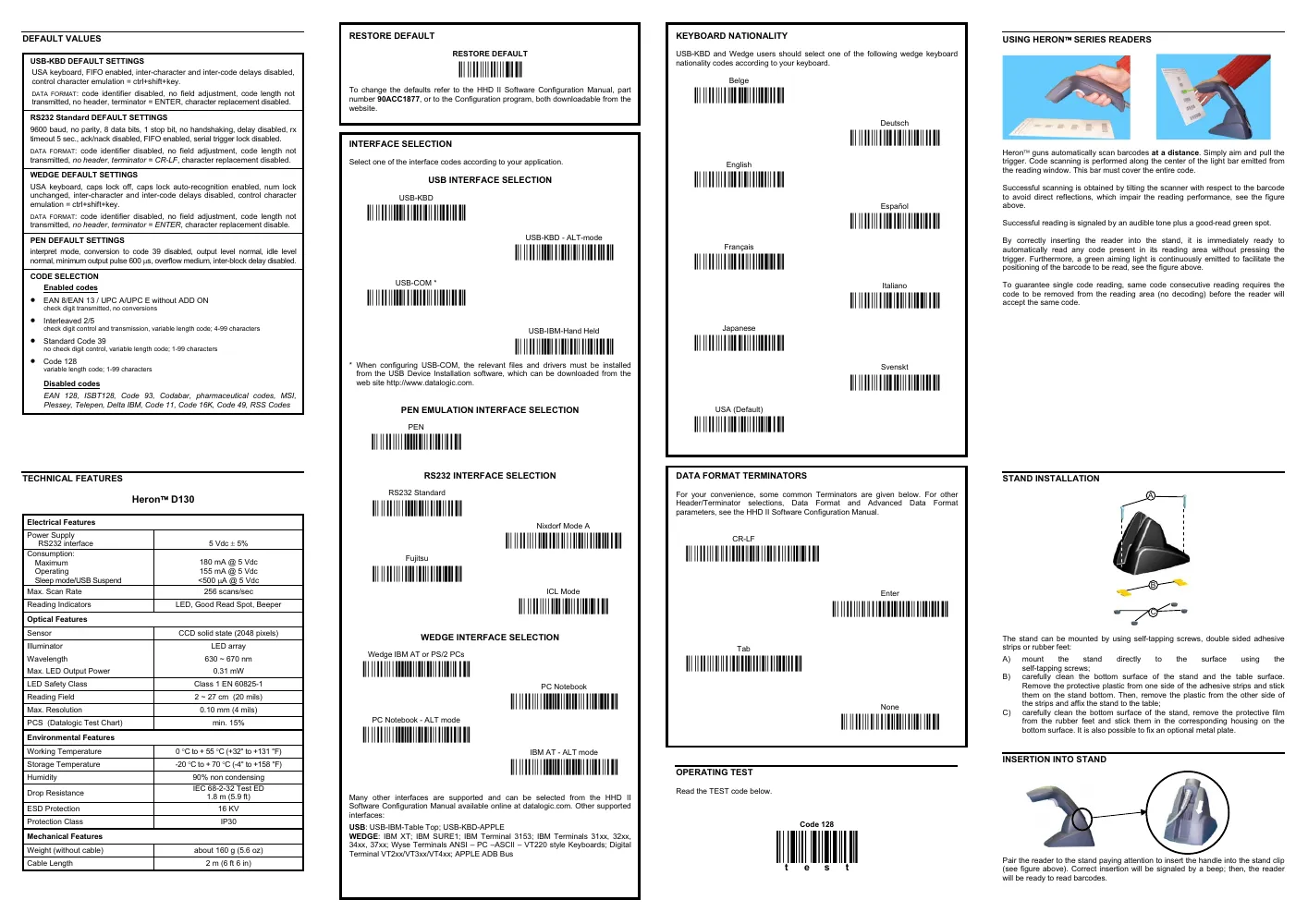
The text of page 2, from the PDF itself
RESTORE DEFAULTDEFAULT VALUESRESTORE DEFAULT
USB-KBD DEFAULT SETTINGS USA keyboard, FIFO enabled, inter-character and inter-code delays disabled, control character emulation = ctrl+shift+key. DATA FORMAT: code identifier disabled, no field adjustment, code length not
transmitted, no header, terminator = ENTER, character replacement disabled.
KEYBOARD NATIONALITY
USING HERON™ SERIES READERS
USB-KBD and Wedge users should select one of the following wedge keyboard nationality codes according to your keyboard.
Ì$+$*oÎ
Belge
To change the defaults refer to the HHD II Software Configuration Manual, part number 90ACC1877, or to the Configuration program, both downloadable from the website.
Ì$+FJ7$-8Î
RS232 Standard DEFAULT SETTINGS 9600 baud, no parity, 8 data bits, 1 stop bit, no handshaking, delay disabled, rx timeout 5 sec., ack/nack disabled, FIFO enabled, serial trigger lock disabled. DATA FORMAT: code identifier disabled, no field adjustment, code length not
transmitted, no header, terminator = CR-LF, character replacement disabled. WEDGE DEFAULT SETTINGS USA keyboard, caps lock off, caps lock auto-recognition enabled, num lock unchanged, inter-character and inter-code delays disabled, control character emulation = ctrl+shift+key. DATA FORMAT: code identifier disabled, no field adjustment, code length not
Deutsch
Ì$+FJ3$-$Î
INTERFACE SELECTION Select one of the interface codes according to your application.
USB INTERFACE SELECTION
Heron™ guns automatically scan barcodes at a distance. Simply aim and pull the trigger. Code scanning is performed along the center of the light bar emitted from the reading window. This bar must cover the entire code.
EnglishÌ$+FJ4$-)ÎUSB-KBD EspañolÌ$+UA03$-:ÎÌ$+FJ6$-3Î
transmitted, no header, terminator = ENTER, character replacement disable. USB-KBD - ALT-mode
PEN DEFAULT SETTINGS interpret mode, conversion to code 39 disabled, output level normal, idle level normal, minimum output pulse 600 μs, overflow medium, inter-block delay disabled. CODE SELECTION Enabled codes
EAN 8/EAN 13 / UPC A/UPC E without ADD ON
Interleaved 2/5•Standard Code 39•Code 128
check digit transmitted, no conversions
Ì$+UA04$-@ÎÌ$+FJ2$-ÊÎ ItalianoÌ$+UA02$-4Î
Ì$+FJ1$-ÅÎ USB-IBM-Hand Held
Ì$+UA01$-.Î
no check digit control, variable length code; 1-99 characters
Disabled codes EAN 128, ISBT128, Code 93, Codabar, pharmaceutical codes, MSI, Plessey, Telepen, Delta IBM, Code 11, Code 16K, Code 49, RSS Codes
PEN EMULATION INTERFACE SELECTION
To guarantee single code reading, same code consecutive reading requires the code to be removed from the reading area (no decoding) before the reader will accept the same code.
Japanese
Ì$+FJ8$-=Î
- When configuring USB-COM, the relevant files and drivers must be installed from the USB Device Installation software, which can be downloaded from the web site http://www.datalogic.com.
variable length code; 1-99 characters
Successful reading is signaled by an audible tone plus a good-read green spot. By correctly inserting the reader into the stand, it is immediately ready to automatically read any code present in its reading area without pressing the trigger. Furthermore, a green aiming light is continuously emitted to facilitate the positioning of the barcode to be read, see the figure above.
Français
USB-COM *
check digit control and transmission, variable length code; 4-99 characters
Successful scanning is obtained by tilting the scanner with respect to the barcode to avoid direct reflections, which impair the reading performance, see the figure above.
Svenskt
Ì$+FJ5$-.Î USA (Default)
Ì$+FJ0$-|Î
PEN
Ì$+CP6$-BÎ RS232 INTERFACE SELECTION
TECHNICAL FEATURESRS232 StandardHeron™ D130
Power Supply RS232 interface Consumption: Maximum Operating Sleep mode/USB Suspend
STAND INSTALLATION
For your convenience, some common Terminators are given below. For other Header/Terminator selections, Data Format and Advanced Data Format parameters, see the HHD II Software Configuration Manual.
Ì$+CP0$-$Î
Electrical Features
DATA FORMAT TERMINATORS
Nixdorf Mode AÌ$+CM2EC0$->Î5 Vdc ± 5%Max. Scan Rate
180 mA @ 5 Vdc 155 mA @ 5 Vdc <500 μA @ 5 Vdc 256 scans/sec
Reading Indicators
LED, Good Read Spot, Beeper
FujitsuCR-LFÌ$+EA120D0A$-ÃÎÌ$+CM1$-ÈÎBICL ModeEnterÌ$+CM0$-ÃÎÌ$+EA1183$-0Î
Optical Features Sensor
CCD solid state (2048 pixels)
IlluminatorLED arrayWavelength630 ~ 670 nmMax. LED Output Power0.31 mWLED Safety ClassClass 1 EN 60825-1Reading Field2 ~ 27 cm (20 mils)Max. Resolution0.10 mm (4 mils)
PCS (Datalogic Test Chart)
min. 15%
Environmental Features
WEDGE INTERFACE SELECTION
B) PC NotebookÌ$+CP505$-ÈÎÌ$+EA10$-dÎ
Ì$+CP508$-2Î IBM AT - ALT mode
Storage Temperature
-20 °C to + 70 °C (-4° to +158 °F)
Ì$+CP507$-+Î
ESD Protection Protection Class
IP30
Drop Resistance
Mechanical Features Weight (without cable) Cable Length
about 160 g (5.6 oz) 2 m (6 ft 6 in)
None
PC Notebook - ALT mode
0 °C to + 55 °C (+32° to +131 °F) 90% non condensing IEC 68-2-32 Test ED 1.8 m (5.9 ft) 16 KV
A)Ì$+EA1184$-8ÎÌ$+CP500$-aÎ
C The stand can be mounted by using self-tapping screws, double sided adhesive strips or rubber feet:
Tab
Wedge IBM AT or PS/2 PCs
Working Temperature Humidity
A
Many other interfaces are supported and can be selected from the HHD II Software Configuration Manual available online at datalogic.com. Other supported interfaces:
C)
mount the stand directly to the surface using the self-tapping screws; carefully clean the bottom surface of the stand and the table surface. Remove the protective plastic from one side of the adhesive strips and stick them on the stand bottom. Then, remove the plastic from the other side of the strips and affix the stand to the table; carefully clean the bottom surface of the stand, remove the protective film from the rubber feet and stick them in the corresponding housing on the bottom surface. It is also possible to fix an optional metal plate.
INSERTION INTO STAND OPERATING TEST Read the TEST code below.
Code 128
USB: USB-IBM-Table Top; USB-KBD-APPLE WEDGE: IBM XT; IBM SURE1; IBM Terminal 3153; IBM Terminals 31xx, 32xx, 34xx, 37xx; Wyse Terminals ANSI – PC –ASCII – VT220 style Keyboards; Digital Terminal VT2xx/VT3xx/VT4xx; APPLE ADB Bus
test
Pair the reader to the stand paying attention to insert the handle into the stand clip (see figure above). Correct insertion will be signaled by a beep; then, the reader will be ready to read barcodes.