


Spec sheet · Datalogic
Spec Sheet for the Datalogic 4410 Falcon Dock 7-0856, Falcon 4410/4420 7-0857 and 3 more models
Spec sheet2 pagesPDF 470 KB
Both pages are below, each with its text.
Filed with · 5 models
Also filed with these models on the old site
 PSC 4410 Falcon Dock 7-0856Desktop docking station from$295.001 in stock
 PSC Falcon 4410/4420 7-0857Desktop docking station from$325.001 in stock
 Datalogic Falcon 4410/4420 11-0195Desktop docking station from$395.007 in stock Datalogic 4410 Falcon Dock 7-0856Desktop docking station Call for availability Datalogic Falcon 4410/4420 7-0857Desktop docking station Call for availability
From the sheet · read page by page
Key facts from this sheet
Each line names its page in the PDF.
A two-page PSC operating instruction sheet (R44-2430 Rev. A, 08/04) for the Falcon 4410/4420 Color single-slot and quad-slot docks, rather than a specification sheet. It describes the dock ports and LEDs, how the docks pass USB and serial ActiveSync communication to a host PC, and how to charge battery packs in them. It does not name a dock part number.
- Device
- Single-slot and quad-slot docks for the Falcon 4410 and 4420 color models p. 1
- Host link
- Microsoft ActiveSync over a USB port or an RS-232 serial port on the dock p. 1
- Power
- External power supply (AC adaptor) p. 1
- Single-slot dock
- One Falcon port plus a spare battery charging port for a Lithium Ion battery pack; power and spare battery LEDs p. 1
- Quad-slot dock
- Four Falcon ports; only the Falcon in the first slot talks to the host PC p. 2
- Compatibility
- Windows CE .NET color Falcon 4410/4420 only; not compatible with monochrome Falcon 4410/4420 chargers and docks p. 1
- First charge
- At least 12 hours for the battery pack and the backup battery p. 2
- Charge time
- Falcon seated in a dock: 4-6 hours; battery pack in the spare battery slot: 3-5 hours p. 2
- Charge LEDs
- Red while charging, green when fully charged; flashing red signals a fault p. 2
What this sheet walks you through
- Connecting a Falcon to a host PC through the dock p. 1, 2
- Charging battery packs in the dock and reading the charge LEDs p. 2
- Using the quad-slot dock with several Falcons p. 2
Good to know
- Use only the chargers and docks made for the color Falcon; the monochrome models' chargers and docks do not work with it. p. 1
- On the quad-slot dock only the first slot communicates, so units must be rotated into it. p. 2
- Electrical ratings are not given here; the sheet points to the Falcon 4410/4420 Product Reference Guide. p. 2
Questions this sheet answers
Will a monochrome Falcon 4410 dock work with a color Falcon?
No. The sheet says the color Falcon is incompatible with other PSC Falcon chargers and docks, including those of the monochrome 4410/4420. p. 1
How does the Falcon dock connect to a PC?
Through its USB port or RS-232 serial port, using Microsoft ActiveSync. p. 1
How long should a new Falcon battery charge before first use?
At least 12 hours, for both the battery pack and the backup battery. p. 2
What does a flashing red LED on the Falcon dock mean?
The charging table lists flashing red as a fault; the sheet refers to the Falcon 4410/4420 Product Reference Guide for troubleshooting it. p. 2
The file
Size and text
Every page · 2
Read it here
Each page as it is printed, and its words beside it, so a phone can search and copy them.
Page1of 2
Open in the PDF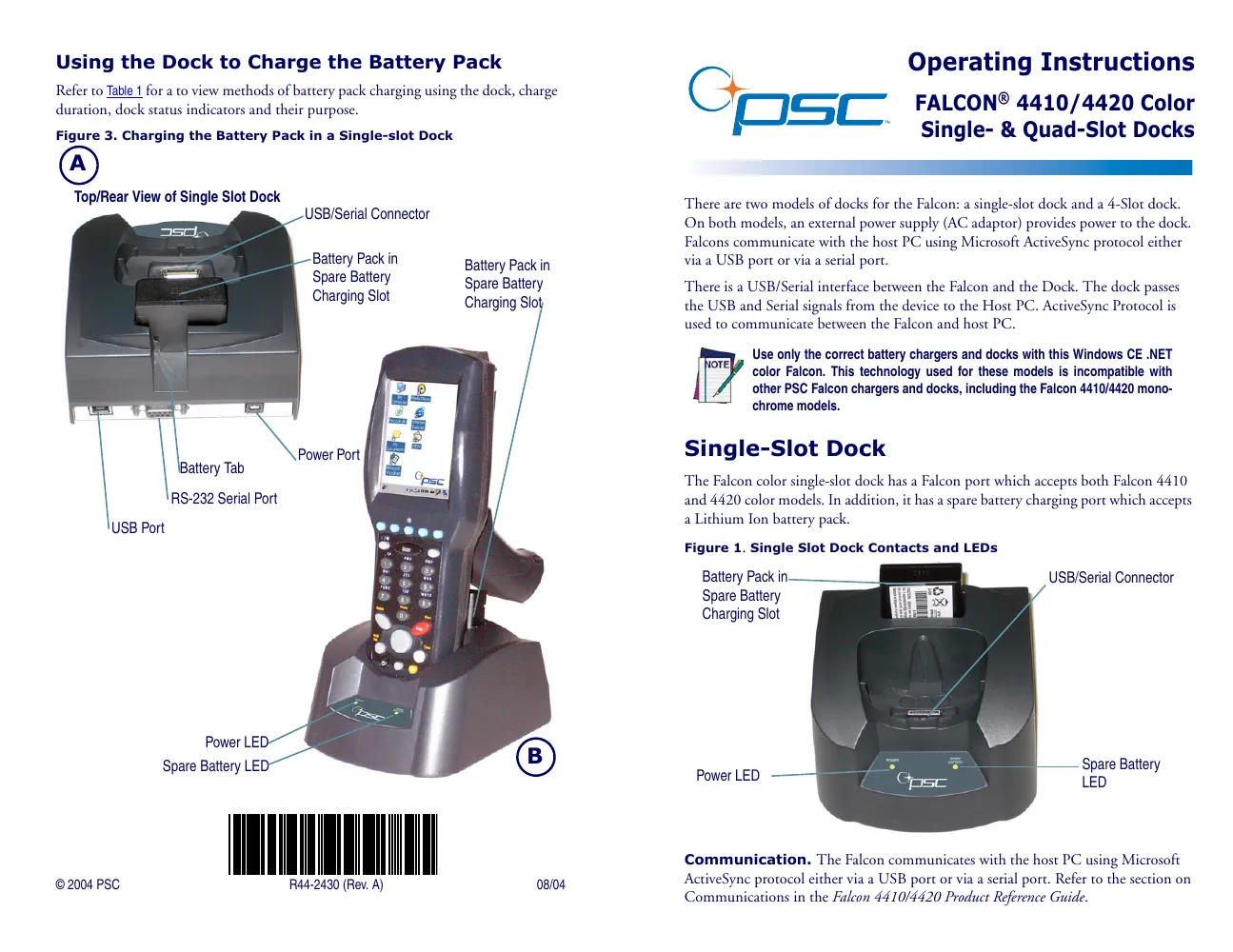
The text of page 1, from the PDF itself
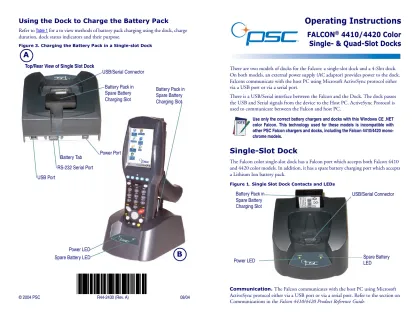
Using the Dock to Charge the Battery Pack
Operating Instructions
Refer to Table 1 for a to view methods of battery pack charging using the dock, charge duration, dock status indicators and their purpose.
FALCON® 4410/4420 Color Single- & Quad-Slot Docks
Figure 3. Charging the Battery Pack in a Single-slot Dock
A Top/Rear View of Single Slot Dock USB/Serial Connector Battery Pack in Spare Battery Charging Slot
Battery Pack in Spare Battery Charging Slot
There are two models of docks for the Falcon: a single-slot dock and a 4-Slot dock. On both models, an external power supply (AC adaptor) provides power to the dock. Falcons communicate with the host PC using Microsoft ActiveSync protocol either via a USB port or via a serial port. There is a USB/Serial interface between the Falcon and the Dock. The dock passes the USB and Serial signals from the device to the Host PC. ActiveSync Protocol is used to communicate between the Falcon and host PC. Use only the correct battery chargers and docks with this Windows CE .NET color Falcon. This technology used for these models is incompatible with other PSC Falcon chargers and docks, including the Falcon 4410/4420 monochrome models.
Battery TabSingle-Slot DockPower Port
The Falcon color single-slot dock has a Falcon port which accepts both Falcon 4410 and 4420 color models. In addition, it has a spare battery charging port which accepts a Lithium Ion battery pack.
RS-232 Serial Port USB Port
Figure 1. Single Slot Dock Contacts and LEDs
Battery Pack in Spare Battery Charging Slot
Power LED Spare Battery LED
© 2004 PSCB Power LEDR44-2430 (Rev. A)08/04USB/Serial ConnectorSpare Battery LED
Communication. The Falcon communicates with the host PC using Microsoft ActiveSync protocol either via a USB port or via a serial port. Refer to the section on Communications in the Falcon 4410/4420 Product Reference Guide.
Page2of 2
Open in the PDF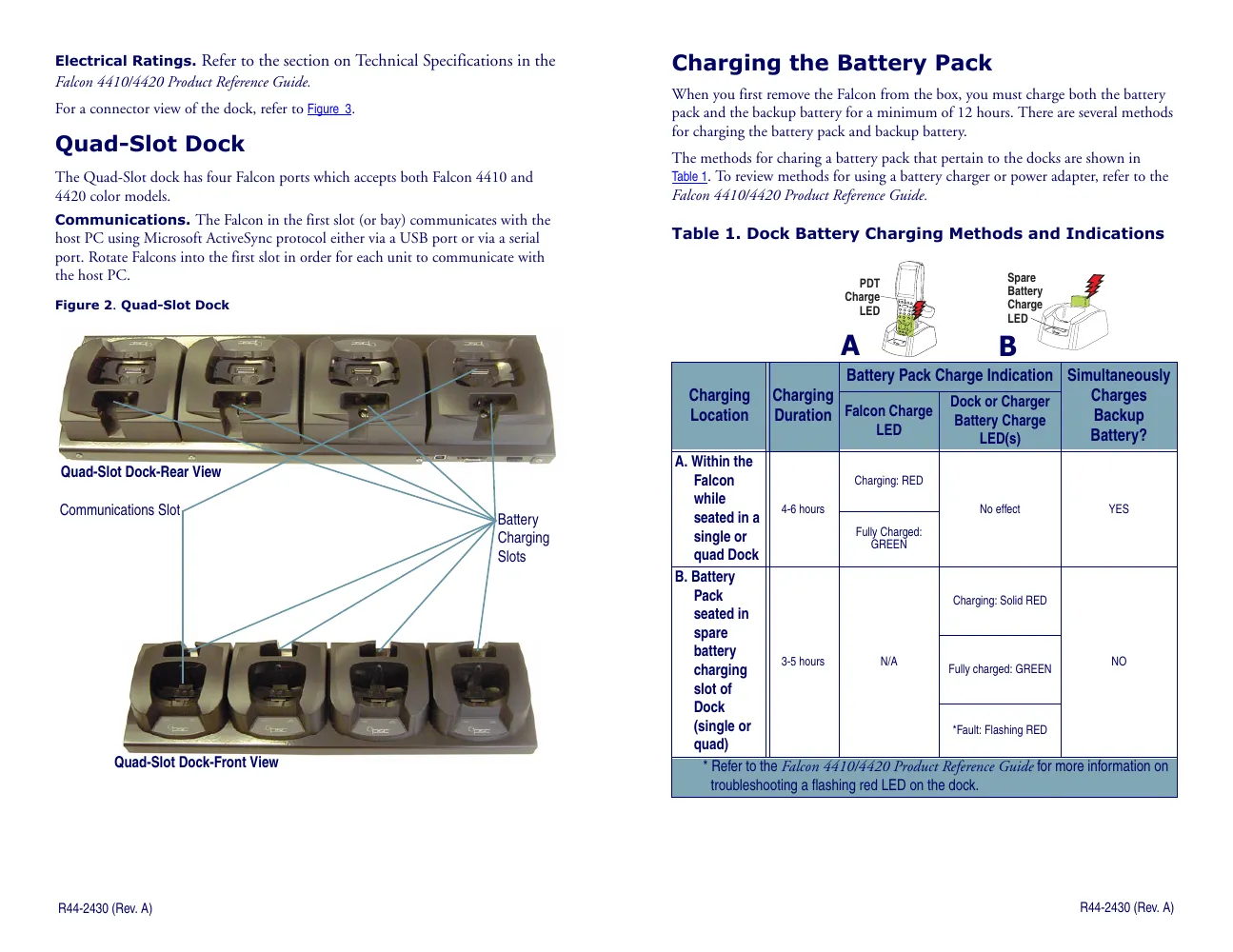
The text of page 2, from the PDF itself
Electrical Ratings. Refer to the section on Technical Specifications in the
Falcon 4410/4420 Product Reference Guide.
Charging the Battery Pack When you first remove the Falcon from the box, you must charge both the battery pack and the backup battery for a minimum of 12 hours. There are several methods for charging the battery pack and backup battery.
For a connector view of the dock, refer to Figure 3.
Quad-Slot Dock The Quad-Slot dock has four Falcon ports which accepts both Falcon 4410 and 4420 color models. Communications. The Falcon in the first slot (or bay) communicates with the
host PC using Microsoft ActiveSync protocol either via a USB port or via a serial port. Rotate Falcons into the first slot in order for each unit to communicate with the host PC.
The methods for charing a battery pack that pertain to the docks are shown in Table 1. To review methods for using a battery charger or power adapter, refer to the Falcon 4410/4420 Product Reference Guide. Table 1. Dock Battery Charging Methods and Indications PDT Charge LED
Figure 2. Quad-Slot Dock
A Charging Location Quad-Slot Dock-Rear View Communications Slot
Quad-Slot Dock-Front View
R44-2430 (Rev. A)
Battery Charging Slots
Spare Battery Charge LED
B
Battery Pack Charge Indication Simultaneously Charging Charges Dock or Charger Duration Falcon Charge Battery Charge Backup LED Battery? LED(s)
A. Within the Charging: RED Falcon while 4-6 hours No effect YES seated in a Fully Charged: single or GREEN quad Dock B. Battery Pack Charging: Solid RED seated in spare battery 3-5 hours N/A NO Fully charged: GREEN charging slot of Dock (single or *Fault: Flashing RED quad)
- Refer to the Falcon 4410/4420 Product Reference Guide for more information on troubleshooting a flashing red LED on the dock.
R44-2430 (Rev. A)