Manual · Cohu
MPC Master and Remote Control Panels, Installation and Operation Instructions
Manual26 pagesPDF 1.9 MB
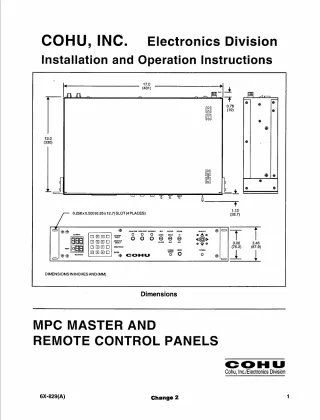
Installation and operation instructions for the Cohu MPC Master and Remote Control Panels of the MPC CCTV camera control system.
What this file really is
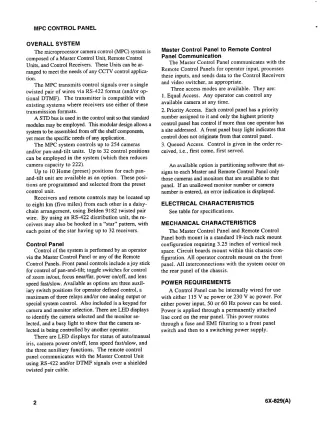
The old site listed this file as a manual for the Cohu MPC System Control Receiver D-111 and MPC System Master Control Panel M-100. The file is named as a manual for the D-111 Control Receiver, but it is the installation and operation manual for the MPC Master and Remote Control Panels; control receivers appear only as connected equipment.
Names · 1 model
The models it names
Filed with · 1 model
Also filed with these models on the old site
Summary
What is in it
Cohu's installation and operation manual for the Master and Remote Control Panels of the MPC (microprocessor camera control) system, which controls CCTV cameras and pan-and-tilt units through control receivers over RS-422. It describes the overall system, panel controls and access modes, specifications, model numbers and options, unpacking and static precautions, rear panel connectors, address and baud rate DIP switches, typical interconnection cabling, programming the panel, partitioning and sequencing, and connector pinouts.
From the manual · read page by page
Key facts from this manual
Some pages are scans or cannot be read; this says only what the readable text supports. Each line names its page in the PDF.
Cohu installation and operation manual 6X-829(A) for the MPC Master and Remote Control Panels, which run CCTV cameras and pan-and-tilt units through control receivers. The site files it under the D-111 control receiver, but the manual describes the control panels, not the receiver itself. It covers internal switch settings, rear-panel wiring, system programming and front-panel operation.
- What it is
- Microprocessor camera control (MPC) panels: a Master Control Panel and Remote Control Panels p. 2
- Power
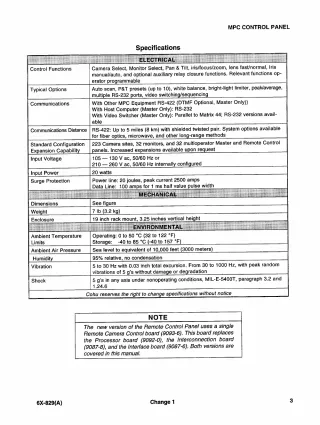
- 115 V ac or 230 V ac, 50 or 60 Hz, set by internal wiring; input power 20 watts p. 2, 3
- Mounting
- 19-inch rack, 3.25 inches of vertical rack space p. 2
- Communications
- RS-422 to other MPC equipment (DTMF optional, Master only); RS-232 to a host computer (Master only); parallel to a Matrix 44 video switcher (Master only) p. 3
- Control line
- RS-422 over a single twisted pair (Belden 9182), daisy chained up to 8 km (5 miles) p. 2
- Operating temperature
- 0 to 50 °C (32 to 122 °F); storage -40 to 85 °C p. 3
- Front panel
- Joystick for pan and tilt; toggles for zoom, focus and iris; keypad for camera and monitor select; LED displays and BUSY light p. 19
- Rear connectors
- RS-422 IN and OUT (daisy chain) and PRESET; RS-232A for a host computer, RS-232B for a serial video switcher, PARALLEL for a Vicon video switcher p. 6
- RS-232 baud rate
- Each port 150 to 19200 baud, set by DIP switches; default 9600 p. 9
- Preset panel
- Optional panel with 10 pushbuttons recalling 10 stored pan/tilt positions p. 6
- Weight
- 7 lb (3.2 kg) p. 3
- Humidity and altitude
- 95% relative, no condensation; sea level to 10,000 feet (3000 meters) p. 3
- Unit address
- Unique address on 8-pole DIP switch S1; default 1 p. 6, 7
- Remote board
- Remote: the newer version uses one Remote Camera Control board (9093-6) in place of the Processor board (9092-0), Interface board (9087-6) and Interconnection board p. 3
What this manual walks you through
- Overview of installing a control panel p. 5
- Setting the address, 2-wire or 4-wire mode and RS-232 baud rate switches p. 6, 7, 9
- Cabling control receivers, remote panels and an RS-422 distribution unit p. 5, 7, 8, 9
- Programming monitor, camera, baud rate and remote panel limits p. 11, 13
- Setting dwell time and a camera sequence for a monitor p. 14
- Choosing the communication type for each camera site p. 15
- Front panel controls and indicators p. 19, 20
- Selecting monitors and cameras and deselecting a panel p. 21, 22
Good to know
- The panel contains parts that static discharge can damage; use static control methods when working inside. p. 5
- Do not apply voltage outside the recommended range for the 115 V ac or 230 V ac option. p. 6
- The address switch is read only at power up or reset, so cycle power or press reset after changing it. p. 7
- Sequencing needs an optional video switcher; during sequencing the camera commands do not work, but RESET stays active. p. 11
Questions this manual answers
What voltage does the Cohu MPC control panel use?
It can be wired internally for 115 V ac or 230 V ac power, at 50 or 60 Hz. p. 2
How far apart can MPC control receivers and remote panels be?
Up to eight km (five miles) apart in a daisy chain on Belden 9182 twisted pair wire. p. 2
What baud rates does the MPC Master Control Panel RS-232 port support?
Each port can be set from 150 to 19200 baud with DIP switches on the RS-232 board; the default is 9600. p. 9
What does the COMM ERROR lamp mean on a Cohu MPC panel?
It glows when communication with the selected camera's control receiver is improper; this is normal for a camera that is not controllable. p. 20
The whole text · 3 parts
Read the manual here as text
Its text as extracted from the PDF, unedited, in parts; each page opens the PDF at that page.
The file