Manual · Code
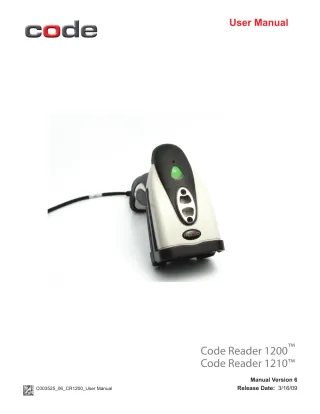
Code Reader 1200 / Code Reader 1210 User Manual
Manual39 pagesPDF 2.5 MB
User manual for the Code Corporation CR1200 and CR1210 corded 2D imaging bar code readers: install, configure and troubleshoot.
Names · 1 model
The models it names
Filed with · 1 model
Also filed with these models on the old site
Summary
What is in it
The user manual for the Code Reader 1200 (and 1210), a corded hand-held 2D CMOS imager that reads linear and two-dimensional bar codes and connects to a host by USB, RS-232 or PS/2 cable. Written for IT staff, it covers unpacking and cable installation with interface settings, targeting and reading technique, operational modes such as continuous read, configuration codes for each symbology, operational features such as prefixes, suffixes and settings lock, and maintenance, firmware download, warranty and troubleshooting.
Its parts
- Introduction
- Getting Started
- Reading Bar Codes
- Optimizing the Read
- Setting Symbology
- Setting Operational Features
- Maintenance and Troubleshooting
From the manual
Key facts from this manual
Each line names its page in the PDF.
User manual (Manual Version 6) for the Code Reader 1200 (CR1200), a corded hand-held 2D imaging bar code reader; the cover also names the Code Reader 1210, which the text mentions only for its targeting distance. It shows how to connect the reader by USB, PS/2 or RS-232 cable, aim and read codes, set symbologies and features by scanning printed setup codes, and look after the reader.
- Device
- Corded hand-held 2D CMOS imaging bar code reader with trigger p. 7
- Imager and processor
- 1.3-megapixel imager, 400-MHz processor p. 7
- Host interfaces
- USB, RS232 or PS2 cable, chosen at ordering; cables attach to the reader with an 8-pin DIN connector p. 10
- USB cable length
- 6 foot or 12 foot p. 10
- Power
- PS/2: powered by the PS/2 port; RS-232: 5V/1.5A power supply that plugs into the RS-232 cable p. 12, 13
- USB modes
- USB Keyboard, USB Downloader, USB Native Two Way, USB Virtual COM 1 Way, USB HID POS (Terminal ID 131) p. 11
- RS-232 defaults
- RS-232 One Way Mode, 57600 baud, 2 stop bits, 8 data bits, no parity p. 13
- RS-232 options
- 1200, 2400, 4800, 9600, 19200, 38400, 57600 or 115200 baud; 7 or 8 data bits; even, odd or no parity p. 14
- PS/2 requirement
- Serial number greater than 10050561 and firmware version greater than 4126 p. 12
- Targeting
- Red and green converging LEDs; optimal distance 3.8 in. (9.7 cm) for the CR1200, 2.3 in. (5.8 cm) for the CR1210 p. 19
- Feedback
- Speaker, vibration motor, and LEDs for targeting and status p. 7
- Software
- Linux Kernel 2.6.11; JavaScript Application Development Suite; field-upgradeable firmware p. 7
- Firmware download
- Over a USB or RS232 cable, not over PS2 p. 37
- Sleep time-out
- Cabled reader time-out of 2 hours or never (default); firmware versions 2098 and above p. 14
What this manual walks you through
- Connecting by USB and choosing a USB communication mode p. 10, 11
- Installing the reader on a PS/2 keyboard port p. 12
- Connecting by RS-232 and setting baud rate, data bits and parity p. 13, 14
- Choosing a keyboard mapping (US English, French, German, Japanese and others) p. 11
- Aiming with the red and green targeting LEDs p. 19
- Saving settings so they survive power-down p. 8
- Resetting the reader to USB, PS/2 or RS232 factory defaults p. 36
- Reading the reader ID and firmware version p. 37
- Cleaning the reader window p. 39
Good to know
- Settings are lost at power-down unless the Save Settings code is scanned. p. 8
- Power off the computer before attaching the PS/2 cable; unplugging a keyboard while it runs locks the computer up. p. 12
- Only a Code Corporation approved power adapter may be used. p. 13
- For disinfecting, use isopropyl or denatured ethyl alcohol; bleach is not recommended. p. 39
- Only individuals authorized by Code should repair or adjust the reader. p. 36
Questions this manual answers
What cables does the Code CR1200 use?
It is ordered with a USB (6 or 12 foot), RS232 or PS2 cable, which attaches to the reader with an 8-pin DIN connector. p. 10
What power supply does the CR1200 RS-232 cable take?
A 5V/1.5A power supply that plugs into the RS-232 cable; the PS/2 version is powered by the PS/2 port instead. p. 13
What are the CR1200 default serial settings?
RS-232 One Way Mode at 57600 baud, 2 stop bits, 8 data bits and no parity. p. 13
How do I find the CR1200 firmware version?
Open a text editor and scan the Reader ID and Firmware code; the reader types a string that includes the firmware versions and its serial number. p. 37
Can I update CR1200 firmware over a PS/2 cable?
No. Firmware and other files are downloaded over a USB or RS232 cable. p. 37
The whole text · 4 parts
Read the manual here as text
Its text as extracted from the PDF, unedited, in parts; each page opens the PDF at that page.
The file