Manual · Argox
Using the ArgoxScan 8000/8120/8150/8250/8310/8312
Manual33 pagesPDF 396 KB
Quick installation and programming guide for ArgoxScan handheld scanners including the 8150: hookup, programming bar codes, pinouts.
Covers · 1 model
The models it covers
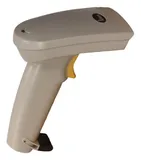
Summary
What is in it
A short quick start guide for the ArgoxScan handheld bar code scanners (8110, 8120, 8150, 8250, 8310 and 8312 are named). It explains how to aim and scan, the recommended order for configuring the scanner, and how to install it as a keyboard wedge, RS-232 or USB device. Most of the booklet is programming bar codes: interface selection, keyboard layouts, RS-232 flow control, baud rate, parity and data bits, scan modes, and pin assignments for the RJ-45, keyboard wedge, PS/2 and DB-9 connectors.
From the manual · read page by page
Key facts from this manual
Some pages are scans or cannot be read; this says only what the readable text supports. Each line names its page in the PDF.
Quick start and programming guide for the ArgoxScan 8000, 8110, 8120, 8150, 8250, 8310 and 8312 bar code scanners. It shows how to connect a scanner by keyboard wedge, RS-232 or USB and how to change settings by scanning programming bar codes, and it gives the connector pin assignments and the main interface, keyboard, scan mode and symbology options.
- Device type
- Bar code scanner that reads along a light bar from its window: aim and pull the trigger p. 2
- Host interfaces
- Keyboard wedge, RS-232 and USB (keyboard emulation); wand emulation on the 8110/8150/8250 p. 3, 5
- RS-232 power
- RS-232 connection uses an external DC adapter at the scanner p. 3
- Scanner connector
- AS Series 8-pin or 10-pin RJ-45, with RS-232 and keyboard pinouts p. 9
- Host-side connectors
- Keyboard wedge combo (Mini-DIN 6P male and DIN 5P female), PS/2 Mini-DIN 6P, RS-232 DB-9F p. 10, 11
- RS-232 defaults
- 9600 BPS, no parity, 8 data bits, no flow control p. 7, 8
- Baud rates
- 300 to 38400 BPS p. 7, 8
- Flow control
- None, RTS/CTS, Xon/Xoff or ACK/NAK p. 7
- Keyboard layouts
- USA (default), Belgium, Danish, France, Germany, Italian, Portuguese, Spanish, Swedish, Switzerland, UK, Latin American, Japanese p. 5, 6
- Scan modes
- Good-read off, Momentary (default), Alternate, Timeout off, Continue, Test only; stand mode p. 12
- Suffix
- Keyboard wedge and USB: Enter (default), Tab or None p. 13
- Codes to enable
- Industrial, Matrix and Standard 2 of 5, Codabar, Code 93, Code 11, MSI/Plessey, UK/Plessey, Telepen, China Post, Italian Pharmacode, RSS; others on by default p. 14, 15
- UPC/EAN supplements
- 8120/8150/8250: none (default), 2 digits, 5 digits, UCC/EAN 128 or auto detection p. 16
What this manual walks you through
- Connecting the scanner by keyboard wedge, RS-232 or USB p. 3
- Programming options by scanning Program, option, value, Finish and Exit bar codes p. 4
- Choosing the host interface and keyboard layout p. 5, 6
- Setting RS-232 flow control, baud rate, parity and data bits p. 7, 8
- Pin assignments of the scanner and host connectors p. 9, 10, 11
- Setting the scan mode and stand mode p. 12
- Enabling symbologies and setting UPC/EAN supplements and conversions p. 14, 15, 16, 18, 20, 21, 23, 25
- Code 39 check sum and format settings p. 26
- Displaying the parameter lists and firmware version on the host p. 31, 32
- Resetting the scanner to factory defaults p. 32
Good to know
- The light bar must cover the entire bar code. p. 2
- Tilt the scanner against the bar code to avoid direct reflections, especially with 2D codes. p. 2
- Settings are saved to non-volatile memory only after the EXIT label is read. p. 2
- Enable a symbology first, before setting its code lengths and other options. p. 2
- Switch off the terminal or computer before connecting a keyboard wedge or RS-232 cable. p. 3
Questions this manual answers
How do I reset an Argox AS-8150 to factory defaults?
Scan the Default value initialization bar code in the guide; it returns all settings to the factory defaults. p. 32
What are the default RS-232 settings of the AS-8150?
9600 BPS, no parity, 8 data bits and no flow control. p. 7, 8
How do I program the AS-8150 with bar codes?
Scan Program, then the option bar code, then the values from the back fold-out page, then Finish. Scan Exit when you are done. p. 4
Does the Argox 8150 support wand emulation?
Yes. The guide lists wand emulation as an interface choice for the 8110, 8150 and 8250. p. 5
How do I check the firmware version of the AS-8150?
Scan the Firmware version list bar code in the guide to display the firmware version. p. 32
Contents
Chapters and sections
Each line opens the PDF at its page.
The whole text · 4 parts
Read the manual here as text
Its text as extracted from the PDF, unedited, in parts; each page opens the PDF at that page.
The file