Manual · AML
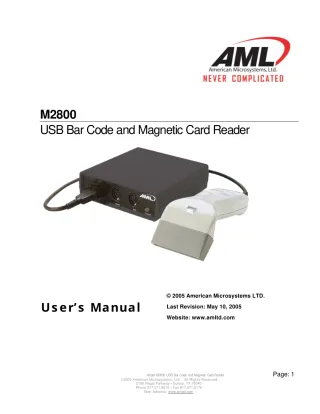
M2800 USB Bar Code and Magnetic Card Reader User's Manual
Manual28 pagesPDF 323 KB
User's manual for the AML M2800 USB bar code and magnetic card reader, a decoder that turns scanner, card and serial data into keyboard input.
Covers · 1 model
The models it covers
Summary
What is in it
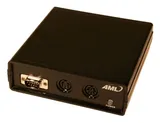
American Microsystems user's manual for the M2800, a USB decoder box that takes input from laser, CCD, wand, slot and magnetic stripe readers and from an RS-232 port, and sends it to a PC as keyboard input. It covers installation, connecting each kind of input device, the factory default settings, changing settings with the setup menu bar codes, the full programming guide by symbology and menu, connecting an electronic scale, specifications, signal definitions, function keys and card data format.
Its parts
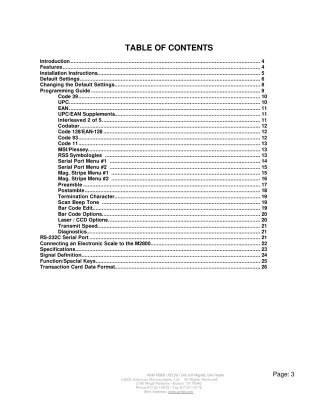
- Introduction
- Features
- Installation Instructions
- Default Settings
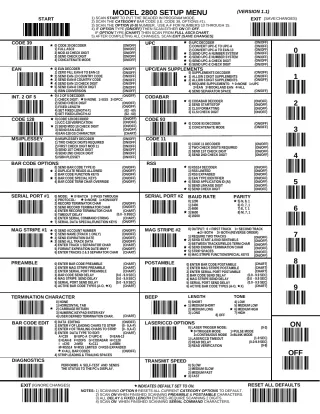
- Changing the Default Settings
- Programming Guide
- RS-232C Serial Port
- Connecting an Electronic Scale to the M2800
- Specifications
- Signal Definition
- Function/Special Keys
- Transaction Card Data Format
From the manual
Key facts from this manual
Each line names its page in the PDF.
The American Microsystems user's manual (May 2005 revision) for the M2800 USB bar code and magnetic card reader, a box that takes wands, laser and CCD scanners, stripe readers and RS-232 devices and types their data into a PC as a USB keyboard. It covers installation, the factory defaults, programming with the setup menu, the serial port and scale hookup, connector pinouts and specifications.
- Device
- USB bar code and magnetic stripe reader that works as a USB HID keyboard, no custom drivers needed p. 4
- Input devices
- Laser and CCD scanners, wands, slot (badge) readers, single or dual track magnetic stripe readers, RS-232 input p. 24
- Connectors
- Laser input 9 pin D; wand input 5 pin DIN; mag stripe input 8 pin DIN; USB Type B; RS-232 input 9 pin D p. 24
- Power
- From the PC USB interface; idle 0.25 watts, 1.25mW during USB suspend p. 24
- Bar codes
- Code 39 and Full ASCII, Interleaved 2 of 5, UPC-A, UPC-E(0), UPC-E(1), EAN with ISBN, supplements, Code 128, EAN-128, Code 93, Code 11, MSI/Plessey, RSS14, RSS Limited, RSS Expanded p. 24
- Magnetic cards
- Single or dual track cards of all standard track formats; bi-directional swipes p. 4
- USB
- USB Spec. 1.0 to 2.0 functionally compliant; standard USB cable 3 meters or less p. 25
- RS-232 port
- Rear 9-pin port for scales, terminals and scanners; pin 2 receive data, pin 3 transmit data, pin 5 ground, RTS tied to CTS p. 22
- Serial defaults
- 9600 baud, None, 8, 1; batch mode p. 7
- Serial buffer
- 256 characters; optional XON/XOFF sends XOFF at 128 characters p. 14
- Indicators
- Audio beep on a good read; red/green status LED p. 24
- Size and weight
- 14 ounces; 5 1/8 in. wide, 5 1/4 in. long, 1 1/2 in. high p. 24
- Windows
- Windows 2000/ME/XP have the HID drivers built in; Windows 98/98SE needs the install CD the first time p. 5
- Wand pinout
- Pin 1 +5V, pin 2 data, pin 3 ground, pins 4 and 5 not used p. 25
What this manual walks you through
- Installing the reader on a Windows PC p. 5
- Connecting a wand, laser or CCD scanner, stripe reader, slot reader or RS232 device p. 5
- Checking the factory default settings p. 6, 7
- Changing settings with the setup menu and resetting all defaults p. 8
- Choosing batch or pass through mode for the serial port p. 14
- Setting laser trigger mode, timeout and read verification p. 21
- Running the self-test diagnostics p. 22
- Connecting an electronic scale, with a Toledo 8213 example p. 23
- Sending function and special keys from bar code data p. 26
- Connector pin assignments p. 25
Good to know
- Do not use USB extension cables; use a USB hub if more length is needed. p. 5
- The cable of a connected RS232 device should be null-modem, not straight through. p. 5
- Continuous scanning mode is not for lasers; use it only with CCD input devices. p. 21
- Pulse mode is for use with the MS-941 triggerless scanner only. p. 21
Questions this manual answers
Does the AML M2800 need a driver?
No. It appears to the PC as a USB HID keyboard, and the HID drivers come with Windows. p. 4
How do I reset the M2800 to factory defaults?
Scan START, then RESET ALL DEFAULTS, then EXIT (Save Changes) on the setup menu. p. 8
Can I connect a scale to the AML M2800?
Yes. Connect it to the serial input, set pass through mode and match the baud rate, parity and data bits to the scale. p. 23
Where does a magnetic stripe reader plug into the M2800?
A reader with an 8-pin DIN connector plugs into the MSR connector on the front panel; single or dual track readers work. p. 5
What is the default serial setting of the M2800?
9600 baud with None, 8, 1, in batch mode. p. 7
The whole text · 3 parts
Read the manual here as text
Its text as extracted from the PDF, unedited, in parts; each page opens the PDF at that page.
The file