Manual · Alien
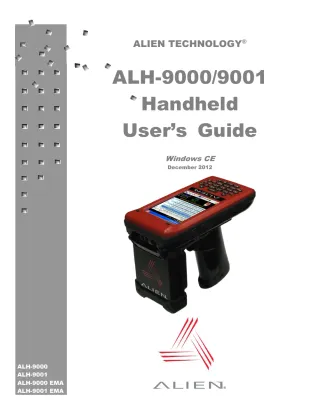
ALH-9000/9001 Handheld User's Guide, Windows CE
Manual58 pagesPDF 2.9 MB
User's guide for the Alien ALH-9000 and ALH-9001 Windows CE handheld UHF RFID readers with barcode scanner, WLAN and Bluetooth.
Covers · 1 model
The models it covers
Summary
What is in it
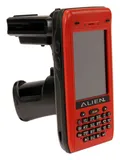
Alien Technology's user's guide for the ALH-9000 and ALH-9001 handhelds (including EMA versions), Windows CE PDAs with a UHF RFID tag reader and a 1D or 2D barcode scanner. It covers package contents and components, batteries and charging, resets, MicroSD cards, system settings, the keypad, ActiveSync, firmware upgrades and the boot menu, then the RFID demo utilities, barcode scanning, wireless LAN, Bluetooth printers, GPS, the camera and 3G SIM card setup.
Its parts
- Introduction
- Basic Functions
- RFID Tag Reader
- Barcode Scanner (1D & 2D)
- Wireless LAN
- Bluetooth
- Using GPS
- Using the Camera
- Using a SIM Card
- Appendix
From the manual
Key facts from this manual
Each line names its page in the PDF.
User's guide for the Alien Technology ALH-9000 and ALH-9001 Windows CE handhelds with a UHF RFID tag reader and a barcode scanner. It covers batteries, resets, system settings, firmware upgrades, the RFID and barcode demo software and the specifications.
- Device
- Windows CE handheld with UHF RFID reader, MicroSD reader and barcode scanner; optional 3G, GPS and camera p. 5
- RFID reader
- UHF 900MHz; EPC Gen2 ISO 18000 6C and ISO 18000 6B; reads 0m - 7m, writes 0m - 3m; 1W EIRP p. 58
- Barcode scanner
- ALH-9001: 2D scanner (ALH-9000: 1D) p. 41
- Processor and OS
- Marvell PXA320 806MHz; Windows CE 5.0 p. 58
- Memory
- ROM 256MB; RAM 256MB; MicroSD (SDHC) slot p. 58
- Display
- 3.5" QVGA TFT LCD, 240x320 pixels, backlit, stylus touchscreen p. 58
- Batteries
- Main 3.7V 3,000mAh; optional 4,400mAh in the pistol grip; backup 3.7V 100mAh p. 58
- Wireless
- 802.11 b/g WLAN; Bluetooth Class 2, v2.0 (SPP only); A-GPS; HSDPA 3G p. 58
- Ports
- RS-232 serial port; USB 1.1; MicroSD slot; SIM slot p. 58
- Keypad
- 29-key p. 58
- Camera
- ALH-9001: 3.0 Mega-pixels with autofocus p. 58
- Adaptor
- Input 100VAC ~ 240VAC; output 5VDC 3A p. 58
- Size and weight
- 6-1/4” x 3-1/4” x 4-5/8” (15.8 cm x 8.0 cm x 11.5 cm); 320g p. 58
- Environment
- Operating -10ºC to 50ºC; storage -30ºC to 60ºC; 1.5m drop to concrete p. 58
What this manual walks you through
- Switching on the backup battery and fitting the main battery p. 9, 10
- Charging the battery p. 10
- Soft and hard resets p. 13, 14
- Installing a MicroSD card p. 14, 15
- Setting screen brightness and timeouts p. 16
- Upgrading the firmware from the Flash disk or a MicroSD card p. 25, 26
- Taking an inventory of RFID tags p. 30
- Changing RFID transmit power and Gen2 settings p. 40
- Sending scanned barcodes into any application p. 42
- Connecting Bluetooth printers p. 4
Good to know
- Charge only with the provided adapter or cradle, or the device may be damaged. p. 10
- If the main and backup batteries both run down, the data in RAM is lost. p. 13
- A firmware upgrade resets the unit to factory defaults and removes data and programs not on the Flash Disk. p. 25
- Do not unplug or turn off the reader during a firmware upgrade. p. 26
- Do not look directly into the barcode scanner window, which emits a laser beam. p. 8
Questions this manual answers
What is the difference between the ALH-9000 and ALH-9001?
The ALH-9000 has a 1D barcode scanner and the ALH-9001 a 2D scanner; the 3.0 Mega-pixel camera is listed for the ALH-9001. p. 41, 58
How far can the ALH-9001 read RFID tags?
The reading range is 0m - 7m and the writing range 0m - 3m, for EPC Gen2 tags. p. 58
What battery does the ALH-9001 use?
A 3.7V 3,000mAh main battery, an optional 4,400mAh battery in the pistol grip, and a 100mAh backup battery. p. 58
How long does the ALH-9001 battery take to charge?
Up to twelve hours to charge completely. p. 12
What comes in the ALH-9001 box?
The handheld, adaptor and AC cable, main battery, cradle, pistol grip, protective film, USB sync cable, stylus and hand strap. p. 6
The whole text · 6 parts
Read the manual here as text
Its text as extracted from the PDF, unedited, in parts; each page opens the PDF at that page.
The file