Manual · Acroprint
timeQplus BIOMETRIC Terminal User Manual (TQ100 Terminal User Manual)
Manual44 pagesPDF 881 KB
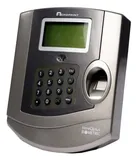
User manual for the Acroprint TQ100 fingerprint time and attendance terminal of the timeQplus BIOMETRIC system.
Covers · 1 model
The models it covers
Summary
What is in it
Acroprint's hardware user manual for the TQ100, the fingerprint data collection terminal of the timeQplus BIOMETRIC time and attendance system, which works with the AttendanceRx PC software. It covers the operating environment, what comes in the box, mounting and powering the terminal, the keypad and menu structure, RS232, RS485 and Ethernet communications, fingerprint enrollment, punching in and out, administrator functions, firewall ports to open, and interface pinouts.
Its parts
- Introduction
- Hardware Setup
- Menu Structure
- Communications
- Fingerprint Registration/Enrollment
- Terminal Usage and Punching In/Out
- Administrator Functions
- Appendix
From the manual
Key facts from this manual
Each line names its page in the PDF.
This is the user manual for the Acroprint TQ100 fingerprint terminal of the timeQplus BIOMETRIC time and attendance system. It explains how to mount the terminal, connect it to the AttendanceRx PC software by RS232, RS485 or Ethernet, enroll fingerprints, punch in and out, and use the administrator menus.
- Device
- Fingerprint time and attendance terminal that works with the AttendanceRx PC software p. 4
- Interfaces
- 9-pin RS232 port and RJ45 port (RS485 and Ethernet) p. 10
- Punch storage
- 30,000 punches; 1000 administrator records p. 13, 14
- Enrollment per user
- Up to 10 fingerprints and 1 password per ID number p. 16
- Operating temperature
- 39F to 110F, indoors only p. 4
- RS485 network
- Up to 32 terminals over up to 1000 feet (300 m); up to 10 recommended p. 10
- RS232 distance
- 50 feet (15 m) maximum cable length p. 10
- Baud rates
- 9600, 19200 or 38400 bps (38400 default) p. 12
- Terminal part numbers
- TQ100 terminal 01-0229-000; TQ100b with operational back-up battery 01-0229-001 p. 3
- Cable and converter
- 485 cable, 6 ft, 72-0203-000; 485/232 converter assembly (RJ11/9 pin) 25-0134-000 p. 3
- Upgrade parts
- 25 employee user upgrade 08-0140-086; FIU optical overlay 87-0106-000 p. 3
- In the box
- Terminal, AttendanceRx software CD, 30 ft RS232 cable, 6 ft CAT5 cable, power adapter, mounting plate and screws p. 4
- Network defaults
- IP 192.168.1.224, subnet mask 255.255.255.0, gateway 192.168.1.1 p. 10, 11
- Firewall ports
- TCP and UDP ports 49183 to 49188 and 49211 to 49212 p. 1
What this manual walks you through
- Mounting the terminal and powering it up p. 5
- Connecting one terminal to a PC by RS232 p. 11
- Wiring an RS485 network with junction boxes and a converter p. 6, 12
- Setting up an Ethernet connection p. 13
- Enrolling and checking employee fingerprints p. 14, 16, 17, 18, 19
- Punching in and out and the messages shown p. 20, 21
- Enrolling administrators and using the data management menus p. 22
- Setting fingerprint sensitivity levels p. 20
- Communication, record and system settings p. 12, 13, 14, 15
- RS232 and RJ45 pin assignments p. 7, 8
Good to know
- Keep the terminal out of direct sunlight, which can affect the fingerprint reader optics. p. 4
- The RS232/RS485 converter is not part of the standard package. p. 12
- Each terminal on a network needs its own device ID, or polling will not work properly. p. 12
- Once punch storage is full, the terminal stores no new punches. p. 13
- Until an administrator is enrolled, any user can change the settings. p. 22
Questions this manual answers
How many punches does the TQ100 hold?
Up to 30,000 punches. An alert can be set to warn before storage fills, and new punches are not stored once it is full. p. 13
How many TQ100 terminals can be on one RS485 network?
Up to 32 terminals over as much as 1000 feet (300 m), though up to 10 is recommended for best performance. p. 10
How many fingerprints can each employee enroll on the TQ100?
Up to 10 fingerprints and 1 password for each user ID number. p. 16
What firewall ports does timeQplus BIOMETRIC need?
The manual lists TCP and UDP ports 49183 to 49188 and 49211 to 49212. p. 1
What is the operating temperature of the TQ100?
39F to 110F. The manual says not to operate it outdoors. p. 4
The whole text · 5 parts
Read the manual here as text
Its text as extracted from the PDF, unedited, in parts; each page opens the PDF at that page.
The file