Manual · Symbol
Referencia de cables Symbol P300, P302 y P304
Manual1 páginaPDF 48 KB
La página está más abajo, con su texto.
Abarca · 3 modelos
Los modelos que abarca

El archivo
Tamaño y texto
Páginas1
PDF48 KB
TextoTexto del propio PDF.
Todas las páginas · 1
Léalo aquí
Cada página tal como está impresa, y su texto al lado, para que en un teléfono se pueda buscar y copiar.
Página1de 1
Abrir en el PDF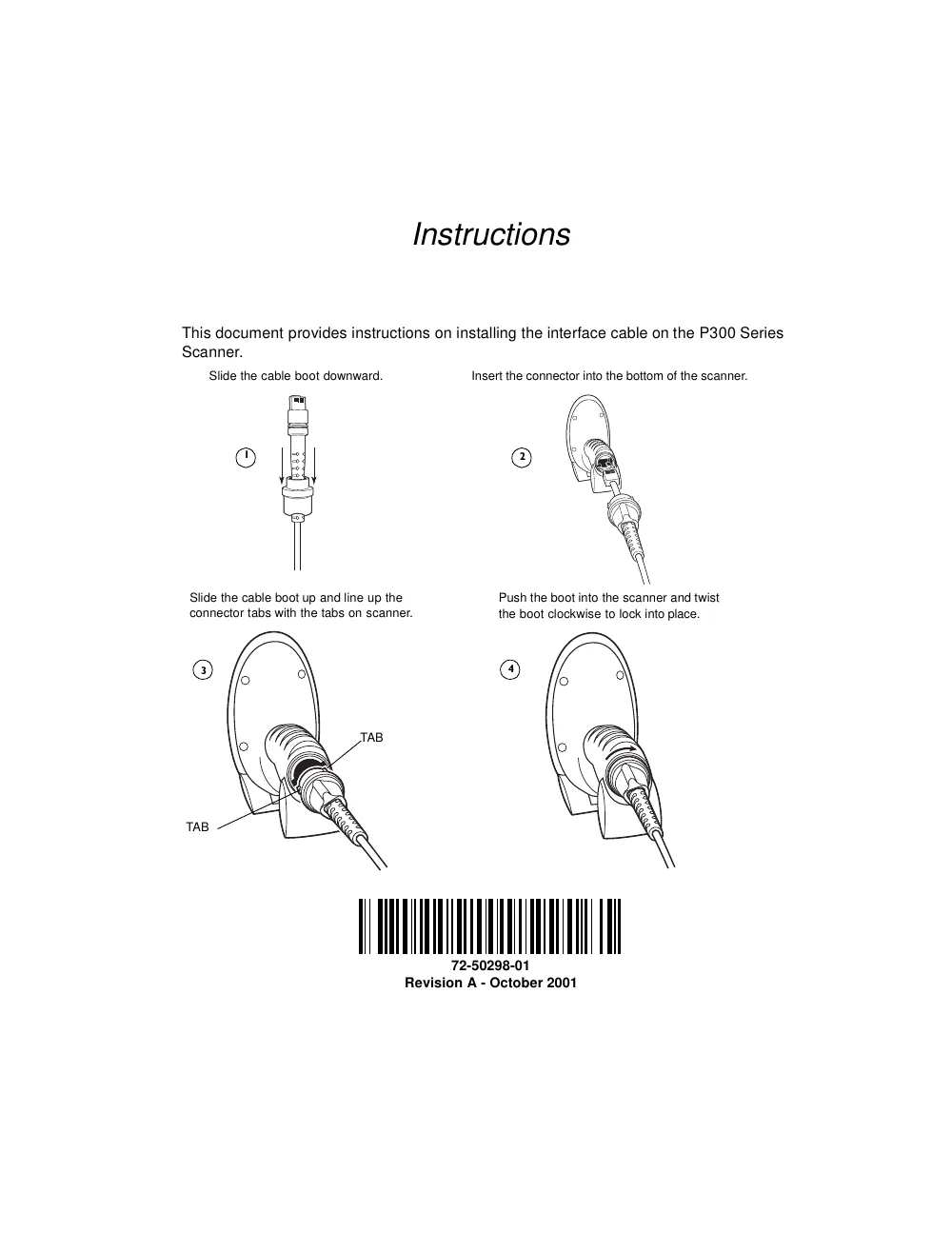
El texto de la página 1, del propio PDF
Instructions This document provides instructions on installing the interface cable on the P300 Series Scanner. Slide the cable boot downward.
Insert the connector into the bottom of the scanner.
1
2
Slide the cable boot up and line up the connector tabs with the tabs on scanner.
Push the boot into the scanner and twist the boot clockwise to lock into place.
43TABTAB
72-50298-01 Revision A - October 2001