Manual · Worth
Worth TriCoder Setup Menu
Manual2 pagesPDF 100 KB
Both pages are below, each with its text.
Filed with · 7 models
Also filed with these models on the old site
 Worth Tricoder T61Portable batch data collection terminal from$495.001 in stock
 Worth Tricoder T62Portable batch data collection terminal from$595.001 in stock Worth Tricoder T63Portable batch data collection terminal from$525.001 in stock
 Worth TriCoder LT63Portable batch data collection terminal Call for availability Worth Tricoder T50Portable batch data collection terminal Call for availability Worth TriCoder T52Portable batch data collection terminal Call for availability Worth TriCoder T53Portable batch data collection terminal Call for availability
From the manual · read page by page
Key facts from this manual
Each line names its page in the PDF.
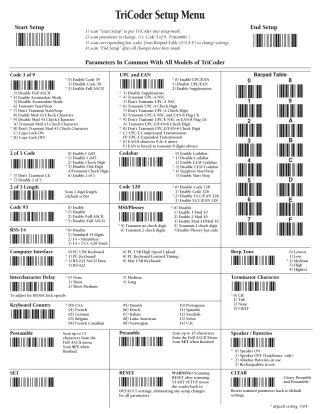
A two-page TriCoder Setup Menu of bar codes, dated 7/04, that sets the parameters common to all TriCoder models plus the serial settings of the RS-232/422 TriCoders; it does not name a specific model. The reader scans Start Setup, a parameter and values from the Barpad Table, then End Setup. It covers symbologies, computer interface, keyboard country, terminator, beeper, batteries, operation mode, clock and serial port settings.
- Document
- Bar code setup menu for TriCoder readers: parameters common to all models, plus RS-232/422 settings p. 1, 2
- Interfaces
- PC keyboard, PC USB keyboard, Mac USB keyboard, PC keyboard learned timing, RS-232 ASCII data, RS-422, PC USB high speed upload p. 1
- Symbologies
- UPC and EAN (with supplements), Code 3 of 9 (Full ASCII), I 2of5 and 2 of 5, Codabar, Code 128 and UCC/EAN 128, Code 93, MSI/Plessey, RSS-14 p. 1
- Keyboard countries
- USA, French, German, Belgian, French Canadian, Danish, Dutch, Italian, Latin American, Norwegian, Portuguese, Spanish, Swedish, Swiss, U.K. p. 1
- Terminator
- CR (default), Tab, None or CR/LF p. 1
- Batteries
- Alkaline (default) or rechargeable, chosen in the Speaker / Batteries setting p. 1
- Speaker
- Speaker on, or off with earphones only; beep tone none, short, short medium, medium or long p. 1
- Operation modes
- Non portable, programming, data collection, data upload, program transmit, program receive p. 2
- Clock
- Date set as 6 digits mmddyy; time as 4 digits hhmm military time p. 2
- Baud rates
- RS-232/422 models: 300 to 38,400 baud, default 9600 p. 2
- Data format
- RS-232/422 models: 7 or 8 data bits (default 8); parity none (default), even or odd; 1 (default) or 2 stop bits p. 2
- Protocols
- RS-232/422 models: none, XON / XOFF, ACK / NAK, polled with or without ACK / NAK, XMODEM p. 2
- Transmission mode
- RS-232/422 models: full duplex (default), half duplex, F45 Y cable or F45A Y cable p. 2
What this manual walks you through
- Putting the TriCoder into setup mode and saving changes p. 1
- Turning bar code symbologies and check digits on or off p. 1
- Choosing the computer interface and keyboard country p. 1
- Setting the date, time and automatic shut down time p. 2
- Setting baud rate, parity and protocol on RS-232/422 TriCoders p. 2
- Resetting the reader to default settings p. 1
Good to know
- Scanning RESET after Start Setup returns the reader to default settings and erases all setup changes. p. 1
- With the speaker set off, sound goes to earphones only. p. 1
Questions this manual answers
How do I program a Worth TriCoder?
Scan Start Setup, scan the parameter to change, scan the values from the Barpad Table (0-9, A-F), then scan End Setup. p. 1
How do I reset a TriCoder to factory defaults?
Scan Start Setup, then RESET. This returns every parameter to its default and erases all setup changes. p. 1
What baud rates does an RS-232 TriCoder support?
300 to 38,400 baud, with 9600 as the default. p. 2
How do I set a TriCoder for rechargeable batteries?
In the Speaker / Batteries parameter, choose 3, Rechargeables in use; alkaline is the default. p. 1
The file
Size and text
Every page · 2
Read it here
Each page as it is printed, and its words beside it, so a phone can search and copy them.
Page1of 2
Open in the PDF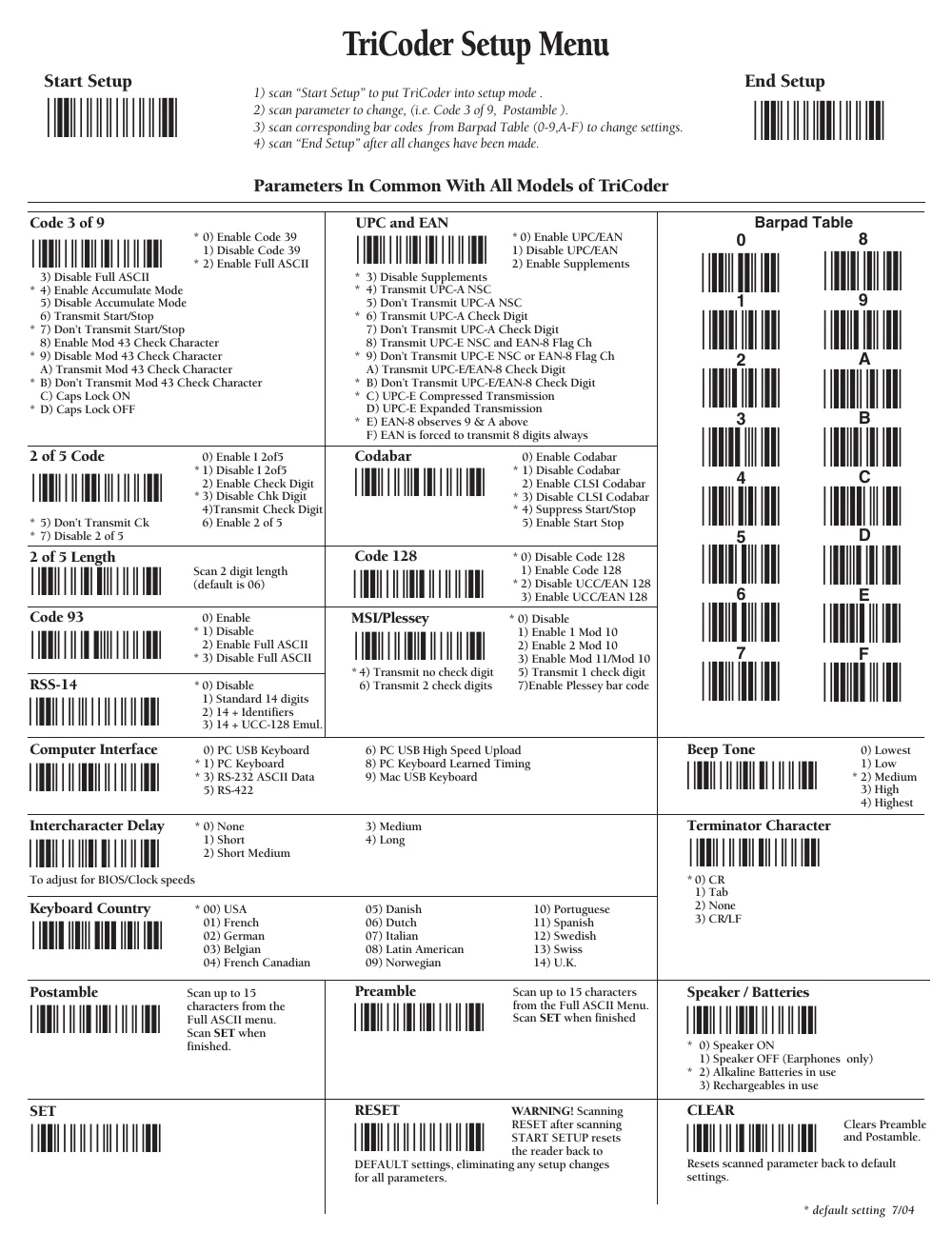
The text of page 1, from the PDF itself
TriCoder Setup Menu Start Setup
End Setup
1) scan “Start Setup” to put TriCoder into setup mode . 2) scan parameter to change, (i.e. Code 3 of 9, Postamble ). 3) scan corresponding bar codes from Barpad Table (0-9,A-F) to change settings. 4) scan “End Setup” after all changes have been made.
*/+/*
*/-/*
Parameters In Common With All Models of TriCoder UPC and EAN
Code 3 of 9
*/A/* 3) Disable Full ASCII
- 0) Enable Code 39 1) Disable Code 39
- 2) Enable Full ASCII
- 4) Enable Accumulate Mode 5) Disable Accumulate Mode 6) Transmit Start/Stop
- 7) Don’t Transmit Start/Stop 8) Enable Mod 43 Check Character
- 9) Disable Mod 43 Check Character A) Transmit Mod 43 Check Character
- B) Don’t Transmit Mod 43 Check Character C) Caps Lock ON
- D) Caps Lock OFF
2 of 5 Code
*/C/*
- 5) Don’t Transmit Ck
- 7) Disable 2 of 5
0) Enable I 2of5
- 1) Disable I 2of5 2) Enable Check Digit
- 3) Disable Chk Digit 4)Transmit Check Digit 6) Enable 2 of 5
*/B/*
- 3) Disable Supplements
- 4) Transmit UPC-A NSC 5) Don’t Transmit UPC-A NSC
- 6) Transmit UPC-A Check Digit 7) Don’t Transmit UPC-A Check Digit 8) Transmit UPC-E NSC and EAN-8 Flag Ch
- 9) Don’t Transmit UPC-E NSC or EAN-8 Flag Ch A) Transmit UPC-E/EAN-8 Check Digit
- B) Don’t Transmit UPC-E/EAN-8 Check Digit
- C) UPC-E Compressed Transmission D) UPC-E Expanded Transmission
- E) EAN-8 observes 9 & A above F) EAN is forced to transmit 8 digits always
Codabar*/D/* Code 1282 of 5 Length*/5/*
Scan 2 digit length (default is 06)
*/S/*
Code 93
0) Enable
- 1) Disable 2) Enable Full ASCII
- 3) Disable Full ASCII
MSI/Plessey
*/W/* RSS-14
*/%/* Computer Interface
*/M/* Intercharacter Delay
*/N/*
- 0) Disable 1) Standard 14 digits 2) 14 + Identifiers 3) 14 + UCC-128 Emul.
Barpad Table
- 0) Enable UPC/EAN 1) Disable UPC/EAN 2) Enable Supplements
*/R/*
- 4) Transmit no check digit 6) Transmit 2 check digits
0) Enable Codabar
- 1) Disable Codabar 2) Enable CLSI Codabar
- 3) Disable CLSI Codabar
- 4) Suppress Start/Stop 5) Enable Start Stop
- 0) Disable Code 128 1) Enable Code 128
- 2) Disable UCC/EAN 128 3) Enable UCC/EAN 128
- 0) Disable 1) Enable 1 Mod 10 2) Enable 2 Mod 10 3) Enable Mod 11/Mod 10 5) Transmit 1 check digit 7)Enable Plessey bar code
*.4.* Postamble*/2/* SET*/$/*8*0* 1 *1* 2 *2* 3
*8* 9 *9* A *A* B *B* C
*3* 4 *4* 5 *5* 6 *6* 7
*C* D *D* E *E* F *F*
*7*
0) PC USB Keyboard
- 1) PC Keyboard
- 3) RS-232 ASCII Data 5) RS-422
6) PC USB High Speed Upload 8) PC Keyboard Learned Timing 9) Mac USB Keyboard
Beep Tone
- 0) None 1) Short 2) Short Medium
3) Medium 4) LongTerminator Character*/L/*
- 00) USA 01) French 02) German 03) Belgian 04) French Canadian Scan up to 15 characters from the Full ASCII menu. Scan SET when finished.
05) Danish 06) Dutch 07) Italian 08) Latin American 09) Norwegian
Preamble
*/1/* RESET
10) Portuguese 11) Spanish 12) Swedish 13) Swiss 14) U.K. Scan up to 15 characters from the Full ASCII Menu. Scan SET when finished
WARNING! Scanning RESET after scanning START SETUP resets the reader back to DEFAULT settings, eliminating any setup changes for all parameters.
*///*
0) Lowest 1) Low
- 2) Medium 3) High 4) Highest
*/H/*
To adjust for BIOS/Clock speeds
Keyboard Country
0
- 0) CR 1) Tab 2) None 3) CR/LF
Speaker / Batteries
*/O/*
- 0) Speaker ON 1) Speaker OFF (Earphones only)
- 2) Alkaline Batteries in use 3) Rechargeables in use
CLEAR
*/./*
Clears Preamble and Postamble.
Resets scanned parameter back to default settings.
- default setting 7/04
Page2of 2
Open in the PDF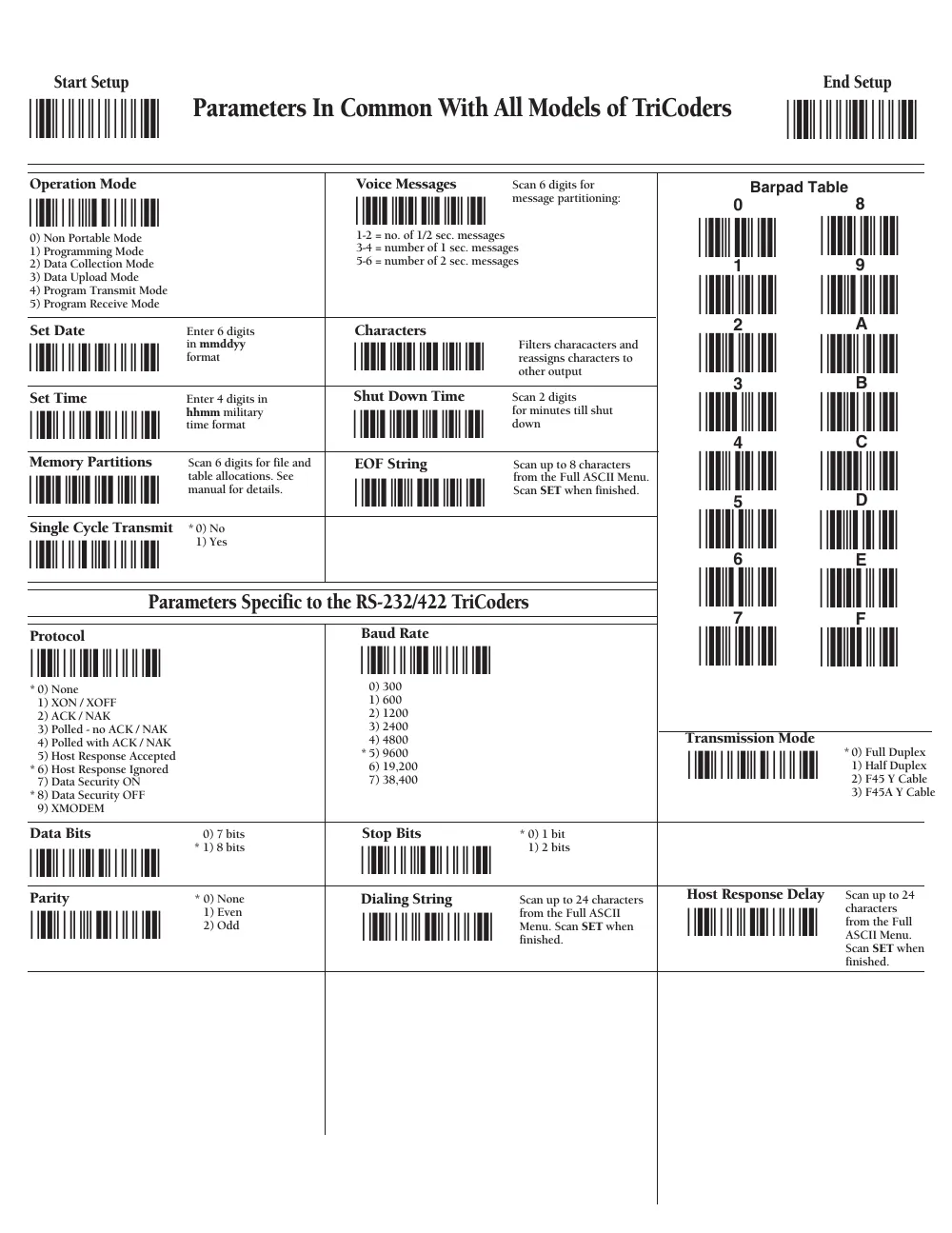
The text of page 2, from the PDF itself
Start SetupEnd Setup*/+/*
Parameters In Common With All Models of TriCoders
Operation ModeVoice Messages*.5.**/Q/*
1-2 = no. of 1/2 sec. messages 3-4 = number of 1 sec. messages 5-6 = number of 2 sec. messages
0) Non Portable Mode 1) Programming Mode 2) Data Collection Mode 3) Data Upload Mode 4) Program Transmit Mode 5) Program Receive Mode
Set Date
*/8/* Set Time
*/9/* Memory Partitions
*.2.* Single Cycle Transmit
*/U/*
Scan 6 digits for message partitioning:
Enter 6 digits in mmddyy format
Characters
*.1.*
Filters characacters and reassigns characters to other output
Enter 4 digits in hhmm military time format
Shut Down Time
Scan 2 digits for minutes till shut down
Scan 6 digits for file and table allocations. See manual for details.
EOF String
*.3.* *.0.*
Scan up to 8 characters from the Full ASCII Menu. Scan SET when finished.
- 0) No 1) Yes
Parameters Specific to the RS-232/422 TriCoders Protocol
Baud Rate*/E/**/F/*Data Bits*/I/* Parity*/G/*0) 7 bits * 1) 8 bits
- 0) None 1) Even 2) Odd
Stop Bits*/J/* Dialing String*/0/*Barpad Table08*0* 1 *1* 2 *2* 3*8* 9
*3* 4 *4* 5 *5* 6 *6* 7 *7*
0) 300 1) 600 2) 1200 3) 2400 4) 4800
- 5) 9600 6) 19,200 7) 38,400
- 0) None 1) XON / XOFF 2) ACK / NAK 3) Polled - no ACK / NAK 4) Polled with ACK / NAK 5) Host Response Accepted
- 6) Host Response Ignored 7) Data Security ON
- 8) Data Security OFF 9) XMODEM
*/-/*
*9* A *A* B *B* C *C* D *D* E *E* F *F*
Transmission Mode
*/K/*
- 0) Full Duplex 1) Half Duplex 2) F45 Y Cable 3) F45A Y Cable
Host Response Delay
Scan up to 24 characters from the Full ASCII Menu. Scan SET when finished.
- 0) 1 bit 1) 2 bits
Scan up to 24 characters from the Full ASCII Menu. Scan SET when finished.
*/4/*