Manual · Whittier
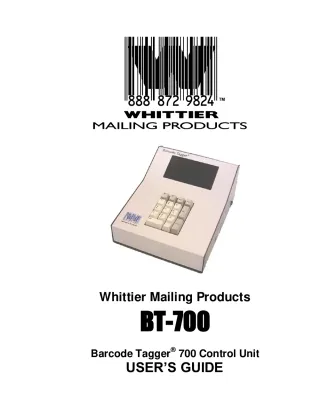
BT-700 Barcode Tagger 700 Control Unit User's Guide
Manual46 pagesPDF 761 KB
User's guide for the Whittier Mailing Products BT-700 Barcode Tagger 700, which prints USPS tray, sack and ACT tags.
Covers · 1 model
The models it covers
Summary
What is in it
The user's guide for the Whittier Barcode Tagger 700 control unit, which looks up the destination line and Content Identifier Number from a 3-digit or 5-digit ZIP Code and prints tray, sack and ACT tags to USPS Domestic Mail Manual specifications. It covers unpacking, cables and printer installation, the startup and system menus, data updates by diskette, and the four operating modes (On Demand, Job, ACT Only and Raw Data), with appendixes on the Tagger job file format, FTP options and class and sortation codes.
Its parts
- Introduction
- Installing the Barcode Tagger 700
- Operation
- On Demand Mode
- Job Mode
- Act Only Mode
- Raw Data Mode
From the manual
Key facts from this manual
Some pages are scans or cannot be read; this says only what the readable text supports. Each line names its page in the PDF.
User's guide for the Whittier Mailing Products Barcode Tagger 700 (BT-700) control unit, which prints USPS tray, sack and ACT tags from a ZIP Code. It covers hookup, the four operating modes, device and ACT table settings, data updates by diskette, building and printing jobs, and the job file format.
- What it is
- Control unit that prints tray, sack and ACT tags, looking up the destination line and CIN from a 3-digit or 5-digit ZIP Code p. 4
- Operating modes
- On Demand, Job, ACT Only and Raw Data p. 5
- Power
- 5-volt wall mount AC adapter with a single pin connector p. 8
- Ports
- Two serial ports; the printer uses the 9-pin COM1, which may be labeled THERMAL PRINTER; COM2 may be labeled SCANNER/MODEM p. 8, 11
- Scanner
- Handheld laser barcode scanner on either serial port, used to make ACT tags from an existing tray or sack tag p. 5, 8
- Job storage
- Up to nine jobs stored internally; unlimited on 3 1/2-inch floppy disks p. 5
- Memory
- Program and update data kept in permanent flash memory; no diskette needed in normal use p. 4
- Network
- Jobs made on another computer arrive by floppy disk or FTP; prints tags from Mail.dat and some Group1, Postalsoft and DataTech files p. 5
- Printers
- Supports several printers so different tag stocks need not be swapped; Device Settings shows Eltron 2742, LT7 drivers p. 4, 11
- Display
- Backlit display p. 4
- Data updates
- Postal data updates by floppy disk, by mail or made from www.traytag.com p. 17, 18
- Update diskette
- Blank IBM or MS-DOS formatted high-density (1.44M) diskette p. 18
- In the box
- Control unit, AC power adapter and cord, user's manual p. 7
- Job file limits
- Tag section limited to 1000 entries; up to 999 tags per entry p. 40
What this manual walks you through
- Connecting power, the printer and a scanner p. 8
- Changing the operating mode p. 10
- Setting printer drivers, tag stock and ports p. 11, 12
- Viewing and editing the ACT table of ZIP Codes and airports p. 13, 14
- Setting the date and time p. 16
- Choosing a security level p. 16, 17
- Registering the unit p. 17
- Updating from diskette and making an update diskette p. 17, 18
- Adding and deleting tags in a saved job p. 33, 34
- Printing ACT tags in ACT Only mode p. 35
Good to know
- Do not turn the unit off while it is loading software. p. 5
- Update diskettes copied on a PC may not load reliably; make backup copies on the Tagger itself. p. 18
- Keep the packing foams and carton; a unit sent for service must ship in its original packaging. p. 7
- The service standard line is only used by USPS facilities sending mail to another facility. p. 15
Questions this manual answers
What power supply does the Whittier BT-700 Tagger use?
A 5-volt wall mount AC adapter with a single pin connector that plugs into the round socket on the back. p. 8
Barcode Tagger 700 says it cannot find the printer. What do I check?
The wrong port is probably selected. Change the printer's port in the Device Settings menu. p. 12
How many jobs can the Barcode Tagger 700 store?
Up to nine jobs internally, with unlimited storage on 3 1/2-inch floppy disks. p. 5
How do I update the postal data on the BT-700?
Choose Update System from any mode's utility menu, then Update from diskette. The update loads in about a minute and keeps the previous settings. p. 17, 18
Can a barcode scanner be connected to the Barcode Tagger 700?
Yes. A handheld laser scanner can go on either serial port and is set up in the Device Settings menu. p. 8
The whole text · 5 parts
Read the manual here as text
Its text as extracted from the PDF, unedited, in parts; each page opens the PDF at that page.
The file