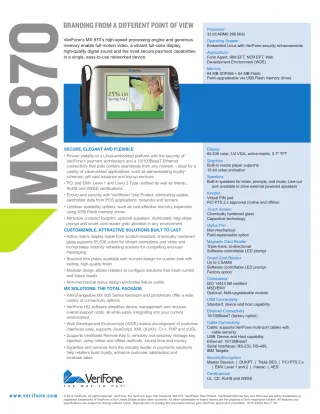
Manual · VeriFone
MX Series Reference Manual
Manual74 pagesPDF 642 KB
Reference manual for VeriFone MX Series payment terminals (MX 870, 860, 850, 830, 760): file authentication, System Mode and downloads.
Names · 3 models
The models it names
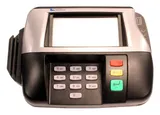 VeriFone MX850POS terminal from$495.003 in stock VeriFone MX860POS terminal from$495.001 in stock
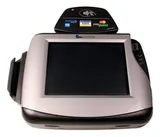 VeriFone MX870POS terminal from$495.00124 in stock
Filed with · 1 model
Also filed with these models on the old site
Summary
What is in it
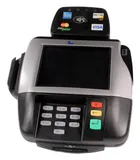
VeriFone's technical reference for the MX Series payment terminals, written for system administrators, application developers and support staff. It describes the features and displays of the MX 870, MX 860, MX 850, MX 830 and MX 760, file authentication and the FILESIGN.EXE signing tool, the System Mode menus for information, configuration, diagnostics, file transfer and security, and how to download applications. Appendices give troubleshooting, an ASCII table and terminal specifications.
Its parts
- Preface
- Features
- File Authentication
- System Mode
- Performing Downloads
From the manual
Key facts from this manual
Each line names its page in the PDF.
The VeriFone MX Series Reference Manual (part number 23754, revision E, 2011) for system administrators, developers and support staff. It covers the MX 870, MX 860, MX 850, MX 830 and MX 760 terminals (the MX 880 appears only in the trademark list) and explains System Mode setup and diagnostics, key loading, application downloads, troubleshooting and the specifications.
- Device
- Linux-based modular payment terminals; the MX 870, MX 860, MX 850 and MX 830 share similar circuit boards, a multifunction connector and mounting stands p. 11
- Interfaces
- Ethernet, USB (Host or Device, depending on the cable), RS-232 for peripherals, RS-485 for ECRs in tailgate mode p. 12, 13, 41
- Power
- 12 V DC at 1.0 A power pack; 120 V AC at 60 Hz (U.S.) p. 69
- Environment
- Operating 0° to 40° C (32° to 104° F); storage -18° to 66° C (0° to 150° F); 15% to 95% humidity, no condensation p. 69
- Card readers
- Triple-track magnetic card reader, smart card reader/writer, optional ISO 14443 contactless module p. 11, 13
- Security
- 3DES encryption, Master Key/Session Key and DUKPT key management, VeriShield file authentication p. 13
- Display
- MX 870: 5.6-inch color 1/4 VGA, touch screen only; MX 860: 4.3-inch color, touch screen and numeric keypad; MX 850: 3.5-inch color 1/4 VGA, touch screen and ATM-style screen-addressable keys p. 12
- Dimensions
- Height 153 mm (6.0 in.), width 192 mm (7.5 in.); depth MX 870: 57 mm (2.24 in.), MX 860 and MX 850: 71 mm (2.8 in.) p. 70
- Weight
- MX 870: 1.68 lbs. (.77kg); MX 860 and MX 850: 1.62 lbs. (.74 kg) p. 70
- Console port
- TTY console on COM1 at 115200 baud, 8 bits, no parity, no flow control; login usr1 p. 42
- Downloads
- FTP over Ethernet, IBM Download Protocol via an IBM ECR, ZonTalk via a PC, Network Download utility; files packed as .tar or .tgz p. 53
- Key loading
- Key loading device on COM2 at 1200 baud, 7 bits, Even parity p. 49
- Internal battery
- The battery diagnostic fails below 2.4 volts p. 45
What this manual walks you through
- Entering and leaving System Mode p. 36, 37
- Reading the serial number, OS version, installed options and I/O module p. 39
- Configuring the Ethernet, ECR and USB ports p. 41
- Opening a serial console session p. 42
- Setting date and time, audio, backlight and touch screen calibration p. 43
- Running diagnostics on the display, touch panel, keypad, card reader, memory and battery p. 44, 45
- Moving through System Mode with the ATM keys on the MX 850 and MX 830 p. 50
- Downloading applications and data to the terminal p. 53
- Troubleshooting a blank display, serial port, failed transactions, stylus and touch screen p. 63, 64, 65
Good to know
- The terminal must be restarted before a new Ethernet setting takes effect. p. 41
- Do not touch the screen while it calibrates. p. 43
- NAND flash can hold errors and still show PASSED; if it shows FAIL, the manual says to replace it immediately. p. 45
- Keys are loaded in a secure area, and the terminal leaves key loading mode after certain timeouts. p. 49
- The terminal carries tamper-evident labels; the manual says never to disassemble it. p. 63
Questions this manual answers
How do I move through System Mode menus with the MX850 keys?
Press ENTER, F1 or F4 to show the hand selector; F1 then moves clockwise through the icons and F4 counter-clockwise. p. 50
What serial settings does the MX Series console use?
Connect a terminal program to COM1 at 115200 baud, 8 bits, no parity and no flow control, then log in as usr1. p. 42
How are applications downloaded to an MX 800 terminal?
By FTP over Ethernet, the IBM Download Protocol through an IBM ECR, ZonTalk from a PC, or the Network Download utility, with files packed in .tar or .tgz form. p. 53
Contents
Chapters and sections
Each line opens the PDF at its page.
The whole text · 11 parts
Read the manual here as text
Its text as extracted from the PDF, unedited, in parts; each page opens the PDF at that page.
The file