Manual · Tysso
Tysso PRP-058 Manual
Manual2 pagesPDF 126 KB
Both pages are below, each with its text.
Covers · 1 model
The models it covers
From the manual · read page by page
Key facts from this manual
Each line names its page in the PDF.
Short user's manual for the Tysso PRP-058 Series direct thermal receipt printer, in serial (PRP-058-S) and parallel (PRP-058-P) models. It lists the package contents and specifications, explains the indicators and buttons, paper loading and the self test, and gives the connector pinouts and the ESC/POS command set.
- What it is
- Direct thermal receipt printer; PRP-058-S serial or PRP-058-P parallel interface p. 2
- Power
- DC 7.5V/2.0A from the supplied power adapter (7.5 VDC output) p. 1, 2
- Serial interface
- Dsub 25-pin female; 9600 bps, none, 8 bits, 1 stop bit; RTS/CTS and Xon/Xoff p. 2
- Parallel interface
- Dsub 25-pin male; 8 bits, BUSY protocol p. 2
- Cash drawer port
- DC 12V/1A, 6-wire RJ-11 socket p. 2
- Paper
- Thermal, TF50KS-E (Japan Paper Co. Ltd.) or AF50KS-E (JUJO Thermal); 57.5 mm wide, 50 mm max roll diameter p. 2
- Printing
- 48 mm effective width; approx. 52 mm/sec or 14 lines/sec; 384 dots/line or 8 dots/mm p. 2
- Print head life
- 50 km p. 2
- Weight
- 740 g without cable and paper roll p. 2
- Dimensions
- 185 mm (L) x 114 mm (W) x 90 mm (H) p. 2
- Font and commands
- ASCII 12 x 24 dots, 1.25 mm (W) x 3.00 mm (H); ESC/POS commands p. 2
- In the box
- Printer, user's manual, serial or parallel cable, power adapter, demo diskette with printer commands, paper roll p. 2
- Error light
- Blinking at 160 ms means out of paper; at 300 ms, print head overheated p. 2
- Key commands
- ESC @ (1B 40) initializes the printer; 1B 70 m n1 n2 controls the cash drawer p. 1
What this manual walks you through
- Unpacking and the standard package p. 2
- Reading the power and error indicators and using the Feed and Online buttons p. 2
- Loading a paper roll p. 2
- Running the printer self test p. 2
- Serial, parallel, power and cash drawer pinouts p. 1
- ESC/POS command set with hex codes p. 1
Good to know
- If the print head overheats, wait for it to cool before printing again; the error light then stops blinking. p. 2
- The Feed button does not work while the error indicator blinks. p. 2
- Feed and Online buttons disabled by command are enabled again automatically when a paper roll is loaded. p. 1
Questions this manual answers
How do I run a self test on the Tysso PRP-058 printer?
Hold down the Online button while powering up, then release it; the printer prints a test page. p. 2
Why is the error light blinking on my PRP-058?
A 160 ms blink means out of paper; a 300 ms blink means the print head overheated and must cool. p. 2
What paper does the PRP-058 use?
Thermal paper 57.5 mm wide with a 50 mm max diameter, such as TF50KS-E or AF50KS-E. p. 2
The file
Size and text
Every page · 2
Read it here
Each page as it is printed, and its words beside it, so a phone can search and copy them.
Page1of 2
Open in the PDF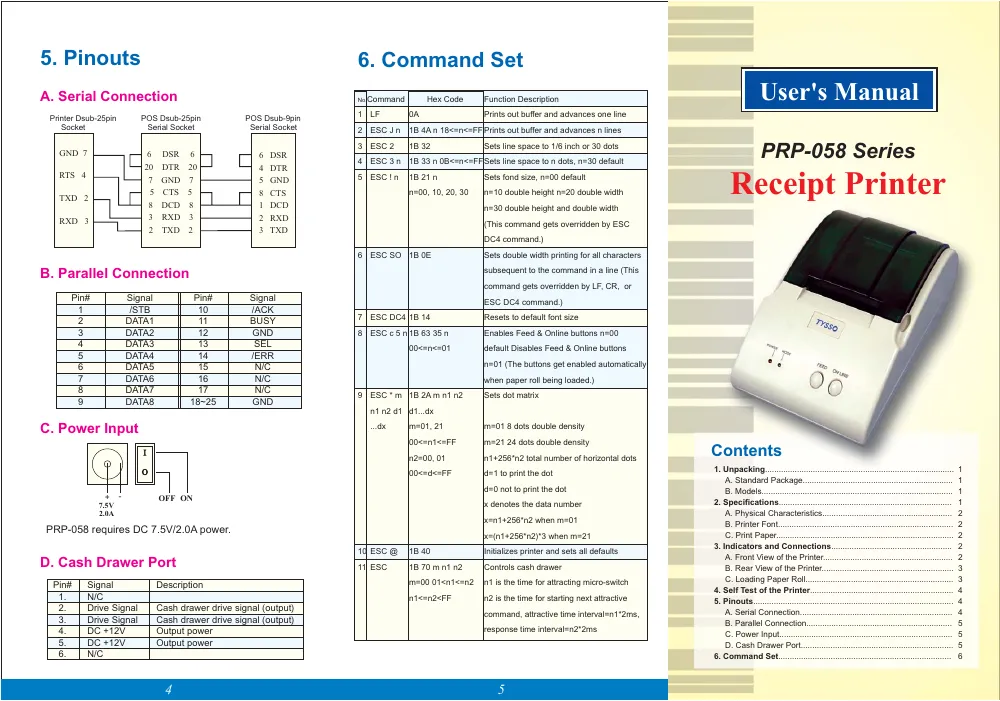
The text of page 1, from the PDF itself
5. Pinouts6. Command SetA. Serial ConnectionNo.Command
Printer Dsub-25pin Socket
POS Dsub-25pin Serial Socket
GND 76 20 7 5 8 3 2RTS 4 TXD 2 RXD 3
DSR DTR GND CTS DCD RXD TXD
6 20 7 5 8 3 2
POS Dsub-9pin Serial Socket
6 4 5 8 1 2 3
DSR DTR GND CTS DCD RXD TXD
Hex CodeFunction Description1 LF0A2 ESC J n
1B 4A n 18<=n<=FF Prints out buffer and advances n lines
3 ESC 2
1B 32
Prints out buffer and advances one line
Sets line space to 1/6 inch or 30 dots
4 ESC 3 n 1B 33 n 0B<=n<=FFSets line space to n dots, n=30 default 5 ESC ! n
User's Manual
1B 21 n
Sets fond size, n=00 default
n=00, 10, 20, 30
n=10 double height n=20 double width n=30 double height and double width
PRP-058 Series
Receipt Printer
(This command gets overridden by ESC DC4 command.) 6 ESC SO 1B 0E
Sets double width printing for all characters subsequent to the command in a line (This
B. Parallel Connection
command gets overridden by LF, CR, or
Pin# 1 2 3 4 5 6 7 8 9
Signal /STB DATA1 DATA2 DATA3 DATA4 DATA5 DATA6 DATA7 DATA8
Pin# 10 11 12 13 14 15 16 17 18~25
Signal /ACK BUSY GND SEL /ERR N/C N/C N/C GND
ESC DC4 command.) 7 ESC DC4 1B 14
Resets to default font size
8 ESC c 5 n 1B 63 35 n
Enables Feed & Online buttons n=00
00<=n<=01
default Disables Feed & Online buttons n=01 (The buttons get enabled automatically when paper roll being loaded.)
9 ESC * m 1B 2A m n1 n2
Sets dot matrixn1 n2 d1 d1...dxC. Power Input...dxI O +7.5V 2.0A-m=01, 21
m=01 8 dots double density
00<=n1<=FF
m=21 24 dots double density
n2=00, 01
n1+256*n2 total number of horizontal dots
00<=d<=FF
d=1 to print the dot d=0 not to print the dot
OFF ON
x denotes the data number x=n1+256*n2 when m=01
PRP-058 requires DC 7.5V/2.0A power.
D. Cash Drawer Port Pin# 1. 2. 3. 4. 5. 6.
Signal N/C Drive Signal Drive Signal DC +12V DC +12V N/C
Description Cash drawer drive signal (output) Cash drawer drive signal (output) Output power Output power
4
x=(n1+256*n2)*3 when m=21 10 ESC @
1B 40
Initializes printer and sets all defaults
11 ESC1B 70 m n1 n2Controls cash drawerm=00 01<n1<=n2
n1 is the time for attracting micro-switch
n1<=n2<FF
n2 is the time for starting next attractive command, attractive time interval=n1*2ms, response time interval=n2*2ms
5
Contents 1. Unpacking................................................................................... 1 A. Standard Package.................................................................. 1 B. Models.................................................................................... 1 2. Specifications............................................................................ 1 A. Physical Characteristics......................................................... 2 B. Printer Font............................................................................. 2 C. Print Paper.............................................................................. 2 3. Indicators and Connections..................................................... 2 A. Front View of the Printer......................................................... 2 B. Rear View of the Printer.......................................................... 3 C. Loading Paper Roll................................................................. 3 4. Self Test of the Printer............................................................... 4 5. Pinouts........................................................................................ 4 A. Serial Connection................................................................... 4 B. Parallel Connection................................................................ 5 C. Power Input............................................................................ 5 D. Cash Drawer Port................................................................... 5 6. Command Set............................................................................ 6
Page2of 2
Open in the PDF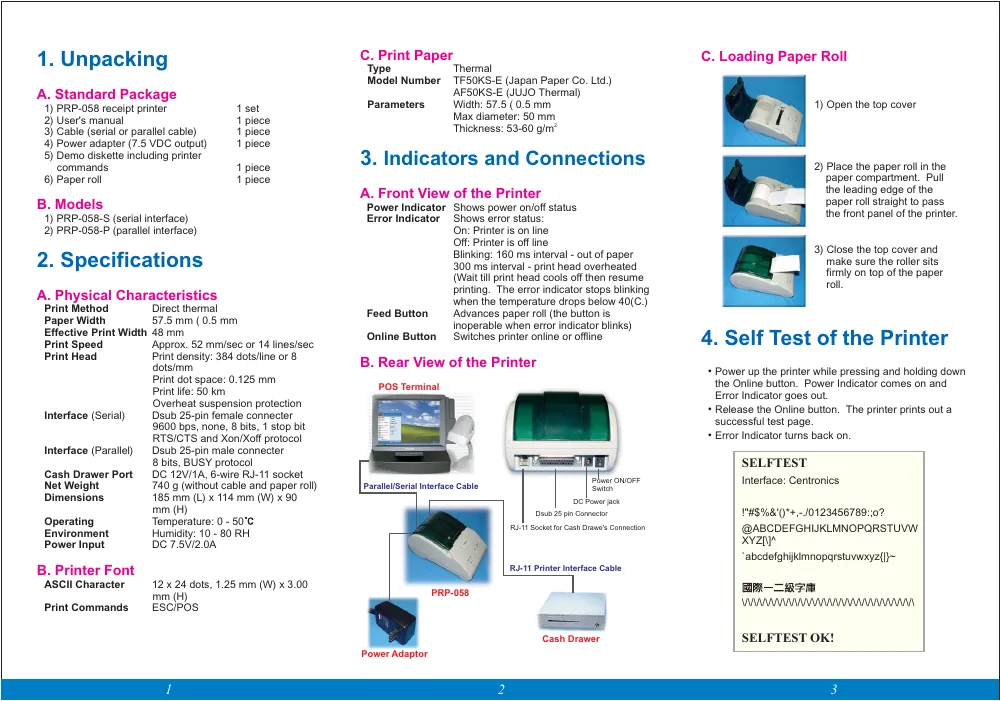
The text of page 2, from the PDF itself
C. Print Paper1. UnpackingType Model Number
A. Standard Package 1) PRP-058 receipt printer 2) User's manual 3) Cable (serial or parallel cable) 4) Power adapter (7.5 VDC output) 5) Demo diskette including printer commands 6) Paper roll
1 set 1 piece 1 piece 1 piece 1 piece 1 piece
Parameters
C. Loading Paper Roll Thermal TF50KS-E (Japan Paper Co. Ltd.) AF50KS-E (JUJO Thermal) Width: 57.5 ( 0.5 mm Max diameter: 50 mm 2 Thickness: 53-60 g/m
1) Open the top cover
3. Indicators and Connections
2) Place the paper roll in the paper compartment. Pull the leading edge of the paper roll straight to pass the front panel of the printer.
A. Front View of the Printer
B. Models 1) PRP-058-S (serial interface) 2) PRP-058-P (parallel interface)
2. Specifications A. Physical Characteristics Print Method Direct thermal Paper Width 57.5 mm ( 0.5 mm Effective Print Width 48 mm Print Speed Approx. 52 mm/sec or 14 lines/sec Print Head Print density: 384 dots/line or 8 dots/mm Print dot space: 0.125 mm Print life: 50 km Overheat suspension protection Interface (Serial) Dsub 25-pin female connecter 9600 bps, none, 8 bits, 1 stop bit RTS/CTS and Xon/Xoff protocol Interface (Parallel) Dsub 25-pin male connecter 8 bits, BUSY protocol Cash Drawer Port DC 12V/1A, 6-wire RJ-11 socket Net Weight 740 g (without cable and paper roll) Dimensions 185 mm (L) x 114 mm (W) x 90 mm (H) Operating Temperature: 0 - 50 Environment Humidity: 10 - 80 RH Power Input DC 7.5V/2.0A
Power Indicator Shows power on/off status Error Indicator Shows error status: On: Printer is on line Off: Printer is off line Blinking: 160 ms interval - out of paper 300 ms interval - print head overheated (Wait till print head cools off then resume printing. The error indicator stops blinking when the temperature drops below 40(C.) Feed Button Advances paper roll (the button is inoperable when error indicator blinks) Online Button Switches printer online or offline
B. Rear View of the Printer
3) Close the top cover and make sure the roller sits firmly on top of the paper roll.
4. Self Test of the Printer
- Power up the printer while pressing and holding down the Online button. Power Indicator comes on and Error Indicator goes out.
- Release the Online button. The printer prints out a successful test page.
- Error Indicator turns back on.
POS Terminal
SELFTEST Power ON/OFF Switch
Parallel/Serial Interface Cable
Interface: Centronics
DC Power jack Dsub 25 pin Connector RJ-11 Socket for Cash Drawe's Connection
!"#$%&'()*+,-./0123456789:;o? @ABCDEFGHIJKLMNOPQRSTUVW XYZ[\]^ `abcdefghijklmnopqrstuvwxyz{|}~
RJ-11 Printer Interface Cable
B. Printer Font ASCII Character Print Commands
12 x 24 dots, 1.25 mm (W) x 3.00 mm (H) ESC/POS
PRP-058
\/\/\/\/\/\/\/\/\/\/\/\/\/\/\/\/\/\/\/\/\/\/\/\/\/\/\/\/\/\ Cash Drawer
SELFTEST OK!Power Adaptor123