Manual · Trimble
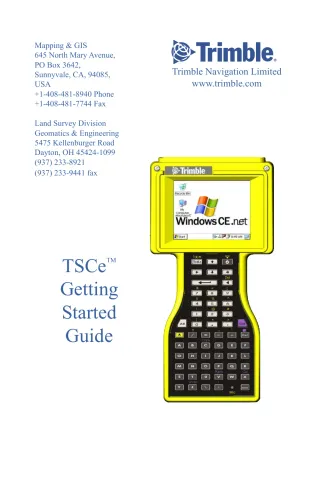
TSCe Getting Started Guide
Manual16 pagesPDF 709 KB
Getting started guide for the Trimble TSCe Windows CE .NET data collector: keys, memory, resets, PC connection, battery care and specifications.
Covers · 1 model
The models it covers
Summary
What is in it
A short getting started guide for the Trimble TSCe data collector running Windows CE .NET. It shows the keys and shortcut keys, explains RAM and the flash disk and when to use a soft or hard reset, and covers touch screen calibration, connecting to a PC by serial, USB, Ethernet or infrared, data transfer with ActiveSync, installing software to the Disk folder, Control Panel settings, charging and changing the battery, cleaning, temperature, shock and water limits, and hardware specifications.
From the manual · read page by page
Key facts from this manual
Each line names its page in the PDF.
Trimble's November 2003 getting started guide (Revision B, part number A-076-3014TMA) for the TSCe data collector, whose operating system is based on Windows CE .NET 4.0. It covers resets, touch screen calibration, connecting to a PC, installing software, charging and changing the battery, care of the unit, hardware specifications and safety.
- Operating system
- TSCe operating system based on Microsoft Windows CE .NET version 4.0 p. 2
- Processor
- Intel StrongARM SA-1110, 206 MHz p. 12
- Memory
- 64 MB low-power SDRAM p. 12
- Storage
- 512 MB non-volatile flash disk, files kept in the Disk folder p. 7, 12
- Display
- 1/4 VGA transflective color LCD touch screen p. 5, 12
- Keyboard
- 57 key tactile action p. 12
- Serial port
- 9-pin RS232 COM1 p. 6, 12
- Multi-function port
- RS232 COM2, Ethernet 10BaseT, USB client, power in/out and audio in/out p. 6, 12
- Infrared
- IrDA Type1 COM3 p. 12
- Battery
- NiMH rechargeable pack, 3800 mAH, 18.5 W-h, 4.8 V; charge at least two hours on the AC adaptor p. 9, 12
- AC adaptor
- Line voltage 100 - 240 V AC 47-63 Hz p. 12
- PC cables
- Null-modem 9-pin female to 9-pin female serial cable RGR-CNULLCAT; multiport adaptor RGR-MULTIADPT for USB or Ethernet p. 6
- Drops and water
- Designed to resist damage from drops up to 122 cm (4 ft) and to withstand accidental immersion p. 11
- Audio
- Integrated speaker and microphone p. 12
What this manual walks you through
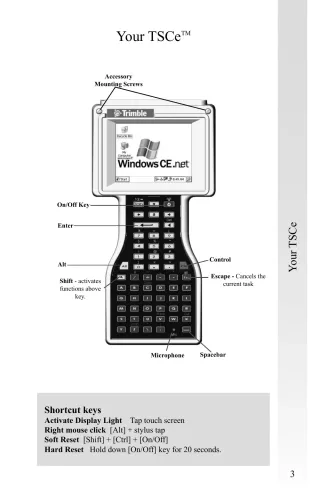
- Soft reset and hard reset p. 3, 4
- Calibrating the touch screen p. 5
- Connecting to a PC by serial cable, USB, Ethernet or infrared p. 6, 7
- Serial, multi-function and 0-shell port pinouts p. 6
- Installing additional software into the Disk folder p. 7
- Control Panel settings such as power, password and regional settings p. 8, 9
- Charging and changing the battery p. 9, 10
- Cleaning the case and touch screen and applying screen protectors p. 10
Good to know
- RAM is volatile; keep data and programs on the flash disk. p. 4
- A hard reset erases RAM; the TSCe backs RAM data up to the System folder on the flash disk. p. 4
- Only Windows CE .NET programs run; programs for desktop Windows or Pocket PC do not. p. 7
- Removing the back case torx screws could cause leaks; tighten the battery door screws after a battery change. p. 11
- Use only AC adaptors intended for the TSCe, and indoors only. p. 13
Questions this manual answers
How do I reset a frozen Trimble TSCe?
Try a soft reset with Shift + Ctrl + On/Off, which keeps RAM. A hard reset, holding On/Off for 20 seconds, erases RAM. p. 4
What cable connects a TSCe to a PC?
A 9-pin female to 9-pin female null-modem serial cable (RGR-CNULLCAT), or the multiport adaptor RGR-MULTIADPT for USB or Ethernet. p. 6
What battery does the TSCe use?
A NiMH rechargeable pack, 3800 mAH, 4.8 V. Recharge it on the AC adaptor for at least two hours. p. 9, 12
Can the TSCe run Pocket PC programs?
No. It runs only programs compatible with Windows CE .NET, not Pocket PC or desktop Windows programs. p. 7
How do I install software on a TSCe?
Connect it to the PC, run Setup.exe or Install.exe, answer No to the default install path and choose Disk. p. 7
The whole text · 2 parts
Read the manual here as text
Its text as extracted from the PDF, unedited, in parts; each page opens the PDF at that page.
The file