Manual · Symbol
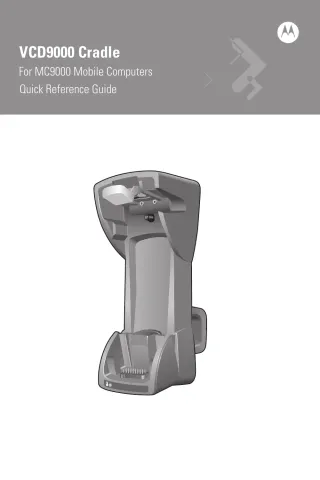
VCD9000 Cradle For MC9000 Mobile Computers Quick Reference Guide
Manual20 pagesPDF 1.1 MB
Quick reference guide for the Symbol VCD9000 vehicle cradle for MC9000 Series mobile computers: mounting, power wiring and charging.
Covers · 1 model
The models it covers
Summary
What is in it
Motorola quick reference guide for the VCD9000 vehicle cradle, which holds a Symbol MC9000 Series mobile computer in a vehicle cab, powers it, charges its battery and a spare battery, and provides a serial port for an external device such as a printer. It covers the parts and requirements, mounting the cradle, wiring vehicle power with the in-line fuse, connecting a serial device, inserting and removing the computer, battery charging, LED indicators, care, troubleshooting and regulatory and safety information.
Its parts
- Introduction
- Requirements
- Parts
- Cradle Mounting
- Power Connection
- Serial Device Connection
- Mobile Computer Insertion and Removal
- Mobile Computer Battery Charging
- LED Indicators
- Care and Cleaning
- Troubleshooting
- Regulatory Information
- Safety Instructions
- Waste Electrical and Electronic Equipment (WEEE)
From the manual · read page by page
Key facts from this manual
Each line names its page in the PDF.
Quick reference guide for the Symbol VCD9000 vehicle cradle for MC9000 Series mobile computers. It explains mounting the cradle in a vehicle, wiring it to vehicle power, connecting a serial device, charging the computer and a spare battery, reading the charging LEDs and troubleshooting.
- Device
- Vehicle cradle for Symbol MC9000 Series mobile computers; holds and powers the computer, adds a serial port, charges its battery and a spare battery p. 3
- Power input
- Vehicle 12 V or 24 V system; operating range 9 V to 32 V, 4A maximum p. 3
- Fuse
- UL-listed in-line fuse, 5A for 12 V or 4A for 24 V (both included), needed when not wired to the fuse panel p. 4
- Ports
- Standard RS-232 serial port and a power port on the bottom of the cradle p. 6
- Serial cable
- DB9 female serial cable; some external devices need a null modem cable p. 4
- Power wiring
- Red wire to +12/24 V vehicle power; black and shield wires to vehicle ground or chassis ground p. 10
- Mounting hardware
- Four 8-32 X 1 in. self-locking screws (provided), four #8 washers recommended, holes drilled with a #6 bit (0.204 in.) p. 4, 7
- Mounting position
- Vertical with the release button at the top, or horizontal with the display facing up p. 7
- Charge time
- About four hours, for the mobile computer battery and for the spare battery p. 13, 14
- Charging LEDs
- Slow blinking amber: charging; solid amber: complete; fast blinking amber: charging error; off: no unit, poor insertion or no power p. 15
- Spare battery slot
- In the back of the cradle, with a latch p. 14
- Guide number
- 72-63295-03 Revision A, September 2007 p. 20
What this manual walks you through
- Mounting the cradle with the template and self-locking screws p. 7, 8
- Wiring the cradle to vehicle power with the in-line fuse p. 9, 10
- Connecting a serial device such as a printer p. 11
- Inserting and removing the mobile computer p. 12, 13
- Charging the mobile computer battery p. 13
- Inserting, removing and charging a spare battery p. 14
- Reading the charging LEDs p. 15
- Troubleshooting charging and data transfer problems p. 16
- Cleaning the cradle p. 15
Good to know
- A properly trained technician must make the power connection. p. 9
- To charge with the ignition off, connect the cradle to unswitched power. p. 9
- Never mount the cradle on its side, upside down, or on or near an air bag cover. p. 7, 8
- Route the power cable with bushings and clamps; worn insulation can short to the chassis and start a fire. p. 9
- Removing the computer during communication interrupts the data transfer. p. 11
Questions this manual answers
What voltage does the Symbol VCD9000 vehicle cradle need?
It runs from a vehicle's 12 V or 24 V system, with an operating range of 9 V to 32 V and a maximum current of 4A. p. 3
What fuse does the VCD9000 use?
A UL-listed in-line fuse, 5A for 12 V or 4A for 24 V, both included, when the cradle is not wired to the fuse panel. p. 4
How long does the VCD9000 take to charge an MC9000 battery?
About four hours, for the battery in the mobile computer and for a spare battery. p. 13
What does a fast blinking amber LED on the VCD9000 mean?
A charging error; check how the mobile computer or spare battery is seated. p. 15
What cable connects a printer to the VCD9000?
A DB9 female serial cable to the cradle's RS-232 port; some devices need a null modem cable. p. 4
Contents
Chapters and sections
Each line opens the PDF at its page.
- Warranty2
- Patents2
- Introduction3
- Requirements4
- Parts5
- Cradle Mounting7
- Power Connection9
- Serial Device Connection11
- Mobile Computer Insertion and Removal12
- Mobile Computer Battery Charging13
- LED Indicators15
- Care and Cleaning15
- Troubleshooting16
- Regulatory Information17
- Safety Instructions18
- Waste Electrical and Electronic Equipment (WEEE)18
The whole text · 2 parts
Read the manual here as text
Its text as extracted from the PDF, unedited, in parts; each page opens the PDF at that page.
The file