Manual · Symbol
Synapse "Smart Cable" for PC Wedge Interface Guide
Manual32 pagesPDF 214 KB
Interface guide for the Symbol Synapse PC wedge smart cables STI80-0100, -0200, -0201 and -0300: setup and programming.
Covers · 2 models
The models it covers
Summary
What is in it
Symbol's interface guide for the Synapse smart cable for PC wedge, model configurations STI80-0100, STI80-0200, STI80-0201 and STI80-0300. The cable connects Symbol scanners to a PC keyboard port so bar code data arrives as keystrokes. The guide lists which hosts may need a power supply, gives setup steps, and has programming bar codes for defaults, LS 9100 communication, host and country selection, unknown characters, intercharacter delay, fast transmit, parameter sets and control sequences, plus keyboard maps and troubleshooting.
Its parts
- Introduction
- Power Supply
- Setup
- Set Synapse Defaults
- Enable LS 9100 Communication
- Host Selection
- Country Selection
- Ignore Unknown Characters
- Intercharacter Delay
- Fast Transmit
- Advanced Features
- Translation to Control Sequence
- Keyboard Maps
- What If...
- Regulatory Information
From the manual · read page by page
Key facts from this manual
Each line names its page in the PDF.
Symbol's interface guide (72-50273-01, Revision A, November 2000) for the Synapse "Smart Cable" for PC Wedge, model configurations STI80-0100, STI80-0200, STI80-0201 and STI80-0300. The cable connects a Symbol scanner to a PC keyboard port, and the guide holds the setup steps and the programming bar codes for host type, keyboard country, timing and parameter sets.
- Device
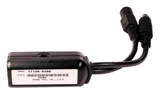
- Synapse keyboard wedge cable: the scanner's bar code data reaches the PC as keyboard keystrokes, with no change to the application p. 3
- Model configurations
- STI80-0100, STI80-0200, STI80-0201, STI80-0300 p. 1
- Supported hosts
- IBM PC/AT and PS/2 and compatibles (default), IBM PC/XT, IBM PS/2-30, NCR 7052 p. 4, 8, 9
- Power
- Powered from the host; NCR 7052 will require a power supply, IBM PC/AT, PS/2, PC/XT and PS/2-30 may; the module has a power jack p. 4, 5
- Connection
- Synapse module plugs into the scanning cable; the module sits between the keyboard cable and the host keyboard port p. 5
- Keyboard countries
- North American (default), German, French, French International, Spanish, Italian, Swedish, British p. 10, 11, 12
- Intercharacter delay
- No (1 ms), Short (5 ms, default), Medium (50 ms), Long (99 ms) p. 14, 15
- Fast transmit
- Enabled by default; can be disabled for older systems p. 16
- Parameter sets
- Two parameter sets, stored in the scanner, for different places the scanner is used p. 3, 17, 18
- Control characters
- TAB, ESC, BS and CR sent as CTRL-I, CTRL-[, CTRL-H, CTRL-M by default, or as TAB, ESC, BACKSPACE, Enter keystrokes p. 20
- Scanners
- Symbol scanners; the LS 9100 needs the Enable LS 9100 Communication bar code p. 3, 7
- Keyboard maps
- Prefix/suffix key value maps for IBM PC/XT, IBM PC/AT, IBM PS/2, NCR 7052 32-Key and NCR 7052 58-Key p. 21, 22, 23, 24, 25, 26
What this manual walks you through
- Connecting the Synapse cable between scanner, keyboard and host p. 5, 6
- Restoring the Synapse defaults p. 7
- Enabling LS 9100 communication p. 7
- Selecting the host type p. 8, 9
- Selecting the keyboard country p. 10, 11, 12
- Choosing how bar codes with unknown characters are sent p. 13
- Setting intercharacter delay and fast transmit p. 14, 15, 16
- Programming and switching parameter sets p. 17, 18, 19
- Sending control characters as CTRL keys or plain keys p. 20
- Troubleshooting with the What If table p. 27
Good to know
- The bar codes in this guide cannot program Synapse cables other than the STI80-01XX/02XX/03XX. p. 3
- Power down the host before connecting the cable. p. 5
- If a non-Synapse interface is later enabled in an LS 9100, the Enable LS 9100 Communication bar code must be scanned again. p. 7
- Erratic scanner behavior, such as the laser not coming on or frequent beeps, calls for a power supply. p. 27
Questions this manual answers
What does the Symbol STI80 Synapse PC Wedge cable do?
It connects a Symbol scanner to a PC keyboard port so bar code data arrives as if typed on the keyboard. p. 3
Does the Synapse PC Wedge cable need a power supply?
Some hosts may not supply enough power. The guide lists the NCR 7052 as needing one and IBM PC/AT, PS/2, PC/XT and PS/2-30 as possibly needing one. p. 4
What does a lo/hi/lo/hi beep mean on a Synapse cable?
Parameter storage in the scanner is full; scan a Set Synapse Defaults bar code for cables no longer in use. p. 27
Contents
Chapters and sections
Each line opens the PDF at its page.
The whole text · 4 parts
Read the manual here as text
Its text as extracted from the PDF, unedited, in parts; each page opens the PDF at that page.
The file