Manual · Motorola
MC40 Mobile Computer Accessories Guide
Manual12 pagesPDF 699 KB
Configuration and accessories guide for the MC40 mobile computer: SKU options, batteries, cradles, power, headset and carrying gear.
Covers · 2 models
The models it covers
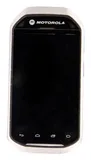
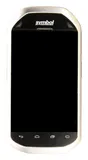
Summary
What is in it
A step-by-step configuration and accessories guide for the MC40 mobile computer. It explains the MC40 SKU options (color, scanner, Android version, MSR, voice, FIPS), then lists part numbers for spare batteries and the 4 slot battery charger, single and 5 slot cradles and cradle configurations, power supplies and cables, cradle cups and covers, the PTT and VoIP headset, holsters, rubber boots and finger straps, the RS507 ring scanner and country AC line cords.
Its parts
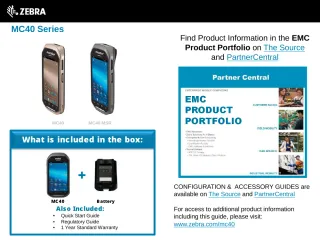
- MC40 Series
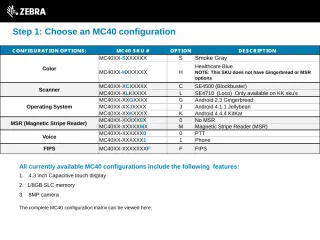
- Step 1: Choose an MC40 configuration
- Step 2: Choose a spare battery type
- Step 3: Choose a charging method
- Step 4: Cradle configurations
- Step 5: Choose cradle power accessories
- Step 6: Choose cradle accessories
- Step 7: Choose a headset
- Step 8: Choose carrying options
- Step 9: Ring scanner accessories
- Step 10: Choose an AC line card
From the manual · read page by page
Key facts from this manual
Some pages are scans or cannot be read; this says only what the readable text supports. Each line names its page in the PDF.
A 12-page Zebra accessories guide for the MC40 mobile computer. It walks through choosing a configuration, spare batteries, chargers and cradles, cradle power parts, a headset, carrying options and ring scanner accessories, and ends with a country list of AC line cords with their part numbers.
- Device
- MC40 mobile computer with 4.3 inch capacitive touch display, 1/8GB SLC memory and 8MP camera p. 3
- Operating system
- Android 2.3 Gingerbread, Android 4.1.1 Jellybean or Android 4.4.4 KitKat p. 3
- Scan engine
- SE4500 or SE4710; the SE4710 only on KK SKUs p. 3
- Options
- Magnetic Stripe Reader (MSR), PTT, phone, FIPS; colors Smoke Gray or Healthcare Blue p. 3
- Spare battery
- 2680mAh standard capacity: BTRY-MC40EAB0E-01R single, BTRY-MC40EAB0E-10R 10 pack p. 4
- Healthcare battery
- Single HC Battery BTRY-MC40EAB0E-03H, Health Care Blue p. 4
- Healthcare charger
- 4 Slot Healthcare Battery Charger, white, disinfectant ready: SACMC40XX-4000HC p. 4
- 5-slot cradle
- CRDUNIV-40-5000R, 5-Slot Charge Only Cradle with 5 terminal cups p. 6
- Cradle parts
- CUPUNIBTRY-1000R adapter cup to mount a 4-Slot Battery Charger on the 5-Slot cradle p. 8
- Cradle power
- 5-slot cradle and 4-slot charger supply: 100-240VAC, 12VDC, 4.16A; single slot cradle supply: 100-240 VAC, 5 V, 1.2 A p. 7
- Cables
- 25-MCXUSB-01R USB cord for the single slot cradle; 25-122026-02R 2-way DC Y cable p. 7
- Headset
- HDST-25MM-PTVP-01, Rev B 2.5MM headset for PTT and VoIP p. 9
- Carrying
- Holster SG-MC40HLSTR-03R; finger strap SG-MC40STRAP-01R; MSR rubber boot SG-MC40-MBOOT-01R p. 10
- US AC line cord
- 23844-00-00R (7.5 feet) or 50-16000-221R (1.8M, NEMA 5-15P) p. 12
What this manual walks you through
- Choosing an MC40 configuration by SKU option p. 3
- Choosing a spare battery and battery charger p. 4
- Choosing a charging method: single slot or five slot cradles p. 5
- Setting up the 5-slot cradle to charge 5 terminals, or 4 terminals plus 4 batteries p. 6
- Choosing cradle power supplies and cables p. 7
- Choosing cradle cups and slot covers p. 8
- Choosing a headset and carrying options p. 9, 10
- Pairing the RS507 ring scanner p. 11
- Picking the AC line cord for each country p. 12
Good to know
- The Rev B headset works only with Android JellyBean (4.1.1) and not on older versions of the MC40. p. 9
- The RS507 ring scanner works only with an MC40 running JellyBean or higher. p. 11
- The H SKU (MC40XX-HXXXXXX) has no Gingerbread or MSR options. p. 3
- 4-slot battery chargers and 5-slot cradles need a power supply and a country specific AC line cord, sold separately. p. 4, 5
- The single slot cradle needs a power supply and USB cable, sold separately. p. 5
Questions this manual answers
What is the spare battery part number for the MC40?
The 2680mAh standard capacity battery is BTRY-MC40EAB0E-01R (single) or BTRY-MC40EAB0E-10R (10 pack); the healthcare battery is BTRY-MC40EAB0E-03H. p. 4
Which USB cable does the MC40 single slot cradle use?
The 25-MCXUSB-01R USB cord. p. 7
What headset works with the MC40?
The HDST-25MM-PTVP-01 Rev B 2.5MM headset for PTT and VoIP, on Android JellyBean (4.1.1) units. p. 9
Can the MC40 5-slot cradle also charge spare batteries?
Yes: with the CUPUNIBTRY-1000R adapter cup a 4-Slot Battery Charger mounts on it, to charge 4 terminals plus 4 batteries. p. 6, 8
What scan engine does the MC40 have?
The SE4500 or the SE4710; the SE4710 is only available on KK SKUs. p. 3
Contents
Chapters and sections
Each line opens the PDF at its page.
- Slide Number 11
- MC40 Series2
- Step 1: Choose an MC40 configuration3
- Step 2: Choose a spare battery type4
- Step 3: Choose a charging method5
- Step 4: Cradle configurations6
- Step 5: Choose cradle power accessories7
- Step 6: Choose cradle accessories8
- Step 7: Choose a headset9
- Step 8: Choose carrying options10
- Step 9: Ring scanner accessories11
- Step 10: Choose an AC line card12
The whole text · 2 parts
Read the manual here as text
Its text as extracted from the PDF, unedited, in parts; each page opens the PDF at that page.
The file