Manual · Symbol
Symbol DS-6708 Quick Start Guide
Manual2 pagesPDF 3.2 MB
Both pages are below, each with its text.
Covers · 1 model
The models it covers
From the manual · read page by page
Key facts from this manual
Each line names its page in the PDF.
Two-page quick start poster (72-83973-01 Revision B, March 2008) for the Symbol DS6708 scanner, meant to be posted in the work area. It shows the accessories, the host cables, a short troubleshooting chart, beeper and LED meanings, and programming bar codes to set defaults and pick the host type.
- Host interfaces
- RS-232, USB, Keyboard Wedge, IBM 46XX p. 1
- RS-232 host types
- Standard RS-232, Nixdorf RS-232 Mode A, Nixdorf RS-232 Mode B, ICL RS-232, Fujitsu RS-232 p. 1
- USB host type
- HID keyboard emulation p. 1
- Accessories
- IntelliStand, wall mount, desk cup p. 1
- Controls
- LED indicators, scan window, scan trigger p. 1
- LED colors
- Green: bar code decoded; red: transmission error; off: ready to scan or no power p. 2
- Laser label
- Class 2 laser product, 630-680nm, 1mW p. 2
- Guide part number
- 72-83973-01 Revision B, March 2008 p. 2
What this manual walks you through
- Attaching and removing the cord p. 1
- Choosing the host interface cable p. 1
- Setting defaults and the host type with programming bar codes p. 1
- Troubleshooting a scanner that does not decode or does not send data p. 1
- Aiming for optimum scanning p. 2
- Reading the beeper and LED indications p. 2
- Ergonomic working positions p. 2
Good to know
- The cables differ depending on the scanner configuration. p. 1
- The scanner uses a Class 2 laser; avoid staring directly into the beam. p. 2
- Changes or modifications not approved by Symbol Technologies could void the user's authority to operate the equipment. p. 2
Questions this manual answers
How do I reset a DS6708 to its defaults?
Scan the Set Defaults bar code printed in the programming bar code section of the quick start guide. p. 1
Which host interfaces does the DS6708 connect to?
RS-232, USB, keyboard wedge and IBM 46XX hosts; the cable varies with the configuration. p. 1
What does a red LED mean on the DS6708?
A transmission error. A green LED means a bar code was decoded. p. 2
Which RS-232 host types does the DS6708 quick start guide list?
Standard RS-232, Nixdorf RS-232 Mode A and Mode B, ICL RS-232 and Fujitsu RS-232. p. 1
The file
Size and text
Every page · 2
Read it here
Each page as it is printed, and its words beside it, so a phone can search and copy them.
Page1of 2
Open in the PDF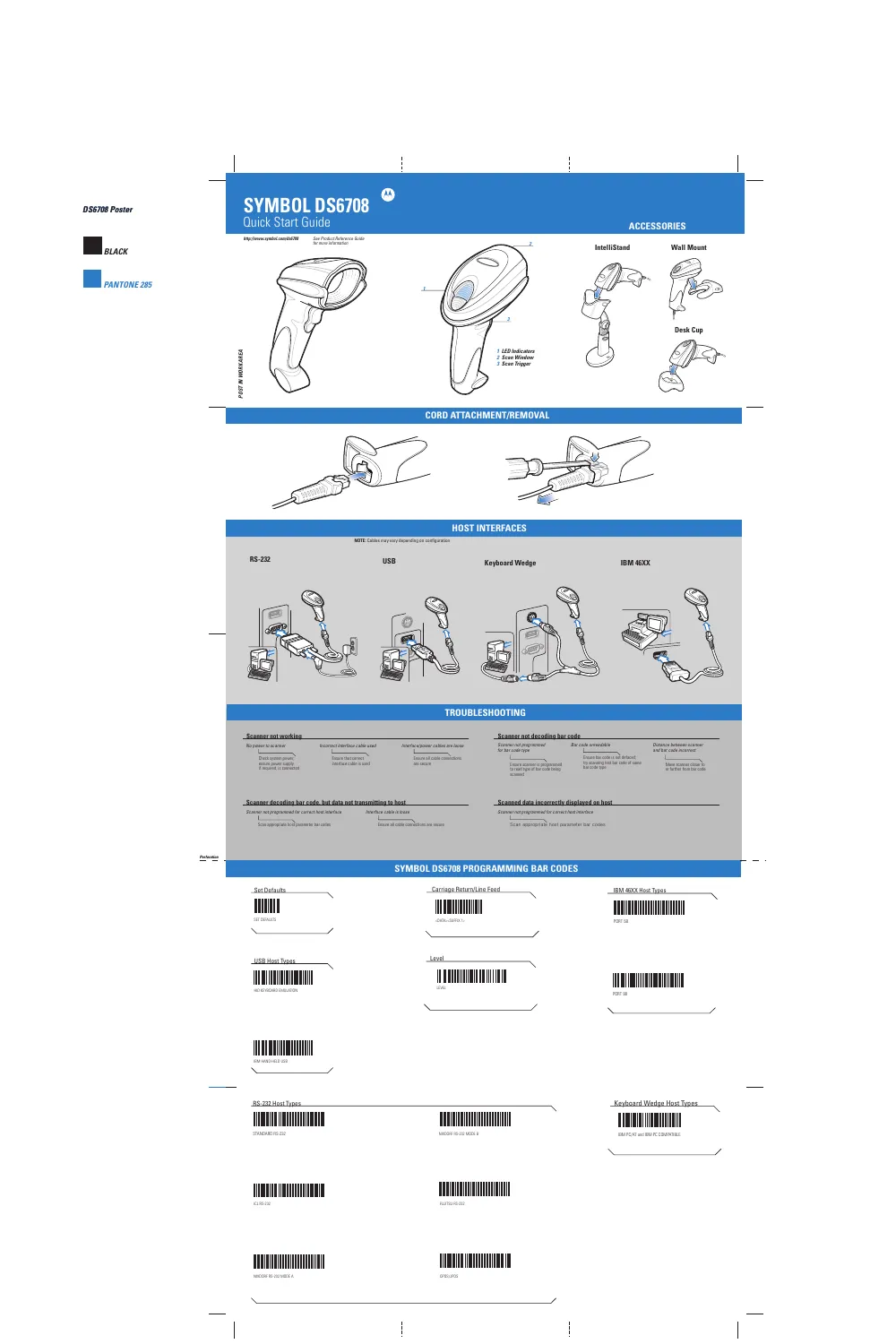
The text of page 1, from the PDF itself
SYMBOL DS6708
DS6708 Poster
Quick Start Guide http://www.symbol.com/ds6708
ACCESSORIES
See Product Reference Guide for more information
2BLACKPANTONE 285IntelliStandWall Mount13
Desk Cup POST IN WORK AREA
1 LED Indicators 2 Scan Window 3 Scan Trigger
CORD ATTACHMENT/REMOVAL
HOST INTERFACES NOTE: Cables may vary depending on configuration
RS-232USBKeyboard WedgeIBM 46XX
TROUBLESHOOTING Scanner not working No power to scanner
Scanner not decoding bar code Incorrect interface cable used
Check system power; ensure power supply, if required, is connected
Interface/power cables are loose
Ensure that correct interface cable is used
Scanner not programmed for bar code type
Ensure all cable connections are secure
Bar code unreadable
Ensure scanner is programmed to read type of bar code being scanned
Ensure bar code is not defaced; try scanning test bar code of same bar code type
Scanner decoding bar code, but data not transmitting to host
Scanned data incorrectly displayed on host
Scanner not programmed for correct host interface
Scanner not programmed for correct host interface
Scan appropriate host parameter bar codes
Interface cable is loose Ensure all cable connections are secure
Distance between scanner and bar code incorrect Move scanner closer to or further from bar code
Scan appropriate host parameter bar codes
Perforation
SYMBOL DS6708 PROGRAMMING BAR CODES Set Defaults
SET DEFAULTSUSB Host TypesHID KEYBOARD EMULATION
Carriage Return/Line Feed
<DATA><SUFFIX 1>IBM 46XX Host TypesPORT 5BLevelLEVELPORT 9BIBM HAND-HELD USB
Keyboard Wedge Host Types
RS-232 Host TypesSTANDARD RS-232NIXDORF RS-232 MODE BICL RS-232FUJITSU RS-232NIXDORF RS-232 MODE AOPOS/JPOS
IBM PC/AT and IBM PC COMPATIBLE
Page2of 2
Open in the PDF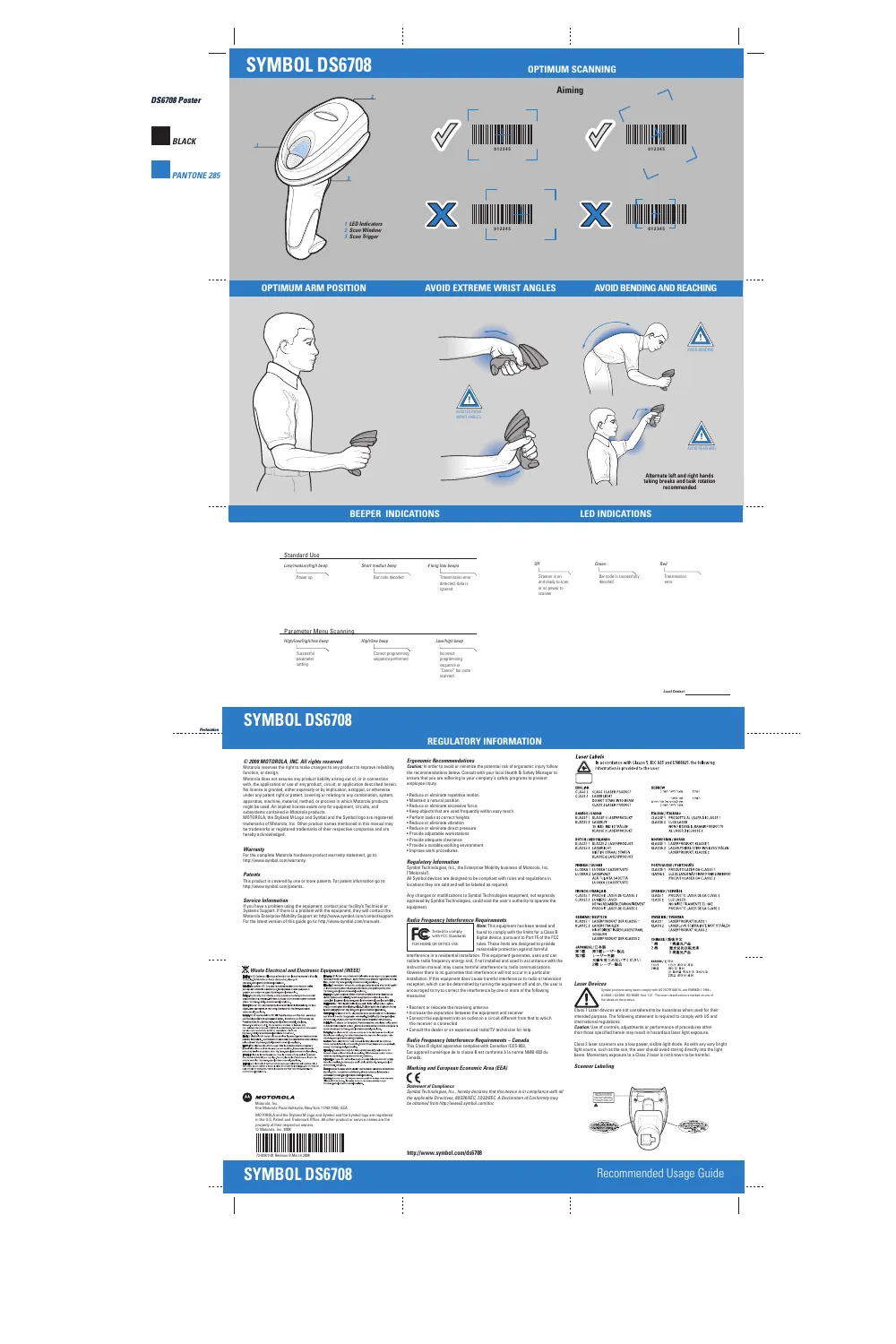
The text of page 2, from the PDF itself
SYMBOL DS6708Aiming2DS6708 PosterBLACKOPTIMUM SCANNING1PANTONE 2850123450123450123450123453
1 LED Indicators 2 Scan Window 3 Scan Trigger
OPTIMUM ARM POSITION
AVOID EXTREME WRIST ANGLES
AVOID BENDING AND REACHING
AVOID BENDING
AVOID EXTREME WRIST ANGLES
AVOID REACHING
Alternate left and right hands taking breaks and task rotation recommended
BEEPER INDICATIONS
LED INDICATIONS
Standard Use Low/medium/high beep Power up
Short mediun beep4 long low beepsBar code decoded
Transmission error detected; data is ignored
Off Scanner is on and ready to scan, or no power to scanner
Green Bar code is successfully decoded
Red Transmission error
Parameter Menu Scanning High/low/high/low beep Successful parameter setting
High/low beep
Low/high beep
Correct programming sequence performed
Incorrect programming sequence or “Cancel” bar code scanned Local Contact:
Perforation
SYMBOL DS6708 REGULATORY INFORMATION © 2008 MOTOROLA, INC. All rights reserved.
Ergonomic Recommendations
Warranty
- Reduce or eliminate repetitive motion
- Maintain a natural position
- Reduce or eliminate excessive force
- Keep objects that are used frequently within easy reach
- Perform tasks at correct heights
- Reduce or eliminate vibration
- Reduce or eliminate direct pressure
- Provide adjustable workstations
- Provide adequate clearance
- Provide a suitable working environment
- Improve work procedures.
Motorola reserves the right to make changes to any product to improve reliability, function, or design. Motorola does not assume any product liability arising out of, or in connection with, the application or use of any product, circuit, or application described herein. No license is granted, either expressly or by implication, estoppel, or otherwise under any patent right or patent, covering or relating to any combination, system, apparatus, machine, material, method, or process in which Motorola products might be used. An implied license exists only for equipment, circuits, and subsystems contained in Motorola products. MOTOROLA, the Stylized M Logo and Symbol and the Symbol logo are registered trademarks of Motorola, Inc. Other product names mentioned in this manual may be trademarks or registered trademarks of their respective companies and are hereby acknowledged.
For the complete Motorola hardware product warranty statement, go to: http://www.symbol.com/warranty.
Caution: In order to avoid or minimize the potential risk of ergonomic injury follow the recommendations below. Consult with your local Health & Safety Manager to ensure that you are adhering to your company's safety programs to prevent employee injury.
Regulatory Information
Patents
Symbol Technologies, Inc., the Enterprise Mobility business of Motorola, Inc. ("Motorola"). All Symbol devices are designed to be compliant with rules and regulations in locations they are sold and will be labeled as required.
Service Information
Any changes or modifications to Symbol Technologies equipment, not expressly approved by Symbol Technologies, could void the user's authority to operate the equipment.
This product is covered by one or more patents. For patent information go to: http://www.symbol.com/patents.
If you have a problem using the equipment, contact your facility’s Technical or Systems Support. If there is a problem with the equipment, they will contact the Motorola Enterprise Mobility Support at: http://www.symbol.com/contactsupport. For the latest version of this guide go to: http://www.symbol.com/manuals.
Radio Frequency Interference Requirements
Note: This equipment has been tested and found to comply with the limits for a Class B digital device, pursuant to Part 15 of the FCC rules. These limits are designed to provide FOR HOME OR OFFICE USE reasonable protection against harmful interference in a residential installation. This equipment generates, uses and can radiate radio frequency energy and, if not installed and used in accordance with the instruction manual, may cause harmful interference to radio communications. However there is no guarantee that interference will not occur in a particular installation. If this equipment does cause harmful interference to radio or television reception, which can be determined by turning the equipment off and on, the user is encouraged to try to correct the interference by one or more of the following measures: Tested to comply with FCC Standards
Waste Electrical and Electronic Equipment (WEEE)
- Reorient or relocate the receiving antenna
- Increase the separation between the equipment and receiver
- Connect the equipment into an outlet on a circuit different from that to which the receiver is connected
- Consult the dealer or an experienced radio/TV technician for help.
Radio Frequency Interference Requirements – Canada
This Class B digital apparatus complies with Canadian ICES-003. Cet appareil numérique de la classe B est conforme à la norme NMB-003 du Canada.
Marking and European Economic Area (EEA)
Motorola, Inc. One Motorola Plaza Holtsville, New York 11742-1300, USA
Statement of Compliance Symbol Technologies, Inc., hereby declares that this device is in compliance with all the applicable Directives, 89/336/EEC, 73/23/EEC. A Declaration of Conformity may be obtained from http://www2.symbol.com/doc
Laser Devices Symbol products using lasers comply with US 21CFR1040.10, and EN60825-1:1994 + A1:2002 + A2:2001, IEC 60825-1(ed. 1.2). The laser classification is marked on one of the labels on the product.
Class 1 Laser devices are not considered to be hazardous when used for their intended purpose. The following statement is required to comply with US and international regulations: Caution: Use of controls, adjustments or performance of procedures other than those specified herein may result in hazardous laser light exposure. Class 2 laser scanners use a low power, visible light diode. As with any very bright light source, such as the sun, the user should avoid staring directly into the light beam. Momentary exposure to a Class 2 laser is not known to be harmful.
Scanner Labeling
LASER LIGHT- DO NOT STARE INTO BEAM . CLASS 2 LASER PRODUCT. LASERSTRAHLUNG - NICHT IN DEN STRAHL BLICKEN. LASER KLASSE 2. LUMI»RE LASER - NE PAS REGARDER DANS LE FAISCEAU. APPAREIL ¿ LASER DE CLASSE 2 630-680nm, 1mW
MOTOROLA and the Stylized M Logo and Symbol and the Symbol logo are registered in the U.S. Patent and Trademark Office. All other product or service names are the property of their respective owners. © Motorola, Inc. 2008
72-83973-01 Revision B March 2008
SYMBOL DS6708
http://www.symbol.com/ds6708
Recommended Usage Guide