Spec sheet · Symbol
CRD6800 Lithium-Ion Cradle Quick Reference
Spec sheet12 pagesPDF 574 KB
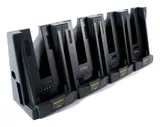
Quick reference guide for the Symbol CRD6800 four-slot lithium-ion charging cradle for Series 68XX terminals.
What this file really is
The old site listed this file as a spec sheet for the Symbol CRD6800-4000. Linked as a spec sheet, but the document is the CRD6800 Lithium-Ion Cradle quick reference guide.
Filed with · 1 model
Also filed with these models on the old site
Summary
What is in it
A quick reference guide for the Symbol CRD6800 Lithium-Ion Cradle, which charges the batteries of up to four Series 68XX terminals. It lists the required equipment and parts of the cradle, how to connect power, insert and remove a terminal, and recharge the battery, explains every LED indicator pattern, and gives a troubleshooting table, ergonomic recommendations, regulatory information, warranty terms and service contacts.
Its parts
- Introduction
- About This Guide
- Required Equipment
- Parts of the Cradle
- Connecting Power
- Inserting and Removing the Terminal
- Recharging the Battery in the 68XX
- LED Indicator
- Troubleshooting
- Ergonomic Recommendations
From the sheet · read page by page
Key facts from this sheet
Some pages are scans or cannot be read; this says only what the readable text supports. Each line names its page in the PDF.
Symbol quick reference guide for the CRD6800 Lithium-Ion Cradle, which charges the batteries of up to four Series 68XX terminals. The document names the cradle as CRD6800 and does not print the designation CRD6800-4000. It shows how to connect power, seat a terminal, read the charging LEDs and solve common problems.
- What it is
- Lithium-Ion battery charging cradle for up to four Series 68XX terminals p. 3
- Power supply
- Symbol-approved, output 15Vdc, minimum 2.5A, certified to EN60950 with SELV outputs p. 4
- In the box
- CRD 6800 Lithium-Ion cradle, AC power supply, DC cable, AC cable p. 3
- Charge time
- Up to 7 hours for a fully discharged battery p. 7
- Charging LEDs
- Quickly flashing green: charging; slowly flashing green: charging a very weak battery; solid green: fully charged; dark: no battery or faulty battery p. 8
- Fault LEDs
- Long red then flashing red: bay failed its self-test; long dark then flashing red: faulty battery p. 8
- Temperature LEDs
- Slowly flashing yellow: battery too cold; quickly flashing yellow: battery too hot p. 8
- Charging temperature
- Too cold: warm battery to above 5°C; too hot: cool battery to below 40°C p. 9
- Parts
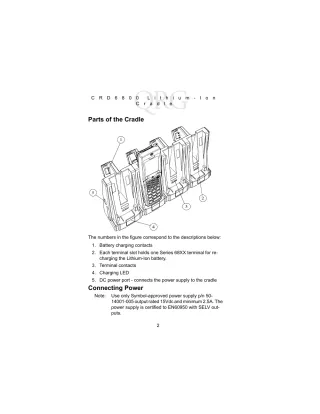
- Battery charging contacts, terminal slots, terminal contacts, charging LED, DC power port p. 4
- Terminal setting
- Put the terminal in SUSPEND mode with power management enabled while it charges p. 7
- Power-up check
- LEDs flash green-yellow-red, then go dark from slot 1 to slot 4 p. 5
- Document
- 72-54434-01 Revision A, February 2002 p. 12
What this sheet walks you through
- Connecting the power supply to the cradle p. 4, 5
- Inserting and removing a 68XX terminal p. 5, 6
- Recharging the battery in the 68XX p. 7
- Reading the cradle LED p. 8
- Troubleshooting power, seating, temperature and battery faults p. 9
- Ergonomic recommendations p. 10
Good to know
- Do not let metal short the exposed contacts on the battery while it is in an operating terminal; the terminal may stop and lose its contents. p. 5
- Fully charge the battery before using the terminal. p. 7
- While charging, the terminal should wake from SUSPEND rarely, and return to SUSPEND within a few minutes if woken. p. 7
- If a bay keeps failing its self-test with a terminal in it, the cradle is faulty and should be repaired; the other bays still charge. p. 9
- The cradle is a Class A digital device; use in a residential area is likely to cause harmful interference. p. 10
Questions this sheet answers
How long does the Symbol CRD6800 cradle take to charge a 68XX battery?
Up to 7 hours for a fully discharged battery, or until the LED is solid green. p. 7
What power supply does the CRD6800 cradle use?
A Symbol-approved supply rated 15Vdc output at a minimum of 2.5A. p. 4
Why is the CRD6800 LED flashing yellow?
The battery is too cold or too hot to charge. Charging starts by itself once the battery is back within range. p. 9
What does dark then flashing red mean on the CRD6800?
The battery failed. Reseating the terminal may be tried, but the battery is probably faulty and should be replaced. p. 9
Contents
Chapters and sections
Each line opens the PDF at its page.
The whole text · 2 parts
Read the sheet here as text
Its text as extracted from the PDF, unedited, in parts; each page opens the PDF at that page.
The file