Manual · Proxim
Harmony OpenAir Access Point Model 7550 User's Guide
Manual37 pagesPDF 355 KB
User's guide for the Proxim Harmony OpenAir Access Point Model 7550: installation, LEDs, roaming, configuration and troubleshooting.
Covers · 1 model
The models it covers
Summary
What is in it
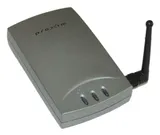
User's guide for the Proxim Harmony OpenAir Access Point Model 7550, a wireless LAN access point that works with a Harmony Access Point Controller. It introduces the Harmony product family and system requirements, then covers installation, mounting, the optional Harmony Power System, LED indicators, OpenAir roaming, the configuration parameters (channel, subchannel, security ID, IP addressing and more), performance hints, troubleshooting and specifications.
Its parts
- Introduction
- Installation
- Wirefree Operation
- Configuration Parameters
- Performance Hints
- Troubleshooting
From the manual
Key facts from this manual
Each line names its page in the PDF.
User's Guide, part 7360.0137 revision B, for the Proxim Harmony OpenAir Access Point Model 7550, a frequency hopping wireless LAN access point run by a Harmony Access Point Controller Model 7560. It walks through installation, the LEDs, the configuration parameters, range and antenna hints, and troubleshooting, and lists the specifications.
- Device
- Harmony OpenAir wireless LAN access point; a Layer 2 bridge between its radio and the Ethernet network p. 6
- Network interface
- Ethernet 10Base-T only; no 100Base-TX p. 10, 32
- Radio
- OpenAir, 2.4-2.5 GHz frequency hopping spread spectrum; 15 independent channels; 1.6 Mbps p. 32
- Output power
- 100 mW or 500 mW, depending on country p. 32
- Power
- Supplied 12V, 1 Amp adapter; a replacement must be UL listed Class 2, min. 1A, 6 to 15VDC p. 7, 32
- Operating temperature
- -20 C to +60 C p. 32
- Requires
- At least one Harmony Access Point Controller, a 10Base-T switch or hub, and an OpenAir client adapter p. 7
- Power over Ethernet
- Optional Harmony Power System Model 7562, through an AP Power Over LAN Module Model 7059 p. 6, 12
- Compatible clients
- Harmony OpenAir PC Card (7430 Series), OpenAir USB Adapter Model 7230, RangeLAN2 PC Card p. 6, 26
- LED error codes
- Status LED blinks red: 1 memory error, 2 flash write error, 3 Ethernet initialization error, 4 radio initialization error p. 27
- Radio settings
- Domain 0 to 15 (default 0); Channel 1 to 15; Subchannel 1 to 15; Security ID up to 20 characters, case sensitive p. 20, 21, 22
- Range
- Up to 1000' outdoors with line of sight; up to 300' indoors p. 25
- Mounting
- Desktop, or four #6-32 tapped holes 0.175" deep underneath; AP Wall Mounting Kit available p. 11
- Firmware
- New firmware images come from the AP Controller p. 30
What this manual walks you through
- Installing the access point, antenna, Ethernet and power p. 8, 9, 10
- Mounting the unit on a surface p. 11
- Powering the unit over Ethernet with the Harmony Power System p. 12, 13
- Reading the top and back panel LEDs p. 13, 14, 15
- Setting the AP name, domain, channel, subchannel, master name and security ID p. 19, 20, 21, 22
- Giving the access point an IP address by DHCP or a static address p. 23, 24
- Improving range with antenna placement p. 25, 26
- Using it with RangeLAN2 and other OpenAir products p. 26
- Reading the red LED error codes p. 27
- Solving common problems: not detected, no sync, amber LED, slow throughput p. 28, 29, 30
Good to know
- A Harmony Access Point Controller must be installed before the access point. p. 8
- Do not use the 10Base-T crossover adapter with the AP Power Over LAN Module. p. 9
- The serial port on the back panel and the rotary switches underneath do not work. p. 15
- Using a power supply other than the supplied adapter may damage the access point. p. 10
- Keep the antenna at least 15 centimeters (6 inches) from any person. p. 32
Questions this manual answers
What do the red blinks on the Proxim 7550 status LED mean?
1 blink is a memory error, 2 a flash write error, 3 an Ethernet initialization error and 4 a radio initialization error. Recycle power first. p. 27
Why is the Proxim 7550 status LED amber?
Solid amber means the unit is initializing, or it has initialized but cannot find an AP Controller to partner with. Blinking amber means it needs a new firmware image. p. 29, 30
Does the Proxim 7550 need an access point controller?
Yes. The guide lists at least one Harmony Access Point Controller as a minimum requirement, installed before the access point. p. 7, 8
Does the Proxim 7550 support 100Base-TX Ethernet?
No. It supports only 10Base-T. p. 10
Contents
Chapters and sections
Each line opens the PDF at its page.
- 1. Introduction5
- The Harmony Family6
- System Requirements7
- The Product Package7
- 2. Installation8
- Installation Procedure8
- Mounting Option11
- Using the Optional Harmony Power System12
- LED Indicators13
- 3. Wirefree Operation16
- Harmony Architecture16
- The OpenAir Specification17
- Roaming Between Harmony OpenAir Access Points17
- Roaming Guidelines18
- 4. Configuration Parameters19
- AP Name19
- Physical Address19
- Enable AP19
- Partnered AP Controller20
- Domain20
- Channel20
- Subchannel21
- Master Name22
- Security ID22
- MAC Optimize22
- IP Addressing23
- 5. Performance Hints25
- Microwave Ovens25
- Antenna Options25
- Range25
- Using Harmony With Other OpenAir-Compatible Products26
- 6. Troubleshooting27
- How to Obtain Help with Your LAN Installation27
- LED Error Codes27
- Common Problems and Solutions28
- A. Parameters31
- B. Harmony OpenAir Access Point Specifications32
- C. How to Reach Technical Support33
- Index34
The whole text · 4 parts
Read the manual here as text
Its text as extracted from the PDF, unedited, in parts; each page opens the PDF at that page.
The file