Manual · Printek
Mt3 Series Operator's Manual
Manual37 pagesPDF 2.0 MB
Operator's manual for the Printek Mt3 series mobile thermal printer: battery, media loading, DIP switches, commands and specs.
Covers · 1 model
The models it covers
Summary
What is in it
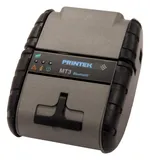
The operator's manual for the Printek Mt3 series, a mobile thermal printer for roll media up to 3 inches wide, with a Bluetooth model (Mt3B) and magnetic or smart card reader options. It explains installing and charging the battery cartridge, loading media, power up and self-test, LED status and the card reader, then setting DIP switches, serial RS232C and Bluetooth connections and the printer's control, font, graphic and bar code commands. Maintenance, troubleshooting, specifications and warranty close the manual.
Its parts
- Introduction
- Getting Started
- Operation
- Configuration and Data Connectivity
- Printer Maintenance and Troubleshooting
- Specifications
From the manual · read page by page
Key facts from this manual
Some pages are scans or cannot be read; this says only what the readable text supports. Each line names its page in the PDF.
Operator's manual (PN 5692 RevA) for the Printek Mt3 Series mobile thermal printer, including the Bluetooth model Mt3B. It covers battery installation and charging, paper loading, self-test, LED status, the magnetic card reader, DIP switch and serial setup, cleaning and troubleshooting. Specifications and accessory part numbers close the manual.
- Device
- Mobile thermal printer for roll media up to 3” wide p. 7
- Interfaces
- Serial RS232 and IrDA infrared; Bluetooth on the Mt3B p. 19, 23
- Battery
- NiMH cartridge, 1600mAH; Mt3 Battery 91244 (5-pack 91245, 20-pack 91246) p. 10, 35
- Charge time
- About 90 minutes fast charge; 24 hours before first use p. 12
- 203 dpi (8 dots per mm), up to 2.0 inches per second p. 34
- Memory
- 32K SRAM, 128K Flash p. 34
- Serial connector
- 6 pin RJ type on the side; at minimum RXD (pin 3) and Common (pin 1) p. 22
- Data cables
- 91251 coiled, DB9 terminated; 91252 coiled, unterminated p. 19, 36
- Power accessories
- AC adaptor 120VAC 91247 (output should read 10V); 4-Bay trickle charger 91248; in-vehicle 12V 91260, 24V 91264 p. 31, 36
- Paper
- Mt3 thermal receipt paper 91253 (5 rolls), 91254 (35 rolls), 91255 (200 rolls) p. 35
- Media
- Thermal direct receipt paper, 2.2 to 3.5 mils, 1.5 inch (38 mm) outside roll diameter, black mark sensing p. 35
- Carry accessories
- Environmental Case 91249, Belt Loop System 91250, Shoulder Carrying Strap 91261 p. 36
- Options
- Magnetic Card Reader; Smart Card Reader p. 7
- Software
- Windows 95/98/NT/2000 and XP drivers; PrinterCE for Windows CE and Pocket PC 2002; Printboy for Palm p. 19
What this manual walks you through
- Installing and charging the battery cartridge p. 11, 12
- Loading thermal paper and tearing off receipts p. 13, 14
- Running the power-up self-test p. 15
- Reading the power, charging and error LEDs p. 16
- Swiping cards through the magnetic card reader p. 17
- Setting the DIP switches for interface, baud rate, parity and power p. 19, 21
- Setting up Bluetooth printing on the Mt3B p. 23, 24
- Cleaning the print head, platen, black mark sensor and tear bar p. 29
- Checking the battery, charger and AC adaptor p. 30, 31
- Troubleshooting power, print quality, paper feed and communication faults p. 32, 33
Good to know
- Charge a new battery for 24 hours before first use. p. 12
- DIP switch changes take effect only after the printer power is reset. p. 21
- Remove the battery for long storage; store it at 40 to 104 degrees F. p. 10
- Tear receipts only against the tear bar, or the paper door may open and the roll fall out. p. 14
- The self-test works only in manual power off mode, the factory default. p. 15
Questions this manual answers
What battery does the Printek Mt3 use?
A 1600mAH NiMH battery cartridge, listed as Mt3 Battery part number 91244. p. 10, 35
How long does the Printek Mt3 take to charge?
A fast charge takes about 90 minutes, but a new battery must be charged for 24 hours before first use. p. 12
How do I set up Bluetooth on the Printek Mt3B?
Bluetooth runs at 19.2Kb/sec with odd parity, so DIP switches 3 and 4 must both be ON. p. 23
How do I run a self-test on the Printek Mt3?
Press and hold FEED, then press ON; press OFF or FEED to stop the self-test print. p. 15
Why does my Printek Mt3 print garbled characters?
The troubleshooting guide points to a baud rate and parity mismatch; make the printer and host settings match. p. 32
The whole text · 4 parts
Read the manual here as text
Its text as extracted from the PDF, unedited, in parts; each page opens the PDF at that page.
The file