Manual · POS-X
Scanner Beeper Options Bar Codes, Manual Page 7-4
Manual1 pagePDF 85 KB
The page is below, with its text.
What this file really is
The old site listed this file as “Configuration Settings” for the POS-X EVO Laser. The page names no maker or model; the POS-X EVO is not named.
Filed with · 1 model
Also filed with these models on the old site

From the manual · read page by page
Key facts from this manual
Much of this manual is scanned with little readable text, so this says only what its text supports. Each line names its page in the PDF.
A one-page scanned sheet of beeper option programming bar codes, filed with the POS-X EVO Laser. Scanning its codes sets the beep tone, beeping on supplements, fast beep and fun tones. The sheet itself does not name a scanner model.
- Contents
- Beeper option programming bar codes p. 1
- Beep tones
- Normal tone, Optional Tones 1 to 6, or no beep p. 1
- Supplements
- Beep once or beep twice on supplements p. 1
- Fast beep
- Enable or disable fast beep p. 1
- Fun tones
- Enable or disable fun tones; after enabling, scan one of the Optional Tone codes p. 1
What this manual walks you through
Questions this manual answers
How do I turn on fun tones on the scanner?
Scan the Enable Fun Tones bar code, then scan one of the Optional Tone bar codes on the sheet. p. 1
Can the scanner beep twice on supplements?
Yes. The sheet has codes to beep once or beep twice on supplements. p. 1
How do I turn off the scanner beep?
The sheet has a No Beep bar code among the beeper options. p. 1
The file
Size and text
Every page · 1
Read it here
Each page as it is printed, and its words beside it, so a phone can search and copy them.
Page1of 1
Open in the PDF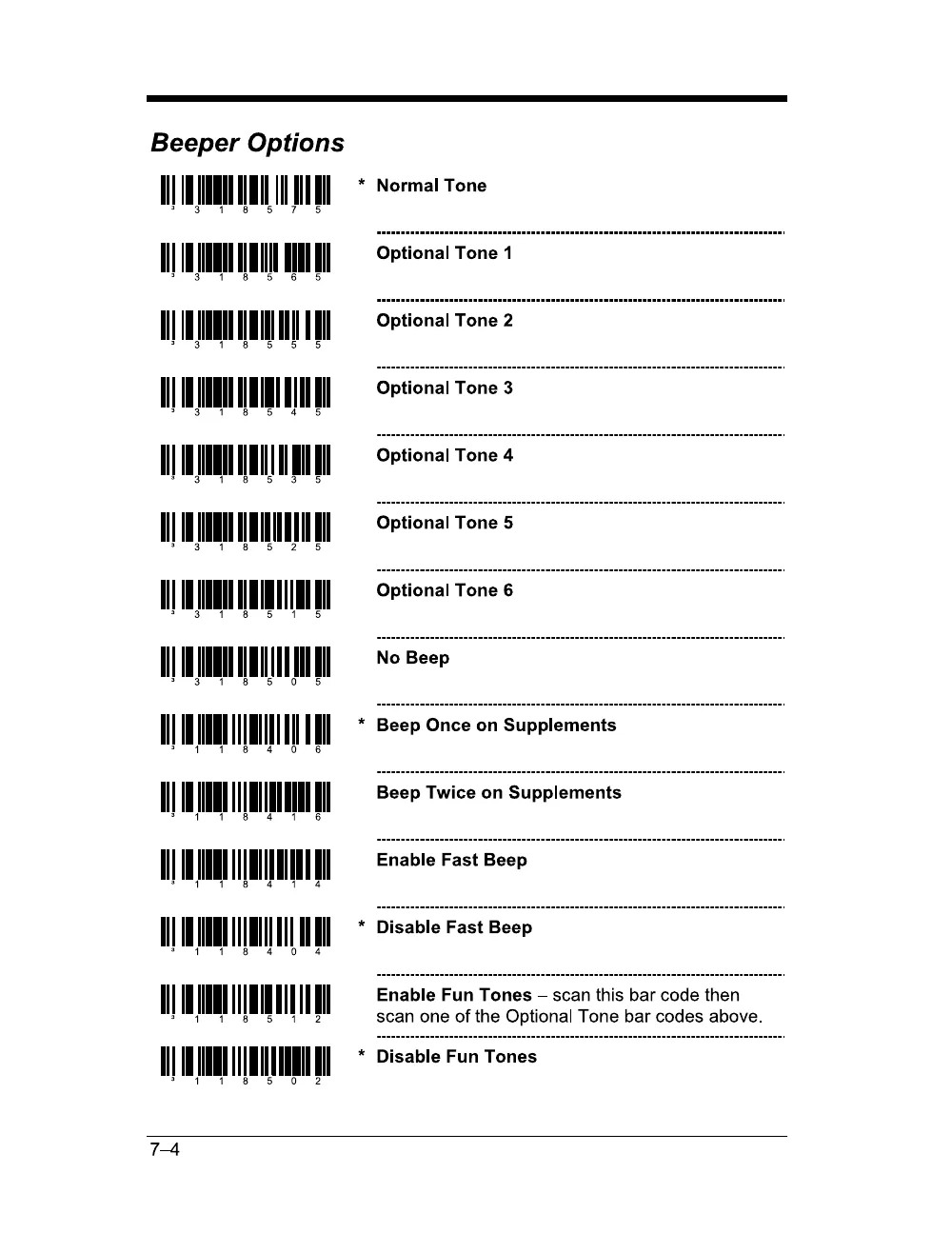
The text of page 1, read from a scan by OCR; it may hold reading errors
Beeper Options
UCM MTL MAT * Normat tone 3 3 01 °=8 «5 7 5
UT AUT AMI] OPticnat Tone 1
UTM TIM 1M] OPticnat Tone 2
HAMMAN HIN NINNI = Ptionat tone 3
| ll lil UM | il ll Optional Tone 4
| ll lil TULL | ll Optional Tone 5
UCT TITTY] = OPticnat Tone 6
UNAM ITNTINT =| No Beee 3 3 1 8 5 0 5
1 1 8 4
- Beep O Suppl t UTM eep Once on supplements
Beep Twi Suppl t | l ll TU eep Twice on Supplements
1 1 8
1 1 8
Enable Fast B HNINN I EPabte Fast Br
3
1 1° 8
- Disable Fast B [IMM] * Pisabie Fast Beep
Enable Fun Tones, this bar code th UNMET IIBITIT INT] = Enable Fun Tones ~ scan this par code then
1 1° 8 scan one of the Optional Tone bar codes above.
UL AMAT TIENT I] | * Disable Fun Tones ° 8 5 0 2
1 1