Manual · Monarch
Monarch Paxar 6015 Quick Start Guide
Manual2 pagesPDF 555 KB
Both pages are below, each with its text.
Covers · 1 model
The models it covers
From the manual · read page by page
Key facts from this manual
Each line names its page in the PDF.
Two-page operating instructions for the Monarch 6015 receipt printer, which works with the Symbol SPT 1500 or Palm III series organizers. It covers connecting the organizer, powering the printer, loading receipt paper, cleaning, replacing the batteries, troubleshooting and the specifications.
- Printer type
- Thermal direct receipt printer for the Symbol SPT 1500 or Palm III series organizers p. 1
- Power
- Four AA batteries (rechargeable NiCad or NiMH preferred, or alkaline) or the optional AC power adapter p. 1, 2
- Printhead
- Thermal direct, 2 inches (51 mm) wide, 203 dpi (8 dots per mm) p. 2
- Connector
- 10-pin connector for the organizer p. 1
- Battery life
- 600 inches (15,240 mm) of printing without recharge p. 2
- Print speed
- 1.0 inches per second for standard receipts p. 2
- Memory
- 64K p. 2
- Dimensions
- 2.38 inches (60 mm) high, 3.38 inches (86 mm) wide, 8.31 inches (211 mm) long p. 2
- Weight
- 0.92 lbs. (0.414 kg) p. 2
- Operating limits
- 32° to 104° F (0° to 40° C) p. 2
- Supply
- Thermal direct receipt paper, 2.25 inches (57 mm) wide, 2.7 mils thick, 600 inches per roll p. 2
- Bar codes
- Codabar, UPC/UCC/EAN/JAN, Interleaved 2 of 5, Code 128, Code 39 p. 2
- AC adapter
- Optional, part 120212 (115 VAC) or 120220 p. 2
- Programmer's Manual
- Part number TC6015PM p. 1
What this manual walks you through
- Attaching the organizer to the printer p. 1
- Powering the printer with batteries or the AC adapter p. 1
- Loading receipt paper p. 1
- Cleaning the printhead and platen roller p. 1, 2
- Replacing the batteries p. 2
- Fixing feed, jam and print quality problems p. 2
Good to know
- Batteries are not included, and the AC power adapter is bought separately. p. 1
- Rechargeable batteries are preferred over alkaline. p. 1
- Remove an organizer's flip cover before inserting it into the printer. p. 1
- Do not clean the printhead with sharp objects. p. 1
Questions this manual answers
What batteries does the Monarch 6015 printer take?
Four AA batteries: rechargeable NiCad or NiMH (preferred) or alkaline. Batteries are not included. p. 2
What is the part number of the Monarch 6015 AC power adapter?
The optional AC power adapter is 120212 (115 VAC) or 120220. p. 2
What size receipt paper does the Monarch 6015 use?
Thermal direct receipt paper 2.25 inches (57 mm) wide and 2.7 mils thick, 600 inches per roll. p. 2
How long do the batteries last in a Monarch 6015?
The specifications give 600 inches (15,240 mm) of printing without recharge. p. 2
Where is the Monarch 6015 Programmer's Manual?
It explains the printer's command language and can be ordered in print as part number TC6015PM. p. 1
The file
Size and text
Every page · 2
Read it here
Each page as it is printed, and its words beside it, so a phone can search and copy them.
Page1of 2
Open in the PDF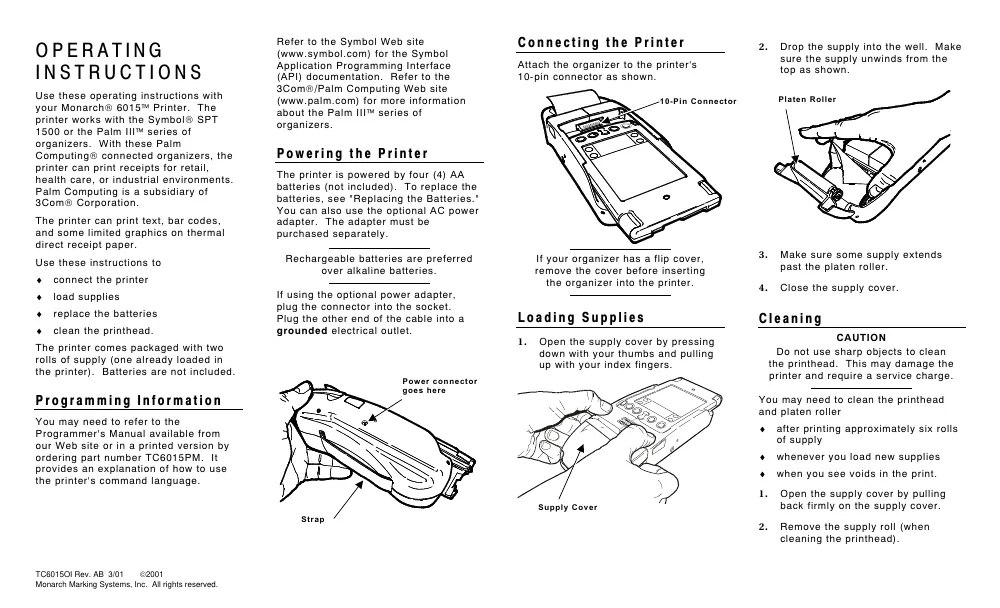
The text of page 1, from the PDF itself
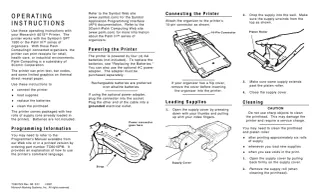
OPERATING INSTRUCTIONS Use these operating instructions with your Monarch 6015 Printer. The printer works with the Symbol SPT 1500 or the Palm III series of organizers. With these Palm Computing connected organizers, the printer can print receipts for retail, health care, or industrial environments. Palm Computing is a subsidiary of 3Com Corporation. The printer can print text, bar codes, and some limited graphics on thermal direct receipt paper. Use these instructions to
♦connect the printer♦load supplies♦replace the batteries♦clean the printhead.
Refer to the Symbol Web site (www.symbol.com) for the Symbol Application Programming Interface (API) documentation. Refer to the 3Com /Palm Computing Web site (www.palm.com) for more information about the Palm III series of organizers.
Connecting the Printer
2.
Attach the organizer to the printer's 10-pin connector as shown.
Platen Roller
10-Pin Connector
Powering the Printer The printer is powered by four (4) AA batteries (not included). To replace the batteries, see "Replacing the Batteries." You can also use the optional AC power adapter. The adapter must be purchased separately. Rechargeable batteries are preferred over alkaline batteries. If using the optional power adapter, plug the connector into the socket. Plug the other end of the cable into a grounded electrical outlet.
If your organizer has a flip cover, remove the cover before inserting the organizer into the printer.
Loading Supplies 1.
The printer comes packaged with two rolls of supply (one already loaded in the printer). Batteries are not included.
3.
Make sure some supply extends past the platen roller.
4.
Close the supply cover.
Cleaning CAUTION Do not use sharp objects to clean the printhead. This may damage the printer and require a service charge.
Open the supply cover by pressing down with your thumbs and pulling up with your index fingers.
Power connector goes here
Programming Information
You may need to clean the printhead and platen roller
You may need to refer to the Programmer's Manual available from our Web site or in a printed version by ordering part number TC6015PM. It provides an explanation of how to use the printer's command language.
♦
after printing approximately six rolls of supply
♦
whenever you load new supplies
♦
when you see voids in the print.
1.
Open the supply cover by pulling back firmly on the supply cover.
2.
Remove the supply roll (when cleaning the printhead).
Supply Cover Strap
TC6015OI Rev. AB 3/01 2001 Monarch Marking Systems, Inc. All rights reserved.
Drop the supply into the well. Make sure the supply unwinds from the top as shown.
Page2of 2
Open in the PDF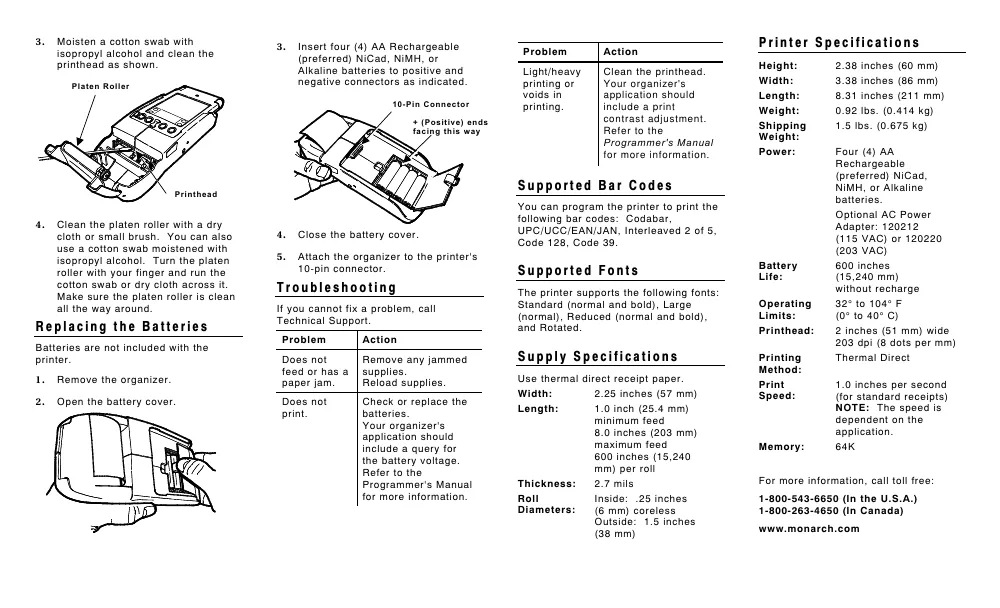
The text of page 2, from the PDF itself
3.
Moisten a cotton swab with isopropyl alcohol and clean the printhead as shown.
3.
Platen Roller
Insert four (4) AA Rechargeable (preferred) NiCad, NiMH, or Alkaline batteries to positive and negative connectors as indicated. 10-Pin Connector
Problem
Action
Light/heavy printing or voids in printing.
Clean the printhead. Your organizer's application should include a print contrast adjustment. Refer to the Programmer's Manual for more information.
- (Positive) ends facing this way
Clean the platen roller with a dry cloth or small brush. You can also use a cotton swab moistened with isopropyl alcohol. Turn the platen roller with your finger and run the cotton swab or dry cloth across it. Make sure the platen roller is clean all the way around.
Replacing the Batteries Batteries are not included with the printer. 1. 2.
Remove the organizer. Open the battery cover.
- Height
- 2.38 inches (60 mm)
- Width
- 3.38 inches (86 mm)
- Length
- 8.31 inches (211 mm)
- Weight
- 0.92 lbs. (0.414 kg)
- Shipping Weight
- 1.5 lbs. (0.675 kg)
- Power
- Four (4) AA Rechargeable (preferred) NiCad, NiMH, or Alkaline batteries.
Supported Bar CodesPrinthead4.Printer Specifications4.
Close the battery cover.
5.
Attach the organizer to the printer's 10-pin connector.
Troubleshooting If you cannot fix a problem, call Technical Support. Problem
Action
Does not feed or has a paper jam.
Remove any jammed supplies. Reload supplies.
Does not print.
Check or replace the batteries. Your organizer's application should include a query for the battery voltage. Refer to the Programmer's Manual for more information.
You can program the printer to print the following bar codes: Codabar, UPC/UCC/EAN/JAN, Interleaved 2 of 5, Code 128, Code 39.
Optional AC Power Adapter: 120212 (115 VAC) or 120220 (203 VAC)
Supported Fonts
- Battery Life
- The printer supports the following fonts: Standard (normal and bold), Large (normal), Reduced (normal and bold), and Rotated.
600 inches (15,240 mm) without recharge
- Operating Limits
- 32 ° to 104 ° F (0 ° to 40 ° C)
- Printhead
- 2 inches (51 mm) wide 203 dpi (8 dots per mm)
- Printing Method
- Thermal Direct
- Print Speed
- 1.0 inches per second (for standard receipts) NOTE: The speed is dependent on the application.
- Memory
- 64K
Supply Specifications Use thermal direct receipt paper. Width:
2.25 inches (57 mm)
- Length
- 1.0 inch (25.4 mm) minimum feed 8.0 inches (203 mm) maximum feed 600 inches (15,240 mm) per roll
- Thickness
- 2.7 mils
For more information, call toll free:
- Roll Diameters
- Inside: .25 inches (6 mm) coreless Outside: 1.5 inches (38 mm)
1-800-543-6650 (In the U.S.A.) 1-800-263-4650 (In Canada) www.monarch.com