Manual · Microscan
Microscan 97-100004-13 and MS-880 Accessory Guide
Manual2 pagesPDF 1.0 MB
Both pages are below, each with its text.
Names · 1 model
The models it names
Filed with · 1 model
Also filed with these models on the old site
From the manual · read page by page
Key facts from this manual
Each line names its page in the PDF.
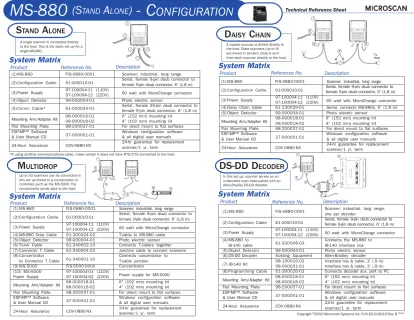
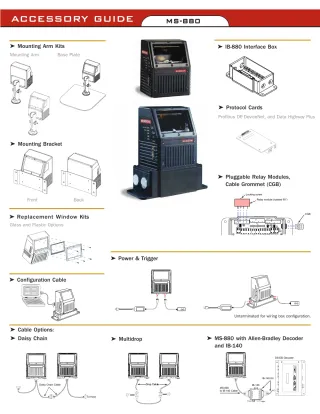
A two-page Microscan accessory guide for the MS-880 scanner, dated 08/02. It lists part numbers for the IB-880 interface box, cables, mounts, replacement windows, the object detector, the 97-100004 power supplies, protocol cards and relay modules, with a drawing of daisy chain, multidrop and Allen-Bradley decoder hookups.
- IB-880 interface box
- 99-420003-01; optional wiring box that houses the network protocol card and relay modules p. 2
- Power supply
- 97-100004-11 (US, terminated), 97-100004-12 (Euro, terminated), 97-100004-13 (US, unterminated), 97-100004-14 (Euro, unterminated); universal input, 24 Volt DC, 50 watt, table top p. 2
- Host cable
- 61-000034-01: female 25-pin Dsub to female 9-pin Dsub, 6’ (1.8 m), RS-232 p. 2
- Configuration cable
- 61-000010-01: female 9-pin to female 9-pin Dsub null modem, 6’ (1.8 m), from the scanner’s configuration port to a PC p. 2
- Daisy chain cable
- 61-130029-01, one per scanner p. 2
- Multidrop cable
- MS-880 Drop Cable 61-300024-02, one per scanner p. 2
- MS-880 to IB-140 cable
- 61-330008-04 (terminated) or 61-330008-05 (unterminated), 20’ (6m) p. 2
- IB-140 kit
- 98-100016-01 (DS1A or DD1A) or 98-000031-01 (DS4A or DD4A); cable and IB-140 box for an Allen-Bradley DS-DD decoder p. 2
- Object detector
- 99-000004-01 (terminated) or 99-000004-02 (unterminated); senses 1 to 10’ (up to 3 m); plugs into the trigger port or wires into the IB-880 p. 2
- Protocol cards
- Profibus DP, DeviceNet and DataHighway Plus; part numbers 98-0000009-02, 98-0000009-03 and 98-0000009-04 p. 2
- Relay modules
- 120 VAC, 240 VAC and 24 VDC versions, part numbers 98-000013-01, 98-000013-02 and 98-000013-03; up to 3 amps; series 70 SM package size p. 2
- Replacement windows
- Glass (standard) or plastic for food industry use; kits 98-000011-01 and 98-000011-02 p. 2
- Mounting
- Arm kits 98-000018-01 and 98-000017-01: 6” (152 mm); 98-000018-02 and 98-000017-02: 4” (102 mm); base plate 98-000046-01, 12” by 12”; mounting plate 98-200037-01 p. 2
- Cable grommet
- CGB 12-000130-01; one comes with each IB-880 p. 2
What this manual walks you through
- Choosing cables for daisy chain or multidrop setups p. 1, 2
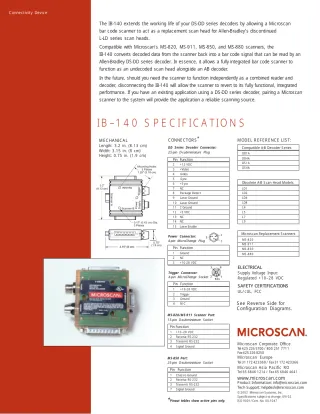
- Connecting the MS-880 to an Allen-Bradley DS-DD decoder through an IB-140 p. 1, 2
- Choosing a mounting arm, base plate or mounting plate p. 2
Good to know
- The guide points to the MS-5000 for a full multidrop configuration. p. 2
- Specifications are subject to change (guide P/N 83-210019 Rev. A 08/02). p. 2
Questions this manual answers
What power supply does the Microscan MS-880 use?
A universal input, 24 Volt DC, 50 watt table top supply: 97-100004-11 (US, terminated), 97-100004-12 (Euro, terminated), 97-100004-13 (US, unterminated) or 97-100004-14 (Euro, unterminated). p. 2
Which cable configures an MS-880 from a PC?
Configuration cable 61-000010-01, a 6’ (1.8 m) female 9-pin to female 9-pin null modem cable. p. 2
What is the IB-880?
Part 99-420003-01, an optional wiring box for the MS-880 that holds the protocol card and relay modules and allows hard wiring. p. 2
How much current can the MS-880 relay modules switch?
Up to 3 amps, AC or DC, in 120 VAC, 240 VAC and 24 VDC versions. p. 2
The file
Size and text
Every page · 2
Read it here
Each page as it is printed, and its words beside it, so a phone can search and copy them.
Page1of 2
Open in the PDF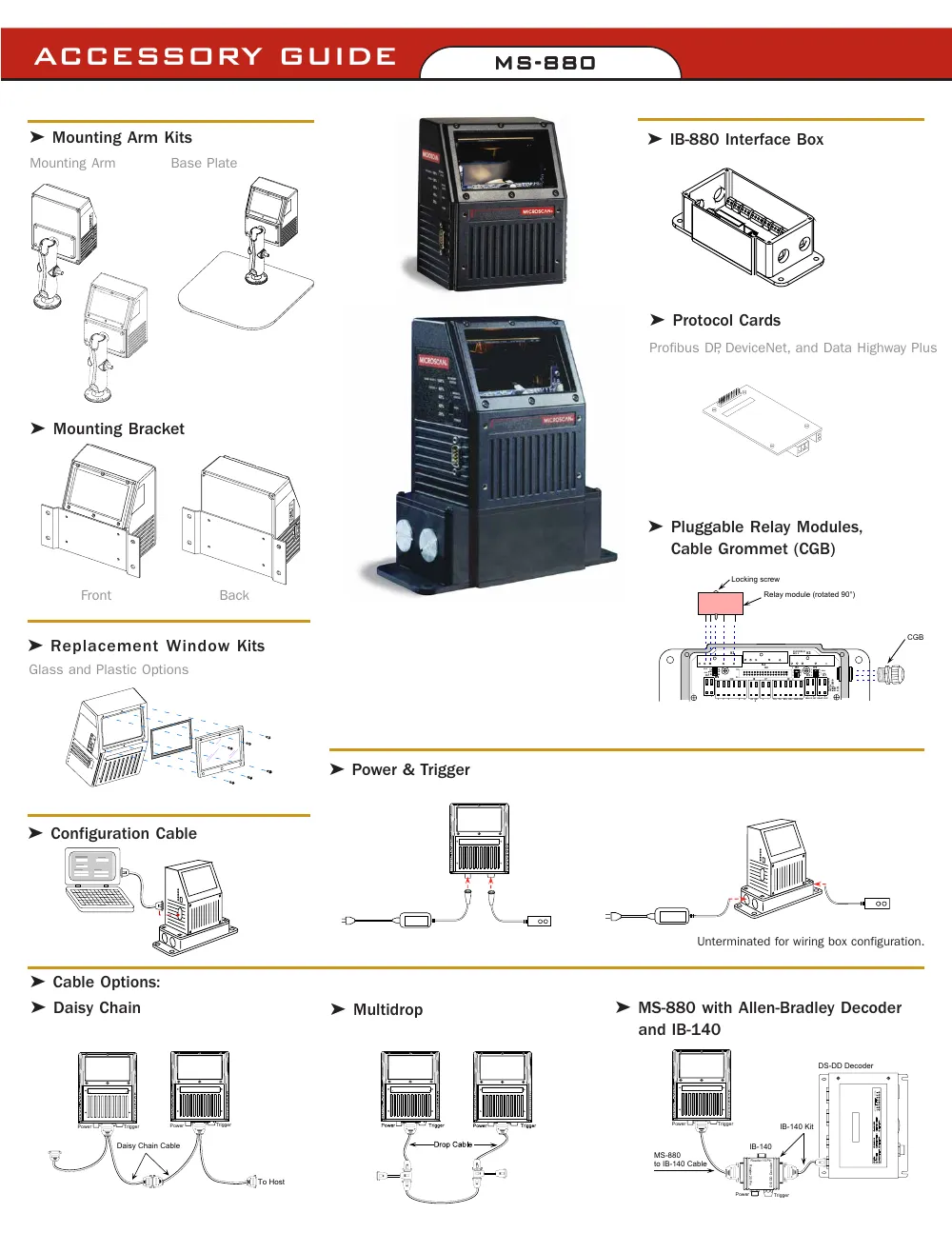
The text of page 1, from the PDF itself
ACCESSORY GUIDE ➤ Mounting Arm Kits Mounting Arm
MS-880 ➤ IB-880 Interface Box
Base Plate
➤ Protocol Cards Profibus DP, DeviceNet, and Data Highway Plus
➤ Mounting Bracket
➤ Pluggable Relay Modules, Cable Grommet (CGB) Locking screw
Back
Relay module (rotated 90°)
CGB
K2
Glass and Plastic Options
RELAY PASS1 3J12 5–2 4 6J131J1033JP1341 3 5J7J8J9JP22 4 6235+5 GN D6+
TX+ TX– RX+ RX– GND CHS
–1 3JP3J15 52 RELAY 4 PASS 6 J172+ 1K3-+-
- REVS/N
- 40-310008-01 REV. 2
K1
MICROSCAN
➤ Replacement Window Kits
MADE IN U.S.A. 43-310008-
Front
+
RELAY 2 OUT RELAY 3 OUT
➤ Power & Trigger ➤ Configuration Cable
Unterminated for wiring box configuration.
➤ Cable Options: ➤ Daisy Chain
➤ Multidrop
➤ MS-880 with Allen-Bradley Decoder and IB-140 DS-DD Decoder
TriggerPowerPowerTriggerDaisy Chain CableTo Host
IB-140 Kit IB-140 Reader 15 Pin Reader 25 Pin
MS-880 to IB-140 CableTriggerPowerDS/ DD DecoderPowerTrigger
Page2of 2
Open in the PDF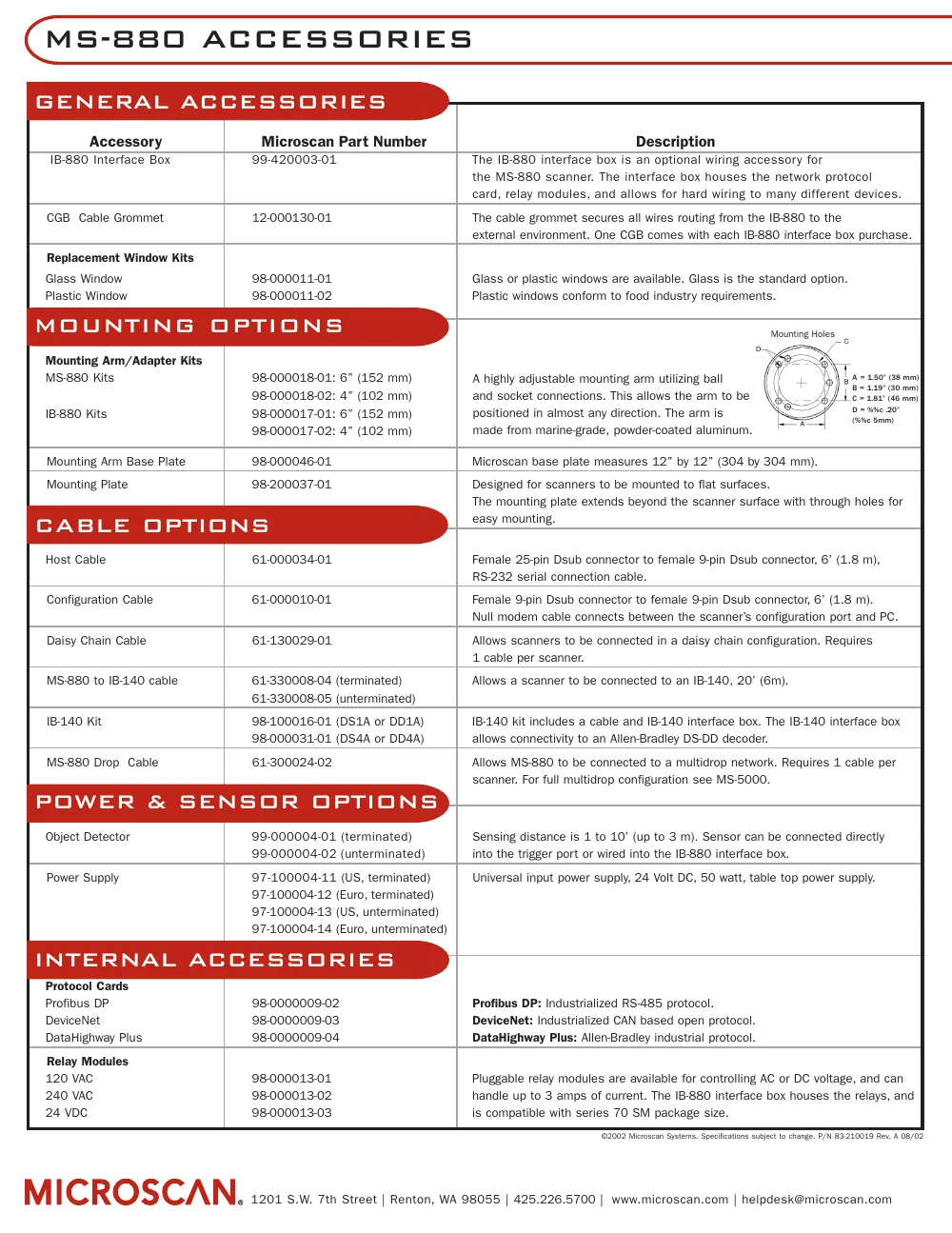
The text of page 2, from the PDF itself
MS-880 ACCESSORIES GENERAL ACCESSORIES Accessory
Microscan Part NumberDescriptionIB-880 Interface Box99-420003-01
The IB-880 interface box is an optional wiring accessory for the MS-880 scanner. The interface box houses the network protocol card, relay modules, and allows for hard wiring to many different devices.
CGB Cable Grommet
12-000130-01
The cable grommet secures all wires routing from the IB-880 to the external environment. One CGB comes with each IB-880 interface box purchase.
98-000011-01 98-000011-02
Glass or plastic windows are available. Glass is the standard option. Plastic windows conform to food industry requirements.
Replacement Window Kits Glass Window Plastic Window
MOUNTING OPTIONS Mounting Arm/Adapter Kits MS-880 Kits
Mounting Holes
98-000018-01: 6” (152 mm) 98-000018-02: 4” (102 mm) 98-000017-01: 6” (152 mm) 98-000017-02: 4” (102 mm)
A highly adjustable mounting arm utilizing ball and socket connections. This allows the arm to be positioned in almost any direction. The arm is made from marine-grade, powder-coated aluminum.
Mounting Arm Base Plate
98-000046-01
Microscan base plate measures 12” by 12” (304 by 304 mm).
Mounting Plate
98-200037-01
Designed for scanners to be mounted to flat surfaces. The mounting plate extends beyond the scanner surface with through holes for easy mounting.
IB-880 Kits
CABLE OPTIONS
A = 1.50” (38 mm) B = 1.19” (30 mm) C = 1.81” (46 mm) D = %%c .20” (%%c 5mm)
Host Cable
61-000034-01
Female 25-pin Dsub connector to female 9-pin Dsub connector, 6’ (1.8 m), RS-232 serial connection cable.
Configuration Cable
61-000010-01
Female 9-pin Dsub connector to female 9-pin Dsub connector, 6’ (1.8 m). Null modem cable connects between the scanner’s configuration port and PC.
Daisy Chain Cable
61-130029-01
Allows scanners to be connected in a daisy chain configuration. Requires 1 cable per scanner.
MS-880 to IB-140 cable
61-330008-04 (terminated) 61-330008-05 (unterminated)
Allows a scanner to be connected to an IB-140, 20’ (6m).
IB-140 Kit
98-100016-01 (DS1A or DD1A) 98-000031-01 (DS4A or DD4A)
IB-140 kit includes a cable and IB-140 interface box. The IB-140 interface box allows connectivity to an Allen-Bradley DS-DD decoder.
MS-880 Drop Cable
61-300024-02
Allows MS-880 to be connected to a multidrop network. Requires 1 cable per scanner. For full multidrop configuration see MS-5000.
POWER & SENSOR OPTIONS Object Detector
99-000004-01 (terminated) 99-000004-02 (unterminated)
Sensing distance is 1 to 10’ (up to 3 m). Sensor can be connected directly into the trigger port or wired into the IB-880 interface box.
Power Supply
97-100004-11 (US, terminated) 97-100004-12 (Euro, terminated) 97-100004-13 (US, unterminated) 97-100004-14 (Euro, unterminated)
Universal input power supply, 24 Volt DC, 50 watt, table top power supply.
INTERNAL ACCESSORIES Protocol Cards Profibus DP DeviceNet DataHighway Plus
98-0000009-02 98-0000009-03 98-0000009-04
Profibus DP: Industrialized RS-485 protocol. DeviceNet: Industrialized CAN based open protocol. DataHighway Plus: Allen-Bradley industrial protocol.
Relay Modules 120 VAC 240 VAC 24 VDC
98-000013-01 98-000013-02 98-000013-03
Pluggable relay modules are available for controlling AC or DC voltage, and can handle up to 3 amps of current. The IB-880 interface box houses the relays, and is compatible with series 70 SM package size. ©2002 Microscan Systems. Specifications subject to change. P/N 83-210019 Rev. A 08/02
1201 S.W. 7th Street | Renton, WA 98055 | 425.226.5700 | www.microscan.com | helpdesk@microscan.com