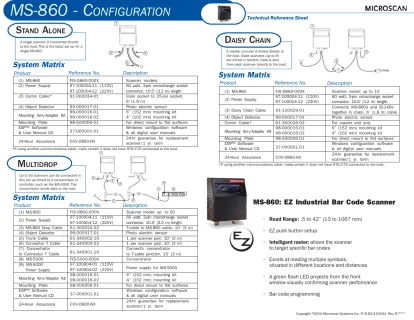
Spec sheet · Microscan
Microscan MS-860 Spec Sheet
Spec sheet2 pagesPDF 125 KB
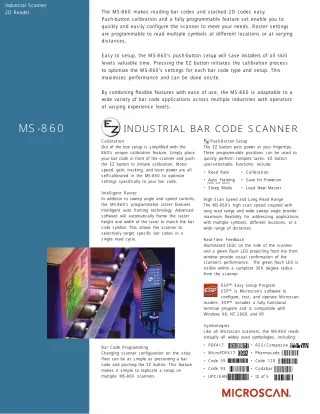
Both pages are below, each with its text.
Covers · 1 model
The models it covers
From the sheet · read page by page
Key facts from this sheet
Each line names its page in the PDF.
Two-page Microscan spec sheet for the MS-860 EZ industrial bar code scanner, a raster laser scanner that reads bar codes and stacked 2D codes. It describes push-button calibration and setup and gives the read range, scanning, electrical, environmental and connector specifications.
- What it is
- Industrial laser scanner for bar codes and stacked 2D codes, with a programmable raster p. 1
- Interfaces
- RS-232, RS-422/485, daisy chain and auxiliary port p. 2
- Connectors
- Host: 25-pin D-subminiature plug; power: 3-pin MicroChange; trigger: 4-pin MicroChange p. 2
- Power
- 10-28 VDC, 110 mA at 24 VDC typical, 200 mV p-p max. ripple p. 2
- Inputs and outputs
- Trigger, new master and input 1: optoisolated, 5-28V; outputs 1, 2, 3: optoisolated, 1-28 VDC p. 2
- Laser
- Semiconductor visible laser diode, 650 nm nominal, 50,000 hour life at 25°C, CDRH Class II p. 2
- Scan rate
- 300 to 1200 scans/second, default 500 p. 2
- Scan geometry
- Rotating 10-faceted mirror; scan width angle typically 60°; pitch ±50°, skew ±40° maximum p. 2
- Symbologies
- Code 128, Code 39, Code 93, Codabar, RSS (Composite), Interleaved 2 of 5, UPC/EAN, PDF417, MicroPDF, Pharmacode p. 2
- Dimensions
- Height 4.28" (109 mm), width 3.74" (95 mm), depth 1.76" (45 mm) p. 2
- Weight
- 16 oz. (453 g) p. 2
- Operating temperature
- 0° to 50°C (32° to 122°F); humidity up to 90% non-condensing p. 2
- Enclosure
- IP65 p. 2
- Setup software
- ESP Easy Setup Program with terminal program, for Windows 98, NT, 2000 and XP p. 1
What this sheet walks you through
- Calibrating the scanner to a bar code with the EZ button p. 1
- EZ button functions: read rate, calibration, auto framing, save for power-on, sleep mode, load new master p. 1
- Copying a setup to other scanners by bar code programming p. 1
- Host, power and trigger connector pin assignments p. 2
- Read ranges by bar width and density p. 2
Good to know
- The default configuration is activated by connecting pin 11 to ground pin 7. p. 2
- Specifications are typical performance at 25°C (77°F) with grade A labels and may vary at temperature extremes. p. 2
- The power ground pin is for power return only. p. 2
Questions this sheet answers
What power does the Microscan MS-860 need?
10 to 28 VDC, drawing about 110 mA at 24 VDC, with no more than 200 mV p-p ripple. p. 2
How do I restore the MS-860 default configuration?
The spec sheet says the default is activated by connecting pin 11 to ground pin 7. p. 2
Does the MS-860 read 2D codes?
It reads stacked 2D codes such as PDF417 and MicroPDF417, as well as Code 39, Code 128, UPC/EAN and other bar codes. p. 1
What software sets up the MS-860?
Microscan's ESP Easy Setup Program, which runs on Windows 98, NT, 2000 and XP and includes a terminal program. p. 1
The file
Size and text
Every page · 2
Read it here
Each page as it is printed, and its words beside it, so a phone can search and copy them.
Page1of 2
Open in the PDF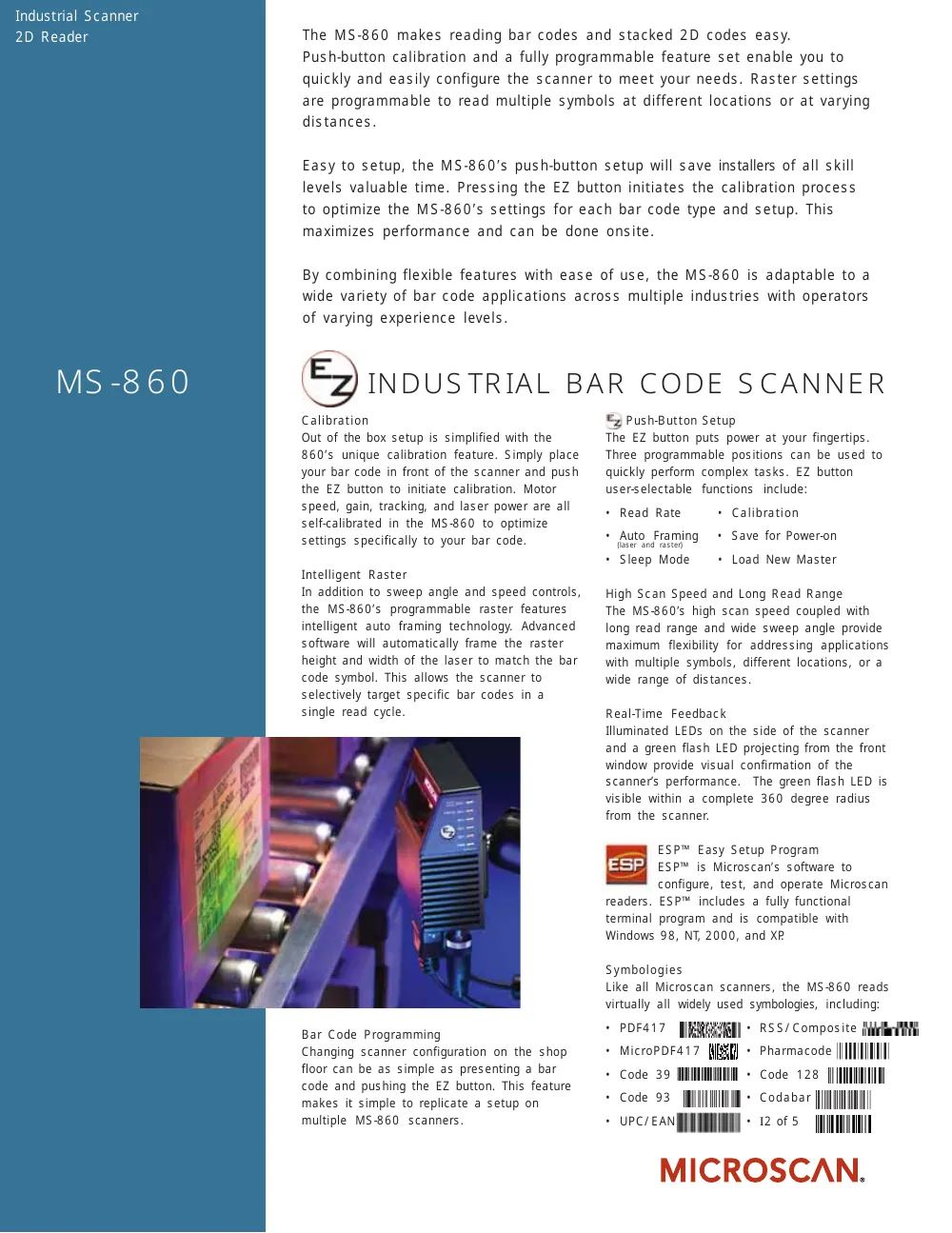
The text of page 1, from the PDF itself
Industrial Scanner 2D Reader
The MS-860 makes reading bar codes and stacked 2D codes easy. Push-button calibration and a fully programmable feature set enable you to quickly and easily configure the scanner to meet your needs. Raster settings are programmable to read multiple symbols at different locations or at var ying distances. Easy to setup, the MS-860’s push-button setup will save installers of all skill levels valuable time. Pressing the EZ button initiates the calibration process to optimize the MS-860’s settings for each bar code type and setup. This maximizes performance and can be done onsite. By combining flexible features with ease of use, the MS-860 is adaptable to a wide variety of bar code applications across multiple industries with operators of var ying experience levels.
MS-860
INDUSTRIAL BAR CODE SCANNER Calibration Out of the box setup is simplified with the 860’s unique calibration feature. Simply place your bar code in front of the scanner and push the EZ button to initiate calibration. Motor speed, gain, tracking, and laser power are all self-calibrated in the MS-860 to optimize settings specifically to your bar code.
Push-Button Setup The EZ button puts power at your fingertips. Three programmable positions can be used to quickly perform complex tasks. EZ button user-selectable functions include:
- Read Rate
- Calibration
- Auto Framing
- Save for Power-on
(laser and raster)
- Sleep Mode Intelligent Raster In addition to sweep angle and speed controls, the MS-860’s programmable raster features intelligent auto framing technology. Advanced software will automatically frame the raster height and width of the laser to match the bar code symbol. This allows the scanner to selectively target specific bar codes in a single read cycle.
- Load New Master
High Scan Speed and Long Read Range The MS-860’s high scan speed coupled with long read range and wide sweep angle provide maximum flexibility for addressing applications with multiple symbols, different locations, or a wide range of distances. Real-Time Feedback Illuminated LEDs on the side of the scanner and a green flash LED projecting from the front window provide visual confirmation of the scanner’s performance. The green flash LED is visible within a complete 360 degree radius from the scanner. ESP™ Easy Setup Program ESP™ is Microscan’s software to configure, test, and operate Microscan readers. ESP™ includes a fully functional terminal program and is compatible with Windows 98, NT, 2000, and XP. Symbologies Like all Microscan scanners, the MS-860 reads virtually all widely used symbologies, including:
Bar Code Programming Changing scanner configuration on the shop floor can be as simple as presenting a bar code and pushing the EZ button. This feature makes it simple to replicate a setup on multiple MS-860 scanners.
- PDF417
- RSS/Composite
- MicroPDF417
- Pharmacode
- Code 39
- Code 128
- Code 93
- Codabar
- UPC/EAN
- I2 of 5
Page2of 2
Open in the PDF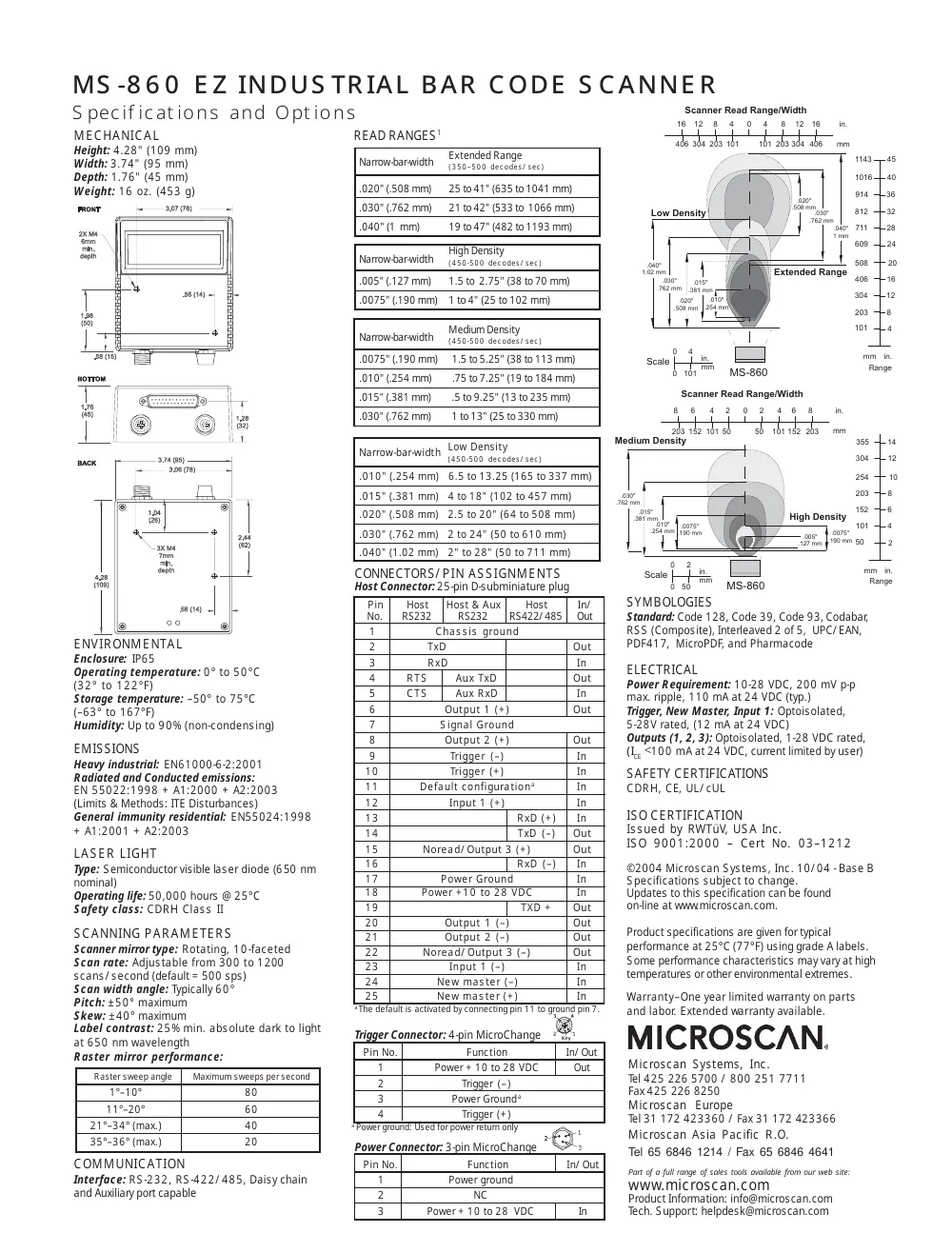
The text of page 2, from the PDF itself
MS-860 EZ INDUSTRIAL BAR CODE SCANNER Scanner Read Range/Width
Specifications and Options MECHANICAL
16
READ RANGES
Height: 4.28" (109 mm) Width: 3.74" (95 mm) Depth: 1.76" (45 mm) Weight: 16 oz. (453 g)
840406 304 203 10116in.101 203 304 4064812mmExtended RangeNarrow-bar-width(350–500 decodes/sec).020" (.508 mm)
25 to 41" (635 to 1041 mm)
.030" (.762 mm)
21 to 42" (533 to 1066 mm)
.040" (1 mm)
19 to 47" (482 to 1193 mm)
.020" .508 mm .030" .762 mm .040" 1 mm
Low DensityHigh DensityNarrow-bar-width(450-500 decodes/sec).005" (.127 mm)
1.5 to 2.75" (38 to 70 mm)
.0075" (.190 mm)
1 to 4" (25 to 102 mm)
.040" 1.02 mm .030" .762 mm
Extended Range .015" .381 mm
.010" .020" .508 mm .254 mm
Medium DensityNarrow-bar-width(450-500 decodes/sec).0075" (.190 mm)
1.5 to 5.25" (38 to 113 mm)
.010" (.254 mm)
.75 to 7.25" (19 to 184 mm)
.015" (.381 mm)
.5 to 9.25" (13 to 235 mm)
.030" (.762 mm)121Scale040 101in. mm1143451016409143681232711286092450820406163041220381014mm in. RangeMS-860
Scanner Read Range/Width 8
1 to 13" (25 to 330 mm)
642203 152 101 50Medium Density
Low Density Narrow-bar-width (450-500 decodes/sec)
02450101 152 20368in. mm
.010" (.254 mm) 6.5 to 13.25 (165 to 337 mm) .030" .762 mm .015" .381 mm .010" .0075" .254 mm .190 mm
.015" (.381 mm) 4 to 18" (102 to 457 mm) .020" (.508 mm) 2.5 to 20" (64 to 508 mm) .030" (.762 mm) 2 to 24" (50 to 610 mm)
High Density355143041225410203815261014
.0075" .005" .190 mm 50 .127 mm
2
.040" (1.02 mm) 2" to 28" (50 to 711 mm) Scale
CONNECTORS/PIN ASSIGNMENTS
ENVIRONMENTAL Enclosure: IP65 Operating temperature: 0° to 50°C (32° to 122°F) Storage temperature: –50° to 75°C (–63° to 167°F) Humidity: Up to 90% (non-condensing)
EMISSIONS Heavy industrial: EN61000-6-2:2001 Radiated and Conducted emissions: EN 55022:1998 + A1:2000 + A2:2003 (Limits & Methods: ITE Disturbances) General immunity residential: EN55024:1998
- A1:2001 + A2:2003
LASER LIGHT Type: Semiconductor visible laser diode (650 nm nominal) Operating life: 50,000 hours @ 25°C Safety class: CDRH Class II
SCANNING PARAMETERS Scanner mirror type: Rotating, 10-faceted Scan rate: Adjustable from 300 to 1200 scans/second (default = 500 sps) Scan width angle: Typically 60° Pitch: ±50° maximum Skew: ±40° maximum Label contrast: 25% min. absolute dark to light at 650 nm wavelength Raster mirror performance: Raster sweep angle
1°–10° 11°–20° 21°–34° (max.) 35°–36° (max.)
a
COMMUNICATION Interface: RS-232, RS-422/485, Daisy chain and Auxiliary port capable
Host & Aux Host RS232 RS422/485 Chassis ground TxD RxD RTS Aux TxD CTS Aux RxD Output 1 (+) Signal Ground Output 2 (+) Trigger (–) Trigger (+) Default configuration a Input 1 (+) RxD (+) TxD (–) Noread/Output 3 (+) RxD (–) Power Ground Power +10 to 28 VDC TXD + Output 1 (–) Output 2 (–) Noread/Output 3 (–) Input 1 (–) New master (–) New master (+)
In/ Out Out In Out In Out Out In In In In In Out Out In In In Out Out Out Out In In In
The default is activated by connecting pin 11 to ground pin 7.
in. mmMS-860Pin No. 1 2 3 4 a
Function Power + 10 to 28 VDC Trigger (–) Power Ground a Trigger (+)
In/Out Out
Standard: Code 128, Code 39, Code 93, Codabar, RSS (Composite), Interleaved 2 of 5, UPC/EAN, PDF417, MicroPDF, and Pharmacode
ELECTRICAL Power Requirement: 10-28 VDC, 200 mV p-p max. ripple, 110 mA at 24 VDC (typ.) Trigger, New Master, Input 1: Optoisolated, 5-28V rated, (12 mA at 24 VDC) Outputs (1, 2, 3): Optoisolated, 1-28 VDC rated, (ICE <100 mA at 24 VDC, current limited by user)
SAFETY CERTIFICATIONS CDRH, CE, UL/cUL
ISO CERTIFICATION Issued by RWTüV, USA Inc. ISO 9001:2000 – Cert No. 03–1212 ©2004 Microscan Systems, Inc. 10/04 - Base B Specifications subject to change. Updates to this specification can be found on-line at www.microscan.com. Product specifications are given for typical performance at 25°C (77°F) using grade A labels. Some performance characteristics may vary at high temperatures or other environmental extremes. Warranty–One year limited warranty on parts and labor. Extended warranty available.
Microscan Europe Tel 31 172 423360 / Fax 31 172 423366
Microscan Asia Pacific R.O.
Power Connector: 3-pin MicroChange Pin No. 1 2 3
Function Power ground NC Power + 10 to 28 VDC
Microscan Systems, Inc. Tel 425 226 5700 / 800 251 7711 Fax 425 226 8250
Power ground: Used for power return only
Tel 65 6846 1214 / Fax 65 6846 4641 In/Out
Part of a full range of sales tools available from our web site:
www.microscan.com Inmm in. RangeSYMBOLOGIES
Trigger Connector: 4-pin MicroChange
Maximum sweeps per second
80 60 40 20Host RS23220 50
Host Connector: 25-pin D-subminiature plug Pin No. 1 2 3 4 5 6 7 8 9 10 11 12 13 14 15 16 17 18 19 20 21 22 23 24 25
0
Product Information: info@microscan.com Tech. Support: helpdesk@microscan.com