Manual · Microscan
Microscan 97-100004-11 and MS-860 Manual
Manual1 pagePDF 110 KB
The page is below, with its text.
Names · 1 model
The models it names
Filed with · 1 model
Also filed with these models on the old site
From the manual · read page by page
Key facts from this manual
Each line names its page in the PDF.
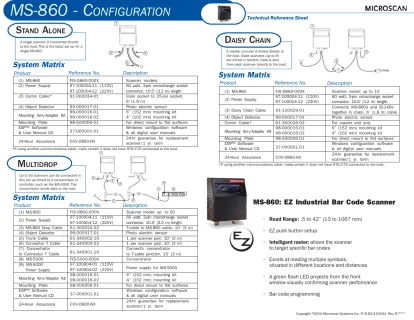
One-page Microscan technical reference sheet on ways to set up the MS-860 industrial bar code scanner: alone on a host, as a master with slave scanners, or many scanners through a concentrator. It lists the parts used in each setup and the scanner's main features.
- What it is
- EZ industrial bar code scanner p. 1
- Read range
- .5 to 42" (13 to 1067 mm) p. 1
- Setup
- EZ push button setup and bar code programming p. 1
- Raster
- Intelligent raster that can target specific bar codes p. 1
- Read indicator
- Green flash LED projected from the front window p. 1
- Setups shown
- Stand alone, daisy chain, multidrop p. 1
- Master and slaves
- One master scanner linked to the host, up to 9 slave scanners linked in tandem p. 1
- Concentrator network
- Up to 50 scanners linked to a concentrator or controller such as the MS-5000 p. 1
- Software
- ESP software and user manual CD p. 1
What this manual walks you through
- Connecting a single scanner directly to the host p. 1
- Linking a master scanner and slave scanners to one host p. 1
- Networking many scanners through a concentrator such as the MS-5000 p. 1
- Parts needed for each setup p. 1
Good to know
- A substitute communications cable must not have RTS/CTS connected to the host. p. 1
Questions this manual answers
What is the read range of the Microscan MS-860?
From .5 to 42 inches (13 to 1067 mm). p. 1
How many MS-860 scanners can be networked together?
Up to 50 scanners can be linked to a concentrator or controller such as the MS-5000; in a master setup, up to 9 slave scanners link to one master. p. 1
Can I use a different communications cable with the MS-860?
Yes, as long as the cable does not have RTS/CTS connected to the host. p. 1
The file
Size and text
Every page · 1
Read it here
Each page as it is printed, and its words beside it, so a phone can search and copy them.
Page1of 1
Open in the PDF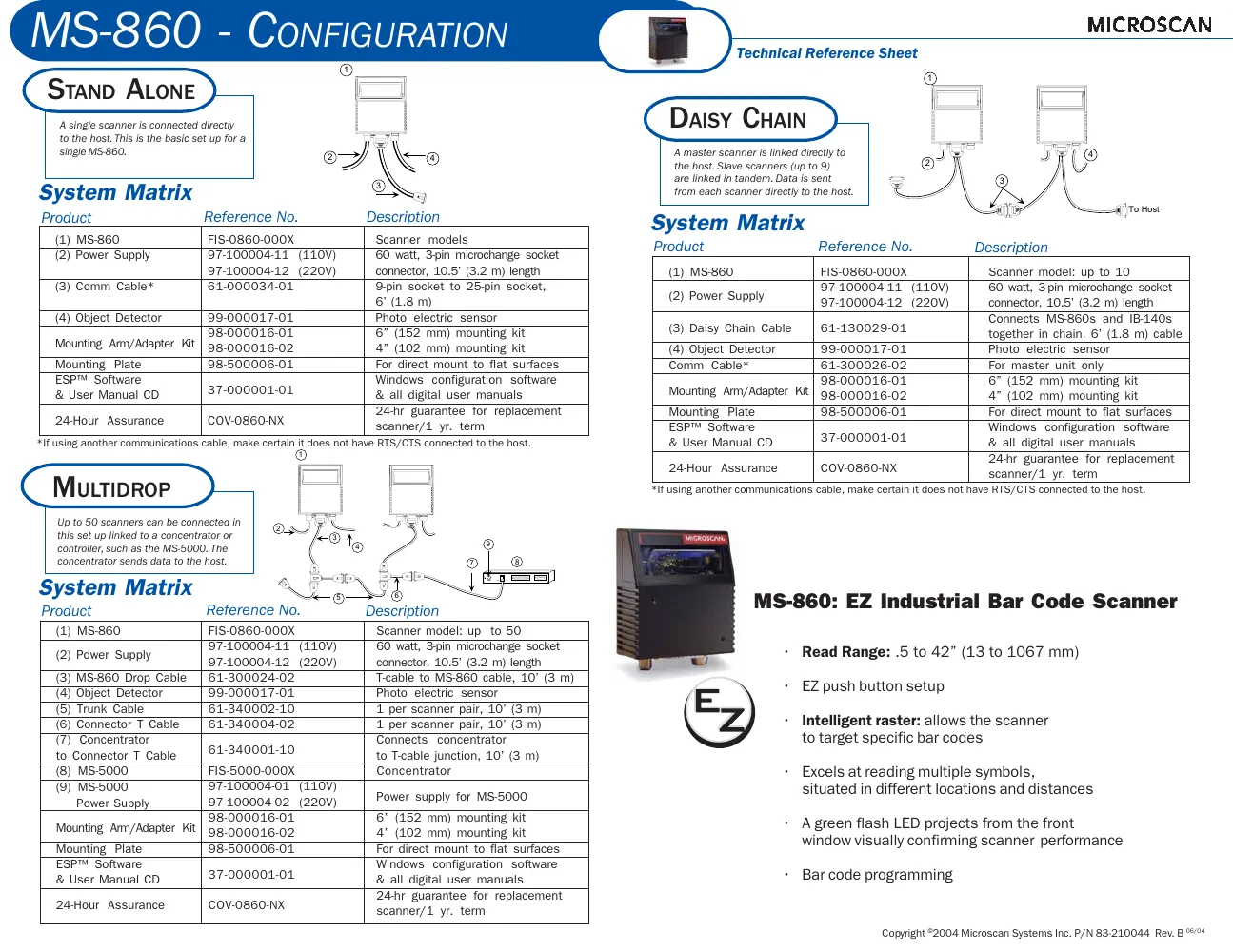
The text of page 1, from the PDF itself
MS-860 - CONFIGURATION
Technical Reference Sheet
1
1
STAND ALONE DAISY CHAIN
A single scanner is connected directly to the host. This is the basic set up for a single MS-860.
2 3
System Matrix Product (1) MS-860 (2) Power Supply (3) Comm Cable*
Reference No.
Description
FIS-0860-000X 97-100004-11 (110V) 97-100004-12 (220V) 61-000034-01
99-000017-01 98-000016-01 Mounting Arm/Adapter Kit 98-000016-02 Mounting Plate 98-500006-01 ESP™ Software 37-000001-01 & User Manual CD COV-0860-NX
*If using another communications cable, make certain it does not have RTS/CTS connected to the host.
3 To HostProductReference No.(1) MS-860
FIS-0860-000X 97-100004-11 (110V) 97-100004-12 (220V)
(2) Power Supply (3) Daisy Chain Cable
61-130029-01
(4) Object Detector Comm Cable*
99-000017-01 61-300026-02 98-000016-01 Mounting Arm/Adapter Kit 98-000016-02 Mounting Plate 98-500006-01 ESP™ Software 37-000001-01 & User Manual CD
124-Hour AssuranceMULTIDROP 2387HOST
System Matrix (2) Power Supply (3) MS-860 Drop Cable (4) Object Detector (5) Trunk Cable (6) Connector T Cable (7) Concentrator to Connector T Cable (8) MS-5000 (9) MS-5000 Power Supply
POWER
5
Reference No. FIS-0860-000X 97-100004-11 (110V) 97-100004-12 (220V) 61-300024-02 99-000017-01 61-340002-10 61-340004-02 61-340001-10
FIS-5000-000X 97-100004-01 (110V) 97-100004-02 (220V) 98-000016-01 Mounting Arm/Adapter Kit 98-000016-02 Mounting Plate 98-500006-01 ESP™ Software 37-000001-01 & User Manual CD 24-Hour Assurance
Scanner model: up to 10 60 watt, 3-pin microchange socket connector, 10.5’ (3.2 m) length Connects MS-860s and IB-140s together in chain, 6’ (1.8 m) cable Photo electric sensor For master unit only 6” (152 mm) mounting kit 4” (102 mm) mounting kit For direct mount to flat surfaces Windows configuration software & all digital user manuals 24-hr guarantee for replacement scanner/1 yr. term
9
4
- ••••••••••••
- •••••••••••
(1) MS-860COV-0860-NXDescription
*If using another communications cable, make certain it does not have RTS/CTS connected to the host.
Up to 50 scanners can be connected in this set up linked to a concentrator or controller, such as the MS-5000. The concentrator sends data to the host.
Product42System Matrix
Scanner models 60 watt, 3-pin microchange socket connector, 10.5’ (3.2 m) length 9-pin socket to 25-pin socket, 6’ (1.8 m) Photo electric sensor 6” (152 mm) mounting kit 4” (102 mm) mounting kit For direct mount to flat surfaces Windows configuration software & all digital user manuals 24-hr guarantee for replacement scanner/1 yr. term
(4) Object Detector
24-Hour Assurance
A master scanner is linked directly to the host. Slave scanners (up to 9) are linked in tandem. Data is sent from each scanner directly to the host.
4COV-0860-NXMONITOR••••• ••••LAN6
Description Scanner model: up to 50 60 watt, 3-pin microchange socket connector, 10.5’ (3.2 m) length T-cable to MS-860 cable, 10’ (3 m) Photo electric sensor 1 per scanner pair, 10’ (3 m) 1 per scanner pair, 10’ (3 m) Connects concentrator to T-cable junction, 10’ (3 m) Concentrator Power supply for MS-5000 6” (152 mm) mounting kit 4” (102 mm) mounting kit For direct mount to flat surfaces Windows configuration software & all digital user manuals 24-hr guarantee for replacement scanner/1 yr. term
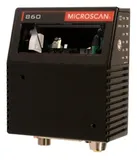
MS-860: EZ Industrial Bar Code Scanner
- Read Range: .5 to 42” (13 to 1067 mm)
- EZ push button setup
- Intelligent raster: allows the scanner to target specific bar codes
- Excels at reading multiple symbols, situated in different locations and distances
- A green flash LED projects from the front window visually confirming scanner performance
- Bar code programming
Copyright ©2004 Microscan Systems Inc. P/N 83-210044 Rev. B 06/04