Manual · Microscan
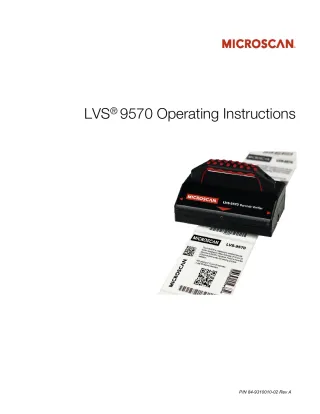
LVS-9570 Operating Instructions
Manual27 pagesPDF 1.9 MB
Operating instructions for the Microscan LVS-9570 handheld barcode verifier: software setup, calibration, scanning technique and cleaning.
Covers · 1 model
The models it covers
Summary
What is in it
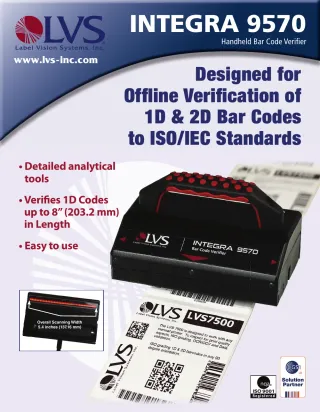
Microscan's operating instructions for the LVS-9570, a handheld line scan barcode verifier that grades 1D and 2D codes to ISO/IEC standards. It covers safety, logging on to the LVS-95XX software, turning on and calibrating the unit with the test card, the hardware, scanning direction, speed and position (ladder and picket fence), quiet zones, scanning labels on boxes, shipping containers and webs, cleaning the sensor window and roller, and engineering specifications with supported symbologies and standards.
Its parts
- Important Information to Read
- Safety Instructions
- About the LVS-9570
- LVS-95XX Software Steps
- Hardware Overview
- Scanning Direction, Speed, and Position
- Scanning Labels Applied to Products
- Cleaning Instructions
- Additional Resources
- Engineering Specifications
From the manual · read page by page
Key facts from this manual
Some pages are scans or cannot be read; this says only what the readable text supports. Each line names its page in the PDF.
The Microscan operating instructions for the LVS-9570 handheld barcode verifier, a line scan camera that grades 1D and 2D barcodes to ISO/IEC standards with the LVS-95XX software. It walks through turning on the camera, calibrating with the test card, scanning in ladder or picket fence orientation, and cleaning, and ends with the engineering specifications.
- Device
- Handheld, line scan camera-based barcode verifier for offline verification of 1D and 2D codes to ISO/IEC standards p. 5
- Scanning area
- 5.4" (137.16 mm) wide in picket fence orientation; 12.0" (305 mm) long in ladder orientation, quiet zone included p. 14
- Minimum X-dimension
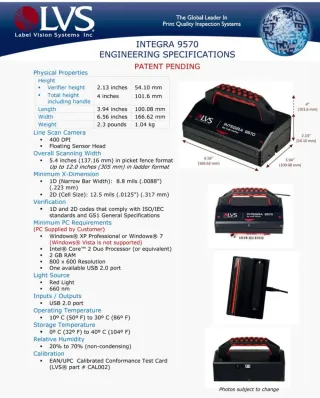
- 1D narrow bar 8.8 mils (0.223 mm); 2D cell size 12.5 mils (0.317 mm) p. 25
- Camera
- 400 DPI line scan camera, floating sensor head p. 25
- Interface
- USB 2.0 port; 6-foot (1.8 m) USB cable supplied, longer cables allowed with a powered USB hub p. 13, 25
- Power
- External power supply not required p. 13
- PC requirements
- Customer-supplied PC: Windows XP Professional or Windows 7, Intel Core 2 Duo or equivalent, 2 GB RAM, 800 x 600, one USB 2.0 port p. 25
- Software
- LVS-95XX software, installed per the LVS-95XX Series Software Installation Guide p. 4
- Calibration
- EAN/UPC Calibrated Conformance Standard Test Card, at least weekly; replace the card every two years p. 8, 9
- Indicator light
- Yellow: processing; green: all parameters grade A, B, C or D; red: a grade of F or no barcode detected p. 12
- Weight
- 2.3 pounds (1.04 kg) p. 25
- Operating temperature
- 10º C (50º F) to 30º C (86º F) p. 25
- ISO conformance
- ISO/IEC 15415:2004(E), 15416:2000(E), 15426-1:2000(E), 15426-2:2004(E) p. 26
- Symbologies
- Include Aztec Code, Code 128, Code 39, ECC-200 (Data Matrix), GS1-128, MaxiCode, PDF417, QR Code, UPC-A, USPS Intelligent Mail Barcode p. 26
What this manual walks you through
- Turning on the LVS-9570 camera in the software, alongside an LVS-9510 or LVS-9505 p. 7
- Calibrating with the EAN/UPC test card p. 8, 9, 10, 11
- Grading a barcode and reading the indicator light p. 11, 12
- Allowing space for the quiet zone p. 15
- Scanning direction and speed p. 16, 17
- Scanning in ladder or picket fence orientation p. 18
- Telling correctly from incorrectly scanned images p. 19, 20
- Scanning labels on boxes, shipping containers, webs and desktops p. 21, 22
- Cleaning the sensor window p. 23
- Cleaning the rubber roller p. 24
Good to know
- Reads flat surfaces only; uneven surfaces cannot be read. p. 21
- The verifier must be pulled through a label; it detects nothing when pushed. p. 16
- Pulled too quickly, it shows an Overspeed Problem message and the image is not captured. p. 17
- Clean the rubber roller only with dishwashing liquid; alcohol, window cleaner or petroleum products crack the rubber. p. 24
- Never spray glass cleaner directly on the sensor glass, and never use an industrial-strength cleaner. p. 23
Questions this manual answers
How often should the LVS-9570 be calibrated?
At least weekly, if not daily. Calibration takes under 30 seconds, and the test card should be replaced every two years. p. 8
What does the Overspeed Problem message on the LVS-9570 mean?
The verifier was pulled through the barcode too quickly and the image was not captured; pull it through slowly. p. 17
How long is the LVS-9570 USB cable?
A 6-foot (1.8 m) USB cable is supplied. A longer cable is allowed when used with a powered USB hub. p. 13
What do the LVS-9570 indicator light colors mean?
Yellow means it is processing, green means all parameters passed with A to D, and red means a failing F grade or no barcode found. p. 12
Can the LVS-9570 verify a barcode on a curved or uneven package?
No. It reads flat surfaces only; an uneven surface such as a bag of chips cannot be read. p. 21
The whole text · 3 parts
Read the manual here as text
Its text as extracted from the PDF, unedited, in parts; each page opens the PDF at that page.
The file