Manual · Microscan
Microscan IB-3PC Quick Start Guide
Manual1 pagePDF 135 KB
The page is below, with its text.
Covers · 1 model
The models it covers
From the manual · read page by page
Key facts from this manual
Each line names its page in the PDF.
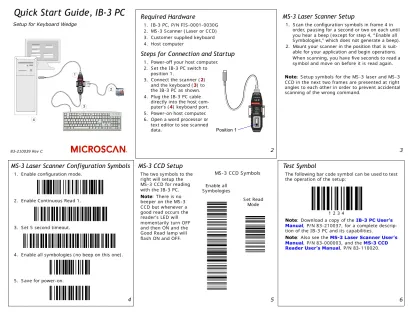
This one-page quick start guide shows how to connect the Microscan IB-3 PC interface as a keyboard wedge with an MS-3 laser or CCD scanner. It gives the connection steps and the setup bar codes for each scanner.
- Part number
- IB-3 PC, P/N FIS-0001-0030G p. 1
- Scanners
- MS-3 scanner, laser or CCD p. 1
- Host connection
- Cable plugs directly into the host computer's keyboard port; the keyboard plugs into the IB-3 PC p. 1
- Connectors
- Scanner, keyboard in, host/serial, and keyboard out/power in p. 1
- Manuals
- IB-3 PC User's Manual P/N 83-210037; MS-3 Laser Scanner manual P/N 83-000003; MS-3 CCD manual P/N 83-110020 p. 1
What this manual walks you through
- Connecting the scanner and keyboard to the host through the IB-3 PC p. 1
- Setting up an MS-3 laser scanner with configuration bar codes p. 1
- Setting up an MS-3 CCD reader p. 1
- Testing the setup with a test bar code p. 1
Good to know
- Power off the host computer before connecting the IB-3 PC. p. 1
- The MS-3 CCD has no beeper; a good read shows on its LED and Good Read lamp. p. 1
- With the setup shown, a symbol is read again after five seconds. p. 1
Questions this manual answers
What is the part number of the Microscan IB-3 PC?
The quick start guide gives P/N FIS-0001-0030G. p. 1
Which scanners work with the IB-3 PC keyboard wedge?
The guide sets it up with an MS-3 scanner, laser or CCD. p. 1
How do I connect the IB-3 PC to a computer?
Power off the computer, connect the scanner and keyboard to the IB-3 PC, plug its cable into the computer's keyboard port, then power on. p. 1
Where is the full IB-3 PC manual?
The guide points to the IB-3 PC User's Manual, P/N 83-210037. p. 1
The file
Size and text
Every page · 1
Read it here
Each page as it is printed, and its words beside it, so a phone can search and copy them.
Page1of 1
Open in the PDF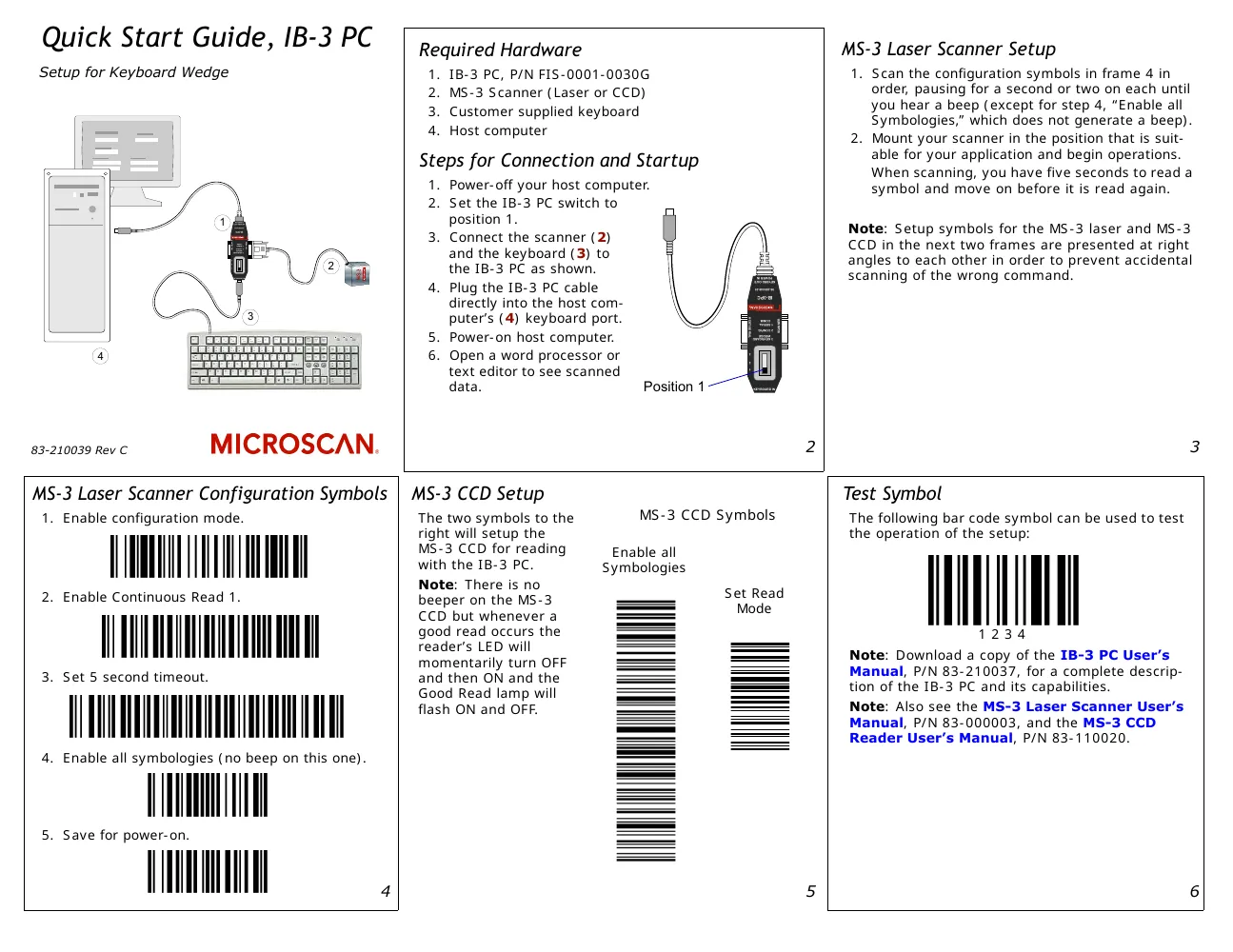
The text of page 1, from the PDF itself
Quick Start Guide, IB-3 PC
MS-3 Laser Scanner Setup
Required Hardware
Setup for Keyboard Wedge
1. Scan the configuration symbols in frame 4 in order, pausing for a second or two on each until you hear a beep (except for step 4, “Enable all Symbologies,” which does not generate a beep). 2. Mount your scanner in the position that is suitable for your application and begin operations. When scanning, you have five seconds to read a symbol and move on before it is read again.
1. IB-3 PC, P/N FIS-0001-0030G 2. MS-3 Scanner (Laser or CCD) 3. Customer supplied keyboard 4. Host computer
Steps for Connection and Startup
SCANNER
IB-3PC 1 SERIAL COMM. 2 CONFIG. 3 KEYBOARD WEDGE
3 2 1
98-000049-01 SCANNER
IB-3PC 1 SERIAL COMM. 2 CONFIG. 3 KEYBOARD WEDGE
3 2 14HOST/SERIAL398-000049-01
KEYBRD OUT/ POWER IN HOST/SERIAL
2 KEYBOARD IN
Note: Setup symbols for the MS-3 laser and MS-3 CCD in the next two frames are presented at right angles to each other in order to prevent accidental scanning of the wrong command.
KEYBRD OUT/ POWER IN
1
1. Power-off your host computer. 2. Set the IB-3 PC switch to position 1. 3. Connect the scanner (2) and the keyboard (3) to the IB-3 PC as shown. 4. Plug the IB-3 PC cable directly into the host computer’s (4) keyboard port. 5. Power-on host computer. 6. Open a word processor or text editor to see scanned Position 1 data.
KEYBOARD IN283-210039 Rev C
MS-3 Laser Scanner Configuration Symbols 1. Enable configuration mode.
MS-3 CCD Setup The two symbols to the right will setup the MS-3 CCD for reading with the IB-3 PC. Note: There is no beeper on the MS-3 CCD but whenever a good read occurs the reader’s LED will momentarily turn OFF and then ON and the Good Read lamp will flash ON and OFF.
2. Enable Continuous Read 1.
3. Set 5 second timeout.
3
Test Symbol MS-3 CCD Symbols
The following bar code symbol can be used to test the operation of the setup:
Enable all Symbologies Set Read Mode 1234 Note: Download a copy of the IB-3 PC User’s Manual, P/N 83-210037, for a complete description of the IB-3 PC and its capabilities. Note: Also see the MS-3 Laser Scanner User’s Manual, P/N 83-000003, and the MS-3 CCD Reader User’s Manual, P/N 83-110020.
4. Enable all symbologies (no beep on this one).
5. Save for power-on.456