Manual · Microscan
Quick Start Guide Quadrus EZ Reader
Manual16 pagesPDF 554 KB
Quick start guide for the Microscan Quadrus EZ fixed-mount reader: hardware, connection, ESP setup, calibration and read test.
Filed with · 1 model
Also filed with these models on the old site
Summary
What is in it
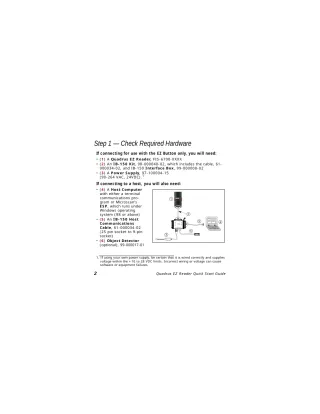
A step-by-step quick start guide for the Microscan Quadrus EZ Reader (FIS-6700 series). It lists the hardware needed, including the IB-150 interface kit and power supply, then shows how to connect the system, position the symbol and reader, install and use the ESP (Easy Setup Program) software, choose the communications protocol, locate the symbol, calibrate the reader, run a readability test, change and save settings, and connect remote video. Many steps can also be done with the EZ Button or by serial command.
Its parts
- Check Required Hardware
- Connect the System
- Position Symbol and Reader
- Install ESP
- Select Reader Model in ESP
- Select Communications Protocol
- Locate the Symbol in the FOV
- Calibrate Settings
- Readability Test
- Applications
- Make Menu Changes and Save in ESP
- Connect to Remote Video (optional)
From the manual · read page by page
Key facts from this manual
Each line names its page in the PDF.
The Microscan quick start guide (P/N 83-210022 Rev G) for the Quadrus EZ Reader, FIS-6700-XXXX. It walks through the hardware needed, connecting through the IB-150 interface box, positioning the reader, installing ESP, locating and calibrating on a symbol, the readability test, saving settings and remote video.
- Device
- Quadrus EZ reader, set up with ESP (Easy Setup Program), serial commands or its embedded menus p. 1
- Power
- Power supply 97-100004-15 (90-264 VAC, 24VDC); any other supply must give +10 to 28 VDC p. 2
- Interface kit
- IB-150 Kit 98-000040-02: cable 61000034-02 and IB-150 Interface Box 99-000008-02 p. 2
- Host cable
- IB-150 Host Communications Cable 61-000034-02, 25 pin socket to 9-pin socket p. 2
- Host link
- RS-232 on a COM port through ESP; TCP/IP or USB per ESP Help or the user's manual p. 7
- Software
- ESP, on Windows 98 or above, from the Microscan Tools CD or the Microscan web site p. 1, 5
- Read angles
- Maximum skew ±30° and pitch ±30°; symbols may be rotated at any angle p. 4
- Accessories
- Object detector 99-000017-01 (optional); mounting stand 98-000020-01 p. 2, 4
- EZ Button
- Hold for 1 beep to locate, 2 beeps to calibrate, 3 beeps for the read rate test, 4 beeps for live video p. 8, 10, 12, 15
- Serial commands
- <op,6,1> starts and <op,6,0> ends calibration; <C> or <Cp> starts and <J> ends the read rate test p. 11, 12
- Video output
- Live video or triggered events to an RS-170 non-interlaced monitor on the video output port p. 15
- Read rate LEDs
- 20%, 40%, 60%, 80%, 100% LEDs on the side, active only during a read rate test p. 12
- Saving settings
- Send, No Save; Send and Save; or Send and Save as Customer Settings (a special section of NOVRAM) p. 14
What this manual walks you through
- Checking the hardware needed, with or without a host p. 2
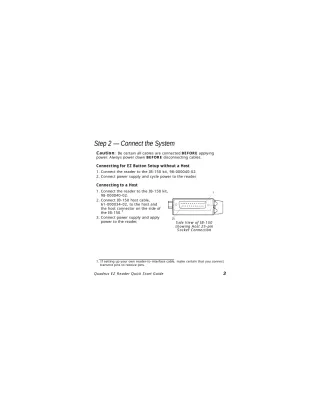
- Connecting the reader through the IB-150 to power and a host p. 3
- Positioning the reader and symbol at the focal distance p. 4
- Installing ESP and selecting the reader model p. 5, 6
- Selecting the RS-232 communications port in ESP p. 7
- Locating the symbol in the field of view with the X-pattern p. 8, 9
- Calibrating by EZ Button, ESP or serial command p. 10, 11
- Running the readability (read rate) test p. 12
- Changing and saving settings in ESP p. 13, 14
- Connecting a remote video monitor p. 15
Good to know
- Connect all cables before applying power, and power down before disconnecting cables. p. 3
- On a home-made reader-to-interface cable, transmit pins must go to receive pins. p. 3
- Place the reader away from sunlight and other ambient light, and tip it to avoid specular glare. p. 4
- On CCD readers in Live Video Mode the shutter cannot be set slower than 1/1000; slower speeds disable video output. p. 15
- If calibration fails, the reader emits 5 short beeps and stops searching. p. 10
Questions this manual answers
What do I need to connect a Quadrus EZ reader to a PC?
The reader, the IB-150 kit 98-000040-02, power supply 97-100004-15, the IB-150 host cable 61-000034-02 and a PC running ESP or a terminal program. p. 2
What voltage does the Quadrus EZ need?
The listed supply gives 24VDC; a different supply must stay within +10 to 28 VDC. p. 2
How do I calibrate the Quadrus EZ without a computer?
Hold the EZ Button until two short beeps; the reader searches its image processing settings and flashes green when done. p. 10
How do I run a read rate test on the Quadrus EZ by serial command?
Send <C> or <Cp> from a terminal to start it and <J> to end it. p. 12
The whole text · 2 parts
Read the manual here as text
Its text as extracted from the PDF, unedited, in parts; each page opens the PDF at that page.
The file