Spec sheet · Metrologic
Metrologic ScanPal 2 Portable Data Terminal Spec Sheet
Spec sheet4 pagesPDF 332 KB
All 4 pages are below, each with its text.
Filed with · 1 model
Also filed with these models on the old site
From the sheet · read page by page
Key facts from this sheet
Each line names its page in the PDF.
This is the Metrologic data sheet for the ScanPal 2, a compact handheld data collection terminal with a CCD scanner, from August 2001. It lists the specifications, the accessories and the three steps to start collecting data with the Windows-based Application Generator.
- Device
- Lightweight handheld data collection terminal with a CCD scan engine p. 2
- Data upload
- RS232, IR, IrDA or keyboard wedge p. 2
- Power
- Two AAA batteries, over 100 hours; optional one Ni-MH rechargeable battery p. 1, 2
- Memory
- 1 MB SRAM (about 50,000 records); 1 MB flash ROM p. 1, 2
- Display
- Backlit LCD, 128 x 64 pixels; small font 20x8 or large font 15x4 characters p. 1, 2
- Keypad
- 21 rubber keys: alphanumeric, function, scanner p. 1
- Scanning
- 610 nm - 623 nm LED; 100 scans/sec; 30 mm - 160 mm (1.2" - 6.3") for 13 mil codes p. 1
- Symbologies
- Autodiscriminates all standard bar codes p. 1
- Size
- 145 mm x 63 mm x 33.5 mm (5.7" x 2.5" x 1.3") p. 1
- Weight
- 180 g (6.3 oz) with batteries p. 1
- Drop
- 1.2 m (4') onto concrete p. 1
- Indicators
- Programmable buzzer (1 KHz - 4KHz); dual-color green and red LED p. 1
- Software
- Windows-based Application Generator; optional C and BASIC compilers p. 1
- Accessories
- Protective case, download/charger cradle, high-speed IrDA transceiver, battery charger with NiMH battery p. 3
What this sheet walks you through
- What comes in the ScanPal 2 kit p. 3
- Defining an application and downloading it to the terminal p. 3
- Collecting data and uploading it to the host p. 3
- Building forms, menus and lookup files in the Application Generator p. 4
Good to know
- For symbologies beyond the standard ones, the sheet says to call Metrologic. p. 1
- The Application Generator allows up to 10 menus and up to three lookup files. p. 4
Questions this sheet answers
What batteries does the ScanPal 2 use?
Two standard AAA batteries, good for over 100 hours; a Ni-MH rechargeable battery and charging cradle are options. p. 1, 2
How many records can a ScanPal 2 store?
Its 1 MB SRAM holds about 50,000 records. p. 2
How do I get data off a ScanPal 2?
Upload it to the host over RS232, IR, IrDA or keyboard wedge. p. 3
The file
Size and text
Every page · 4
Read it here
Each page as it is printed, and its words beside it, so a phone can search and copy them.
Page1of 4
Open in the PDF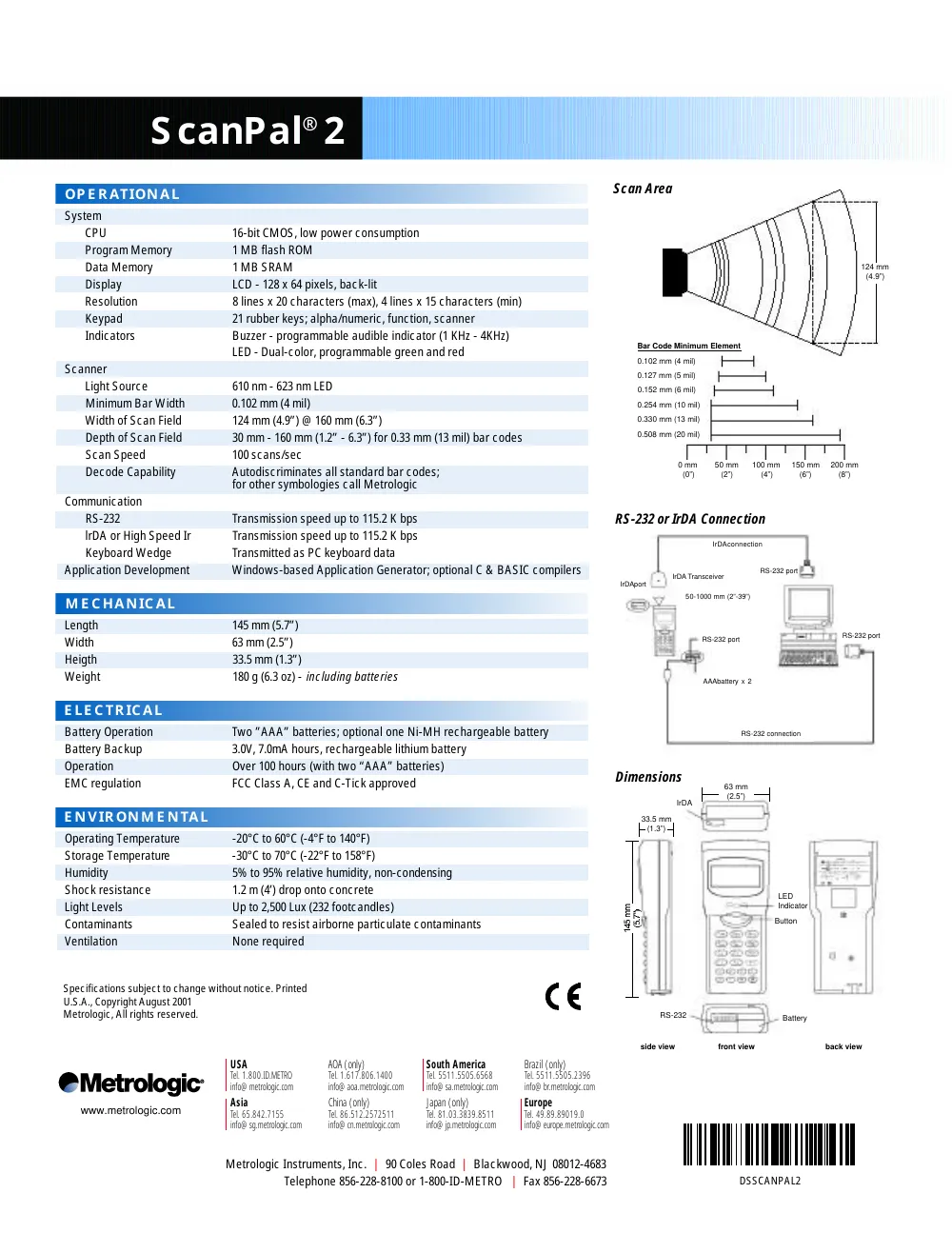
The text of page 1, from the PDF itself
ScanPal® 2 Scan Area
O P E R AT I O N A L System CPU Program Memory Data Memory Display Resolution Keypad Indicators Scanner Light Source Minimum Bar Width Width of Scan Field Depth of Scan Field Scan Speed Decode Capability Communication RS-232 lrDA or High Speed Ir Keyboard Wedge Application Development
16-bit CMOS, low power consumption 1 MB flash ROM 1 MB SRAM LCD - 128 x 64 pixels, back-lit 8 lines x 20 characters (max), 4 lines x 15 characters (min) 21 rubber keys; alpha/numeric, function, scanner Buzzer - programmable audible indicator (1 KHz - 4KHz) LED - Dual-color, programmable green and red
124 mm (4.9”)
Bar Code Minimum Element 0.102 mm (4 mil) 0.127 mm (5 mil)
610 nm - 623 nm LED 0.102 mm (4 mil) 124 mm (4.9”) @ 160 mm (6.3”) 30 mm - 160 mm (1.2” - 6.3”) for 0.33 mm (13 mil) bar codes 100 scans/sec Autodiscriminates all standard bar codes; for other symbologies call Metrologic
0.152 mm (6 mil) 0.254 mm (10 mil) 0.330 mm (13 mil) 0.508 mm (20 mil)
0 mm (0”)
Transmission speed up to 115.2 K bps Transmission speed up to 115.2 K bps Transmitted as PC keyboard data Windows-based Application Generator; optional C & BASIC compilers
50 mm (2”)100 mm (4”)150 mm (6”)200 mm (8”)
RS-232 or IrDA Connection IrDAconnection
RS-232 port
IrDA Transceiver IrDAport 50-1000 mm (2”-39”)
MECHANICAL Length Width Heigth Weight
145 mm (5.7”) 63 mm (2.5”) 33.5 mm (1.3”) 180 g (6.3 oz) - including batteries
RS-232 portRS-232 portAAAbattery x 2
ELECTRICAL Battery Operation Battery Backup Operation EMC regulation
Two ”AAA” batteries; optional one Ni-MH rechargeable battery 3.0V, 7.0mA hours, rechargeable lithium battery Over 100 hours (with two “AAA” batteries) FCC Class A, CE and C-Tick approved
RS-232 connectionDimensions63 mm (2.5”)IrDA
E N V I R O N M E N TA L Operating Temperature Storage Temperature Humidity Shock resistance Light Levels Contaminants Ventilation
33.5 mm (1.3”)
-20°C to 60°C (-4°F to 140°F) -30°C to 70°C (-22°F to 158°F) 5% to 95% relative humidity, non-condensing 1.2 m (4’) drop onto concrete Up to 2,500 Lux (232 footcandles) Sealed to resist airborne particulate contaminants None required
LED Indicator Button
Specifications subject to change without notice. Printed U.S.A., Copyright August 2001 Metrologic, All rights reserved.
RS-232side viewUSA
Tel. 1.800.ID.METRO info@metrologic.com
www.metrologic.com
Asia
Tel. 65.842.7155 info@sg.metrologic.com
AOA (only) Tel. 1.617.806.1400 info@aoa.metrologic.com
South America
Tel. 5511.5505.6568 info@sa.metrologic.com
China (only)
Japan (only)
Tel. 86.512.2572511 info@cn.metrologic.com
Tel. 81.03.3839.8511 info@jp.metrologic.com
Battery
front view
Brazil (only) Tel. 5511.5505.2396 info@br.metrologic.com
Europe
Tel. 49.89.89019.0 info@europe.metrologic.com
Metrologic Instruments, Inc. | 90 Coles Road | Blackwood, NJ 08012-4683 Telephone 856-228-8100 or 1-800-ID-METRO | Fax 856-228-6673
DSSCANPAL2
back view
Page2of 4
Open in the PDF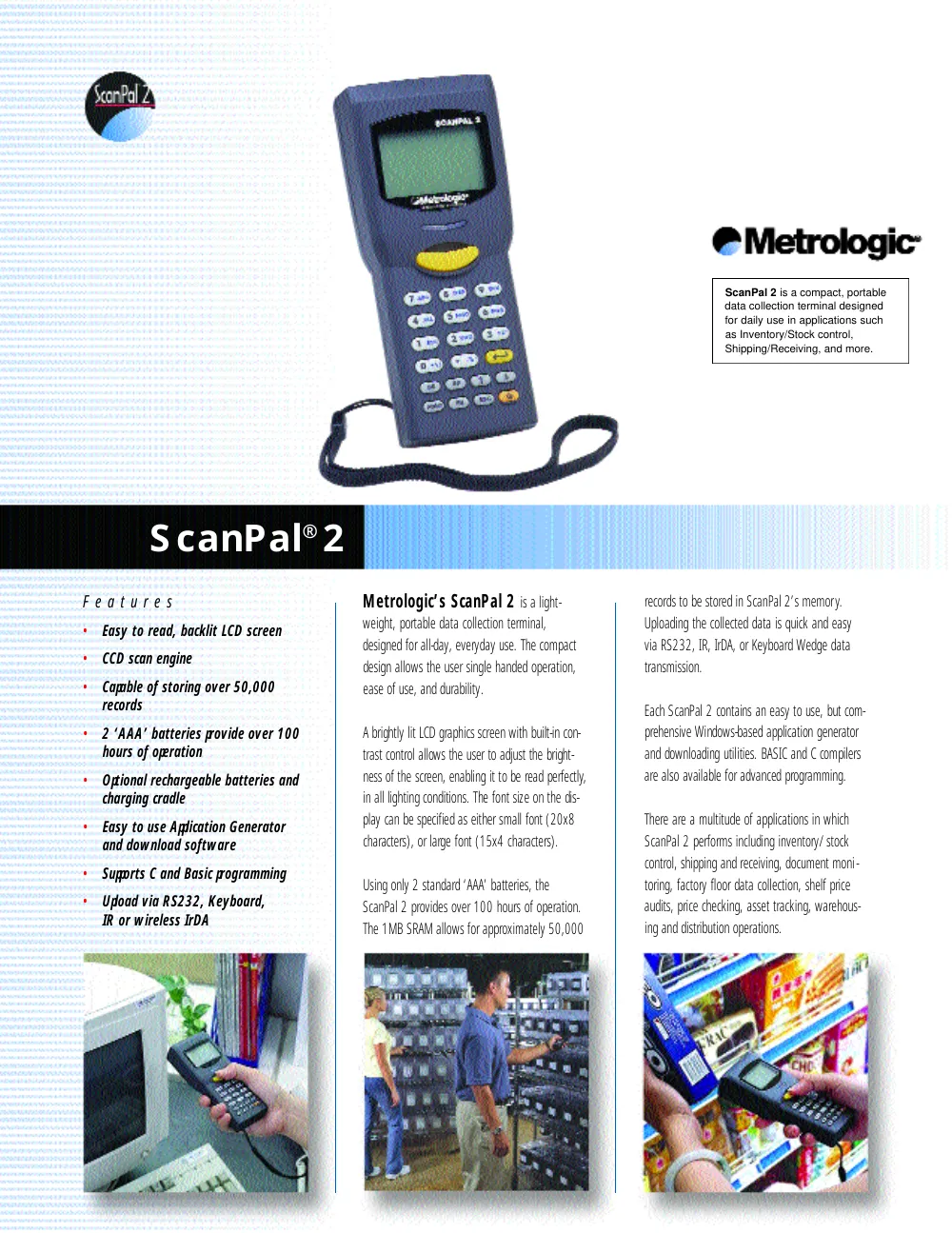
The text of page 2, from the PDF itself
ScanPal 2 is a compact, portable data collection terminal designed for daily use in applications such as Inventory/Stock control, Shipping/Receiving, and more.
ScanPal® 2 Features
Metrologic’s ScanPal 2 is a light-
- Easy to read, backlit LCD screen
weight, portable data collection terminal, designed for all-day, everyday use. The compact design allows the user single handed operation, ease of use, and durability.
- CCD scan engine
- Capable of storing over 50,000 records
- 2 ‘AAA’ batteries provide over 100 hours of operation
- Optional rechargeable batteries and charging cradle
- Easy to use Application Generator and download software
- Supports C and Basic programming
- Upload via RS232, Keyboard, IR or wireless IrDA
A brightly lit LCD graphics screen with built-in contrast control allows the user to adjust the brightness of the screen, enabling it to be read perfectly, in all lighting conditions. The font size on the display can be specified as either small font (20x8 characters), or large font (15x4 characters). Using only 2 standard ‘AAA’ batteries, the ScanPal 2 provides over 100 hours of operation. The 1MB SRAM allows for approximately 50,000
records to be stored in ScanPal 2’s memory. Uploading the collected data is quick and easy via RS232, IR, IrDA, or Keyboard Wedge data transmission. Each ScanPal 2 contains an easy to use, but comprehensive Windows-based application generator and downloading utilities. BASIC and C compilers are also available for advanced programming. There are a multitude of applications in which ScanPal 2 performs including inventory/stock control, shipping and receiving, document moni toring, factory floor data collection, shelf price audits, price checking, asset tracking, warehousing and distribution operations.
Page3of 4
Open in the PDF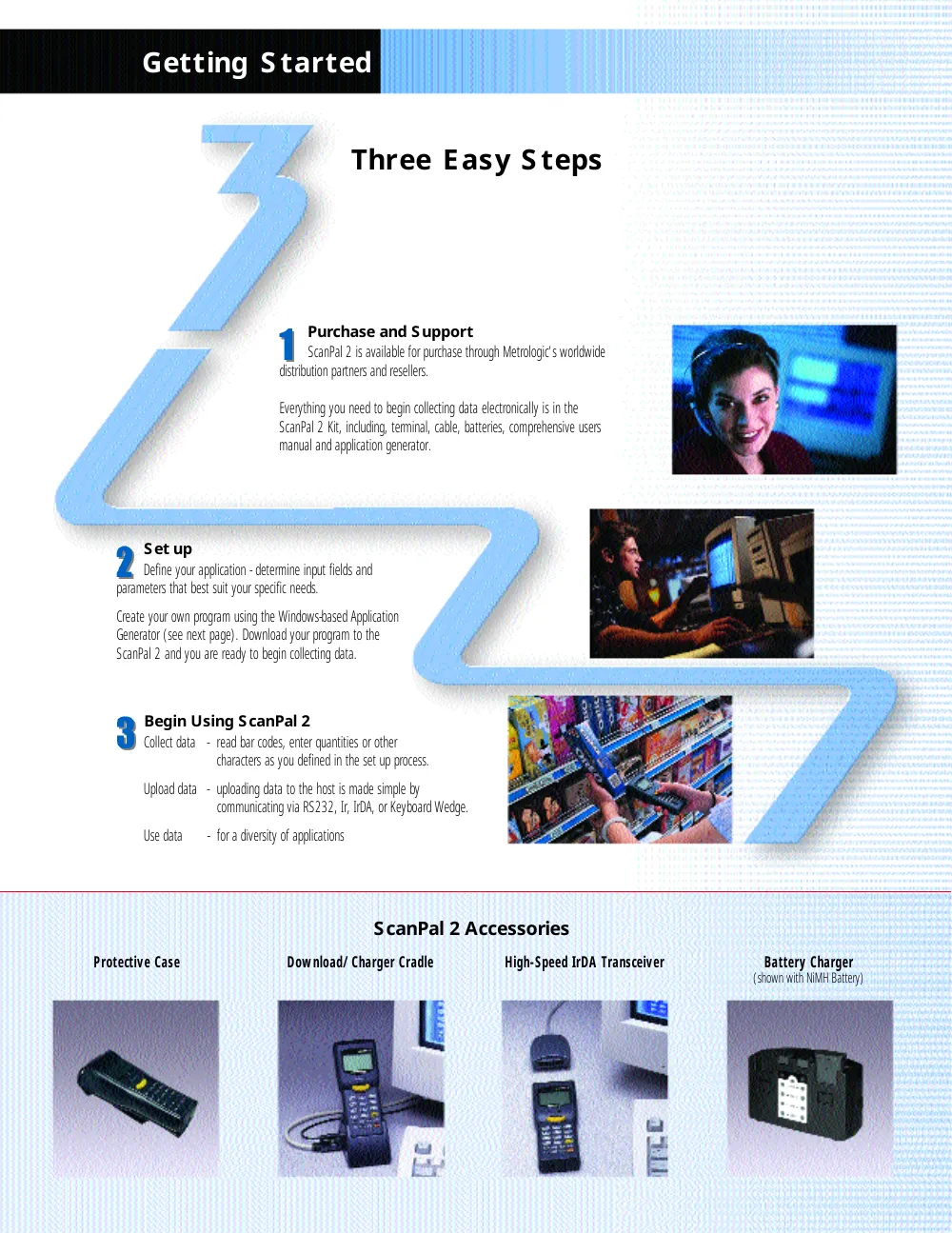
The text of page 3, from the PDF itself
Getting Started Three Easy Steps
Purchase and Support ScanPal 2 is available for purchase through Metrologic’s worldwide distribution partners and resellers. Everything you need to begin collecting data electronically is in the ScanPal 2 Kit, including, terminal, cable, batteries, comprehensive users manual and application generator.
Set up Define your application - determine input fields and parameters that best suit your specific needs. Create your own program using the Windows-based Application Generator (see next page). Download your program to the ScanPal 2 and you are ready to begin collecting data.
Begin Using ScanPal 2 Collect data - read bar codes, enter quantities or other characters as you defined in the set up process. Upload data - uploading data to the host is made simple by communicating via RS232, Ir, IrDA, or Keyboard Wedge. Use data
- for a diversity of applications
ScanPal 2 Accessories Protective Case
Download/Charger Cradle
High-Speed IrDA Transceiver
Battery Charger (shown with NiMH Battery)
Page4of 4
Open in the PDF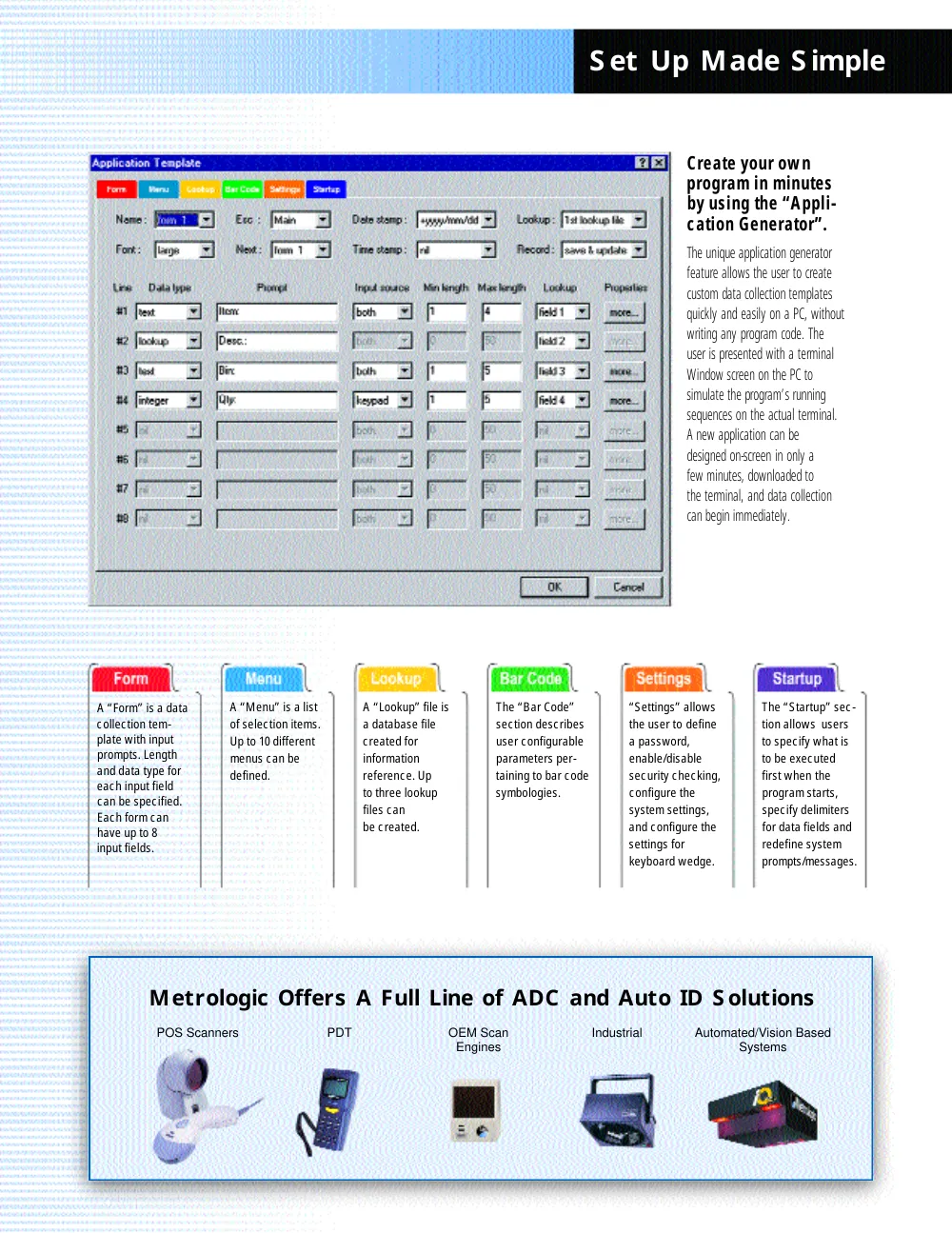
The text of page 4, from the PDF itself
Set Up Made Simple
Create your own program in minutes by using the “Application Generator”. The unique application generator feature allows the user to create custom data collection templates quickly and easily on a PC, without writing any program code. The user is presented with a terminal Window screen on the PC to simulate the program’s running sequences on the actual terminal. A new application can be designed on-screen in only a few minutes, downloaded to the terminal, and data collection can begin immediately.
A “Form” is a data collection template with input prompts. Length and data type for each input field can be specified. Each form can have up to 8 input fields.
A “Menu” is a list of selection items. Up to 10 different menus can be defined.
A “Lookup” file is a database file created for information reference. Up to three lookup files can be created.
The “Bar Code” section describes user configurable parameters pertaining to bar code symbologies.
“Settings” allows the user to define a password, enable/disable security checking, configure the system settings, and configure the settings for keyboard wedge.
The “Startup” section allows users to specify what is to be executed first when the program starts, specify delimiters for data fields and redefine system prompts/messages.
Metrologic Offers A Full Line of ADC and Auto ID Solutions POS Scanners
PDTOEM Scan EnginesIndustrial
Automated/Vision Based Systems