Manual · LXE
MX1 Cradle Reference Guide: Storage/Charging/Communication Options for the LXE 2330, 2335 and MX1
Manual100 pagesPDF 2.4 MB
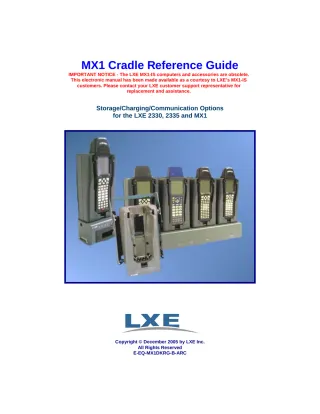
Reference guide for the LXE MX1 docking cradle, Multidock, AC/DC Singledocks and battery chargers for the LXE 2330, 2335 and MX1.
Covers · 1 model
The models it covers
Summary
What is in it
An archived LXE reference guide for the single docking cradle and related storage, charging and communication options for the LXE 2330, 2335 and MX1 hand-held computers. It covers cradle components and indicators, table, wall and vehicle mount installation, AC and vehicle power connections, RS232 and IR data transfer (including ROM-DOS and MS-DOS file transfer), the Multidock, AC and DC Singledocks and modem, and the battery pack chargers. It notes that the MX1-IS is not compatible with these cradles.
Its parts
- Introduction
- Installation
- Using The Docking Cradle
- Multidock and AC/DC Singledocks
- Battery Pack Chargers
From the manual
Key facts from this manual
Each line names its page in the PDF.
LXE's reference guide for the single docking cradle that holds, charges and links the LXE 2330, 2335 and MX1 hand-held computers, with chapters on multidocks, AC and DC singledocks and battery chargers. It explains the cradle modules and status lights, mounting, power hookups and serial cabling. The guide states that the 2330, 2335 and MX1 are obsolete.
- What it is
- Single docking cradle that holds, powers, charges and communicates with the LXE 2330, 2335 and MX1 p. 9
- Compatible devices
- 2330, 2335 and MX1; the MX1-IS (bright blue keypad) is not compatible p. 13
- Data link
- IR to RS232 conversion; 9-pin RS232 port, half-duplex, with TD, RD, CTS, RTS, DTR, DSR and GND p. 19, 20
- IR link
- IrDA-SIR 1.0 compatible, fixed at 9600 bps, 2 cm to 1 meter at a 30 degree viewing angle p. 20
- Power input
- 12VDC from a 120/240VAC adapter or a 24 to 60VDC supply, or 8 to 18VDC direct from a vehicle battery p. 19
- Battery charging
- NiMH pack charged in the device: 3.5 hour fast charge at 350mA (8VDC max), then 30mA trickle p. 19
- Status lights
- CRADLE PWR and DOCKING PWR green when powered; CHARGING on: fast charge, blinking: pending; READY on: complete; both off: battery absent or fault p. 21
- Fuses
- 4.0 Amp fast-blo fuse for the module circuits, 1.1 Amp self-resetting fuse for the device; not user replaceable p. 19
- Components
- Passive storage cradle, Power/Charging and Communications Module (PCM), and wall, table or vehicle brackets p. 12, 17
- AC supply rating
- 12VDC NEC Class 2 (or LPS) output, minimum 1.7A and 14 Watts p. 43
- Serial cables
- DB9 to DB25 or DB9 to DB9 for a printer or computer; DB9 to circular DIN for a Renegade printer p. 17
- Clip-on charger
- 2335 and MX1: recharges a dead battery in 8 hours with the device off; each needs a 9000A303PSCIGLTADPT power supply p. 25, 90
- 2330 retainer
- Retainer 153852-0001 with screw 711205-1716, needed on each 2330 used in the cradle p. 15
- Status
- 2335 and MX1 obsolete as of December 2005; 2330 as of May 2000 p. 15
What this manual walks you through
- Quick start: mounting the cradle and inserting the device p. 11
- Fitting the retainer to a 2330 p. 15
- Cradle maintenance and the vehicle mount p. 16
- Cradle configurations and add-on modules p. 17, 18
- Reading the power, charging and IR status lights p. 21, 22
- Connecting AC power p. 43
- Wiring the 24/60VDC vehicle power supply p. 45, 46
- Wiring the cradle directly to an 8-18VDC vehicle battery p. 47, 48
- Connecting the cradle to a printer or PC by RS232 or DIN cable p. 49
- Using the clip-on portable charger p. 90
Good to know
- The MX1-IS and its battery pack must not be placed in this cradle or these chargers; damage may result. p. 13
- The power switch must be on and both power indicators green before the battery can charge. p. 21
- Vehicle power must come through a fused circuit with a 5 Amp maximum time delay fuse. p. 45
- A 2330 without an "M" in its serial number must be upgraded before use in the cradle. p. 15
- The guide says to replace the storage cradle once a year. p. 16
Questions this manual answers
Which devices fit the LXE MX1 docking cradle?
The LXE 2330, 2335 and MX1. The MX1-IS, with its bright blue keypad, is not compatible. p. 13
How long does the MX1 cradle take to charge a battery?
A fast charge takes 3.5 hours, after which the charger switches to a trickle charge. p. 19
Can the MX1 vehicle cradle run from a vehicle battery above 12 V?
Yes, through the 24 to 60VDC power supply with 12VDC output; 8 to 18VDC can be wired directly. p. 19
How do I connect the MX1 cradle to a printer or PC?
Connect a 9-pin RS-232 cable to the back of the cradle; a data transfer program must run on both ends. p. 49
What does a blinking CHARGING light on the MX1 cradle mean?
Fast charge is pending; steady means fast charge in progress, and READY on means charging is complete. p. 21
Contents
Chapters and sections
Each line opens the PDF at its page.
The whole text · 12 parts
Read the manual here as text
Its text as extracted from the PDF, unedited, in parts; each page opens the PDF at that page.
- MX1 Cradle Reference Guide1-8
- Chapter 1 Introduction, pages 9 to 179-17
- Chapter 1 Introduction, pages 18 to 2618-26
- Chapter 2 Installation, pages 27 to 3427-34
- Chapter 2 Installation, pages 35 to 4235-42
- Chapter 2 Installation, pages 43 to 5043-50
- Chapter 3 Using The Docking Cradle51-64
- Chapter 4 Multidock and AC/DC Singledocks, pages 65 to 7265-72
- Chapter 4 Multidock and AC/DC Singledocks, pages 73 to 8073-80
- Chapter 4 Multidock and AC/DC Singledocks, pages 81 to 8881-88
- Chapter 5 Battery Pack Chargers89-96
- Index97-100
The file