Browse
(440) 299-7778
Menu
(440) 299-7778
One-year parts and labor warranty30-day money-back guaranteeEnglishEspañolContact
Page 1 of Endpoint-Link Pro Field Service Representative's Guide

Manual · Itron

Endpoint-Link Pro Field Service Representative's Guide

Manual162 pagesPDF 2.6 MB

Field guide to Itron Endpoint-Link Pro v5.5 on FC200 and FC300 handhelds: work orders, sync, and reading and programming meter endpoints.

Download the PDF2.6 MB

Covers · 1 model

The models it covers

Summary

What is in it

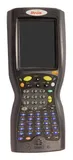
A field service representative's guide to Itron's Endpoint-Link Pro handheld software, which runs on FC200-series and FC300-series handheld data collectors. It explains logging on, the main screen, processing and creating work orders, syncing with the server, and the endpoint tools for reading, checking, programming, unlocking and resetting ChoiceConnect, OpenWay and SaveSource endpoints on electric, gas and water meters. Appendices cover antenna alignment, register types, iRescue and tamper codes.

Its parts

  1. Getting Started
  2. Order Processing
  3. The Sync Screen
  4. The Endpoint Tools Menus
  5. The Tools Menu

Key facts · 5

In its own words

Each line is quoted from the file.

Handhelds

Endpoint-Link Pro runs on FC200-series and FC300-series handheld data collection devices.

Operating system

This guide assumes that you are familiar with basic Windows CE tasks

Order sync

When you place a handheld into its dock (also called a cradle) and log on

Endpoint tools

options for reading, installing, programming, checking, and unlocking endpoints

Software version

Endpoint-Link Pro v5.5

Contents

Chapters and sections

Each line opens the PDF at its page.

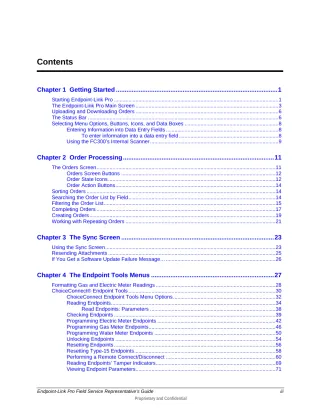
  1. Getting Started7
    1. Starting Endpoint-Link Pro7
    2. The Endpoint-Link Pro Main Screen9
    3. Uploading and Downloading Orders12
    4. The Status Bar12
    5. Selecting Menu Options, Buttons, Icons, and Data Boxes14
  2. Order Processing17
    1. The Orders Screen17
    2. Sorting Orders20
    3. Searching the Order List by Field20
    4. Filtering the Order List21
    5. Completing Orders23
    6. Creating Orders25
    7. Working with Repeating Orders27
  3. The Sync Screen29
    1. Using the Sync Screen29
    2. Resending Attachments31
    3. If You Get a Software Update Failure Message…32
  4. The Endpoint Tools Menus33
    1. Formatting Gas and Electric Meter Readings34
    2. ChoiceConnect® Endpoint Tools36
    3. OpenWay Endpoint Tools80
    4. SaveSource Endpoint Tools99
  5. The Tools Menu119
    1. Viewing Order Statistics120
    2. The Admin Menu121
    3. Resetting the Ethernet Connection121
    4. Viewing Job Type Code Statistics122
    5. Viewing the Handheld’s Order Type Versions123
    6. Viewing Endpoint-Link Pro Software Information124
  6. Handheld-Endpoint Orientation125
    1. Aligning the Handheld’s Antenna125
  7. 60WP and 80W-i Endpoint Programming Mode Activation131
  8. 2.4GZ OpenWay® Gas Module Programming Mode Activation135
    1. Programming the 2.4ZR OpenWay Range Extender136
  9. Working with Dresser Roots Series B3 and LM-MA Registers141
    1. Programming Endpoints for Series B3 and LM-MA Registers141
    2. Checking Endpoints Installed with Series B3 and LM-MA Registers142
  10. Restoring the Endpoint-Link Pro Components with iRescue149
4 more lines, from page 151 on
  1. Endpoint Tamper/Event Code Descriptions151
    1. Tampers by Endpoint151
  2. 100G Datalogging Remote Disconnect Gas ERT Module Error Codes and Troubleshooting157
  3. Index161

From the PDF’s own bookmarks.

The file

Revision and size

Part no.TDC-0735-013
Revision08/29/2011, Endpoint-Link Pro v5.5
PublisherItron, Inc.
Pages162
PDF2.6 MB
TextText from the PDF itself; page 1 is a scan, read by OCR, which may hold reading errors.
TDC-0735-013

The first pages · 3 of 162

Look before you download

Each page opens the PDF at that page.

Page 1
Page 1of 162
Page 2
Page 2of 162
Page 3
Page 3of 162

More documents · 1

For the same models