Manual · Intermec
Intermec SR30 Quick Start Guide
Manual2 pagesPDF 639 KB
Both pages are below, each with its text.
Covers · 1 model
The models it covers

From the manual · read page by page
Key facts from this manual
Each line names its page in the PDF.
Two-page multilingual quick start guide (P/N 930-203-002, 2008) for the Intermec SR30 handheld scanner. It shows the cables for connecting it to a host, the RS-232 defaults and the optional power supply, and prints bar codes for testing, resetting to factory defaults and reading version numbers.
- Cables
- RS-232 236-159-xxx, 236-160-xxx or 236-161-xxx; keyboard wedge 236-162-xxx; Y-cable 236-204-xxx; wand emulation 236-163-xxx; USB 236-164-xxx p. 2
- Power supply
- Optional, P/N 851-089-105 p. 2
- Electrical rating
- 5 V, 0.5 A p. 1
- RS-232 defaults
- 19200, 8, no parity, 1 p. 2
- Setup software
- EasySet, from www.intermec.com/EasySet p. 2
- Bar codes printed
- Code 39 test, get firmware, decode and sub-system version, Reset Factory Defaults p. 1
- Guide part number
- 930-203-002 p. 1
What this manual walks you through
- Connecting the SR30 to a host device p. 2
- Scanning a bar code p. 2
- Testing with the Code 39 test bar code p. 1
- Resetting factory defaults p. 1
- Reading firmware, decode and sub-system versions p. 1
Good to know
- Scanner cables are sold and ordered separately. p. 1
- Use restrictions are given in a separate compliance insert. p. 1
Questions this manual answers
Which cables connect the Intermec SR30 to a host?
RS-232 (236-159-xxx, 236-160-xxx or 236-161-xxx), keyboard wedge 236-162-xxx, Y-cable 236-204-xxx, wand emulation 236-163-xxx or USB 236-164-xxx. p. 2
What are the Intermec SR30 RS-232 defaults?
19200, 8, no parity, 1. p. 2
What power does the Intermec SR30 need?
It is rated 5 V, 0.5 A; an optional power supply is P/N 851-089-105. p. 1, 2
How do I configure the Intermec SR30?
Download EasySet from www.intermec.com/EasySet. p. 2
The file
Size and text
Every page · 2
Read it here
Each page as it is printed, and its words beside it, so a phone can search and copy them.
Page1of 2
Open in the PDF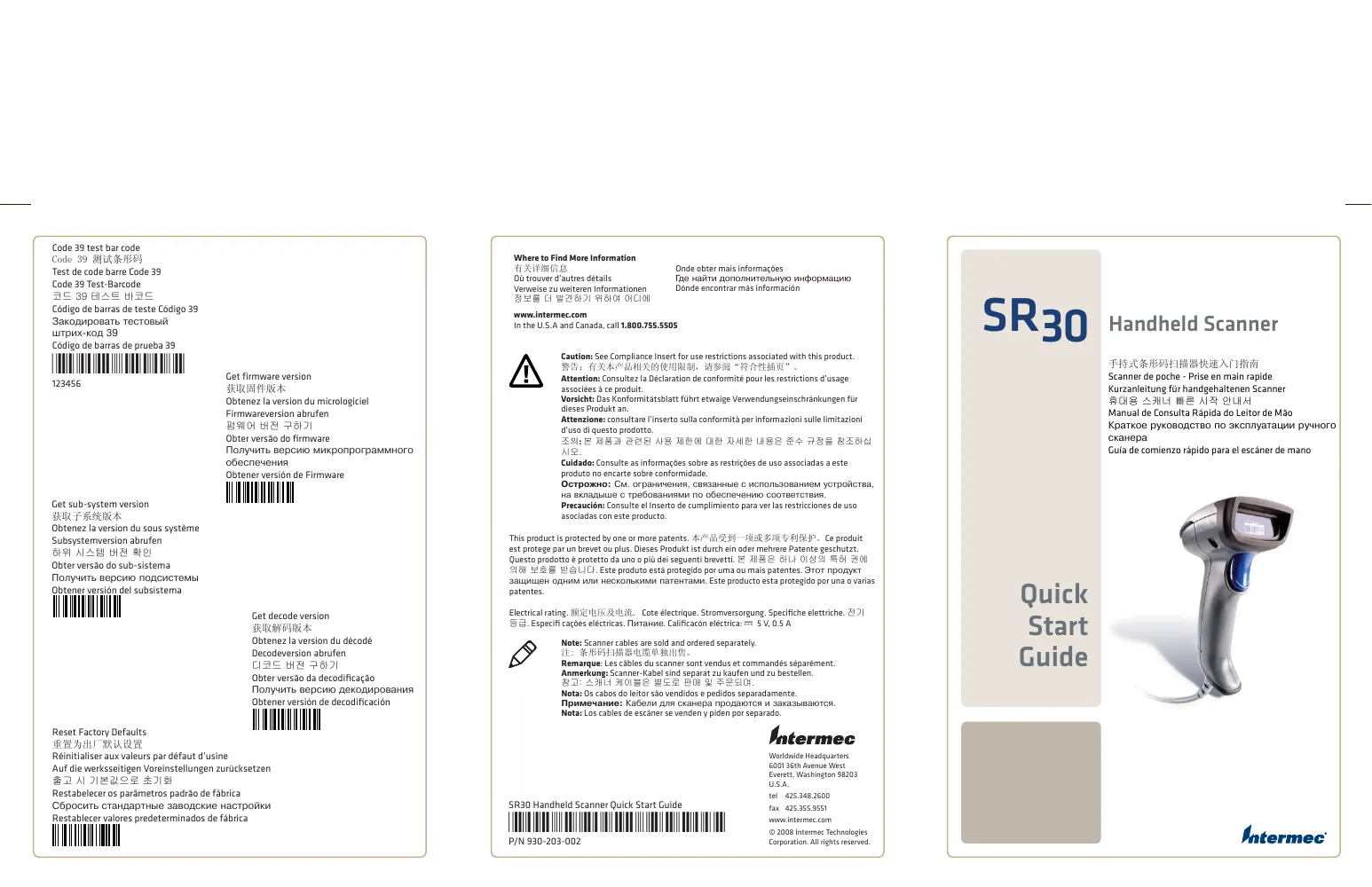
The text of page 1, from the PDF itself
Code 39 test bar code Code 39 测试条形码 Test de code barre Code 39 Code 39 Test-Barcode 코드 39 테스트 바코드 Código de barras de teste Código 39 Çàêîäèðîâàòü òåñòîâûé øòðèõ-êîä 39 Código de barras de prueba 39
*123456* 123456
Where to Find More Information 有关详细信息 Où trouver d’autres détails Verweise zu weiteren Informationen 정보를 더 발견하기 위하여 어디에
Onde obter mais informações Ãäå íàéòè äîïîëíèòåëüíóþ èíôîðìàöèþ Dónde encontrar más información
SR30 Handheld Scanner
www.intermec.com In the U.S.A and Canada, call 1.800.755.5505
Get firmware version 获取固件版本 Obtenez la version du micrologiciel Firmwareversion abrufen 펌웨어 버전 구하기 Obter versão do firmware Ïîëó÷èòü âåðñèþ ìèêðîïðîãðàììíîãî îáåñïå÷åíèÿ Obtener versión de Firmware
Get sub-system version 获取子系统版本 Obtenez la version du sous système Subsystemversion abrufen 하위 시스템 버전 확인 Obter versão do sub-sistema Ïîëó÷èòü âåðñèþ ïîäñèñòåìû Obtener versión del subsistema
Caution: See Compliance Insert for use restrictions associated with this product. 警告:有关本产品相关的使用限制,请参阅“符合性插页”。 Attention: Consultez la Déclaration de conformité pour les restrictions d’usage associées à ce produit. Vorsicht: Das Konformitätsblatt führt etwaige Verwendungseinschränkungen für dieses Produkt an. Attenzione: consultare l’inserto sulla conformità per informazioni sulle limitazioni d’uso di questo prodotto. 조 : 본 제품과 관련된 사용 제한에 대한 자세한 내용은 준수 규정을 참조하십 시오. Cuidado: Consulte as informações sobre as restrições de uso associadas a este produto no encarte sobre conformidade. Îñòðîæíî: Ñì. îãðàíè÷åíèÿ, ñâÿçàííûå ñ èñïîëüçîâàíèåì óñòðîéñòâà, íà âêëàäûøå ñ òðåáîâàíèÿìè ïî îáåñïå÷åíèþ ñîîòâåòñòâèÿ. Precaución: Consulte el Inserto de cumplimiento para ver las restricciones de uso asociadas con este producto. This product is protected by one or more patents. 本产品受到一项或多项专利保护。Ce produit est protege par un brevet ou plus. Dieses Produkt ist durch ein oder mehrere Patente geschutzt. Questo prodotto è protetto da uno o più dei seguenti brevetti. 본 제품은 하나 이상의 특허 권에 의해 보호를 받습니다. Este produto está protegido por uma ou mais patentes. Ýòîò ïðîäóêò çàùèùåí îäíèì èëè íåñêîëüêèìè ïàòåíòàìè. Este producto esta protegido por una o varias patentes.
Get decode version 获取解码版本 Obtenez la version du décodé Decodeversion abrufen 디코드 버전 구하기 Obter versão da decodificação Ïîëó÷èòü âåðñèþ äåêîäèðîâàíèÿ Obtener versión de decodificación Reset Factory Defaults 重置为出厂默认设置 Réinitialiser aux valeurs par défaut d’usine Auf die werksseitigen Voreinstellungen zurücksetzen 출고 시 기본값으로 초기화 Restabelecer os parâmetros padrão de fábrica Ñáðîñèòü ñòàíäàðòíûå çàâîäñêèå íàñòðîéêè Restablecer valores predeterminados de fábrica
Electrical rating. 额定电压及电流. Cote électrique. Stromversorgung. Specifiche elettriche. 전기 등급. Especifi cações eléctricas. Ïèòàíèå. Calificacón eléctrica: x 5 V, 0.5 A Note: Scanner cables are sold and ordered separately. 注: 条形码扫描器电缆单独出售。 Remarque: Les câbles du scanner sont vendus et commandés séparément. Anmerkung: Scanner-Kabel sind separat zu kaufen und zu bestellen. 참고: 스캐너 케이블은 별도로 판매 및 주문되며. Nota: Os cabos do leitor são vendidos e pedidos separadamente. Ïðèìå÷àíèå: Êàáåëè äëÿ ñêàíåðà ïðîäàþòñÿ è çàêàçûâàþòñÿ. Nota: Los cables de escáner se venden y piden por separado.
SR30 Handheld Scanner Quick Start Guide
*930-203-002* P/N 930-203-002
Worldwide Headquarters 6001 36th Avenue West Everett, Washington 98203 U.S.A. tel 425.348.2600 fax 425.355.9551 www.intermec.com © 2008 Intermec Technologies Corporation. All rights reserved.
手持式条形码扫描器快速入门指南 Scanner de poche - Prise en main rapide Kurzanleitung für handgehaltenen Scanner 휴대용 스캐너 빠른 시작 안내서 Manual de Consulta Rápida do Leitor de Mão Êðàòêîå ðóêîâîäñòâî ïî ýêñïëóàòàöèè ðó÷íîãî ñêàíåðà Guía de comienzo rápido para el escáner de mano
Quick Start Guide
Page2of 2
Open in the PDF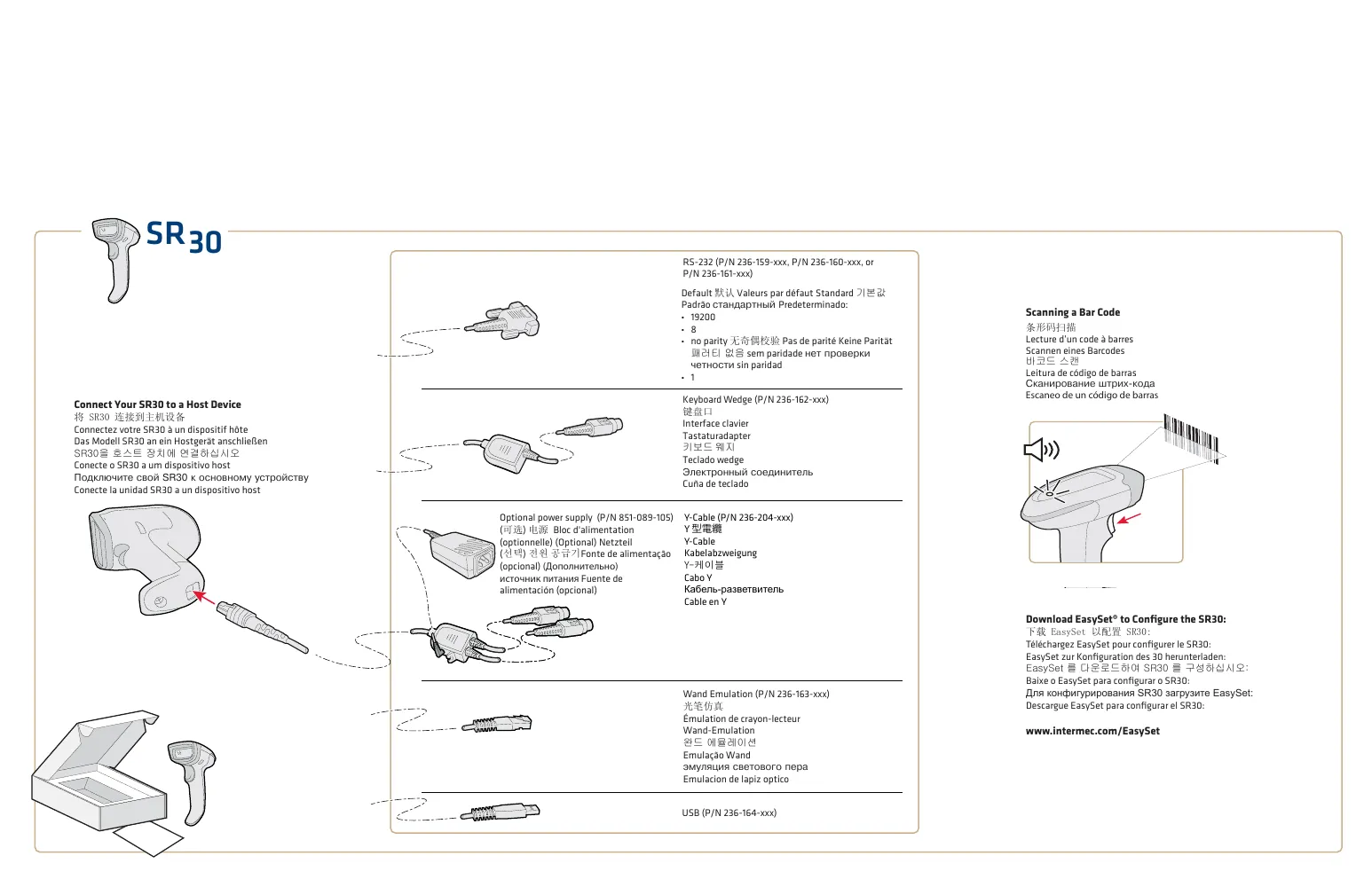
The text of page 2, from the PDF itself
SR 30
RS-232 (P/N 236-159-xxx, P/N 236-160-xxx, or P/N 236-161-xxx) Default 咬䅸 Valeurs par défaut Standard ἝⷥB Padrão ñòàíäàðòíûé Predeterminado:
- 19200
- 8
- no parity ᮴༛ي᷵偠 Pas de parité Keine Parität B 䐕⣙䏝B㚳㠹 sem paridade íåò ïðîâåðêè ÷åòíîñòè sin paridad
- 1 Keyboard Wedge (P/N 236-162-xxx) 䬂Ⲭষ Interface clavier Tastaturadapter 䆑ⷡ◉ 㟕㪭 Teclado wedge Ýëåêòðîííûé ñîåäèíèòåëü Cuña de teclado
Connect Your SR30 to a Host Device
Connectez votre SR30 à un dispositif hôte Das Modell SR30 an ein Hostgerät anschließen utUR㠱B䜥㎑䎥B㢒㽅㚽B㛝ᶝ䙅㏚㏉㜑 Conecte o SR30 a um dispositivo host Ïîäêëþ÷èòå ñâîé SR30 ê îñíîâíîìó óñòðîéñòâó Conecte la unidad SR30 a un dispositivo host Optional power supply (P/N 851-089-105) (ৃ䗝) d'alimentation (optionnelle) (Optional) Netzteil (선택) 전원 공급기Fonte de alimentação (opcional) (Дополнительно) источник питания Fuente de alimentación (opcional)
Scanning a Bar Code 条形码扫描 Lecture d’un code à barres Scannen eines Barcodes 바코드 스캔 Leitura de código de barras Ñêàíèðîâàíèå øòðèõ-êîäà Escaneo de un código de barras
Y-Cable (P/N 236-204-xxx) Y 型電纜 Y-Cable Kabelabzweigung প玿氳拓 Cabo Y Кабель-разветвитель Cable en Y
Download EasySet® to Configure the SR30:
Wand Emulation (P/N 236-163-xxx) ܝヨӓⳳ Émulation de crayon-lecteur Wand-Emulation 㜱◉B㚽ⲙ⣵㡡㉅ Emulação Wand ýìóëÿöèÿ ñâåòîâîãî ïåðà Emulacion de lapiz optico USB (P/N 236-164-xxx)
下载 EasySet 以配置 SR30: Téléchargez EasySet pour configurer le SR30: EasySet zur Konfiguration des 30 herunterladen: EasySet 를 다운로드하여 SR30 를 구성하십시오: Baixe o EasySet para configurar o SR30: Для конфигурирования SR30 загрузите EasySet: Descargue EasySet para configurar el SR30:
www.intermec.com/EasySet