Manual · Intermec
PB40 4-Inch Belt Printer Equipped with a Bluetooth Qualified Module by Socket Communications: Quick Start Guide
Manual16 pagesPDF 352 KB
Quick start guide for the Intermec PB40 4-inch thermal belt printer with Bluetooth: batteries, paper, self-test, wireless setup.
Covers · 1 model
The models it covers
Summary
What is in it
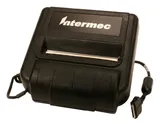
Intermec's quick start guide for the PB40 (PB400B140), a 4-inch direct thermal belt printer with a Bluetooth module by Socket Communications. It lists the packing contents and accessories with part numbers, then covers removing the battery tabs, charging and the LED and beep indicators, loading paper, reading the self-test printout, replacing the battery, serial use, switching to wireless printing and pairing with a 700 Series mobile computer, cleaning, troubleshooting and specifications.
Its parts
- Packing List
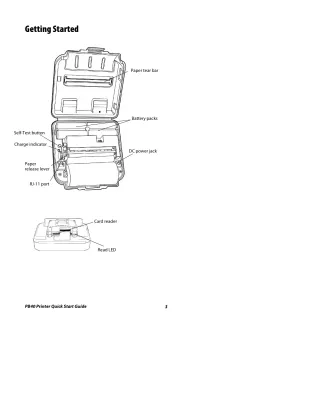
- Getting Started
- Before Using Your Printer For The First Time
- Charging the Lithium Ion Batteries
- Paper Loading
- Printer Self-Test
- Replacing The Battery
- Using Your Printer with Serial Connection
- PB40 Printer using Wireless Printing
- Maintenance and Troubleshooting
- Specifications
- Global Services and Support
From the manual · read page by page
Key facts from this manual
Each line names its page in the PDF.
Intermec's quick start guide (April 2003) for the PB40 4-inch belt printer equipped with a Bluetooth qualified module by Socket Communications, model PB400B140. It covers the packing list and accessories, charging, paper loading, the self-test, serial and wireless printing with a 700 Color or 700 Monochrome Mobile Computer, cleaning, troubleshooting and specifications.
- Device
- 4-inch direct thermal belt printer (PB400B140) with a Bluetooth qualified module by Socket Communications p. 2, 14
- Interface
- RS-232C, Infrared, IrDA, ASK; ships in serial mode, switchable to wireless printing p. 10, 14
- Paper width
- 4.4 inch (112 mm) thermal paper p. 14
- Battery
- Li-Ion 7.2V pack, replacement P/N 320-081-021; charges in about three hours p. 2, 5
- Memory
- 1 Mb or 4 Mb Flash; 1 Mb or 4 Mb RAM p. 8
- Operating temperature
- +32° to +122°F (0° to +50°C) p. 14
- Power adapters
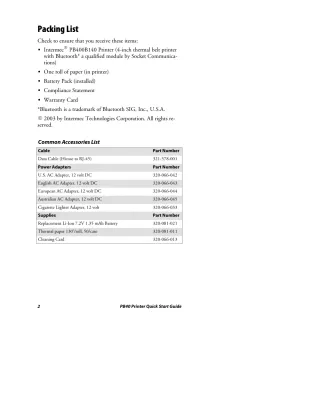
- 12 volt DC AC adapters: U.S. 320-066-042, English 320-066-043, European 320-066-044, Australian 320-066-045; cigarette lighter adapter 320-066-033 p. 2
- Data cable
- Hirose to RJ-45, P/N 321-578-001 p. 2
- Supplies
- Thermal paper 130'/roll, 50/case, 320-081-011; cleaning card 320-066-013 p. 2
- Size and weight
- 6.81 x 6.56 x 3.34 in. (167 x 172 x 85.5 mm); 25.2 oz. (714 g) p. 14
- Firmware
- Version 4.26 for the printer, 1.09 or greater for the card reader p. 8
- Printing protocol
- Easy Print Protocol for bar codes, stored graphics and rotated fonts; full IBM and international character sets p. 14
- Wireless COM port
- 700 Color Mobile Computer applications use COM6; 700 Monochrome applications use COM7 p. 11
- Beep codes
- One: out of sleep mode; two: out of paper; three: battery low; one long: no program, only boot code p. 5
What this manual walks you through
- Removing the protective battery tab strips before first use p. 4
- Charging the battery and reading the charge LED p. 5
- Loading paper automatically or manually p. 6, 7
- Printing and reading a self-test p. 8, 9
- Replacing the battery pack p. 9
- Switching between serial and wireless printing modes p. 10
- Pairing the printer with a 700 Mobile Computer over Bluetooth p. 10, 11
- Cleaning the printer inside and out p. 11, 12
- Troubleshooting paper loading, printing and charging problems p. 12, 13
Good to know
- When shipping the printer by air freight, turn wireless printing off and set it to serial so the radio is not enabled. p. 10
- A depleted battery may need 5-10 minutes of charging before the printer can print a self-test. p. 12
- Use only the recommended battery pack. p. 13
- The self-test table lists infrared as not available at this time. p. 8
- Liner'ed labels can make the print head sticky; manual paper loading works best for them. p. 6, 13
Questions this manual answers
How long does the PB40 battery take to charge?
About three hours; the LED turns green when charging is complete. p. 5
What do the PB40 beeps mean?
One beep: out of sleep mode; two: out of paper; three: battery low; one long beep: no program, only boot code. p. 5
How do I switch the PB40 to wireless printing?
It ships in serial mode; each self-test toggles between wireless printing and serial mode, and the printout shows the current mode. p. 10
Which COM port does a 700 mobile computer use to print to the PB40?
700 Color applications use COM6 and 700 Monochrome applications use COM7. p. 11
What if the PB40 print is too light?
In the Configuration Program, open Paper Options and raise the Darkness setting until the print is dark and crisp. p. 13
The whole text · 2 parts
Read the manual here as text
Its text as extracted from the PDF, unedited, in parts; each page opens the PDF at that page.
The file