


Manual · Intermec
Intermec AG3 Manual
Manual2 pagesPDF 79 KB
Both pages are below, each with its text.
Covers · 1 model
The models it covers

From the manual · read page by page
Key facts from this manual
Each line names its page in the PDF.
Two-page instruction sheet for the Intermec AG3 protective boot for the CK30 handheld computer. It explains how to tell the CK30 wide case from the standard case and how to fit the boot on each.
- Product
- Protective boot for the CK30 Handheld Computer p. 1
- Fits
- CK30 wide case and standard case; the back strap is cut off for the wide case p. 1, 2
- Battery access
- The CK30 battery can be changed with the boot in place p. 2
- Instructions part number
- P/N 074299-001 p. 1
What this manual walks you through
Good to know
- The CK30 case type depends on the internal scanner installed; check it before fitting the boot. p. 1
Questions this manual answers
Does the AG3 boot fit the CK30 wide case?
Yes. For a CK30 with a wide case, cut along the groove of the boot's back strap and remove the strap first. p. 2
Do I need to remove the AG3 boot to change the CK30 battery?
No. The battery can be changed with the boot on. p. 2
How do I put the AG3 boot on a CK30?
Slide the top of the CK30 into the boot, then pull the bottom of the boot over the bottom of the CK30. p. 2
The file
Size and text
Every page · 2
Read it here
Each page as it is printed, and its words beside it, so a phone can search and copy them.
Page1of 2
Open in the PDF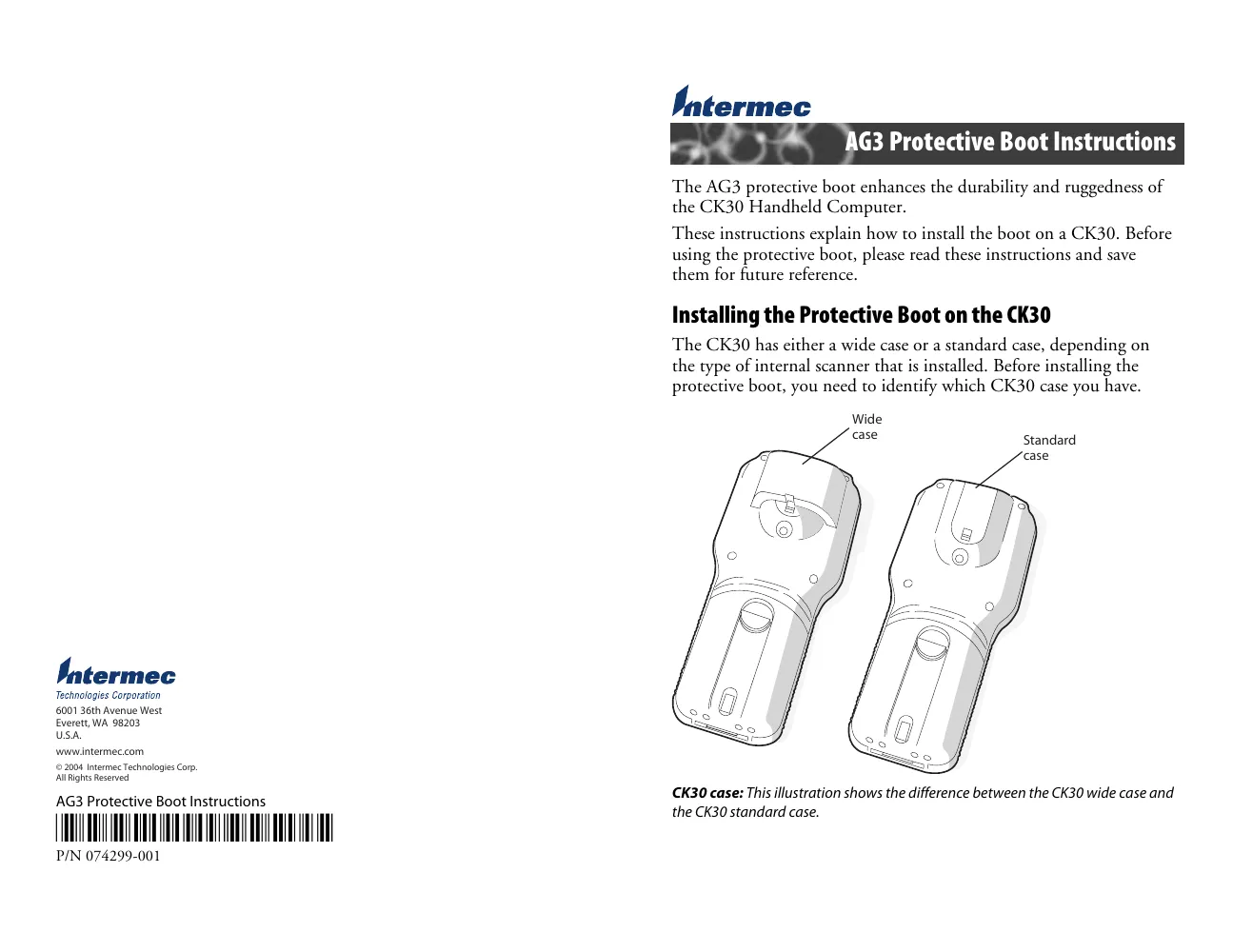
The text of page 1, from the PDF itself
AG3 Protective Boot Instructions The AG3 protective boot enhances the durability and ruggedness of the CK30 Handheld Computer. These instructions explain how to install the boot on a CK30. Before using the protective boot, please read these instructions and save them for future reference.
Installing the Protective Boot on the CK30 The CK30 has either a wide case or a standard case, depending on the type of internal scanner that is installed. Before installing the protective boot, you need to identify which CK30 case you have. Wide case
Standard case
6001 36th Avenue West Everett, WA 98203 U.S.A. www.intermec.com © 2004 Intermec Technologies Corp. All Rights Reserved
AG3 Protective Boot Instructions
*074299-001* P/N 074299-001
CK30 case: This illustration shows the difference between the CK30 wide case and the CK30 standard case.
Page2of 2
Open in the PDF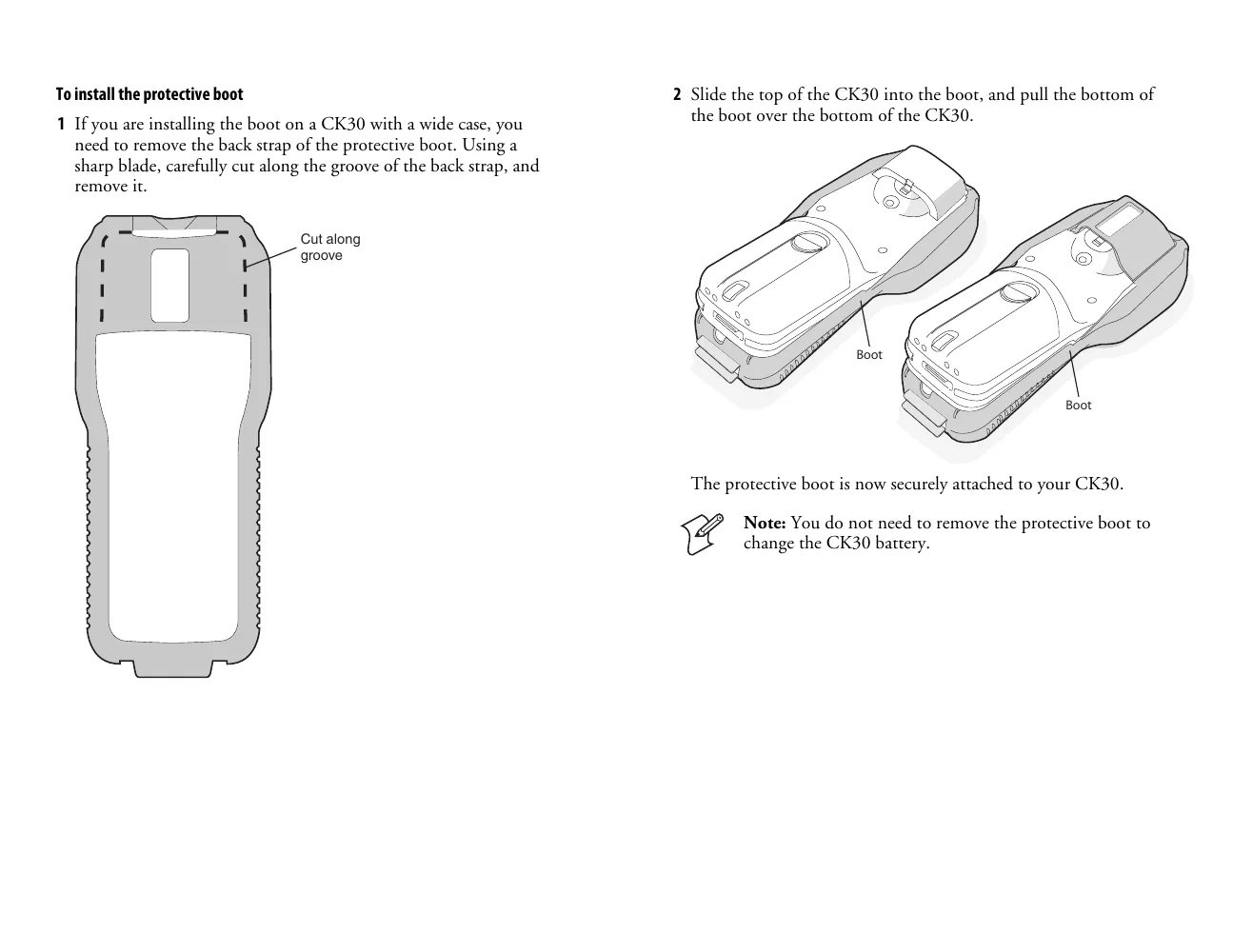
The text of page 2, from the PDF itself
To install the protective boot 1 If you are installing the boot on a CK30 with a wide case, you need to remove the back strap of the protective boot. Using a sharp blade, carefully cut along the groove of the back strap, and remove it.
2 Slide the top of the CK30 into the boot, and pull the bottom of the boot over the bottom of the CK30.
Cut along grooveBootBoot
The protective boot is now securely attached to your CK30. Note: You do not need to remove the protective boot to change the CK30 battery.