Manual · Intermec
CN3 and CN4 Single Dock (AD10) Instructions
Manual28 pagesPDF 2.0 MB
Multilingual instructions for the Intermec AD10 single dock, which powers a CN3 or CN4 computer and charges a spare battery.
Covers · 1 model
The models it covers
Summary
What is in it
A short multilingual instruction sheet for the Intermec AD10 single dock for CN3 series and CN4 series mobile computers. In English and ten other languages, it explains what the dock does (powers the computer, charges a spare battery separately, provides USB host and client ports), the items sold separately, the meaning of the computer and spare battery status LEDs, what to try when a battery will not charge, the charging temperature range, and a diagram of the dock's ports.
From the manual · read page by page
Key facts from this manual
Some pages are scans or cannot be read; this says only what the readable text supports. Each line names its page in the PDF.
This multilingual instruction sheet covers the Intermec CN3/CN4 Single Dock, Model AD10, which powers a CN3 or CN4 series computer and charges a spare battery. It explains the two status LEDs, what to do when a battery will not charge, and the dock's ports. Several of the translated pages are scans with no usable text.
- Device
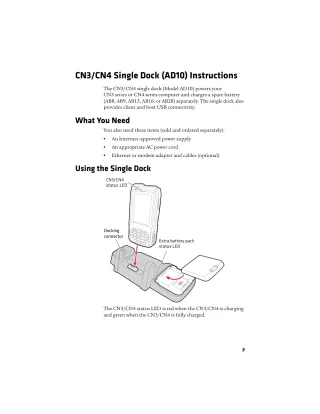
- Single dock that powers a CN3 or CN4 series computer and charges a spare battery separately p. 3
- Spare batteries
- AB8, AB9, AB15, AB16 or AB28 p. 3
- Ports
- Power connector, USB host connector, USB client connector p. 3, 4
- Electrical rating
- 12 V, 2.5 A, 30 W p. 28
- Charging temperature
- 5°C to 35°C (41°F to 95°F) p. 4
- Sold separately
- Intermec-approved power supply and AC power cord; optional Ethernet or modem adapter and cables p. 3
- Computer LED
- Red while the CN3/CN4 charges, green when fully charged p. 3
- Spare battery LED
- Red charging, green charged, yellow out of temperature range, red and yellow alternating not charging, off no battery or no power p. 4
- Sheet part number
- P/N 943-237-003 p. 28
What this manual walks you through
- Reading the computer status LED p. 3
- Reading the spare battery status LED p. 4
- Fixing a spare battery that will not charge p. 4
- Finding the power and USB ports on the dock p. 4
Good to know
- Batteries charge properly only with the dock between 5°C and 35°C (41°F to 95°F). p. 4
- If a battery still will not charge after reseating it and cleaning the contacts, it may be defective. p. 4
- The power supply and AC cord are not included and must be Intermec-approved. p. 3
- A separate Compliance Insert lists restrictions for the product. p. 28
Questions this manual answers
Which batteries does the Intermec AD10 dock charge?
It charges a spare AB8, AB9, AB15, AB16 or AB28 battery. p. 3
What does a yellow battery LED mean on the AD10?
The spare battery is outside its charging temperature range; keep the dock between 5°C and 35°C. p. 4
Why is the AD10 battery LED flashing red and yellow?
The battery is not charging; make sure it is firmly installed and the charging pins and contacts are clean. p. 4
The whole text · 3 parts
Read the manual here as text
Its text as extracted from the PDF, unedited, in parts; each page opens the PDF at that page.
The file